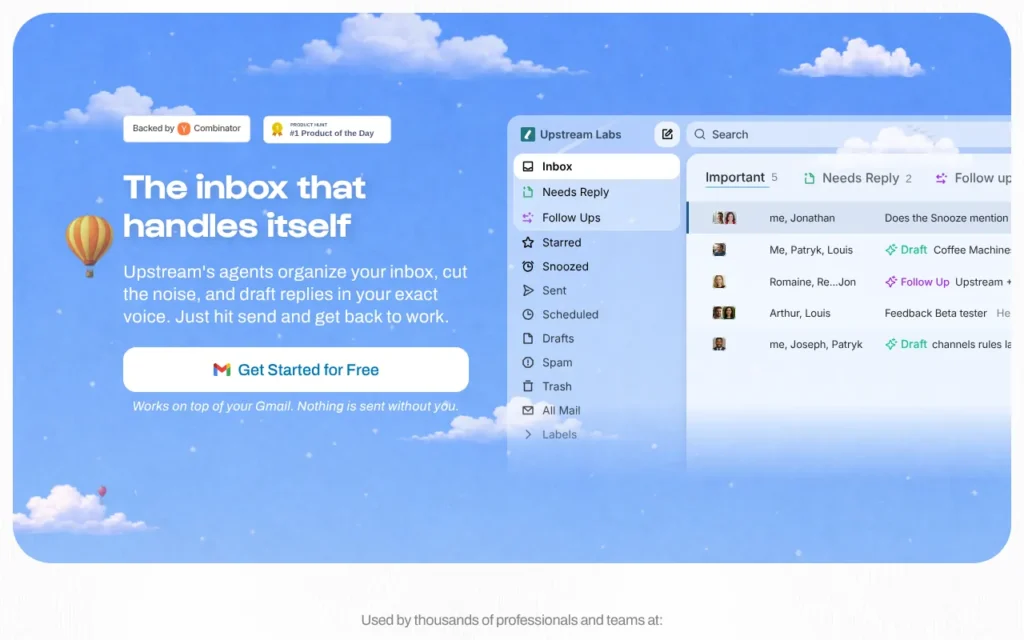
Upstream is a Gmail client from a small Paris team whose agents sort your inbox, draft replies in your voice and chase follow-ups. It suits founders and small teams who live in Gmail. The free plan gives you seven AI drafts a week, and Pro is $20 (about £15) per person a month, billed yearly. It was #1 Product of the Day and of the Week on Product Hunt in June 2026. My verdict: a careful, well-made email agent, held back by thin privacy paperwork. ★★★½☆ 3.5/5.
Key facts
- What it does: Sorts your Gmail inbox, drafts replies in your writing style and brings threads back with a follow-up draft when they go quiet
- Made by: Upstream Labs, Inc. (Neuilly-sur-Seine, near Paris, France; Y Combinator Summer 2023)
- Launched on Product Hunt: 18 June 2026, #1 Product of the Day
- Price: Free; Pro $20 (about £15) per member a month, billed yearly; Max $60 (about £45) per member a month, billed yearly
- Free plan or trial: Free Core plan for up to 5 team seats, no card needed; Pro has a free trial (length not stated)
- Works with: Gmail and Google Workspace (not Outlook), Granola, Notion, Google Drive and Calendar, plus Claude, ChatGPT, Codex and Cursor through its MCP server; web, Mac and Windows desktop and iPhone
- Best for: Founders, freelancers and small teams who use Gmail and spend too long on replies
- Our rating: ★★★½☆ 3.5/5
On this page
- What is Upstream?
- Watch the demo
- How it did on Product Hunt
- What Product Hunt users said
- How much does Upstream cost?
- What I like
- What I'd want fixed
- Who should use it?
- Is it safe to use? Privacy and permissions
- Using it in the UK
- Other launches from the same team
- Alternatives to Upstream
- My verdict
- Frequently asked questions
What is Upstream?
Upstream is an email app that sits on top of your existing Gmail account. You connect Gmail, and it splits your inbox into views such as Needs Reply, VIP and Noise. Cold emails and newsletters get moved out of the way. The idea is that you open your inbox and see straight away what needs you.
The main job is replying. Upstream studies your past emails and saves your writing patterns as a personal prompt. When you open a thread, a draft is already waiting, written with the recipient and earlier messages in mind. You tweak it and press send. It also decides when a quiet conversation should come back to your inbox, and drafts the follow-up for you.
That is what makes it an agent rather than a chatbot. It works on your inbox before you ask, and it can take on requests such as finding a receipt or booking a meeting. The makers say nothing is sent without you. There is one catch worth knowing: its MCP server lets outside agents such as Claude send email directly, so that promise depends on how you set those up.
Watch the demo
The official launch video, which the founders also linked from their Y Combinator launch post, walks through agents clearing the noise, drafting replies in your voice, following up on time and handling requests.
Video: Upstream on YouTube.
How it did on Product Hunt
Upstream finished first on its launch day and first for the week. For June 2026 its badge says #3, but the monthly leaderboard says #2.
| Launch | Date | Daily rank | Other awards | Upvotes |
|---|---|---|---|---|
| Upstream: The inbox designed for humans and agents | 18 June 2026 | #1 Product of the Day | #1 Product of the Week (week of 15 June 2026); #3 Product of the Month (June 2026) on its badge; #2 on the June monthly leaderboard | 960 |
Upvotes as shown on Product Hunt on 17 October 2026.
That is a strong result. Here is what each source shows. Upstream's award badge says #3 for June, and Goldfish's badge says #2. The June monthly leaderboard lists Upstream second and Goldfish third. Fundraisly is first on both. It was the team's first Product Hunt launch, and it came two weeks after a $3 million pre-seed round, so it had a lot of support behind it.
What Product Hunt users said
- The review score is 5.0 from just 1 review, from someone who said he used it while building Twenty 2.0, so there is not much to go on yet.
- Several commenters had switched from other email apps. One former Superhuman user said the drafts sounded like them, and another had been looking for a replacement since Google closed its Inbox app.
- People asked who gets credit when an agent acts. The founder replied that nothing is sent without your approval and that Upstream stays in sync with your normal Gmail address.
- Requests were mostly for more: a calendar app came up, and one commenter asked about a public roadmap, other email providers and how the team pays for AI costs.
- I did not see real complaints. Most comments were congratulations and people saying they had signed up.
How much does Upstream cost?
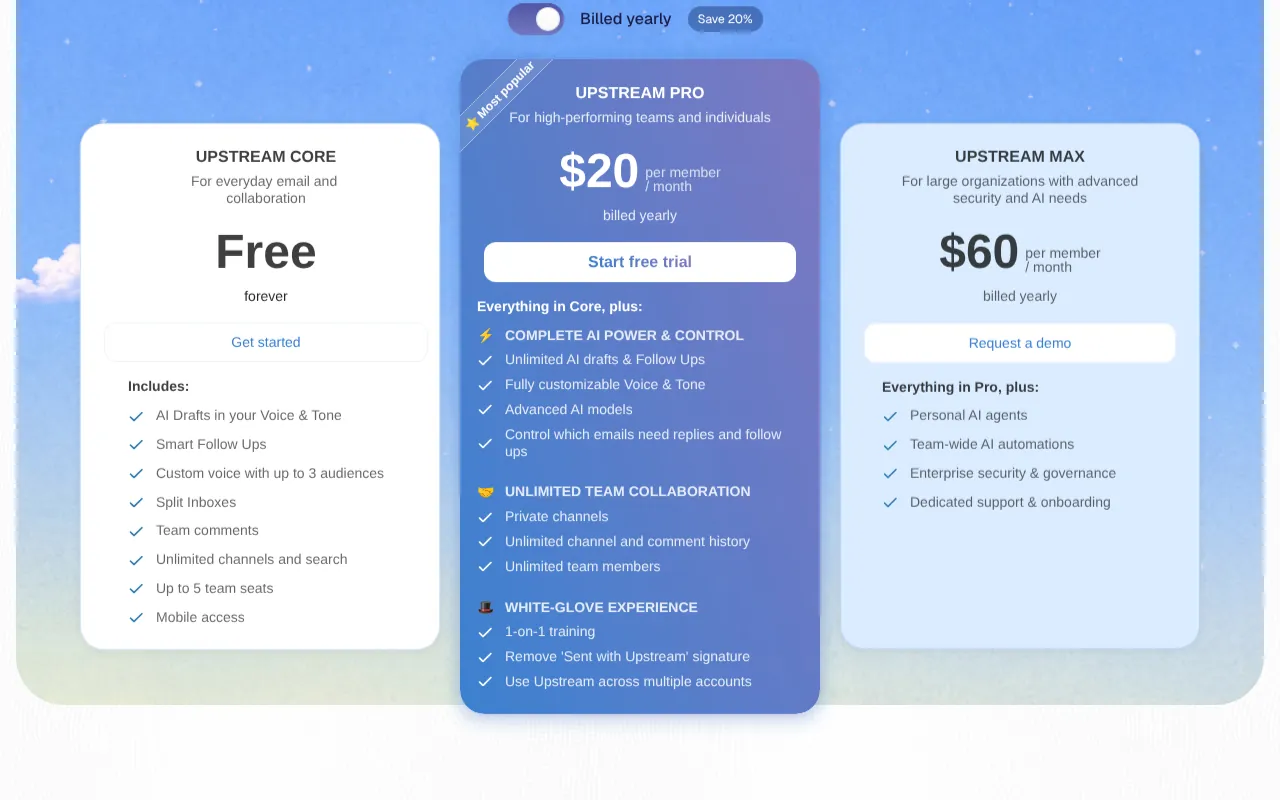
Upstream has a free plan, and the paid plans are priced per team member and billed yearly.
| Plan | Price | What you get |
|---|---|---|
| Core | Free forever | 7 AI drafts and 3 smart follow-ups a week, voice for up to 3 audiences, split inboxes, team comments, unlimited channels and search, up to 5 team seats, mobile app |
| Pro | $20 (about £15) per member a month, billed yearly | Unlimited AI drafts and follow-ups, fully custom voice and tone, advanced AI models, private channels, unlimited team members, several accounts, no "Sent with Upstream" signature, 1-on-1 training |
| Max | $60 (about £45) per member a month, billed yearly, by demo request | Everything in Pro plus personal AI agents, team-wide AI automations, enterprise security and governance, dedicated support |
The pricing page does not mention VAT. It says yearly billing saves 20%, but it shows no monthly price, so budget for $240 (about £180) per person up front for Pro.
What I like
- Drafts are ready before you open the email, so the time saving happens without any prompting.
- It learns your tone from past emails, and you can set different voices for up to three audiences even on the free plan.
- The free plan is real, needs no card and lets a small team of five try it.
- The team says it never trains AI models on your data and says it is CASA Tier 2 compliant.
- It keeps your normal Gmail or Google Workspace address and history, so you can walk away easily. It also lets you pick between Claude and ChatGPT models for each task.
- The MCP server with 44 documented tools is unusually open for an email app, if you want to drive your inbox from Claude or Cursor.
What I'd want fixed
- It is Gmail only. Outlook was planned at launch in June, but the FAQ still says non-Gmail accounts do not work.
- Pro removes the "Sent with Upstream" signature, so expect it on emails sent from the free plan.
- The FAQ says Upstream is GDPR compliant, but the privacy policy itself is a generic template. It does not mention GDPR, Gmail data rules, which AI companies process your email or where it is stored.
- There is no monthly billing, so you pay a year up front once the trial ends.
- I could not find terms of service on the site.
- The MCP tools for composing and replying send email directly, with no approval step mentioned in the docs.
Who should use it?
Upstream suits a founder, consultant or small team in Gmail who answers a lot of similar emails and wants them drafted. The free plan is enough to see if the drafts sound like you. If your business runs on Outlook or Microsoft 365, skip it for now. If you want a wider assistant that also handles Slack, meetings and to-dos, look at Bond instead.
Is it safe to use? Privacy and permissions
- Upstream needs full access to your Gmail account, because it reads, sorts and drafts replies to your mail. Its iPhone app privacy labels list contacts and email content among the data linked to you.
- The site says emails are encrypted in transit and at rest, that it has CASA Tier 2 compliance, and that it never trains AI models on your data. The FAQ says drafts come from Claude and ChatGPT models, which means your email text is passed to those providers to write them.
- The privacy policy names a French company but says data may be processed wherever its service providers are. The FAQ claims GDPR compliance, yet the policy does not mention GDPR or UK GDPR. Read my guide to AI agents and UK GDPR before connecting a work inbox with client data.
- Agents connected through MCP use a personal access token and can send email, so keep that token private.
Using it in the UK
- There are no country limits on the site, and the iPhone app is listed on the UK App Store.
- Prices are shown in dollars only, and VAT is not mentioned, so check at checkout whether it is added.
- The company is in France and its FAQ claims GDPR compliance, but the policy gives no data location or UK GDPR details.
Other launches from the same team
- None found. The makers' Product Hunt profiles list only this Upstream launch.
Alternatives to Upstream
- Bond - pick it if you want a to-do list that pulls in Slack, meetings and Notion as well as email.
- Hey Noah - pick it if you want an executive assistant you can text or call to schedule and follow up for you.
- Shortwave - pick it if you want another agentic Gmail app with monthly billing, from $30 a seat with a 14-day trial.
My verdict
| Area | Score |
|---|---|
| Usefulness | 4/5 |
| Getting started | 4/5 |
| Value for money | 4/5 |
| Trust and privacy | 3/5 |
| UK fit | 3/5 |
| Overall | ★★★½☆ 3.5/5 |
I would try Upstream on the free plan if I lived in Gmail, mainly for drafts and follow-ups. I would not connect a client-heavy inbox until the privacy policy catches up with the product. If the drafts save you an hour a day, Pro is fair value.
Frequently asked questions
Is Upstream free?
Yes. The Core plan is free forever, needs no credit card and includes 7 AI drafts and 3 follow-ups a week for up to 5 team seats. Pro costs $20 (about £15) per member a month, billed yearly, and has a free trial.
Does Upstream send emails without asking?
Not inside the app. The makers say nothing is sent without you, and drafts wait for you to press send. The exception is its MCP server: if you connect Claude or another agent, the reply and compose tools can send email directly.
Upstream vs Shortwave: which is cheaper?
Upstream, on paper. It has a free plan with 7 AI drafts a week, and Pro is $20 (about £15) per member a month, billed yearly. Shortwave's pricing page shows no free plan; it starts at $30 (about £23) a seat a month with a 14-day trial. Both work with Gmail, and I have not tested either side by side.
Read next
Sources
- Upstream on Product Hunt - checked 17 October 2026
- Upstream launch page on Product Hunt - checked 17 October 2026
- Upstream reviews on Product Hunt - checked 17 October 2026
- Upstream makers on Product Hunt - checked 17 October 2026
- Product Hunt daily leaderboard, 18 June 2026 - checked 17 October 2026
- Product Hunt weekly leaderboard, week of 15 June 2026 - checked 17 October 2026
- Product Hunt monthly leaderboard, June 2026 - checked 17 October 2026
- Goldfish on Product Hunt (June 2026 #2 badge) - checked 17 October 2026
- We won Product of the Day, Upstream forum post - checked 17 October 2026
- Upstream homepage - checked 17 October 2026
- Upstream pricing - checked 17 October 2026
- Upstream for teams - checked 17 October 2026
- Upstream for agents - checked 17 October 2026
- Upstream privacy policy - checked 17 October 2026
- Upstream MCP docs - checked 17 October 2026
- Upstream MCP tool reference - checked 17 October 2026
- Upstream - Email on the UK App Store - checked 17 October 2026
- Upstream launch video on YouTube - checked 17 October 2026
- Launch YC: Upstream, the first inbox designed for humans and agents - checked 17 October 2026
- Tech.eu: Upstream raises $3M to launch collaborative AI inbox - checked 17 October 2026
- Shortwave pricing - checked 17 October 2026
- Hey Noah homepage - checked 17 October 2026
- Shortwave homepage - checked 17 October 2026


