
A Claude Code skill is a folder containing a SKILL.md file of instructions. To install one, put the folder in ~/.claude/skills/ for every project or .claude/skills/ inside one project, or install a plugin with /plugin install name@claude-plugins-official. To use it, type /skill-name at the start of a message, or let Claude load it when your request matches its description. This guide covers the three ways to install a skill, how to write your own in five minutes, how to run, list and remove them, and what to check before you trust one. It suits anyone using Claude Code, including non-coders on the desktop app.
Key facts
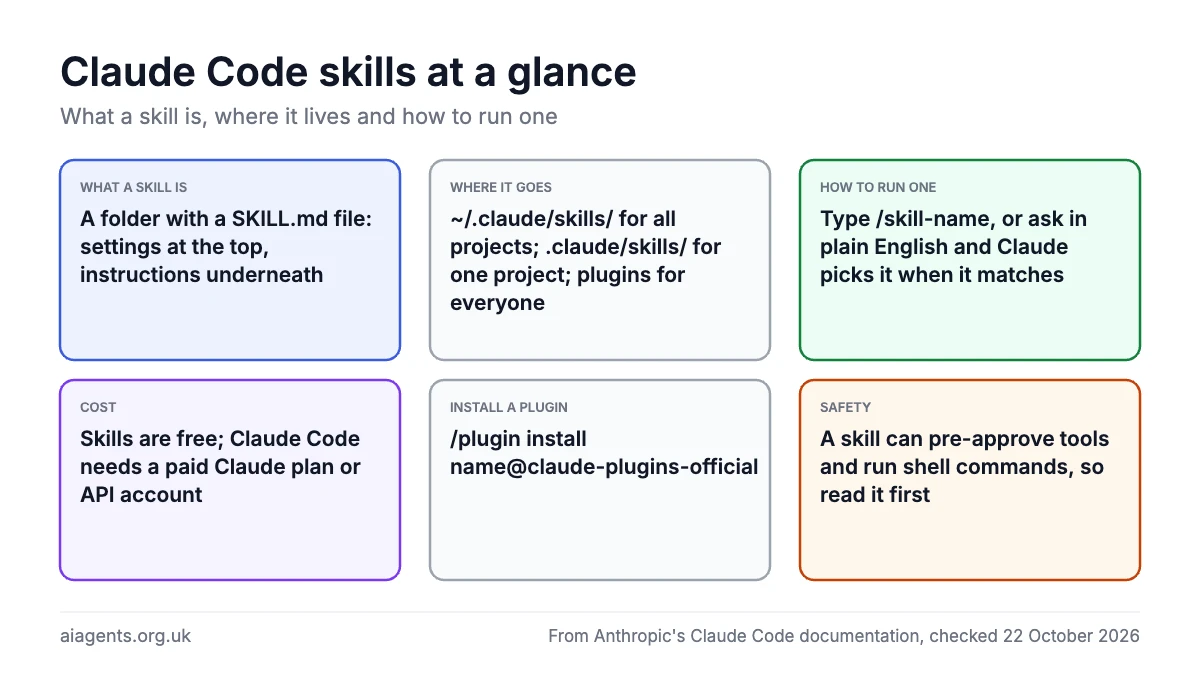
- What a skill is: a folder with a SKILL.md file: a few lines of settings at the top, then instructions Claude follows
- Where it goes:
~/.claude/skills/for all your projects,.claude/skills/in a project for your team, or a plugin for anyone - How to run one:
/skill-name, or ask in plain English and Claude picks it when it matches - Cost: skills are free; Claude Code itself needs a paid Claude plan or API account
- Standard: the Agent Skills open standard (agentskills.io), so the same folder works in other AI tools
- Safety: a skill can pre-approve tools and run shell commands, so read it before you install it
On this page
- What is a Claude Code skill?
- Where do Claude Code skills live?
- How to install skills in Claude Code: three ways
- How to create your own skill in five minutes
- How to use a skill
- How to list, switch off or remove a skill
- Are skills safe? What to check first
- Frequently asked questions
What is a Claude Code skill?
A skill is a set of instructions that Claude Code adds to its toolkit. (Looking for skills in claude.ai or the desktop app rather than the terminal? Read Claude skills explained; the format is the same and this page covers the terminal side.) Anthropic's advice is to make one whenever you keep pasting the same checklist or procedure into chat, or when a section of your CLAUDE.md file has grown from facts into a procedure. The skill's instructions load only when it runs, so a long one costs nothing until you use it.
The whole thing is a folder with one required file, SKILL.md. The top of that file holds a few settings between --- markers (the "frontmatter"); the rest is plain Markdown that Claude reads as instructions. Only one setting is recommended: description, which tells Claude when to use the skill. The folder name becomes the command you type.
Two things worth knowing. Custom commands and skills are now the same feature: a file at .claude/commands/deploy.md and a skill at .claude/skills/deploy/SKILL.md both create /deploy. And Claude Code skills follow the Agent Skills open standard, so a skill folder written for Claude Code can work in other tools that support it, and vice versa. The same idea runs through OpenClaw's skills and ClawHub; our weekly chart of the top 20 agent skills tracks what people are installing.
Where do Claude Code skills live?
Where you save the folder decides which sessions load it. Anthropic's documentation lists these locations:
| Location | Path | Loads in |
|---|---|---|
| Personal | ~/.claude/skills/<skill-name>/SKILL.md | Every project on this machine |
| Project | .claude/skills/<skill-name>/SKILL.md | Sessions in this repository; commit it so your team gets it |
| Plugin | <plugin>/skills/<skill-name>/SKILL.md | Wherever the plugin is enabled, as /plugin-name:skill-name |
| Enterprise | .claude/skills/ in the managed settings directory | Every user your organisation deploys it to |
| claude.ai account | Downloaded to ~/.claude/skills/synced/ | Cowork, cloud and terminal sessions signed in with that account |
The ~ means your home folder, so on a Mac the personal path is /Users/your-name/.claude/skills/. The folder is hidden; press Cmd+Shift+. in Finder to see it. If two skills share a name, the personal one beats the project one, and a plugin skill keeps its plugin-name: prefix so it never clashes.
How to install skills in Claude Code: three ways
1. Copy a skill folder into place
Most skills shared on GitHub are plain folders. Anthropic publishes its own in the anthropics/skills repository, and the Agent Skills site lists more. To install one:
- Download or clone the repository and find the folder that contains SKILL.md.
- Read SKILL.md, especially any
allowed-toolsline and any line starting with!(see are skills safe?). - Move the folder to
~/.claude/skills/for all your projects, or.claude/skills/inside the project. - In Claude Code, type
/skillsto check it is listed. Claude Code watches these folders, so a skill you add during a session appears without a restart. If the skills folder did not exist when the session started, run/reload-skills.
mkdir -p ~/.claude/skills
mv ~/Downloads/skill-folder ~/.claude/skills/
2. Install a plugin from the official marketplace
A plugin bundles one or more skills, often with hooks, subagents and MCP servers, and installs as one unit. Anthropic runs an official marketplace. In a Claude Code session, type /plugin to browse it, or install a plugin by name. This example installs Anthropic's skill-creator plugin, which helps you write and test skills:
/plugin install skill-creator@claude-plugins-officialIf Claude Code says the marketplace is not found, add it first with /plugin marketplace add anthropics/claude-plugins-official. If it says the plugin is not found, refresh your copy of the catalogue with /plugin marketplace update claude-plugins-official. When the install finishes it may ask you to run /reload-plugins. The plugin's skills then appear as /plugin-name:skill-name. In the VS Code extension and the desktop app, the plugin manager is a menu rather than a command. Our Claude plugin directory review looks at what is on the marketplace.
3. Turn a skill on in your claude.ai account
Skills enabled for your claude.ai account are synced into Claude Code automatically when you sign in with that account. Manage them from Customize in the Claude desktop app's sidebar, or the skills settings on claude.ai. Claude Code downloads them into ~/.claude/skills/synced/ and checks for changes while you work. This is also the only route that works in Cowork sessions and cloud sessions, which do not read the skills folder on your Mac. Anthropic's own skills, such as pdf and xlsx, always sync.
How to create your own skill in five minutes
This example, adapted from Anthropic's documentation, makes a skill that summarises your uncommitted changes and flags anything risky. Open Terminal and create the folder:
mkdir -p ~/.claude/skills/summarize-changesSave this as ~/.claude/skills/summarize-changes/SKILL.md. The description is what Claude matches against your requests; the line beginning ! runs a command and pastes its output into the instructions before Claude reads them.
---
description: Summarises uncommitted changes and flags anything risky. Use when the user asks what changed, wants a commit message, or asks to review their diff.
---

## Current changes

!`git diff HEAD`

## Instructions

Summarise the changes above in two or three bullet points, then list any risks you notice such as missing error handling, hardcoded values, or tests that need updating. If the diff is empty, say there are no uncommitted changes.
Open a project, make a small edit, start Claude Code with claude and either type /summarize-changes or ask "What did I change?". Both should produce a short summary and a list of risks.
Useful settings to add to the frontmatter as you go: name to change the command, disable-model-invocation: true so only you can run it (right for anything with side effects, such as a deploy), user-invocable: false for background knowledge Claude should use but you would never type, allowed-tools to pre-approve tools for that turn, and argument-hint to show what to type after the command. Put $ARGUMENTS in the body to pass in what you type after the skill name. Anthropic suggests keeping SKILL.md under 500 lines and moving reference material into extra files in the same folder.
How to use a skill
- Run it yourself: put the name at the start of your message, for example
/fix-issue 123. Anything after the name becomes$ARGUMENTS. Typing the name after plain text, such as "go ahead and /deploy", does not run it; it gives Claude permission to run it if your wording asks for that. - Let Claude choose: every skill's name and description sits in Claude's context, so when your request matches a description, Claude loads the full skill and follows it. Skills marked
disable-model-invocation: trueare the exception. - See what is available:
/skillslists every skill in the session, grouped by where it came from. Asking "What skills are available?" works too. - Bundled skills: Claude Code ships with its own, such as
/doctorfor a setup checkup,/code-review,/debugand/loopfor running a prompt on a schedule. They work the same way.
One habit worth forming: once a skill is invoked, its instructions stay in the conversation and Claude Code does not re-read the file. If Claude seems to drift from a skill later in a long session, invoke it again.
How to list, switch off or remove a skill
- Personal or project skill: delete its folder from
~/.claude/skills/or.claude/skills/. It disappears from/skillsin the current session. - Plugin skill: disable or uninstall the plugin from the
/pluginmenu, or with/plugin uninstall plugin-name@claude-plugins-official. - Synced skill: turn it off in your claude.ai account. Deleting the folder by hand does nothing useful, because the next sync downloads it again.
- Keep it but hide it: in the
/skillsmenu, highlight a skill and press Space to cycle it between on, name-only, user-only and off, then Esc to save. This writes askillOverridesentry to your settings without touching the skill file, which suits skills checked into a shared repository. - Find the dead weight:
/skill-doctor(Claude Code 2.1.252 or later) shows what each skill costs in context and how often it has been used, so you can switch off the ones you never touch. Every listed skill adds to your context on every turn, whether or not it runs.
Are skills safe? What to check first
A skill is text, but it is text that steers an agent with access to your files and terminal, so treat an unknown one the way you would treat a script from a stranger. Three things matter:
- Pre-approved tools. An
allowed-toolsline lets Claude use those tools without asking you for the turn the skill runs. Anthropic's docs warn that this applies even in a folder you have never trusted, so read theallowed-toolsof skills checked into a repository before you run Claude Code there. - Injected commands. Any line beginning with
!runs a shell command on your machine the moment the skill loads. Check what each one does. ThedisableSkillShellExecutionsetting switches this off for skills from user, project and plugin sources. - Where it came from. Prefer Anthropic's own repository, the official marketplace and publishers you recognise. Anthropic does not security-audit plugins, and a plugin runs with your user permissions.
The wider picture, including the malicious skills found on OpenClaw's ClawHub, is in are agent skills safe to install?. For how MCP servers fit alongside skills, see what is MCP?.
Frequently asked questions
How do I install skills in Claude Code?
Put the skill's folder, the one containing SKILL.md, in ~/.claude/skills/ to use it in every project or in .claude/skills/ inside one project. For a plugin, type /plugin install plugin-name@claude-plugins-official in a Claude Code session, or browse the marketplace with /plugin. Skills enabled for your claude.ai account sync in automatically. Type /skills to confirm it loaded.
Where are Claude Code skills stored?
Personal skills are in ~/.claude/skills/, project skills in the project's .claude/skills/ folder, plugin skills inside the plugin's own skills/ folder, and skills synced from your claude.ai account in ~/.claude/skills/synced/. On a Mac the .claude folder is hidden in your home directory.
How do I use a skill in Claude Code?
Type the skill's name with a slash at the start of your message, such as /summarize-changes, adding any arguments after it. Or describe what you want in plain English: Claude reads every skill's description and loads the one that matches. /skills lists what is available in the session.
What is the difference between a skill and a plugin in Claude Code?
A skill is one folder with a SKILL.md file of instructions. A plugin is a package that can contain several skills plus hooks, subagents and MCP servers, installed as one unit from a marketplace. Plugin skills run as /plugin-name:skill-name, so they never clash with your own.
Are Claude Code skills free?
Yes. Skills are text files and the official marketplace is free. Claude Code itself is not free: it comes with Claude Pro at £18 a month including VAT in the UK, or pay-as-you-go API billing. Prices are in our Claude Code guide.
How do I remove a skill from Claude Code?
Delete the skill's folder for a personal or project skill, run /plugin uninstall plugin-name@marketplace-name for a plugin skill, or turn a synced skill off in your claude.ai account. To keep a skill but stop Claude using it on its own, set it to off or user-only in the /skills menu.
Read next
- Claude skills explained: claude.ai and the desktop app
- Top 20 agent skills this week
- Are agent skills safe to install?
- Claude Code explained: UK pricing and how to install it
- Claude plugin directory review
- What is MCP?
Sources
- Extend Claude with skills, Anthropic docs - checked 22 October 2026
- Plugins, Anthropic docs - checked 22 October 2026
- anthropics/skills, GitHub - checked 22 October 2026
- Agent Skills open standard - checked 22 October 2026


