
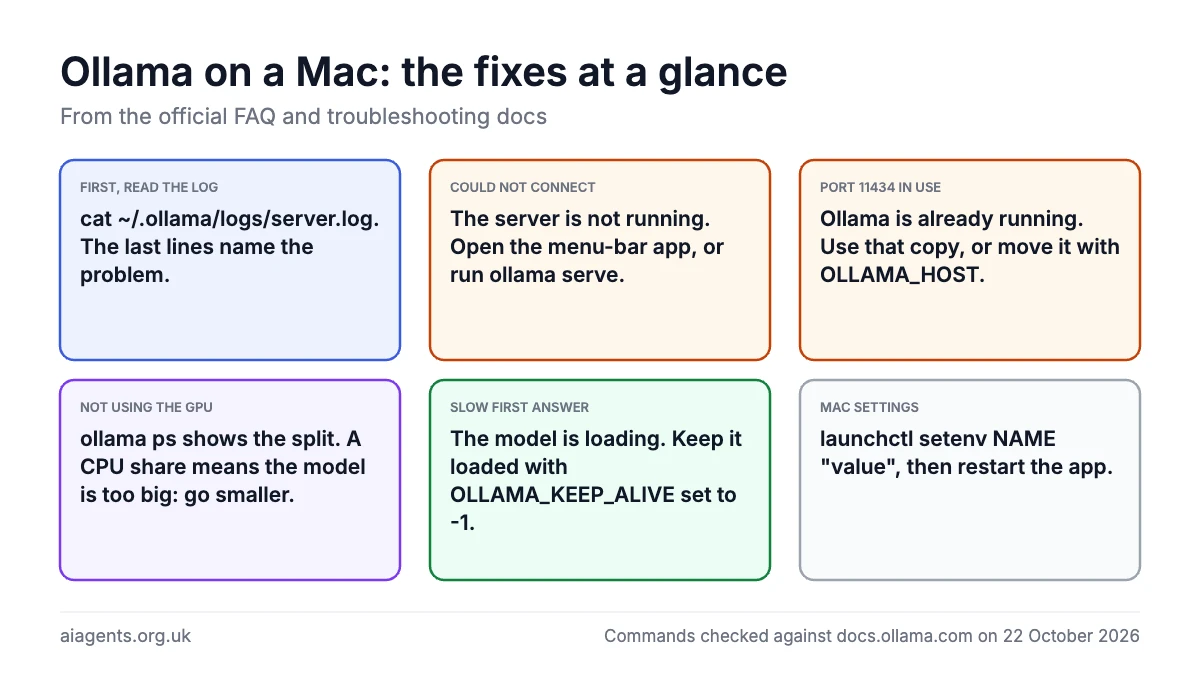
Most Ollama problems on a Mac come down to four things: the server is not running, it is already running when you try to start a second copy on port 11434, the model is too big for your memory so part of it runs on the processor, or the context window is set larger than the machine can hold. Each has a two-minute fix, and the server log at ~/.ollama/logs/server.log tells you which one you have. This page lists the fixes in the order people need them, taken from Ollama's own FAQ and troubleshooting documentation. New to Ollama? Start with the Ollama guide; this page is for when it misbehaves.
On this page
- Start here: read the log
- "Could not connect to ollama server"
- Port 11434 is already in use
- Ollama is not using the GPU
- Answers are slow, or the first one takes ages
- Changing the context length without running out of memory
- Changing Ollama's settings on a Mac
- Frequently asked questions
Start here: read the log
Ollama's documentation says the best way to find out what happened is the server log. On a Mac, open Terminal and run:
cat ~/.ollama/logs/server.logScroll to the bottom; the last few lines usually name the problem. If you started Ollama by typing ollama serve in a Terminal window, the log is in that window instead. Two quick checks go with it: ollama ps shows which models are loaded and where, and ollama list shows which are installed.
"Could not connect to ollama server"
The server is not running. On a Mac the server is the menu-bar app: look for the llama icon at the top right of the screen. If it is missing, open Ollama from Applications, or start the server yourself with:
ollama serveThen try your command again in a second Terminal window. If the app refuses to start, the fastest reset is to quit it from the menu bar, wait ten seconds and open it again. Nothing is lost: your models stay in ~/.ollama/models. If you have told another program, such as OpenClaw or Open WebUI, where Ollama lives, make sure it points at http://127.0.0.1:11434 with nothing after the port number; the OpenClaw guide explains why a trailing /v1 breaks tool calling.
Port 11434 is already in use
An error saying the address 127.0.0.1:11434 is already in use means Ollama is already running, almost always as the menu-bar app, and you have tried to start a second copy with ollama serve. You do not need both. Either quit the menu-bar app and keep the Terminal version, or close the Terminal and use the app; ollama run and every other command talk to whichever one is alive.
If something else has taken the port, or you want Ollama on a different one, change the address with the OLLAMA_HOST setting. For the menu-bar app on a Mac, set it with launchctl and restart the app:
launchctl setenv OLLAMA_HOST "127.0.0.1:11435"The same setting, with 0.0.0.0:11434, lets other machines on your network reach Ollama. The docs note it binds to 127.0.0.1 only by default, which is the safe choice; only open it up if you understand who else is on the network.
Ollama is not using the GPU
Run ollama ps while a model is loaded and read the PROCESSOR column. The docs give three readings: 100% GPU means the whole model is on the graphics chip, 100% CPU means it is all in system memory, and a split such as 48%/52% CPU/GPU means part of it did not fit. On an Apple Silicon Mac the GPU is the same chip and the same memory, so a split means the model is bigger than the share of memory macOS lets the graphics side use, which is about 75% by default.
The fix is a smaller model or a smaller file: pick the 4-bit version, drop a size (14B instead of 27B), or shorten the context length as described below. The local LLM memory calculator shows which models fit your memory with room to spare. Intel Macs have no usable GPU for Ollama and always run on the processor. On Linux PCs with Nvidia or AMD cards, the troubleshooting docs cover driver problems; an AMD card on a driver older than ROCm 7 hangs during discovery and falls back to the CPU.
Answers are slow, or the first one takes ages
Three causes, in order of likelihood:
- The model is loading. The first answer after a pause includes reading the whole file into memory. By default Ollama unloads a model after five minutes idle. To keep it loaded, set
OLLAMA_KEEP_ALIVEto-1(see changing settings), or warm it up before you need it withollama run gemma4 "". To free the memory on purpose, useollama stop gemma4. - Part of the model is on the CPU. Check
ollama psas above. Even a 10% spill slows every word. - The context is huge. A long document or a long chat fills the context window, and every new word has to attend to all of it. Start a fresh chat, or raise the limit only as far as you need.
Two settings help at long context. OLLAMA_FLASH_ATTENTION=1 forces on a memory-saving method that Ollama normally picks automatically, and OLLAMA_KV_CACHE_TYPE=q8_0 halves the memory the conversation cache uses with, in the docs' words, usually no noticeable impact on quality.
Changing the context length without running out of memory
Ollama's default context window is 4,096 tokens, roughly 3,000 words, which is too small for a long document. You can raise it three ways. For one chat, type this inside ollama run:
/set parameter num_ctx 16384For every model, set OLLAMA_CONTEXT_LENGTH as a server setting. For a program that talks to the API, pass num_ctx in the options. Memory use grows with the context, and the docs point out it is multiplied again by OLLAMA_NUM_PARALLEL if you allow parallel requests, so a 32K context on a 16 GB Mac can push a model that fitted at 4K onto the CPU. Raise it in steps and watch ollama ps. Coding agents need far more: Ollama's documentation recommends at least 64,000 tokens for coding tools, which is covered in Claude Code with Ollama.
Changing Ollama's settings on a Mac
Ollama is configured with environment variables. When it runs as the menu-bar app, the docs say to set each one with launchctl setenv and then restart the app:
launchctl setenv OLLAMA_KEEP_ALIVE "-1"
launchctl setenv OLLAMA_CONTEXT_LENGTH "16384"
The settings people change most:
| Setting | What it does | Default |
|---|---|---|
OLLAMA_HOST | Address and port the server listens on | 127.0.0.1:11434 |
OLLAMA_MODELS | Folder where models are stored; use it to move them to an external drive | ~/.ollama/models |
OLLAMA_KEEP_ALIVE | How long a model stays loaded after use; -1 keeps it, 0 unloads at once | 5 minutes |
OLLAMA_CONTEXT_LENGTH | Default context window in tokens | 4096 |
OLLAMA_ORIGINS | Extra web origins allowed to call the API, such as browser extensions | Local only |
OLLAMA_MAX_LOADED_MODELS | How many models may be in memory at once | 3 per GPU |
OLLAMA_NO_CLOUD | 1 turns off Ollama's cloud models and web search | Off |
OLLAMA_DEBUG | 1 writes more detail to the log | Off |
Two more that are not environment variables. To stop Ollama opening at login, go to System Settings, search for Login Items and switch off Ollama under "Allow in the Background". To turn off every cloud feature permanently, put {"disable_ollama_cloud": true} in ~/.ollama/server.json; after a restart the log shows "Ollama cloud disabled: true". The Ollama guide covers updating, stopping, restarting and uninstalling. Every everyday command is in the Ollama commands cheat sheet, and what the cloud features cost and send is in Ollama Cloud explained.
Frequently asked questions
Why does Ollama say port 11434 is already in use?
Because Ollama is already running, usually as the menu-bar app, and you have tried to start a second copy with ollama serve. Use the copy that is running, or quit the app first. To put Ollama on another port, set OLLAMA_HOST to an address such as 127.0.0.1:11435 with launchctl setenv and restart the app.
How do I check whether Ollama is using the GPU on my Mac?
Run ollama ps with a model loaded and read the PROCESSOR column. 100% GPU means the whole model is on the graphics chip; a split such as 48%/52% CPU/GPU means it did not fit in the memory macOS allows the GPU. Choose a smaller model, the 4-bit version or a shorter context to get back to 100% GPU.
Where does Ollama store models on a Mac?
In ~/.ollama/models, a hidden folder in your home directory. To keep them somewhere else, such as an external drive, set the OLLAMA_MODELS variable to the new folder with launchctl setenv OLLAMA_MODELS, move the folder, and restart Ollama.
How do I keep a model loaded in Ollama?
Ollama unloads a model five minutes after its last use. Set OLLAMA_KEEP_ALIVE to -1 to keep every model loaded until you unload it, or pass keep_alive: -1 in an API call for one model. ollama stop followed by the model name unloads it and frees the memory straight away.
How do I increase the context length in Ollama?
The default is 4,096 tokens. Inside ollama run, type /set parameter num_ctx followed by the number you want. For every model, set OLLAMA_CONTEXT_LENGTH on the server. Larger contexts use more memory, so check ollama ps afterwards to make sure the model is still fully on the GPU.
Where are the Ollama logs on a Mac?
At ~/.ollama/logs/server.log. Run cat ~/.ollama/logs/server.log in Terminal and read the last lines. Set OLLAMA_DEBUG to 1 and restart Ollama for more detail, and Ollama's Discord helps interpret what you find.
Why does Open WebUI or a browser extension get a 403 from Ollama?
Ollama only accepts browser requests from 127.0.0.1 and 0.0.0.0 by default. Add the other origin with OLLAMA_ORIGINS; for all Chrome, Firefox and Safari extensions the docs suggest chrome-extension://*,moz-extension://*,safari-web-extension://*. Programs that call the API from outside a browser do not need this.
How do I turn off Ollama's cloud features?
Set disable_ollama_cloud to true in ~/.ollama/server.json, or set the OLLAMA_NO_CLOUD environment variable to 1, then restart Ollama. The log will show "Ollama cloud disabled: true". You lose cloud models and web search; local models are unaffected.
Read next
- Ollama guide: install, models, updating and uninstalling
- Can my Mac run this model? Local LLM memory calculator
- Run a local LLM on your Mac: the complete guide
- Ollama vs LM Studio vs Jan
- Ollama commands cheat sheet
- Ollama Cloud explained: free tier, Pro prices and privacy
- Open WebUI review: a ChatGPT-style front end for Ollama
Sources
- Ollama FAQ: context length, GPU check, environment variables on macOS, keep-alive, origins, model location, cloud features - checked 22 October 2026
- Ollama troubleshooting: log locations, debug logging, GPU discovery on Linux - checked 22 October 2026


