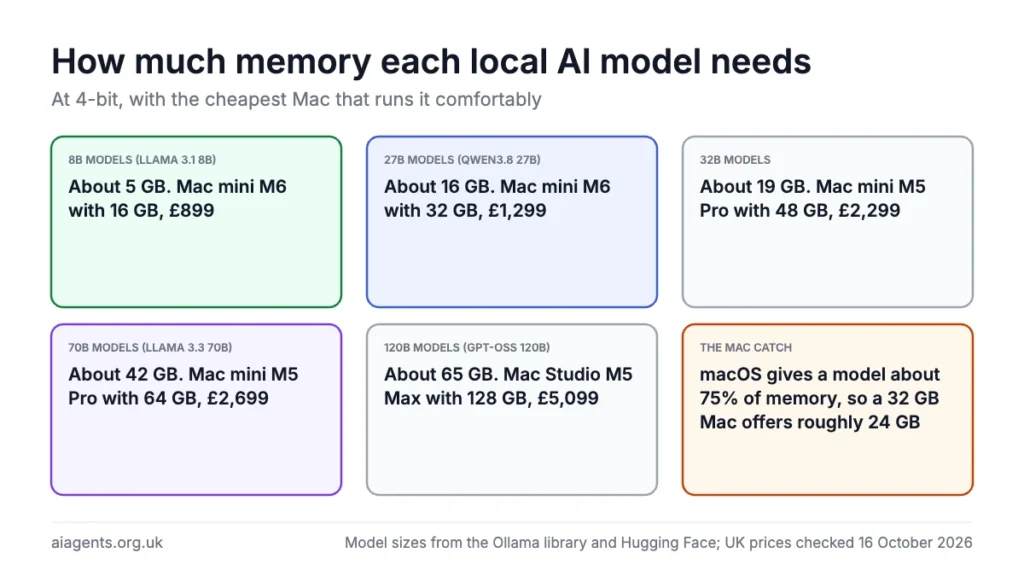
A Mac with 16 GB runs models up to about 8B parameters, 32 GB runs 27B models such as Qwen3.8 27B, 64 GB runs 70B models and 128 GB runs models up to about 120B. The calculator below does the sums for your machine: pick how much memory you have, or pick the model you want, and it shows what fits, how much room is left and the cheapest Mac or mini PC that runs it, with UK prices. The memory rule and the model sizes are the ones used in which Mac or mini PC to buy for local AI.
Rule of thumb: a 4-bit file is about 0.6 GB per billion parameters and an 8-bit file about 1.06 GB, plus 2 to 4 GB for the conversation. By default macOS lets the graphics side use about 75% of memory, an AMD mini PC on Linux about 86%, and on a PC with a separate graphics card only the card's own memory counts. "Comfortable" means the file fits with room for a long conversation; "tight" means it loads but you will hit the limit with long documents. Where a model is listed on the Ollama library, its download size is used instead of the formula.
How the calculator works out what fits
Three numbers decide whether a model runs: the size of the model file, how much of your memory the graphics side is allowed to use, and the room a conversation needs on top. The file size depends on the model's parameter count and how far it has been squeezed. At 4-bit, the standard way to run AI at home, a file is about 0.6 GB per billion parameters, so a 27B model is about 16 GB and a 70B model about 42 GB. At 8-bit it is about 1.06 GB per billion. Where a model is on the Ollama library, the calculator uses the library's download size instead.
On a Mac, memory is shared between processor and graphics, but by default macOS lets the graphics side use about 75% of it. That is why a 32 GB Mac gives a model roughly 24 GB and a 128 GB Mac about 96 GB. An AMD mini PC running Linux gives a model about 110 GB of 128 GB. On a Windows PC with a separate graphics card, only the card's own memory counts, and a model that does not fit spills onto the processor and slows down sharply. The calculator leaves 5 GB for a long conversation before calling a fit comfortable.
Mixture-of-experts models, with "A3B" or "A22B" in the name, must fit whole in memory but only use the active part on each word, so they answer much faster than their total size suggests. Qwen3.6 35B-A3B is the one to try on a 48 GB machine.
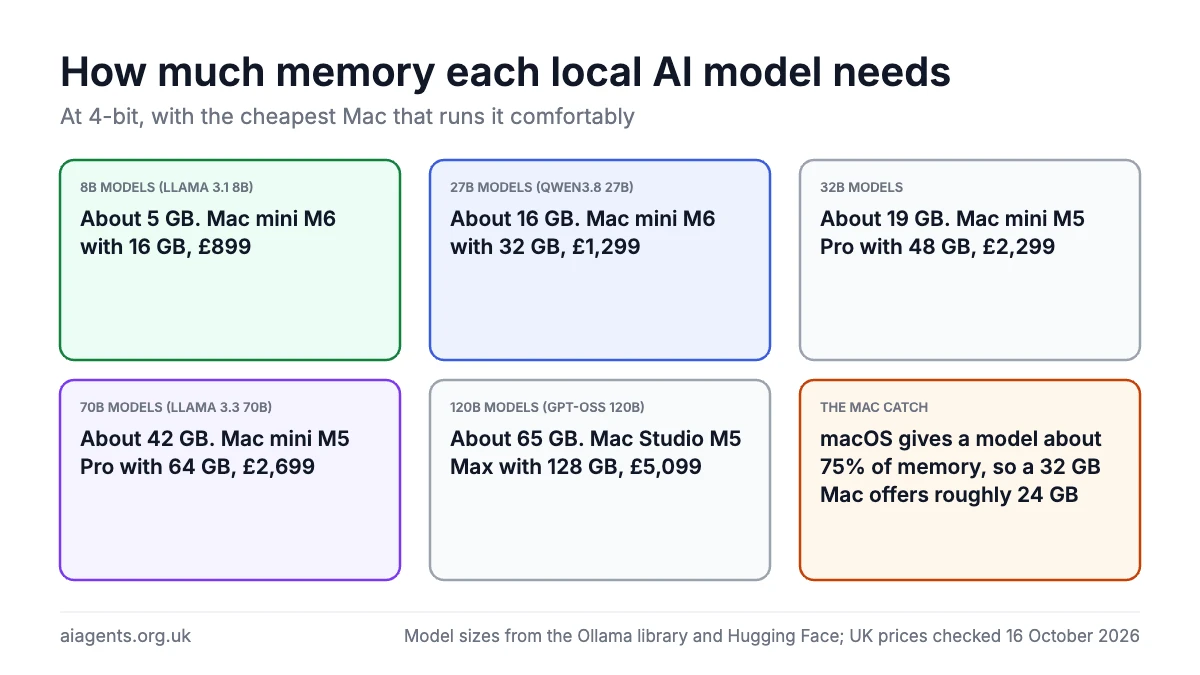
The memory rule in one table
| Memory | Runs well at 4-bit | Cheapest Mac (UK) | Cheapest AMD mini PC (UK) |
|---|---|---|---|
| 16 GB | Models up to 8B; 14B at a squeeze | Mac mini M6, £899 | None worth buying |
| 24 GB | 14B models | Mac mini M6, built to order, £1,099 | None worth buying |
| 32 GB | 27B models such as Qwen3.8 27B | Mac mini M6, built to order, £1,299 | None worth buying |
| 48 GB | 32B models, or 27B at 8-bit | Mac mini M5 Pro, built to order, £2,299 | None worth buying |
| 64 GB | 70B models | Mac mini M5 Pro, built to order, £2,699 | GMKtec EVO-X2, £1,729.99 before import VAT |
| 128 GB | 70B at 8-bit, models up to about 120B | Mac Studio M5 Max, built to order, £5,099 | GMKtec EVO-X2, £2,829.99 |
| 256 GB | 235B mixture-of-experts models | Mac Studio M5 Ultra, built to order, £9,499 | Minisforum MS-S1 MAX-P495 (192 GB), £6,679 |
Every machine in that table has its own review with the models it runs and published speeds: start with which Mac or mini PC to buy for local AI. Buying before Christmas? The Black Friday AI deals page tracks UK price drops on all of them. Once you have the machine, run a local LLM on your Mac walks through the setup and the Ollama guide covers the models.
Frequently asked questions
Can I run an LLM locally on my Mac?
Yes. Any Apple Silicon Mac (M1 onwards) runs a small model, and because the graphics chip shares the Mac's memory, a Mac with 32 GB or more runs mid-size and large models too. Install Ollama or LM Studio, download a model that fits your memory and chat with it offline. Intel Macs run on the processor only and are much slower.
What is the best local LLM for a Mac?
The biggest one that fits your memory with room to spare. On 16 GB, Gemma 4 or Llama 3.1 8B. On 32 GB, Qwen3.8 27B is the model of the moment. On 64 GB, Llama 3.3 70B. On 128 GB, gpt-oss 120B. Models with an MLX build, such as Gemma 4 and Qwen3.8, often run faster on Apple Silicon.
Are MacBooks good for running LLMs?
Yes, within the memory you buy. A MacBook Air tops out at 32 GB, enough for 27B models, and the 14-inch MacBook Pro with an M5 Pro or M5 Max goes up to 128 GB. The 16-inch and 14-inch MacBook Pro M5 Max with 128 GB is the cheapest 128 GB laptop at £6,699. Expect the fans to run and the battery to drain quickly with a big model loaded.
Which Mac is best for LLMs?
For most people, the Mac mini M6 with 32 GB at £1,299: quiet, simple and big enough for 27B models. For 70B models, the Mac mini M5 Pro with 64 GB at £2,699. If money is no object, the Mac Studio M5 Max with 128 GB at £5,099 has more than twice the memory speed of the AMD mini PCs, so answers arrive faster.
How much memory does a 70B model need?
About 42 GB at 4-bit and 74 GB at 8-bit, plus room for the conversation. On a Mac that means 64 GB for 4-bit and 128 GB for 8-bit, because macOS gives a model about three quarters of the memory. The 64 GB Mac mini M5 Pro at £2,699 is the cheapest Mac that runs a 70B model comfortably.
What do 4-bit and 8-bit mean?
They describe how far the model's numbers have been squeezed, a process called quantisation. A 4-bit file is about half the size of an 8-bit one and runs faster, with a small loss in quality that most people never notice. 4-bit is the standard way to run AI at home; 8-bit is worth it if you have twice the memory to spare.
Why can a Mac only use about 75% of its memory for AI?
macOS caps how much shared memory the graphics side can take so the rest of the system keeps running. The default cap is about 75%, so a 32 GB Mac gives a model roughly 24 GB. Advanced users can raise the cap with a Terminal command, at the risk of starving everything else; the calculator assumes the default.
Read next
- Which Mac or mini PC should you buy to run AI at home? (UK prices)
- Run a local LLM on your Mac: the complete guide
- Ollama guide: the best models for your memory
- Ollama models list: the 30 most downloaded and which fit your Mac
- Black Friday AI deals 2026 (UK)
- Is it safe to run Chinese AI models on your Mac?
Sources
- Ollama library: download sizes for gemma4, gpt-oss, qwen3.8 and llama3.2, checked 16 October 2026
- Hugging Face trending models: parameter counts, pulled 16 October 2026
- macOS graphics memory cap: the 75% default and how to change it
- Apple UK store, Mac mini and Mac Studio: prices checked 16 October 2026
- GMKtec UK and Minisforum UK: prices checked 16 October 2026


