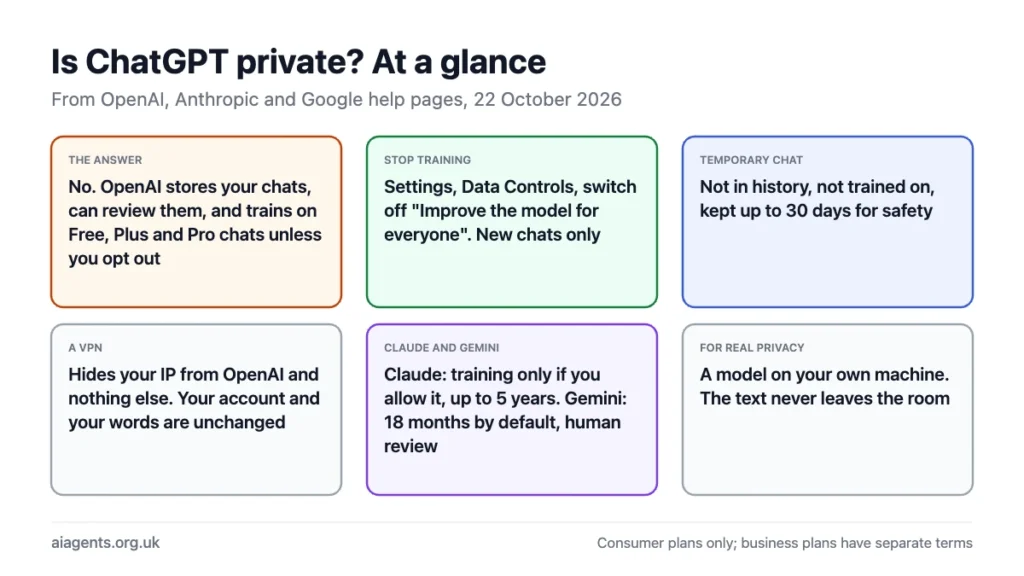
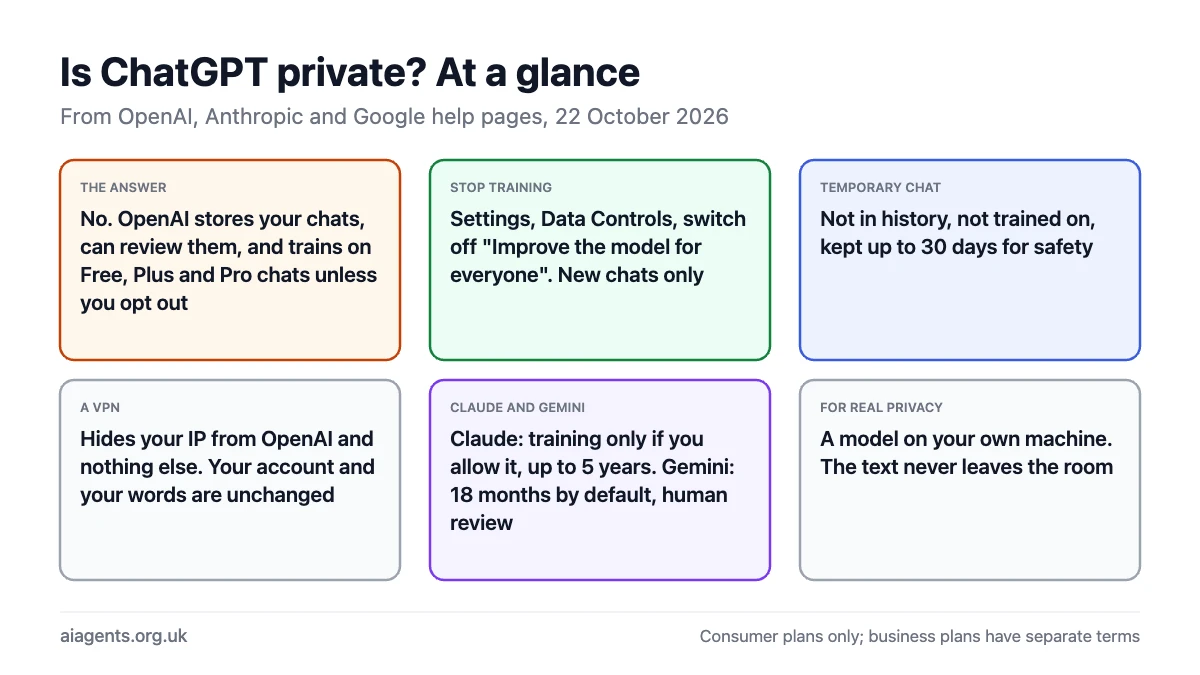
No, ChatGPT is not private by default. OpenAI stores every conversation in your account, its staff can review them, and on Free, Plus and Pro plans new chats are used to train its models unless you turn off "Improve the model for everyone" in Settings under Data Controls. Two features reduce that: the training toggle, which stops new chats being used, and Temporary Chat, which keeps a conversation out of your history, out of training and off OpenAI's systems after 30 days. A VPN changes none of it, because OpenAI still has your account and your words. If you need a conversation nobody else can read, the answer is a model on your own machine. This page sets out what OpenAI keeps, from its own help pages read on 22 October 2026, and does the same for Claude and Gemini.
On this page
- What I found in my own accounts
- What ChatGPT keeps
- How to stop ChatGPT training on your chats
- Temporary Chat: ChatGPT's incognito mode
- Who can see your chats
- Does a VPN make ChatGPT private?
- Using ChatGPT anonymously: no account, crypto, burner email
- Claude and Gemini: the same questions
- What you should not tell ChatGPT
- Frequently asked questions
What I found in my own accounts
Help pages tell you what the settings do. They do not tell you what yours are set to, so on 22 October 2026 I opened the privacy settings in the three accounts I use most and took screenshots. I have a free ChatGPT account, a paid Claude account and a Google account that has used Gemini since June 2025.
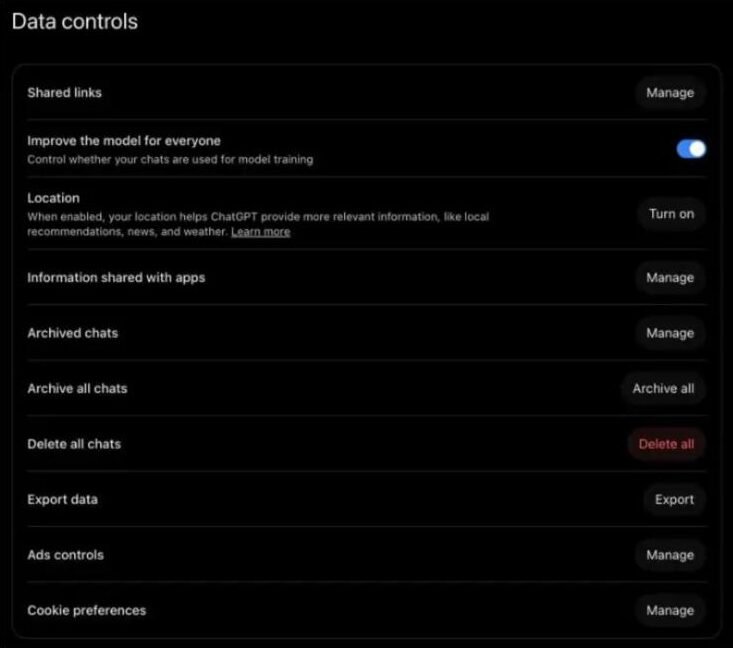
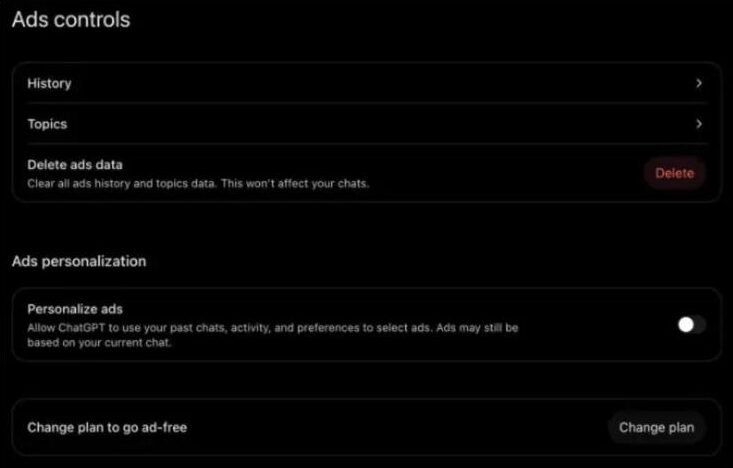
ChatGPT: training was on, and there is now an ads page. Under Settings and Data controls, "Improve the model for everyone" was switched on. I had never touched it, which is the point: that is the default, and it had been quietly on for every chat I had ever had on that account. The same page has gained an entry I did not expect, "Ads controls". On the free plan ChatGPT now shows adverts, keeps an ads history and a list of topics, and offers a "Personalise ads" toggle that lets it "use your past chats, activity, and preferences to select ads". That toggle was off on my account, and there is a "Delete ads data" button and a "Change plan to go ad-free" link beside it. Your chats are not shown to advertisers, as ChatGPT itself put it when I asked, but if you switch personalisation on they are used to pick what you see.
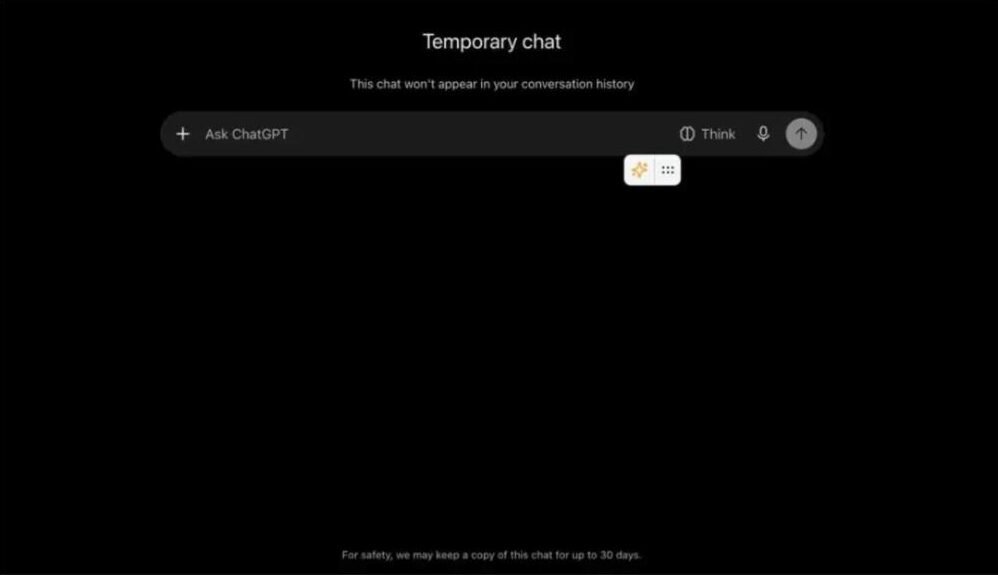
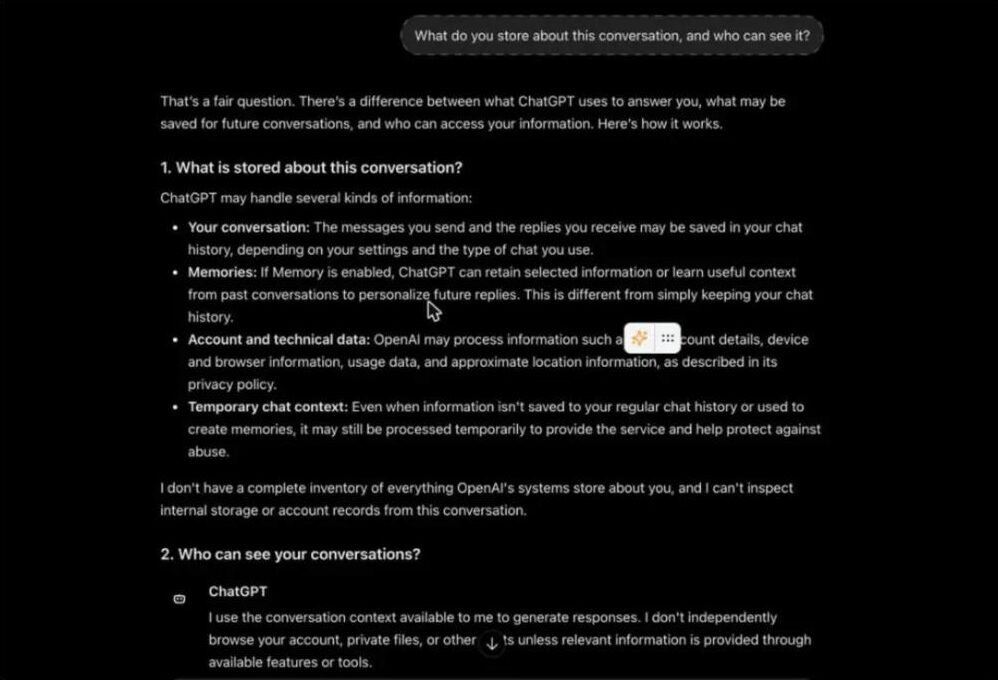
Temporary Chat says the 30 days on the screen. I opened a Temporary Chat and the footer reads "For safety, we may keep a copy of this chat for up to 30 days", which is the help-page wording put where you will see it. In that chat I asked "What do you store about this conversation, and who can see it?" The answer was careful and, as far as I can check it against OpenAI's own pages, accurate: it separated chat history, memories, account and technical data and temporary-chat context; said it had no complete inventory of what OpenAI stores and could not inspect internal records; named authorised staff and service providers as the people who may see content for security, support or legal reasons; and ended with the line worth remembering, that deleting a conversation, turning off model training and removing a memory "are three different things". I also ran my two standard accuracy prompts in the same chat, a UK GDPR question and a timetable puzzle, and it got both right, citing the ICO for the first.
Claude: off, and in a different place. Claude's equivalent lives under Settings and Privacy as "Help improve our AI models", with a separate "Location metadata" toggle beside it. Both were off on my account. Anthropic's page says the choice is yours either way; what I can add is that on my account, which has been paid for some time, nothing was on that I had not chosen. The same page has buttons to export your data and to manage shared chats, shared artifacts and uploaded files, which is where to look if you have ever shared a Claude conversation by link.

Gemini: on since the first day, with the 72 hours spelled out. Google's "Keep activity" page for Gemini Apps showed the setting on, with the date it had been on since, which was the day I first used Gemini. Auto-delete was set to 18 months, the default, and a separate unticked box offered to let Google use audio, Gemini Live video and screen shares too. The page states in its own words that when the setting is off "Google still saves chats for 72 hours to respond to you and help keep Gemini safe". Below the setting sits a full list of every prompt I had ever sent, by day, which is a useful reminder of what "activity" means.

The pattern across the three is the one the help pages describe, now with evidence: the two services that default to training were training on me, and the one that defaults to off was off. If you have never opened these pages, assume ChatGPT and Gemini are set the way mine were.
What ChatGPT keeps
Every conversation you have while signed in is saved to your chat history until you delete it, and OpenAI's help centre says existing conversations "may be used for model training if you have not opted out." Deleting a chat removes it from your sidebar; OpenAI's retention policy then applies to its copy. On top of the text, OpenAI holds your account details, device and usage data, and, if you use memory, the facts it has stored about you across chats. The Team, Enterprise and Edu plans are the exception: OpenAI says they offer "more control of their data" and does not train on their content.
How to stop ChatGPT training on your chats
One switch. Open Settings, choose Data Controls and turn off "Improve the model for everyone". It was on in my own account when I looked, as it will be in yours unless you have already changed it. OpenAI's wording: while it is off, "new conversations won't be used to train our models." The setting applies to your whole account, not one device. Three details worth knowing. It only covers new chats, so anything already in your history stays eligible until you delete it. Your chats still appear in your history and are still stored; the switch is about training, not retention. And if you asked OpenAI's support team to opt you out before the toggle existed, OpenAI says it will honour that even though the toggle does not show it.
- Web, signed in: profile icon at bottom left, Settings, Data Controls, switch off "Improve the model for everyone".
- iPhone: the three dots at top right, Settings, Data Controls.
- Android: the three lines at top left, Settings, Data Controls.
Temporary Chat: ChatGPT's incognito mode
Temporary Chat is the closest ChatGPT has to a private mode. OpenAI's FAQ says a temporary chat "stays out of your chat history and is not used to improve OpenAI models while it remains temporary", and that "OpenAI may keep a copy of a temporary chat for up to 30 days for safety purposes." It does not create or update memories. You choose, before the first message, whether it can read your existing memories and custom instructions or start blank.
What it is not is end-to-end private. For those 30 days the text sits on OpenAI's systems and can be reviewed for abuse, and if you later save the chat, your training setting applies to it. Think of it as a chat that will not haunt your sidebar, not a chat nobody can read.
Who can see your chats
Other users cannot. Your chats are not public and there is no way for another person to browse them, which is the question behind "can people see my chats on ChatGPT". OpenAI can: its systems process the text, trusted staff can review conversations for abuse monitoring, and anything used for training is seen by the training process. Anyone with access to your account can, which in practice means whoever knows your password or picks up your unlocked phone. And a shared link makes that one conversation visible to anyone who has the link. ChatGPT is confidential in the way email is confidential: private from the public, readable by the provider.
Does a VPN make ChatGPT private?
No. A VPN replaces your IP address with the VPN server's and hides your traffic from your internet provider, employer or the café Wi-Fi. That is all it does. OpenAI still knows who you are from your login, still reads your prompts, still applies its retention and training rules, and still infers your location from your account and from what you type. Even Proton, which sells a VPN, puts it this way in its own article: "A VPN can't change how OpenAI collects, retains, reviews, or uses the information you provide" and "Hiding your IP address doesn't make you anonymous to OpenAI."
A VPN is useful alongside ChatGPT in two narrow cases: reaching it where a network blocks it, and stopping your ISP seeing that you use it at all. It can also cause problems, from extra captchas to ChatGPT guessing you are in the wrong country. If the goal is that OpenAI cannot read what you write, the VPN is solving a different problem.
Using ChatGPT anonymously: no account, crypto, burner email
You can use ChatGPT without signing in, with limits on tools and model access, and OpenAI's help centre shows a Data Controls setting for logged-out users too, reached through the ? icon at bottom right. That removes the account link but not the words: OpenAI still processes and stores what you type under its policy, now tied to your device and IP instead of your name. A burner email gets you an account the same way, with the same result.
Paying in crypto is not something OpenAI offers. The services that do, such as Venice, are a different product: they accept a token or a wallet payment and route your prompts to OpenAI with your identity stripped, which stops OpenAI knowing who you are and does not stop it reading the text. Duck.ai does the same for free, without crypto. Both are covered in private AI chatbots compared, and the token side in crypto AI explained. The point stands throughout: anonymity hides who you are, privacy hides what you said, and only running the model yourself does the second.
Claude and Gemini: the same questions
| ChatGPT (Free, Plus, Pro) | Claude (Free, Pro, Max) | Gemini (consumer) | |
|---|---|---|---|
| Trains on your chats? | Yes unless "Improve the model for everyone" is off | Only if you allow model improvement in Privacy Settings | Yes when "Keep Activity" is on, the default |
| Retention when training is allowed | Per OpenAI's retention policy | "up to 5 years" in de-identified form, for chats after the setting was enabled | 18 months by default; 3, 36 months or indefinite as options |
| Retention when training is off | Chats stay in history until deleted | Deleted chats gone from back-end "within 30 days" | "still saved for 72 hours so Gemini can respond to you" |
| Human review | For abuse monitoring | Per Anthropic's policy | "A subset of chats are reviewed by human reviewers", kept up to three years, disconnected from your account |
| Private mode | Temporary Chat: not in history, not trained, kept up to 30 days | Incognito chats: "not used to improve Claude" even with the setting on | Turn Keep Activity off; 72-hour window remains |
| Business plans | Team, Enterprise, Edu: not used for training | Claude for Work and API: separate commercial terms | Workspace: separate terms |
Google's notice has the detail people miss: chats already reviewed by human reviewers are not deleted when you delete your activity, and are kept for up to three years. Anthropic's five-year figure applies only to chats after you switched model improvement on, and its feedback thumbs are stored for up to five years regardless. All three are honest about this in their help pages; none of it is hidden, it is just long.
What you should not tell ChatGPT
Anything you would not put in an email to a company you do not know. Other people's personal data if you are a business, because you become a controller sharing it with a US processor without a contract; see AI agents and UK GDPR. Passwords, card numbers and account details, which have no business in any chat. Medical and legal detail you would be unhappy to see reviewed by a stranger, even one bound by a confidentiality agreement. And anything under NDA. For all of those, a model on your own Mac does the same job with the text never leaving the room, and the private AI guide shows how little that costs now.
Frequently asked questions
Does ChatGPT store your data?
Yes. Conversations are saved to your account until you delete them, along with account, device and usage data and any memories it has stored about you. On Free, Plus and Pro plans, saved chats can also be used for training unless you turn off "Improve the model for everyone" under Settings, Data Controls. Temporary Chats are kept for up to 30 days for safety and are not used for training.
Can people see my chats on ChatGPT?
Other users cannot; your chats are not public. OpenAI can, for abuse monitoring and, if you have not opted out, for training. Anyone with access to your account can see your history, and a chat you share by link is visible to anyone with that link. Treat it as private from the public and readable by the provider.
Is ChatGPT confidential?
Not in the professional sense. There is no confidentiality agreement between you and OpenAI on a consumer plan, and OpenAI's own policy allows review of conversations. Business plans add a data processing agreement and no training, which is the minimum a UK firm needs. For material that must stay confidential, use a model running on your own machine.
Can ChatGPT leak your chats?
The realistic risks are an account takeover through a weak or reused password, a chat shared by link that reaches further than intended, and a bug or breach on OpenAI's side, which has happened before with a 2023 incident that briefly exposed other users' chat titles. Turn on two-factor authentication, do not share chats by link unless you mean it, and keep anything you could not bear to see leaked off the service.
Does Claude train on your data?
Only if you allow it. Anthropic's privacy centre says consumer chats are used for model improvement when "You choose to allow us to use your chats and coding sessions to improve Claude", with the setting under Privacy Settings. If allowed, data may be kept in de-identified form for up to five years; Incognito chats are never used; deleted chats leave Anthropic's back-end within 30 days. Claude for Work and the API are under separate commercial terms.
Does Gemini store your data?
Yes. With Keep Activity on, the default, Google keeps Gemini chats for 18 months and uses them to improve its services, including training generative AI models. A subset is reviewed by people and kept for up to three years, disconnected from your account. With Keep Activity off, chats are still saved for 72 hours and are not used for training unless you send feedback.
Does the free ChatGPT show ads, and do they use my chats?
Yes to the first, and only if you let it to the second. On 22 October 2026 the free plan's Data controls page had an "Ads controls" section with an ads history, a topics list, a "Delete ads data" button and a "Personalise ads" toggle, off by default on my account, that allows ChatGPT to use past chats and activity to choose adverts. Ads can still be based on the chat you are in. Advertisers do not see your conversations, and paid plans remove the ads.
How do I use ChatGPT anonymously?
Use it without signing in, or through a service such as Duck.ai or Venice that strips your identity before passing the prompt to OpenAI. Either way OpenAI still reads and stores the text; anonymity hides who you are, not what you said. A VPN adds nothing beyond hiding your IP address. For a conversation nobody else can read, run a model on your own computer.
Read next
- Private AI chatbots compared
- Private AI: the UK guide
- Run a local LLM on your Mac
- AI agents and UK GDPR
Sources
- OpenAI Help Centre: Data Controls FAQ - read 22 October 2026
- OpenAI Help Centre: Temporary Chat FAQ - read 22 October 2026
- Anthropic Privacy Centre: how long do you store my data and is my data used for model training - read 22 October 2026
- Google: Gemini Apps Privacy Hub - read 22 October 2026
- Proton: Does a VPN protect you when using ChatGPT? (Proton sells a VPN and a rival assistant) - read 22 October 2026
- OpenAI: March 20 ChatGPT outage, the 2023 chat-title exposure - read 22 October 2026
- My own accounts: ChatGPT Settings, Data controls and Ads controls on a free plan; a ChatGPT Temporary Chat with three test prompts; Claude Settings, Privacy; Google My Activity, Gemini Apps activity - screenshots above, 22 October 2026


