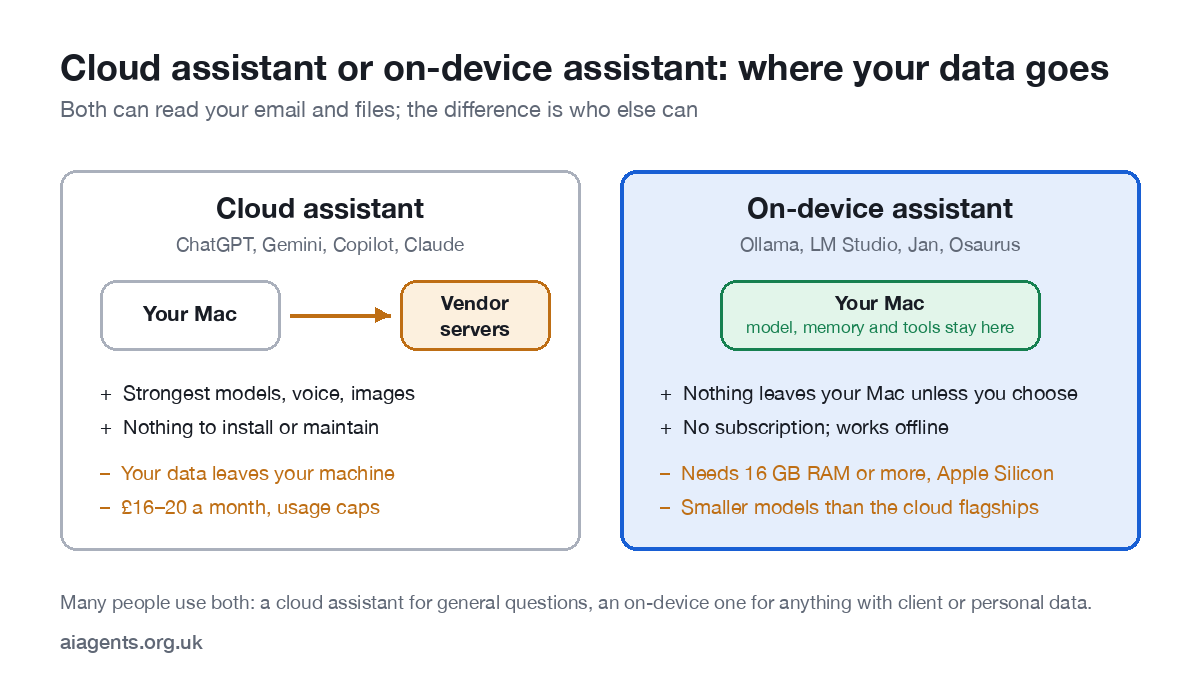
With a local LLM you can run an AI agent entirely on a Mac with Apple Silicon and 16 GB or more of memory: the model, its memory and its tools all stay on the machine, nothing goes to a vendor, there is no subscription, and it works with the Wi-Fi off. The trade-off is model size: local models are a step behind the cloud flagships on hard reasoning, but for inbox triage, document work, research and most small-business admin they are more than enough. This guide covers which Mac, which models, which software, how to set up a first agent, and what it costs over a year against the cloud.
Key facts
- Minimum: any Apple Silicon Mac (M1 or later) with 16 GB unified memory. 32 GB is the sweet spot; 64 GB and above runs the big models.
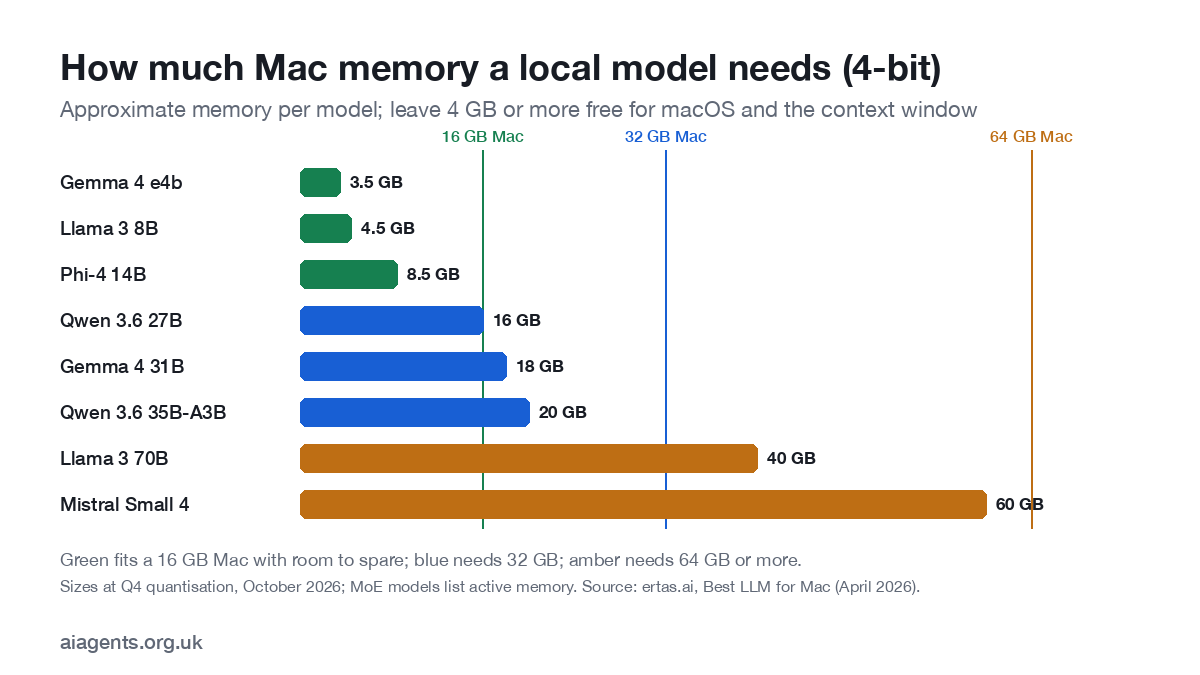
- Rule of thumb: about 0.6 GB of memory per billion parameters at 4-bit, plus headroom for macOS and the context window.
- Models (October 2026): 16 GB: Gemma 4 e4b, Phi-4 14B. 32 GB: Qwen 3.6 27B, Gemma 4 31B. 64 GB+: Qwen 3.6 35B-A3B, Llama 3 70B.
- Software: Ollama or LM Studio to run models; Jan for a chat interface; an agent harness such as OpenClaw or Hermes Agent for tools, memory and schedules.
- Privacy: no vendor processor, no transfer, no training on your data; UK GDPR still applies to what you do with it.
On this page
- Why run an agent locally?
- Which Mac do you need?
- Which models run well?
- Which software?
- Set up your first local agent
- Tools, memory and schedules
- What does local AI on a Mac cost over a year?
- What are the limits?
- Frequently asked questions
- Sources
Why run an AI agent locally?
Three reasons, in the order people give them. Privacy: client emails, health records, legal files and your own diary never leave the machine, so there is no vendor to trust, no data-processing agreement to read and nothing for a model company to train on. Cost: a cloud assistant is £16 to £20 a month per person, forever; a local one costs electricity. Control: the model does not change under you overnight, the service does not go down, and it works on a train.
The reason it is practical on a Mac specifically is unified memory. Apple Silicon shares one pool of fast memory between the CPU and GPU, so a 32 GB MacBook can hold a model that would need an expensive dedicated graphics card elsewhere. Apple's MLX framework and the open-source llama.cpp both exploit this, and the main tools below are built on one or the other. If you are choosing a machine, my guide to which Mac or mini PC to buy for local AI compares 12 of them with UK prices.
Which Mac do you need?
Memory matters more than chip generation. A base M1 with 16 GB runs a useful small model; an M4 with 8 GB does not. If you are buying for this purpose, buy memory first and the chip second. In Apple's UK store in October 2026, the Mac mini M6 starts at £899 with 16 GB (up to 32 GB), the Mac mini M5 Pro at £1,699 with 24 GB (up to 64 GB) and the Mac Studio M5 Max at £2,499 with 36 GB or £3,099 with 64 GB.
| Memory | What runs well | Agent use | Typical Mac |
|---|---|---|---|
| 8 GB | Tiny models only (3-4B) | Not recommended for agents | Older base MacBook Air |
| 16 GB | 8B-14B models (about 4.5-8.5 GB each) | Inbox summaries, drafting, note-taking, simple tool use | MacBook Air, Mac mini M6 base |
| 24-32 GB | 27B-31B dense models (about 16-18 GB) | Most small-business agents; research; multi-step tasks | MacBook Pro, Mac mini M5 Pro, iMac |
| 64 GB | 70B dense (about 40 GB) or large mixture-of-experts models | Everything above, faster and with longer context | MacBook Pro or Mac Studio with a Max chip |
| 96-128 GB+ | The largest open models at good quality | Always-on agents serving a small team | Mac Studio |
A Mac mini with 32 GB is the best value for an always-on agent: it is silent, sips power, and can sit under a desk running your inbox agent on a schedule while you use a laptop.
Which local AI models run well on a Mac in October 2026?
Open models have improved fast. The names below are the ones that run well today at 4-bit quantisation, which halves memory use with little loss in quality. We re-check this table every quarter.
| Memory tier | Model | Size | Memory at 4-bit | Good at |
|---|---|---|---|---|
| 16 GB | Gemma 4 e4b | Small, efficient | Under 4 GB | Fast replies, summaries, light tool use |
| 16 GB | Llama 3 8B | 8B | About 4.5 GB | General chat and drafting |
| 16 GB | Phi-4 | 14B dense | About 8.5 GB | Reasoning for its size; good first agent model |
| 32 GB | Qwen 3.6 27B | 27B dense | About 16 GB | Tool use and multi-step agent work; the all-rounder |
| 32 GB | Gemma 4 31B | 31B dense | About 18 GB | Writing quality, long documents |
| 64 GB+ | Qwen 3.6 35B-A3B | 35B total, 3B active (MoE) | About 20 GB, runs at small-model speed | Fast agent loops with strong quality |
| 64 GB+ | Llama 3 70B | 70B dense | About 40 GB | Depth over speed; hard reasoning |
| 64-96 GB | Mistral Small 4 | 119B total, 6B active (MoE) | About 50-65 GB | Top-end quality for a team machine |
For agents specifically, choose a model with reliable tool calling: the Qwen and Gemma families lead here. Download the MLX build where one exists; on Apple Silicon it is usually faster than the GGUF equivalent. The newest strong option is Qwen 3.8: see Qwen 3.8 on a Mac for which build fits your memory.
Which software?
You need two things: something that runs the model, and something that turns a model into an agent by giving it tools, memory and a schedule. Some apps do both.
| Tool | What it is | Best for | Cost |
|---|---|---|---|
| Ollama | Command-line model runner with a local API; huge model library | Developers; running a model that other apps talk to | Free, open source |
| LM Studio | Desktop app to download, run and chat with models; MLX support | Beginners who want a friendly interface; testing models | Free for personal use |
| Jan | Open-source chat app that runs models locally | A private ChatGPT-style chat window | Free, open source |
| OpenClaw | Open-source agent you run yourself, reached through chat apps; works with a local model | Turning a local model into an agent that acts | Free, open source |
| MLX-LM / llama.cpp | The engines underneath; command-line | Tinkerers; maximum speed | Free, open source |
Independent reviews and head-to-heads, including Ollama vs LM Studio vs Jan, are in the Tools and platforms hub. For the two main model runners head to head, see Ollama vs LM Studio; for a chat window on top, read our reviews of Open WebUI, Msty and AnythingLLM. If you only want quick summaries and rewrites, your Mac may already have a model built in: Apple's on-device model from Terminal.
Set up your first local agent
- Check your Mac: Apple menu, About This Mac. You want "Apple M-something" and 16 GB or more of memory.
- Install a model runner. LM Studio if you want buttons, Ollama if you are happy in Terminal. Both are a single download.
- Download one model from the table that fits your memory. For a 16 GB Mac, start with Phi-4 or Gemma 4 e4b. Choose the MLX or 4-bit build.
- Test it in chat for ten minutes. Paste a long email thread and ask for a summary and three draft replies. If it is too slow, drop a size.
- Install an agent harness that can use local models and connect tools; OpenClaw is a free option that works with a local model. Point it at the model you just tested.
- Give it one job and one tool: read a mail folder and write a daily summary to a note. Read access only.
- Add a schedule so it runs each morning, and a log you can read. After 30 days of boring logs, add the next tool.
Expect an afternoon for the first run and an hour of tuning over the following week, mostly on the instruction you give the agent.
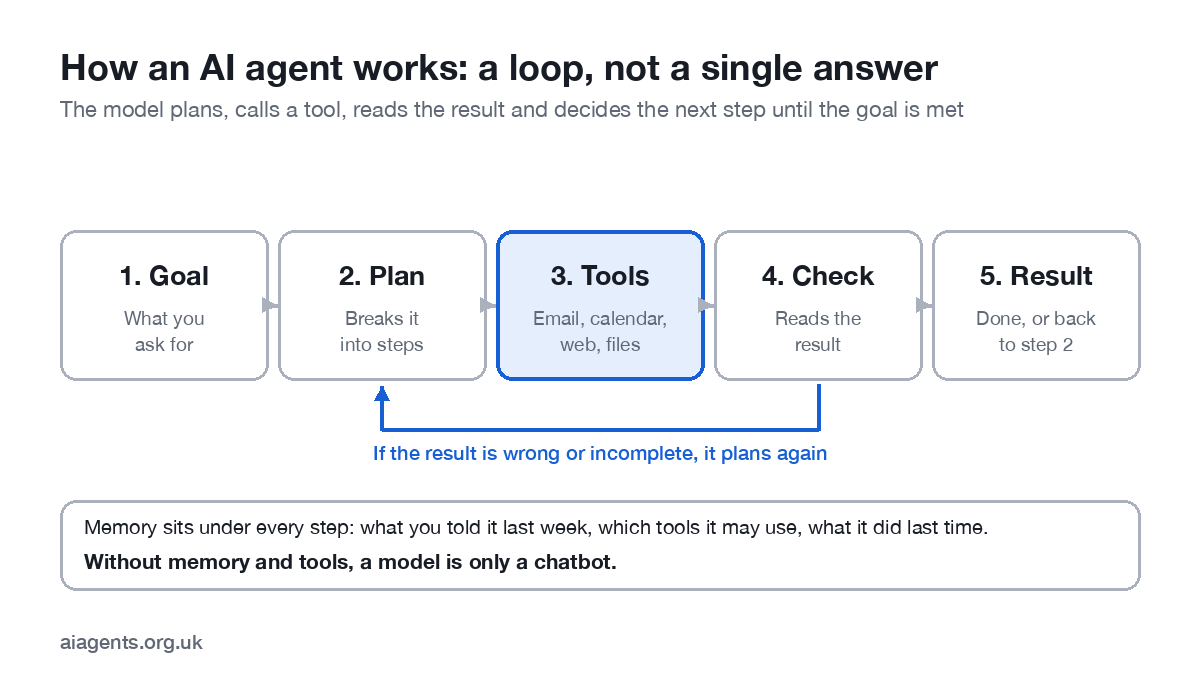
What turns a local model into an agent?
A model on its own is a chatbot. It becomes an agent when it has tools (email, files, calendar, browser), memory (what you told it last week, what it did yesterday) and a loop that runs without you prompting each step. The Model Context Protocol (MCP) has become the common way to plug tools into agents, so a harness that speaks MCP can use the same tools as the cloud assistants. Skills, reusable instructions for a type of task, do for agents what templates do for documents. Schedules and folder watchers let an agent run on a timer or when a file changes, which is where the real time saving is.
What does local AI on a Mac cost over a year?
| Option | Year-one cost | Ongoing | Notes |
|---|---|---|---|
| Cloud assistant, one person | About £190-240 | £16-20 a month | Usage caps; data goes to the vendor |
| Cloud assistant, five-person firm | About £950-1,200 | £80-100 a month | Plus admin; business tiers cost more |
| Local, Mac you already own | £0 | Electricity: a few pounds a year for a Mac mini | Smaller models; your time to set up |
| Local, new Mac mini 32 GB | About £1,000-1,400 | Electricity | Pays back against a five-person cloud bill in about a year; you also get a Mac |
For an individual with a modern Mac the local route is free; for a small firm it is a one-off purchase against a permanent subscription. The honest caveat is time: setting up and tending a local agent takes a few hours you would not spend on a cloud account.
What are the limits?
- Reasoning depth. On hard, multi-step problems the cloud flagships are still better. For admin, the gap rarely shows.
- Speed on big models. A 70B model on a 64 GB laptop is usable, not snappy. Mixture-of-experts models such as Qwen 3.6 35B-A3B fix most of this.
- Context length. Very long documents eat memory. Summarise in sections.
- No voice, images or video to speak of yet from local agent tools, compared with the cloud apps.
- Privacy is a tool-list question. A local agent with a web-search tool still sends search terms out. Keep the list short.
Frequently asked questions
Can I run AI agents on a Mac without the internet?
Yes. With a local model and a tool such as Ollama, LM Studio, Jan or OpenClaw, the whole loop runs on the Mac. You need the internet only to download the model and for any tool the agent uses that is itself online, such as web search.
How much RAM do I need to run a local AI model on a Mac?
16 GB is the practical minimum and runs 8B to 14B models well. 32 GB runs the 27B to 31B class that handles most agent work. 64 GB or more opens up 70B models and the large mixture-of-experts models. Allow roughly 0.6 GB of memory per billion parameters at 4-bit, plus room for the system and the context.
Which local model is best for agents on a Mac in 2026?
For 16 GB Macs, Gemma 4 e4b or Phi-4 14B. For 32 GB, Qwen 3.6 27B or Gemma 4 31B. For 64 GB and above, Qwen 3.6 35B-A3B for speed or Llama 3 70B for depth. Tool use, which agents need, is strongest in the Qwen and Gemma families.
Is a local AI agent really private?
The model and its memory stay on your Mac, so nothing goes to a vendor. Privacy then depends on the tools you connect: an agent that searches the web still sends the search terms out. Keep the tool list short and you keep the privacy.
Is a Mac mini good enough for local AI?
An M4 Mac mini with 16 GB handles small models and light agent tasks; a 32 GB or 64 GB configuration is the sweet spot for the money and is quiet enough to leave running as an always-on agent.
Does UK GDPR still apply if the agent runs locally?
Yes. You are still the controller. What changes is that there is no third-party processor and no international transfer, which removes a chunk of the DPIA. See our guide to AI agents and UK GDPR.
How do I run an LLM locally on a Mac?
Install LM Studio or Ollama, download a model sized for your memory (around 14B parameters on 16 GB, 27B on 32 GB), and chat with it. To turn it into an agent, add a harness or workflow tool that gives it tools, memory and a schedule. The first setup takes under an hour.
Related: new to LM Studio? Start with the complete LM Studio guide.
Related: running a model for a whole office? See self-hosted LLMs for tools, hardware prices and security.
Related: Ollama: the complete guide, with the best models for 8, 16 and 32 GB Macs.
This week: This week Meta showed its 816B Muse Spark Open running on two 512 GB Mac Studios and Apple published M5 Ultra speed figures; the details and what they mean for a normal Mac are in local AI this week.
Next: before you connect client data to anything, local or cloud, read AI agents and UK GDPR: what the ICO expects.
For the bigger picture, including the server route and what UK GDPR asks of you, see the private AI guide.
Read next
- Which Mac or mini PC should you buy to run AI at home?
- Is it safe to run Chinese AI models on your Mac?
- OpenClaw explained: the free AI agent you run yourself
- Hermes Agent: the self-improving AI agent, explained
- Meta Muse: what it does and whether you can use it in the UK
- Ollama vs LM Studio: which to install on your Mac
- Ollama commands cheat sheet
- Your Mac already has a free local LLM
Sources
- Ertas, Best LLM for Mac (Apple Silicon) in 2026 (updated 30 April 2026) - model sizes and memory at Q4
- Apple, MLX: an array framework for Apple silicon - the Apple-native framework the fast Mac tools build on
- ICO, Tech Futures: agentic AI (January 2026), summarised by Inside Global Tech - UK GDPR applies to agents wherever they run



Pingback: Mac Studio M5 Max for local AI: UK price and what it runs
Pingback: Mac mini M6 for local AI: UK price and what it runs