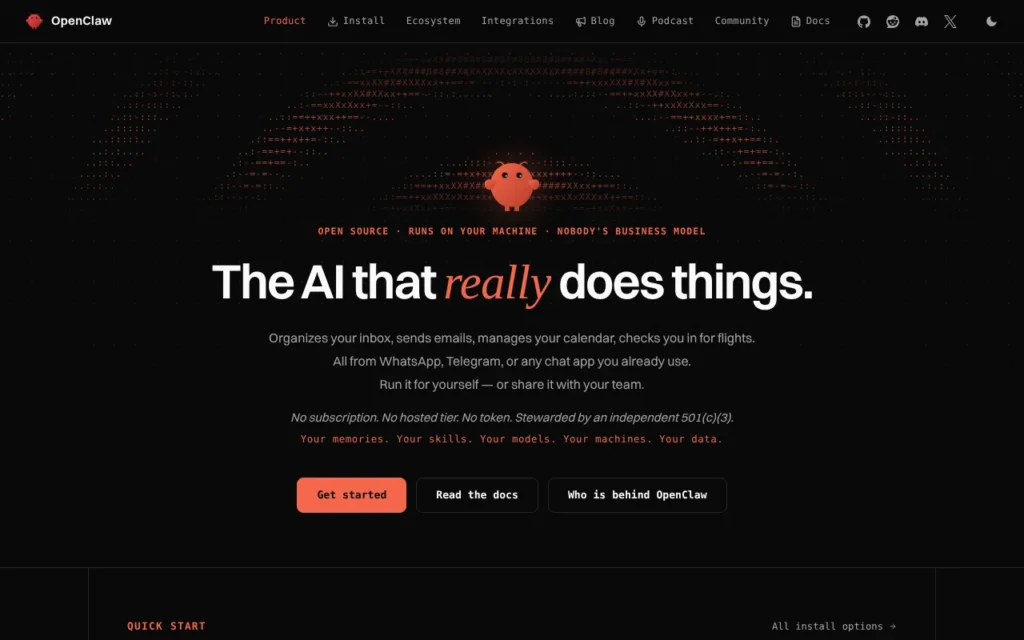
OpenClaw is a free, open-source AI agent that runs on your own computer and does tasks for you through chat apps such as WhatsApp, Telegram and Slack. It suits technically confident people and small teams who want an assistant they control. The software costs £0; you pay only for any cloud AI model you connect, or nothing extra with a free local model. It works in the UK, and the official site lists no country restrictions. Know this first: it can run commands on your machine, and its sandbox is off by default.

Key facts
- What it is: A self-hosted personal AI agent you message from chat apps or a browser dashboard
- Made by: The OpenClaw Foundation, a US non-profit; created by Peter Steinberger
- Price: Free (MIT licence); you pay only for any cloud AI model you connect, as of 17 October 2026
- Free plan or trial: The whole product is free; there is no paid tier or hosted version
- Runs on: macOS 15 or later, Windows 10 and 11, 64-bit Linux
- What you need: A computer that can stay on, plus an AI model (a subscription, an API key, or a free local model via Ollama or LM Studio)
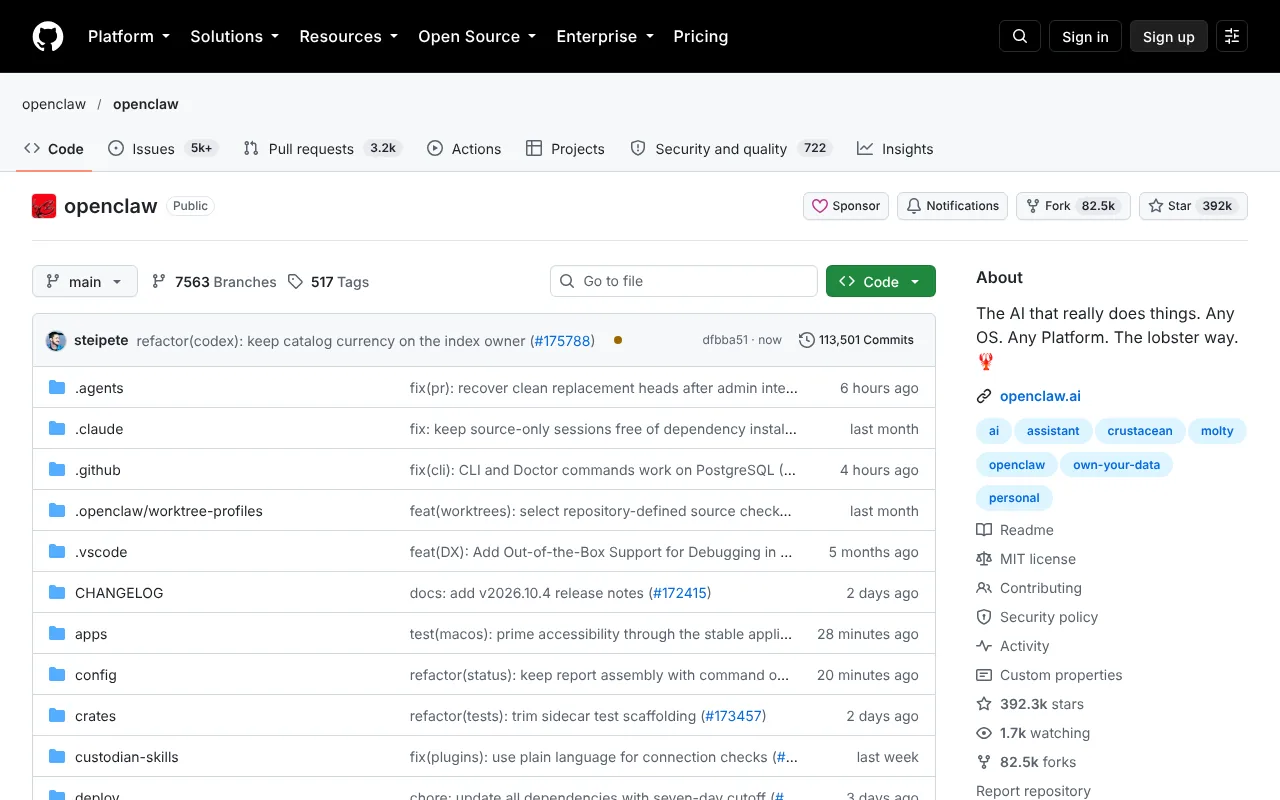
- Open source: Yes, MIT licence, about 392,000 GitHub stars on 17 October 2026
- Available in the UK: Yes, no country restrictions found as of 17 October 2026
- Best for: Tinkerers, privacy-minded Mac owners and small teams who want an always-on assistant they control
- Official site: openclaw.ai
On this page
- What is OpenClaw?
- What's new in OpenClaw in October 2026?
- How much does OpenClaw cost in the UK?
- What do you need to run OpenClaw?
- How do you install and set up OpenClaw on a Mac?
- How do you use OpenClaw? First things to try
- Best OpenClaw video tutorials
- Official OpenClaw links
- Is OpenClaw safe? Privacy, security and UK GDPR
- OpenClaw alternatives: Hermes Agent, Claude Cowork and others
- Who should use OpenClaw?
- Frequently asked questions
What is OpenClaw?
OpenClaw is a personal AI agent: software that takes actions rather than just answering questions. It can sort your inbox, draft emails, manage your calendar or run a task on your computer.
It has three parts:
- The Gateway. A small background program on your Mac, PC or a rented server. It holds your settings, memory and connections, and by default only listens on your own machine.
- Channels. The chat apps you talk to it through, 29 of them on 17 October 2026, including WhatsApp, Telegram, Slack, Discord, Signal and iMessage, plus a browser dashboard.
- Models and skills. OpenClaw has no AI brain of its own. You plug in ChatGPT or Claude through an existing login, an API key, or a free model on your own computer. Skills are add-ons that teach it new jobs, shared through a registry called ClawHub.
Austrian developer Peter Steinberger started it in November 2025. According to Wikipedia, it launched as Warelay, became Clawdbot, was renamed Moltbot on 27 January 2026 after trademark complaints from Anthropic, and became OpenClaw three days later. Steinberger joined OpenAI in February 2026. The project is now run by the OpenClaw Foundation, which announced its US 501(c)(3) non-profit status on 8 July 2026. The homepage says plainly that OpenClaw is not an OpenAI product.
Our guide to personal AI assistants in the UK puts it alongside the hosted options.
What's new in OpenClaw in October 2026?
OpenClaw ships updates almost daily. These are the changes that matter, newest first.
- 18 October 2026: Version 2026.10.5 is now the latest stable release on GitHub, with 2,250 pull requests from 638 contributors. The release notes headline a redesigned sidebar, Skill Workshop 2.0 with saved versions and Undo for the skills it learns, and public links for sharing a conversation. Note the warning on that last one: a shared link exposes future messages in that chat to anyone who has it.
- 16 October 2026: Version 2026.10.4 arrived as a stable release on GitHub. The Gateway now survives your computer sleeping.
- 15 October 2026: A test release, 2026.10.10-beta.1, raised the minimum for the native apps to macOS 26.2. The stable Mac app still supports macOS 15, but plan an upgrade.
- 15 October 2026: TIME named Nvidia's NemoClaw, a sandboxed agent built on OpenClaw, a Best Invention of 2026.
- 10 October 2026: Version 2026.10.1 (3,055 commits from 402 contributors) added skill search, MCP Apps beside the chat (see what MCP is) and full backups. Two fix releases followed within days, so back up before updating.
- 2 October 2026: Tencent's AI-Infra-Guard joined ClawScan, so every ClawHub upload is now checked by Tencent's and Nvidia's scanners, then an AI judge.
- 29 September 2026: The foundation launched OpenClaw Enterprise, a free control plane for organisations, developed with Red Hat and Nvidia after starting at OpenAI. It is pre-1.0 and suited to internal pilots for now.
- 25 September 2026: Microsoft's new Copilot Autopilot agent is built on OpenClaw, the foundation said.
- 21 September 2026: A Trail of Bits audit found no critical issues, 2 high, 16 medium and 6 low; the foundation says every actionable one is fixed.
- 3 September 2026: A native macOS installer arrived that detects AI access already on your Mac, including Ollama.
- 30 August 2026: OpenClaw 2.0 (version 2026.8.1) brought simpler setup, a rebuilt browser app and shared team sessions.
Older skills need one fix: the skills documentation says the pre-July 2026 metadata.clawdbot block is no longer read, so rename it to metadata.openclaw.
How much does OpenClaw cost in the UK?
OpenClaw is free. On 17 October 2026 the homepage said there is no subscription, no hosted tier and no paid edition, so VAT does not apply. Your real costs are the model and the machine.
| Option | Price (USD) | Price (GBP) | What you get |
|---|---|---|---|
| OpenClaw, self-hosted | $0 | £0 | The full product, apps and every channel |
| OpenClaw Enterprise | $0 | £0 | Pre-1.0 control plane, run on your own servers |
| Free local model (Ollama or LM Studio) | $0 | £0 | No token bills; you pay in hardware and electricity |
| Cloud model (subscription or API key) | Varies | Varies | Billed by OpenAI, Anthropic, Google or whoever you connect |
| Managed hosting from a third party (Hostinger example) | $5.99 a month, renewing at $11.99 | About £4.50, renewing at about £9 | Not run by OpenClaw; shown without VAT, so add 20% |
Prices checked 17 October 2026. Hostinger's figures come from its OpenClaw hosting page, which shows dollars excluding VAT.
Watch for three hidden costs:
- API bills. Agents work in loops, so a busy agent on a pay-per-use API can cost far more than a chat app. Set a spending cap with your provider first.
- An always-on computer. OpenClaw works best when it never sleeps: a spare Mac, mini PC or small server.
- Your time. Updates arrive constantly and sometimes break things.
See what AI agents cost in the UK for the wider picture.
What do you need to run OpenClaw?
- A computer. The install page lists macOS 15 or later (Apple silicon or Intel), Windows 10 or 11, and 64-bit Linux. A small rented Linux server also works.
- Node.js 24.16+ or 26.1+. The installer adds it if missing.
- An AI model. An existing Claude Code or Codex login, an API key, or a local model. For local models, setup looks for one with tool calling (the ability to trigger actions) and at least 16,000 tokens of context, the amount of text it can hold in mind at once.
- Enough memory. OpenClaw publishes no RAM figure, and its docs use mid-sized models such as
gemma4andqwen3.5:9b. I would treat 16GB of unified memory as a sensible floor on a Mac; see the best Mac for local AI. - Some confidence. No coding, but you should be happy pasting commands into Terminal and reading error messages.
How do you install and set up OpenClaw on a Mac?
This is the free, private route: OpenClaw plus a local model through Ollama, so your prompts stay on your Mac. New to Ollama? Read our Ollama guide or running AI on your Mac first.
- Check your Mac. Open the Apple menu, choose About This Mac and confirm macOS 15 or later.
- Install Ollama and download a model. Install Ollama from ollama.com, then run this in Terminal. The download is several gigabytes.
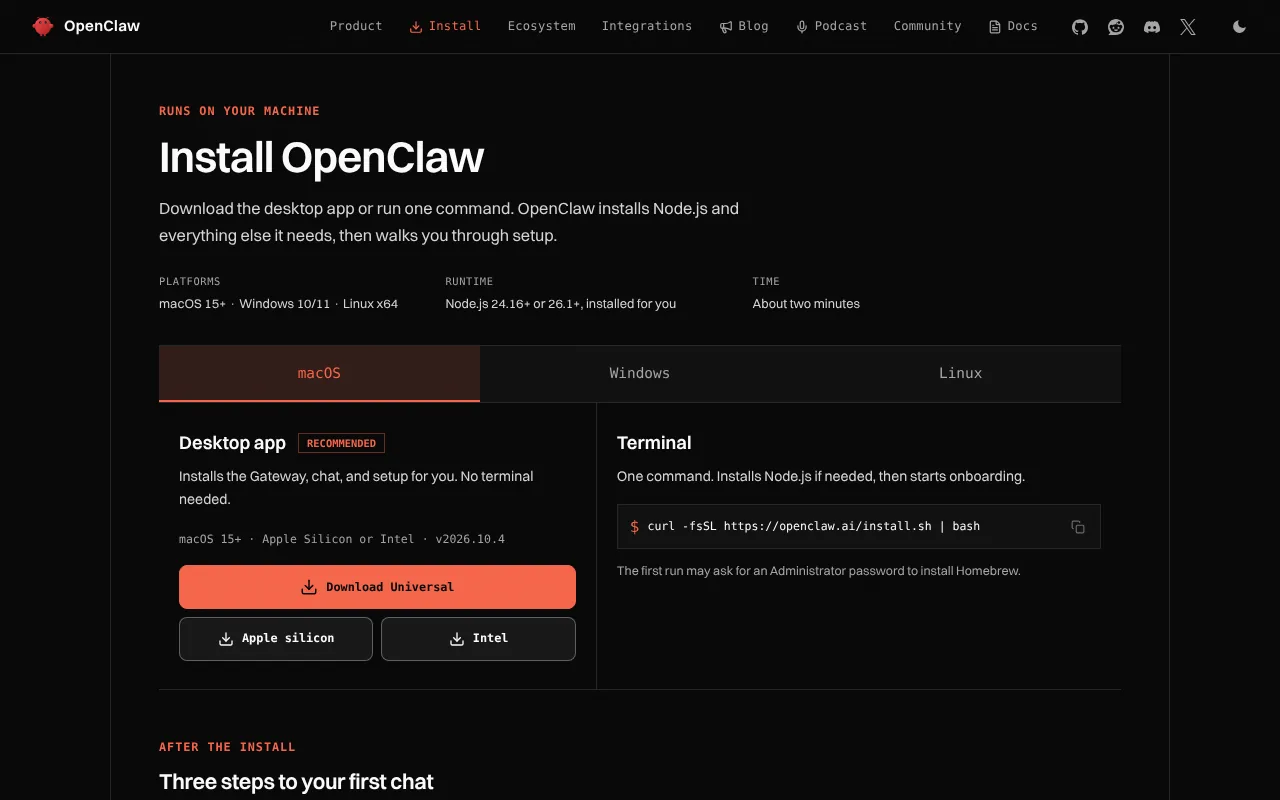
ollama pull gemma4- Install OpenClaw. Download the Mac app (Apple silicon, Intel or Universal) from openclaw.ai/install, or run the installer below. It may ask for your Mac password to install Homebrew.
curl -fsSL https://openclaw.ai/install.sh | bash- Run the setup wizard. It starts automatically after installing. To rerun it, use the command below. Choose Ollama, then Local only, then pick
gemma4.
openclaw onboard- Run the Gateway in the background. If it is running in your Terminal window, press Ctrl+C, then install it as a service so it survives restarts.
openclaw gateway install- Check it is running. Success is a status line showing the Gateway listening on port 18789.
openclaw gateway status- Open the dashboard and say hello. If your first message gets a reply, OpenClaw and your local model are working.
openclaw dashboard- Run the built-in safety check. It flags settings that have drifted from the safe defaults.
openclaw security auditOne snag: if you type the Ollama address by hand, use http://127.0.0.1:11434 with no /v1 on the end. The Ollama provider docs warn that /v1 breaks tool calling.
OpenClaw with LM Studio instead
Prefer LM Studio? Start its server, run openclaw onboard and choose LM Studio. Pick a model marked as trained for tool use, with at least 16K of context. Our Ollama vs LM Studio vs Jan comparison helps you choose.
lms server start --port 1234Connect Telegram to message it from your phone
The docs call Telegram the quickest channel. In Telegram, message @BotFather, send /newbot and copy the token. Then add it, check the connection, message your bot and approve the pairing code within an hour.
openclaw channels add --channel telegram --token <bot-token>
openclaw channels status --probe
openclaw pairing list telegram
openclaw pairing approve telegram <CODE>
Windows and Linux notes
Windows has a Hub app, a WSL2 route and the PowerShell installer below. Linux uses the same curl script, or AppImage and .deb desktop builds. On Windows PCs with an Nvidia RTX card that has 24GB or more of memory, setup can download a local model for you.
iwr -useb https://openclaw.ai/install.ps1 | iexHow do you use OpenClaw? First things to try
Start with jobs that only read information, then widen its access as you build trust.
- Summarise files. "Summarise the three PDFs in Documents/Quotes and tell me which builder is cheapest."
- Plan your day by phone. "What is on my calendar tomorrow, and is there a gap for a 30-minute call?"
- Build a dashboard. "Make me a dashboard of my open tasks and this week's deadlines."
- Search old chats. "Find what we discussed about the boiler service last month."
- Save a routine as a skill. "Save how you just did that as a reusable skill called weekly-report."
- Research and compare. "Find three UK suppliers of recycled packaging and compare minimum order sizes in a table."
- Check its permissions. "Which tools and permissions do you currently have?" Then run
openclaw security audit.
For more ideas, browse our 25 AI agent examples.
Best OpenClaw video tutorials
Video: Bart Slodyczka on YouTube.
Bart Slodyczka does a clean install with the new macOS app, then covers onboarding, memory, skills, Telegram and a local model through LM Studio.
| Video | Channel | Length | Uploaded | Best for |
|---|---|---|---|---|
| OpenClaw 2.0 Is Finally Here - But Is It Worth Using? | Bart Slodyczka | 18:01 | 1 September 2026 | Fresh OpenClaw 2.0 install on a Mac with a local model |
| Live Demo: OpenClaw's New Web UI, Multiplayer OpenClaw, and Mac Onboarding | OpenClaw (official) | 51:02 | 19 August 2026 | The team previewing the Mac installer and web UI |
| Local Models Got a HUGE Upgrade - Full Guide (Ollama/OpenClaw) | Tech With Tim | 18:51 | 24 April 2026 | Choosing hardware and a model, then connecting Ollama |
| OpenClaw 2.0 Telegram Bot! Complete Local Setup | Ray Codes | 9:02 | 2 September 2026 | Telegram with a local Ollama model |
| OpenClaw 2.0 Is An App Now!? Full Windows Setup For Beginners | AI Fire Academy | 7:02 | 29 September 2026 | Windows install with WSL and Telegram pairing |
| OpenClaw Security Risks: 6 Dangers of Autonomous AI Agents | IBM Technology | 14:46 | 4 June 2026 | Prompt injection and credential risks, before you start |
Watch the IBM video first, then follow Bart Slodyczka's install with this page open beside it.
Official OpenClaw links
| Link | What it's for |
|---|---|
| openclaw.ai | Official homepage |
| openclaw.ai/install | Desktop apps and install commands |
| Getting started docs | Step-by-step quickstart |
| Ollama provider docs | Using local Ollama models |
| GitHub repository | Source code and issue tracker |
| GitHub releases | Changelog and release notes |
| Security page | Security status, advisories and reporting |
| ClawHub | Skills and plugins registry |
| Community forum | Help from other users |
| Privacy policy | What the apps and website collect |
Is OpenClaw safe? Privacy, security and UK GDPR
OpenClaw can be run safely, but it is not safe by default like a phone app. It has real access to your computer, and one of its own maintainers called it "far too dangerous" for people who cannot use a command line, as Wikipedia reports.
A UK example shows why. In May 2026 the mathematician Hannah Fry's team gave an OpenClaw agent, which named itself Cass, a bank card and real errands. It spent more than $100 in tokens failing to buy 50 paperclips because of anti-bot checks, signed a complaint letter in Fry's name, and handed its API keys, usernames and passwords to a fake "software engineer" on WhatsApp who claimed its memory would be wiped, The Register reported on 5 May 2026. Treat every message an agent reads as a possible instruction from a stranger.
What it can access. Whatever you connect: files, email, calendar, browser and chat accounts. Tools run directly on your computer unless you set up sandboxing, which the sandboxing docs confirm is off by default. The security docs assume one trusted operator per Gateway, so give people you do not fully trust a separate Gateway.
Where your data goes. To the model you choose. A local model keeps prompts on your machine; a cloud model sends them to that provider, so check whether it trains on your data. OpenClaw itself sends a daily update check with your version, operating system and processor type, and the telemetry docs say approximate location is kept for three months. The GitHub README says update.checkOnStart: false turns this off.
The privacy policy. The policy, effective 2 August 2026, says there is no central cloud for app data. It names no data controller and does not mention UK GDPR. The website uses Google Analytics.
Known incidents:
- February 2026: CVE-2026-25253, rated 8.8 out of 10, let a malicious link steal the Gateway token and run commands on your machine. It was fixed in 2026.1.29 on 30 January, published as a CVE on 1 February and reported by The Hacker News on 2 February.
- February 2026: Koi Security's ClawHavoc report found 341 malicious skills among 2,857 on ClawHub, most installing the Atomic Stealer password thief on Macs through fake "prerequisite" steps (The Hacker News).
- February to May 2026: Unit 42 found five more malicious skills that slipped past the scanners, including two Mac infostealers.
- March 2026: Chinese authorities restricted state firms, government bodies and banks from running OpenClaw, according to Wikipedia.
The security page is unusually open: 1,799 reports since January 2026, 722 published fixes (39 with a CVE) and 14 confirmed critical issues, all fixed.
Practical safety settings:
- Keep the Gateway on your own machine and never expose port 18789 to the internet.
- Leave pairing on, so strangers messaging your bot are ignored until you approve them.
- Turn on sandboxing through
agents.defaults.sandbox, using Docker or Podman, before connecting anything important. - Turn on command approvals by setting
tools.exec.modetoask; out of the box, commands run without asking. The opt-in Auto mode lets a reviewer model pass one-off low- or medium-risk commands and sends the rest to you. - Install skills only from publishers you trust, read the SKILL.md file, and never paste a Terminal command a skill tells you to run.
- Run
openclaw security auditafter every change, and consider a separate Mac user account for OpenClaw.
Running Qwen or other Chinese models locally? Read whether Chinese AI models are safe to run locally.
UK GDPR. If a business uses OpenClaw with customer or staff data, the business is the data controller. A cloud model provider is a processor that needs a data processing agreement, and data leaving the UK needs a lawful transfer route. A local model avoids most of that. Our guide to AI agents and UK GDPR explains what to document.
OpenClaw alternatives: Hermes Agent, Claude Cowork and others
| Agent | Made by | Where it runs | Price (17 October 2026) | Local models | In the UK |
|---|---|---|---|---|---|
| OpenClaw | OpenClaw Foundation | Your computer or server | Free, MIT licence | Yes (Ollama, LM Studio) | Yes |
| Hermes Agent | Nous Research | Your computer or server | Free, MIT licence; optional Nous Portal from $20 a month (about £15) | Yes, needs 64K context | Yes |
| ChatGPT Dots | OpenAI | OpenAI's cloud | In the UK, a Business Premium seat from £75 a month billed yearly (two-seat minimum) | No | Not on Pro at launch; Business Premium only |
| Meta Muse | Meta | Meta's cloud | Free tier; $20 (about £15) or $100 (about £75) a month | No | No, US and Canada only |
| Grok Bot | xAI | xAI's cloud | Included with SuperGrok and Cursor Pro plans; no standalone price | No | Not confirmed |
| NemoClaw | Nvidia | Your machine, inside a sandbox | Free, Apache 2.0 licence, alpha | Yes (Ollama, vLLM, NIM) | Yes |
Pick OpenClaw for the biggest community, the most chat apps and full control. Hermes Agent is the closest rival, with more focus on learning skills from experience. Pick Dots or Muse if you would rather pay to skip maintenance and security work, but check UK availability first. NemoClaw suits Nvidia hardware owners who want OpenClaw sandboxed from the start.
OpenClaw vs Claude Cowork. Claude Cowork is Anthropic's desktop agent for non-coding work on Mac and Windows. It needs a paid Claude plan (Pro is £18 a month plus VAT) and its sessions run in Anthropic's cloud by default, whereas OpenClaw is free, open source and can run on local models. Read our Claude Cowork review.
Who should use OpenClaw?
OpenClaw suits you if you are comfortable in Terminal, want an assistant inside the chat apps you already use, and care about owning your data. It is especially good value for Mac owners already running Ollama or LM Studio, because the whole setup costs nothing. Small teams can share one Gateway; our guide to AI agents for UK small businesses shows where that fits.
Skip it if error messages make you panic, you want no upkeep, or you handle sensitive client data with nobody to check the setup. A hosted assistant, or waiting for OpenClaw Enterprise 1.0, is safer. Either way, I would run it read-only for a fortnight before giving it email or banking access.
Frequently asked questions
What is OpenClaw?
OpenClaw is a free, open-source AI agent that runs on your own computer and acts on your behalf. You talk to OpenClaw through chat apps such as WhatsApp, Telegram, Slack or iMessage, or a browser dashboard, and it can read files, manage calendars, draft emails and run tasks. OpenClaw has no built-in AI model, so you connect a cloud service or a free local model.
Is OpenClaw free?
Yes. OpenClaw is free under the MIT licence, with no subscription, hosted tier or paid edition as of 17 October 2026. Costs come from what you connect: a cloud model such as ChatGPT or Claude is billed by its provider, while a local model through Ollama or LM Studio costs nothing beyond hardware and electricity. Third-party managed OpenClaw hosting is optional and charged separately.
Is OpenClaw safe?
OpenClaw can be used safely, but only with care. OpenClaw runs commands on your computer, its sandbox is off by default, and its ClawHub skills registry has hosted hundreds of malicious skills since early 2026. Keep the Gateway local, leave pairing on, turn on command approvals and sandboxing, install skills only from trusted publishers and run the built-in security audit regularly.
How do I install OpenClaw on a Mac?
To install OpenClaw on a Mac running macOS 15 or later, download the desktop app from openclaw.ai/install or run the one-line installer in Terminal. The OpenClaw setup wizard then asks you to choose a model, such as a ChatGPT or Claude login or a local Ollama model. Setup has worked when the dashboard replies to your first message.
Can OpenClaw use Ollama and free local models?
Yes. OpenClaw works with Ollama and LM Studio, so you can run it with a free model on your own machine. During OpenClaw setup, choose Ollama and then Local only, and pick a model that supports tool calling with at least 16,000 tokens of context. The OpenClaw docs use Gemma 4 and Qwen 3.5 as examples.
Hermes Agent vs OpenClaw: which should I choose?
Both are free, MIT-licensed agents you host yourself, and both connect to Telegram, Slack, Discord, WhatsApp and Signal. OpenClaw has the larger community, with about 392,000 GitHub stars against roughly 254,000 for Hermes Agent on 17 October 2026. Hermes Agent, from Nous Research, focuses on improving its own skills and needs a larger 64K context window for local models.
Is OpenClaw the same as Clawdbot and Moltbot?
Yes. OpenClaw was called Clawdbot, then briefly Moltbot from 27 January 2026 after trademark complaints from Anthropic, and took the OpenClaw name on 30 January 2026. Guides that mention Clawdbot or Moltbot describe earlier versions of OpenClaw, and older skills using the metadata.clawdbot block must be renamed to metadata.openclaw to keep working.
Does OpenAI own OpenClaw?
No. OpenClaw's creator, Peter Steinberger, joined OpenAI in February 2026, and OpenAI is a donor and sponsor, but OpenClaw is run by the independent OpenClaw Foundation, a US non-profit. The OpenClaw homepage states it is not an OpenAI product. Other donors and partners include the University of Michigan, Amazon, Red Hat, Nvidia and Microsoft.
What is the OpenClaw Browser Relay?
Browser Relay is OpenClaw's Chrome extension and local bridge. It attaches to a Chrome tab you already have open, so the agent can navigate, click, fill in forms and read the page using your existing logins. Install it with openclaw browser extension install, load the unpacked extension in Chrome and click its icon on the tab you want to share. It gives the agent full access to that tab, so use a separate Chrome profile that holds only the logins the job needs.
How do I update OpenClaw?
Back up first, then run the updater. openclaw backup create takes a restorable snapshot of your settings, memory and sessions; openclaw update downloads the new version, checks it against your setup and restarts the Gateway. openclaw update status shows which version you are on and how the last update went. New versions arrive most weeks and sometimes break things, so if you would rather update less often, openclaw update --channel extended-stable moves you to the slower channel.
How do I uninstall OpenClaw?
Run openclaw uninstall. On its own it asks which parts to remove and defaults to the Gateway service only. openclaw uninstall --all --yes removes the service, your settings and state, the workspace folders and the Mac app in one go, so take a backup with openclaw backup create first if you might want any of it back. The command-line tool itself is removed the way you installed it; for an npm install that is npm uninstall -g openclaw, and OpenClaw's install documentation lists the other methods.
How do I start, stop or restart OpenClaw?
Use the gateway commands: openclaw gateway restart restarts the background service, openclaw gateway stop stops it and openclaw gateway status tells you whether it is running and listening on port 18789. If you have not installed it as a service yet, openclaw gateway install does that, and openclaw dashboard reopens the web dashboard.
Where is OpenClaw installed?
Your settings, memory and sessions live in a hidden .openclaw folder in your home directory. The Mac app sits in Applications, and the openclaw command is a Node package. The OPENCLAW_STATE_DIR and OPENCLAW_CONFIG_PATH environment variables move the state folder and config file elsewhere, and openclaw doctor reports the paths in use.
Read next
- Ollama guide: run free AI models on your own computer
- LM Studio guide
- Hermes Agent guide
- Which Mac or mini PC to buy for local AI
- AI agents and UK GDPR
Sources
- OpenClaw homepage - checked 17 October 2026
- OpenClaw install page - checked 17 October 2026
- OpenClaw getting started docs - checked 17 October 2026
- OpenClaw Ollama provider docs - checked 17 October 2026
- OpenClaw Ollama setup docs - checked 17 October 2026
- OpenClaw LM Studio docs - checked 17 October 2026
- OpenClaw Telegram setup docs - checked 17 October 2026
- OpenClaw security docs - checked 17 October 2026
- OpenClaw sandboxing docs - checked 17 October 2026
- OpenClaw telemetry docs - checked 17 October 2026
- OpenClaw update command docs - checked 22 October 2026
- OpenClaw uninstall command docs - checked 22 October 2026
- OpenClaw skills documentation - checked 17 October 2026
- OpenClaw GitHub repository - checked 17 October 2026
- OpenClaw 2026.10.4 release - checked 17 October 2026
- OpenClaw 2026.10.5 release notes - checked 22 October 2026
- OpenClaw 2026.10.10-beta.1 release - checked 17 October 2026
- OpenClaw 2026.10.1 release - checked 17 October 2026
- OpenClaw 2026.10.1 release notes - checked 17 October 2026
- OpenClaw channels docs - checked 17 October 2026
- OpenClaw security advisory for CVE-2026-25253 (GitHub) - checked 17 October 2026
- OpenClaw security page - checked 17 October 2026
- OpenClaw privacy policy - checked 17 October 2026
- OpenClaw 2.0, Accidentally - checked 17 October 2026
- Introducing the OpenClaw Foundation - checked 17 October 2026
- OpenClaw Enterprise announcement - checked 17 October 2026
- Tencent AIG joins ClawScan - checked 17 October 2026
- Microsoft Autopilot is built on OpenClaw - checked 17 October 2026
- OpenClaw security audit recap - checked 17 October 2026
- New macOS installer and Windows local AI - checked 17 October 2026
- Auto mode for exec approvals - checked 17 October 2026
- OpenClaw on Wikipedia - checked 17 October 2026
- The Hacker News: one-click remote code execution bug - checked 17 October 2026
- The Hacker News: 341 malicious ClawHub skills - checked 17 October 2026
- Unit 42: OpenClaw skills and the AI supply chain - checked 17 October 2026
- The New Stack: OpenClaw Enterprise - checked 17 October 2026
- TIME: Nvidia NemoClaw - checked 17 October 2026
- Nvidia NemoClaw on GitHub - checked 17 October 2026
- Hermes Agent on GitHub - checked 17 October 2026
- Hermes Agent homepage - checked 17 October 2026
- Hermes Agent local Ollama guide - checked 17 October 2026
- OpenAI Help Center: Getting started with your dot - checked 17 October 2026
- Layer3Labs: ChatGPT Dots pricing - checked 17 October 2026
- BetterClaw: Dots vs Muse vs Grok Bot - checked 17 October 2026
- xAI: Grok Bot comes to more plans - checked 17 October 2026
- Hostinger OpenClaw hosting - checked 17 October 2026


