LM Studio is a free desktop app that finds, downloads and runs open AI models on your own computer, so you can chat with them privately or serve them to other apps. It runs on Apple Silicon Macs, Windows and Linux, it has been free for work use since July 2025, and the current version is 0.4.26 (13 October 2026). This guide covers what LM Studio is, what you need to run it, how to install it and load your first model, which models fit your memory, how to use it as a local server for other apps, and how private it really is.
Key facts
- What: a desktop app for running open models (Qwen, Gemma, gpt-oss and others) on your own machine.
- Price: free for home and work since 8 July 2025. Paid plans only cover cloud models in the separate Bionic app.
- Needs: an Apple Silicon Mac on macOS 14+, or a Windows or Linux PC. 16 GB of memory is the realistic starting point.
- Engines: llama.cpp for GGUF files everywhere, plus Apple's MLX on Macs.
- Server: OpenAI- and Anthropic-compatible API on port 1234, a headless mode and the
lmscommand line. - Privacy: chats and documents stay on your computer; no telemetry, according to its privacy policy.
On this page
- What is LM Studio?
- Is LM Studio free?
- What do you need to run LM Studio?
- How do you install LM Studio and run your first model?
- Which LM Studio models should you use?
- How do you use LM Studio as a local server?
- MCP and plugins: giving the model tools
- What is LM Studio Bionic?
- Is LM Studio private and safe?
- LM Studio vs Ollama vs Jan
- Frequently asked questions
- Sources
What is LM Studio?
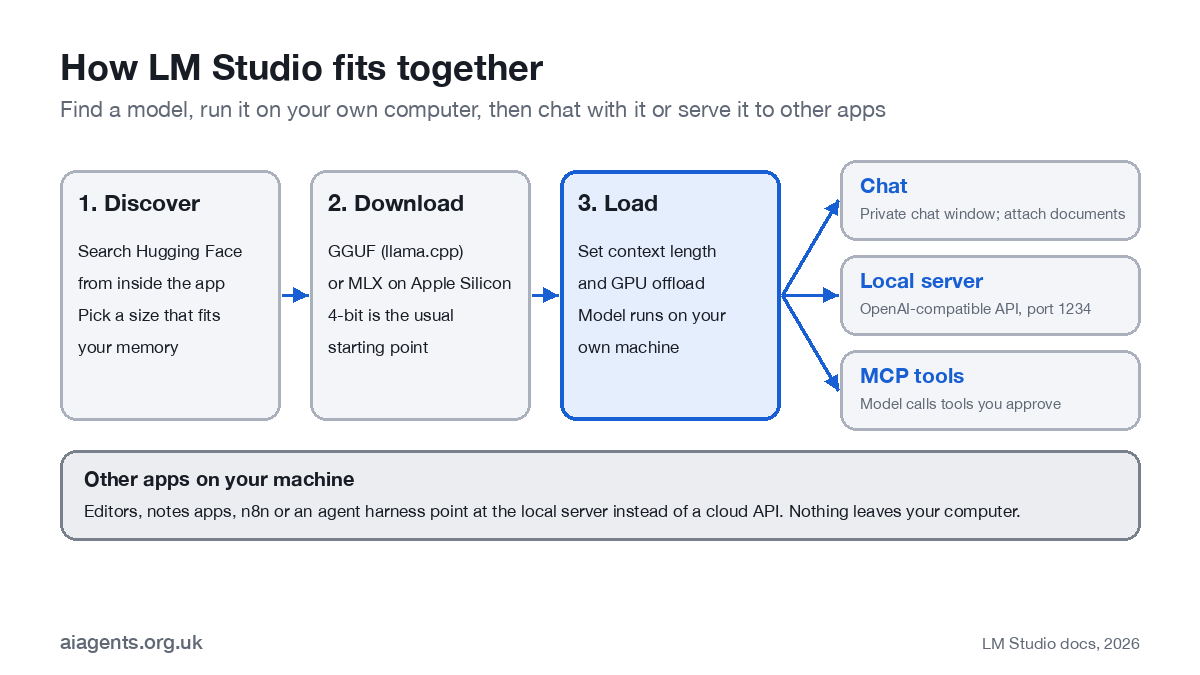
LM Studio is the easiest way to run a large language model on your own hardware without touching a terminal. You search for a model inside the app, download a version sized for your memory, load it and start chatting. Nothing you type leaves your computer.
It does three jobs. It is a model browser for the thousands of open models on Hugging Face. It is a private chat app, with document chat built in. And it is a local server: other software on your machine, from a code editor to an automation tool, can use the model as if it were a cloud API. It is made by Element Labs, and since July 2026 it has a sister app, Bionic, for agents (more below).
Is LM Studio free?
Yes, for home and work. On 8 July 2025 LM Studio dropped the separate commercial licence it used to ask businesses for, so a company can install it for staff with no form to fill in. The app terms allow "personal and / or internal business purposes".
| Plan | Price | What it covers |
|---|---|---|
| Free | $0 | Everything in the local app, plus LM Link between up to 5 of your own devices |
| Bionic+ | $20 a month | Cloud models in the Bionic agent app, hosted in the US |
| Pro | $100 a month | Higher cloud limits in Bionic |
| Teams | Coming soon | Not yet priced |
| Enterprise | On request | SSO, controls over which models and MCP servers staff can use, own infrastructure or a US zero-data-retention cloud |
Prices are published in US dollars only. If all you want is to run models locally, you never need to pay.
What do you need to run LM Studio?
| Computer | Requirement | Memory guidance |
|---|---|---|
| Mac | Apple Silicon (M1 or later), macOS 14 or newer. Intel Macs are not supported. | 16 GB or more recommended; 8 GB works for small models with short context |
| Windows | x64 with AVX2, or Arm (Snapdragon X Elite) | 16 GB RAM and 4 GB+ of dedicated graphics memory recommended |
| Linux | AppImage for x64 and Arm64; Ubuntu 20.04 or newer | As Windows |
Memory is what decides which models you can run. On a Mac the processor and graphics share one pool of unified memory, so a 32 GB Mac can load models that would need an expensive graphics card on a PC. Our guide to running a local LLM on a Mac covers which Mac to buy. If you are choosing a machine, my guide to which Mac or mini PC to buy for local AI compares 12 of them with UK prices.
How do you install LM Studio and run your first model?
- Download it from lmstudio.ai/download and install it like any other app.
- Open the Discover tab (Cmd+2 on a Mac, Ctrl+2 on Windows and Linux).
- Search for a model. Type a name such as "qwen3.5" or "gemma 4", or paste a Hugging Face link.
- Pick a size and quantisation. The same model comes in several file sizes; names like Q4_K_M or 4bit are the compressed versions. LM Studio advises 4-bit or higher if your hardware can take it. Choose a file comfortably smaller than your memory.
- Load it in the Chat tab and type. The first answer takes a few seconds while the model loads; after that it streams.
- Set the defaults. In My Models, the gear icon on each model sets context length, how much runs on the graphics processor (GPU offload) and Flash Attention.
- Save a preset. A preset stores a system prompt plus settings such as temperature, so "UK English, short answers" is one click next time.
To chat with your own files, drag a .pdf, .docx or .txt into the chat. A short document goes in whole; a long one is searched and only the relevant passages are used.
Which LM Studio models should you use?
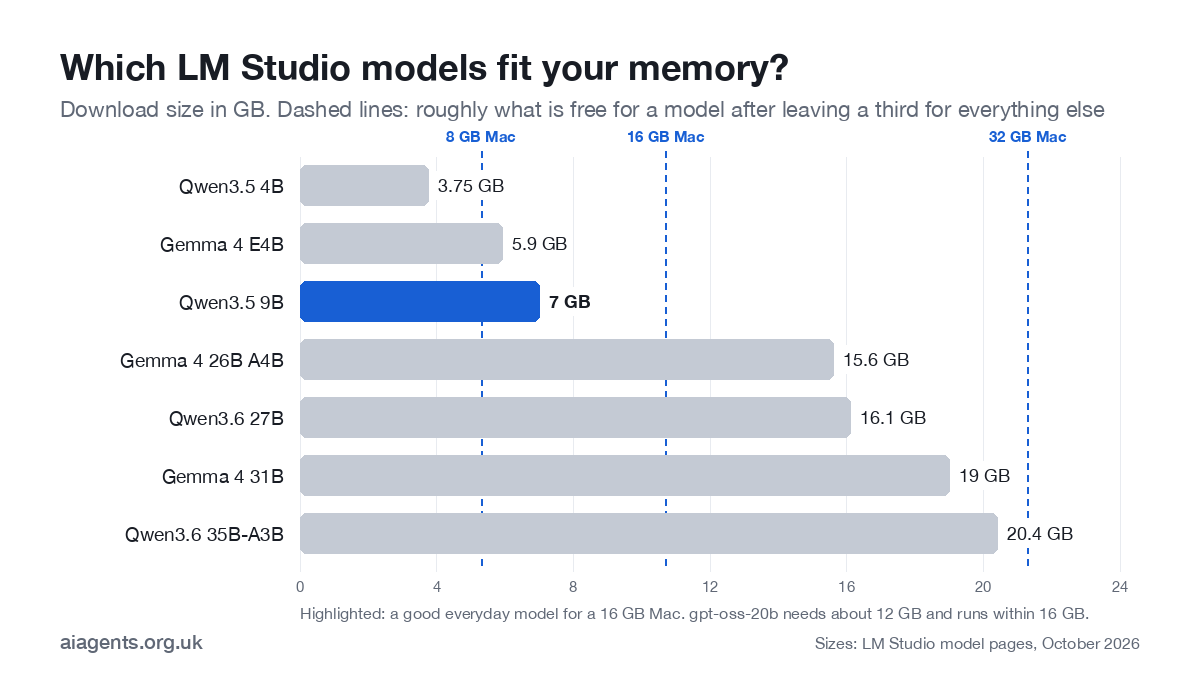
LM Studio does not publish recommendations by memory size, so the table below maps the download sizes on its own model pages to typical Mac memory. Leave a third of your memory free for the operating system, your other apps and the conversation itself.
| Your memory | Models that fit (download size) | Good for |
|---|---|---|
| 8 GB | Qwen3.5 4B (3.75 GB); Gemma 4 E4B (5.9 GB) at a squeeze | Short drafts, summaries, quick questions |
| 16 GB | Qwen3.5 9B (7 GB), gpt-oss-20b (needs 12 GB+, runs within 16 GB) | Everyday writing and research; gpt-oss-20b handles tools |
| 32 GB | Gemma 4 26B A4B (15.6 GB), Qwen3.6 27B (16.1 GB), Gemma 4 31B (19 GB), Qwen3.6 35B-A3B (20.4 GB) | Close to cloud quality for most business writing; good tool use |
| 64 GB+ | Two mid-size models at once; gpt-oss-120b needs about 65 GB, so 96 GB or more in practice | Running an agent and a chat model side by side |
If you want the model to use tools (search the web, read files, call an app), pick one marked with the hammer icon for tool use. gpt-oss-20b, Gemma 4 and the Qwen3.5 and Qwen3.6 families are listed with tool use on their LM Studio pages. The newer Qwen 3.8 27B runs comfortably on a 32 GB Mac; our Qwen 3.8 on a Mac guide covers the LM Studio and MLX options.
How do you use LM Studio as a local server?
Turn on the server in the Developer tab, or run lms server start, and LM Studio listens on http://localhost:1234. Any app that can talk to OpenAI can talk to it instead: point the app's "base URL" at localhost and pick your loaded model.
- OpenAI-compatible:
/v1/chat/completions,/v1/responses,/v1/embeddings,/v1/modelsand/v1/completions. - Anthropic-compatible (since 0.4.1):
/v1/messages, so tools built for Claude, such as Claude Code, can run on a local model. Start with at least 25,000 tokens of context. - Native API (since 0.4.0):
/api/v1/chatplus endpoints to list, load, unload and download models. - Parallel requests: since 0.4.0, several requests can share one loaded model (llama.cpp models only for now).
Headless mode. Version 0.4.0 added llmster, a background service with no window, for a Mac mini in a cupboard or a Linux server. Install it with LM Studio's install script, then run lms daemon up. In the desktop app you can instead tick the option to run the server on login.
The commands you will use most:
lms get qwen3.5-9b          # download a model
lms ls                       # list downloaded models
lms load qwen3.5-9b --context-length=16384 --gpu=max
lms ps                       # what is loaded now
lms server start             # start the API on port 1234
lms unload --all
LM Link (0.4.5, February 2026) lets you use the models on one of your machines from another, end-to-end encrypted over Tailscale: run a big model on a desktop and use it from a laptop, or from an iPhone through the Locally app LM Studio bought in April 2026. LM Studio's own page still describes it as a preview rolling out in batches.
MCP and plugins: giving the model tools
Since version 0.3.17 (June 2025) LM Studio is an MCP host: add servers to a file called mcp.json and the model can call them, with a confirmation dialog before each call. Plugins, written in TypeScript, are a second route and are still in beta. Both are covered step by step in LM Studio plugins and MCP. If MCP is new to you, start with what MCP is.
What is LM Studio Bionic?
Bionic is a separate agent app from the same company, launched on 16 July 2026 for Mac and Windows and on Linux since September. It plans and carries out multi-step tasks, and its local models run on the LM Studio runtime. Its paid plans add cloud models hosted in the US. Bionic is not a rename of LM Studio: the desktop app described on this page carries on, and since 0.4.26 the two can run side by side.
If you use Bionic's cloud models for client or staff data, treat them like any other US cloud service under UK GDPR: check the data processing terms and the transfer safeguards first. Our guide to AI agents and UK GDPR explains what to check. Our full LM Studio Bionic guide covers what it can do, what Secure Cloud costs and how it compares with Claude Code.
Is LM Studio private and safe?
For the local app, yes, with two caveats. LM Studio's privacy policy says none of your messages, chat histories or documents are ever transmitted and that the app has no telemetry or user tracking. Update checks do send the app version, your operating system and your IP address.
- Caveat 1: what you add. MCP servers and plugins run with your permissions. LM Studio's own documentation warns that some can run arbitrary code, read local files and use your network. Install only ones you trust.
- Caveat 2: the cloud parts. Bionic's cloud models and the enterprise zero-data-retention cloud are US-hosted. Local stays local; cloud is cloud.
- UK GDPR still applies when you process personal data with a local model. You avoid an international transfer and a processor contract, but you are still the controller, and a DPIA may still be needed. See self-hosted LLMs for the full picture.
LM Studio vs Ollama vs Jan
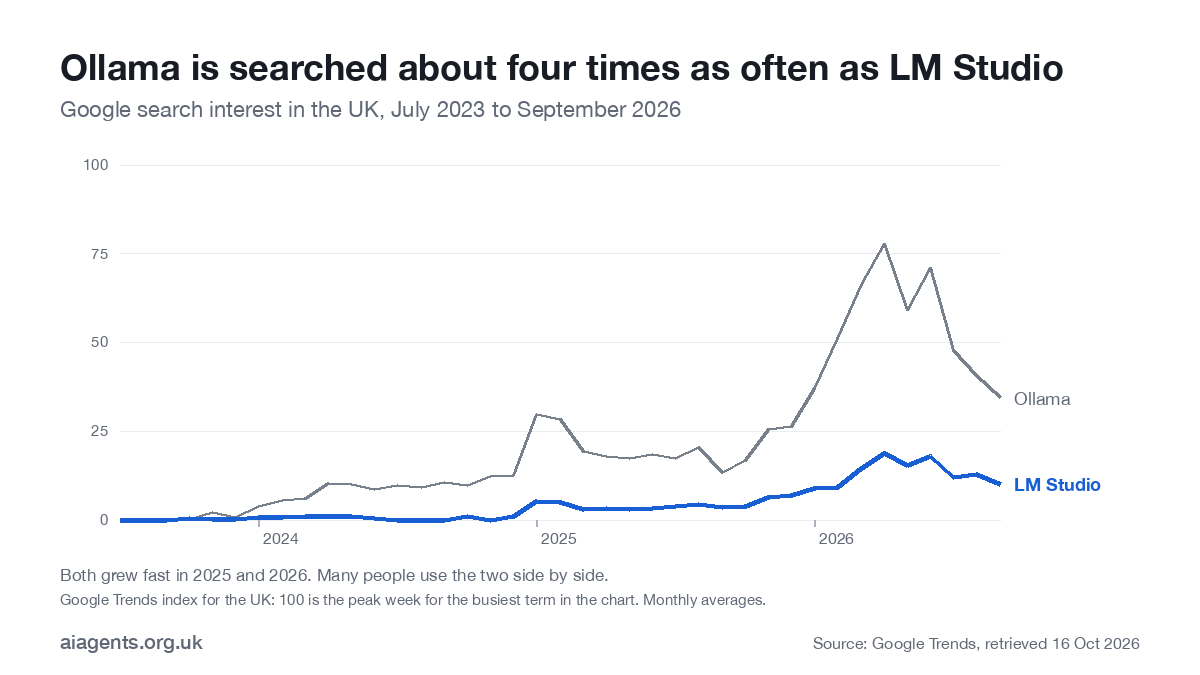
In the UK, Ollama is searched about four times as often as LM Studio, according to Google Trends, but interest in LM Studio has roughly tripled since 2025.
| LM Studio | Ollama | Jan | |
|---|---|---|---|
| Licence | Free, proprietary app; open CLI, SDKs and MLX engine | Open source (MIT) | Open source (Apache 2.0) |
| Best for | Finding and testing models with a GUI; local server | Powering other apps from the command line | Simple private chat |
| Mac support | Apple Silicon only, macOS 14+ | Apple Silicon and Intel (CPU only), macOS 14+ | macOS 13.6+ |
| Default port | 1234 | 11434 | 1337 |
| MCP | Built in since 0.3.17 | Through other apps | Built in |
The full comparison, including speed on Apple Silicon, is in Ollama vs LM Studio vs Jan. None of the three is an agent on its own: to have a model act on a schedule with tools and memory, see how to build an AI agent. For just LM Studio against Ollama, with usage numbers and what users say, read Ollama vs LM Studio.
Frequently asked questions
Is LM Studio free?
Yes. LM Studio has been free for home and work use since 8 July 2025, with no separate commercial licence. The paid plans, Bionic+ at $20 a month and Pro at $100 a month, cover cloud models in the separate Bionic agent app, not the local app.
Does LM Studio need the internet?
Only to search for and download models and to check for updates. Once a model is downloaded, chatting, chatting with documents and the local server all work offline.
Is LM Studio safe to use?
Its privacy policy says chats, documents and messages are never sent anywhere and that the app has no telemetry; update checks send the app version, operating system and IP address. The main risk is what you add yourself: MCP servers and plugins can run code with your permissions.
Does LM Studio work on an Intel Mac?
No. LM Studio needs an Apple Silicon Mac (M1 or later) with macOS 14 or newer. On an Intel Mac, Ollama still runs, on the processor only.
Is LM Studio open source?
No. The desktop app is proprietary. Its command-line tool, its JavaScript and Python SDKs and its MLX engine are open source under the MIT licence.
What is the difference between LM Studio and Ollama?
LM Studio is a desktop app with a model browser, Apple's MLX engine and a built-in MCP client. Ollama is open source and command-line first, and is what many other apps plug into. Many people use both.
Related: Prefer a lighter tool that runs in the background? Read the Ollama guide: best models, cloud pricing in pounds and setup.
This week: LM Studio added DeepSeek V4.1 Flash 1017 to its Bionic cloud tier on 17 October; the week's other local AI changes are in local AI this week.
Next: give your local model tools with LM Studio plugins and MCP.
Read next
- Which Mac or mini PC should you buy to run AI at home?
- Is it safe to run Chinese AI models on your Mac?
- LM Studio Bionic explained
- Ollama vs LM Studio: which to install on your Mac
- Qwen 3.8 on a Mac: which build fits your memory
Sources
- Google Trends, UK search interest (retrieved 16 October 2026) - relative interest over time
- LM Studio, 0.4.26 changelog (13 October 2026) - current version
- LM Studio, LM Studio is free for use at work (8 July 2025) - licence change
- LM Studio, Pricing - plans, checked 16 October 2026
- LM Studio, System requirements - Mac, Windows and Linux
- LM Studio, Introducing LM Studio 0.4.0 (28 January 2026) - llmster, parallel requests, REST API
- LM Studio, OpenAI compatibility endpoints - server endpoints
- LM Studio, Anthropic compatibility - /v1/messages
- LM Studio, lms CLI - commands
- LM Studio, Chat with documents - document chat
- LM Studio, Introducing LM Studio Bionic (16 July 2026) - Bionic
- LM Studio, Privacy policy (June 2026) - what is and is not sent
- LM Studio model pages: Qwen3.5, Qwen3.6, Gemma 4, gpt-oss-20b - download sizes


