
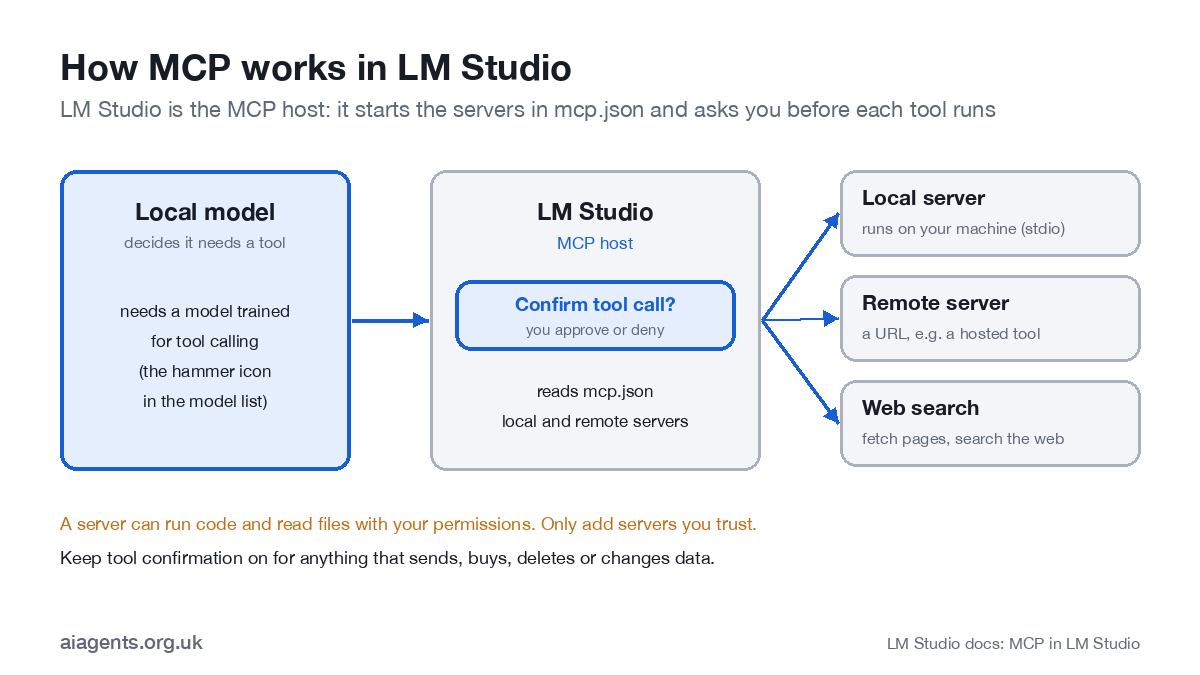
LM Studio plugins and MCP servers both give a local model tools: the ability to search the web, read files or call another app instead of only writing text. MCP is the route most people should use. LM Studio has been an MCP host since version 0.3.17 (June 2025): you list servers in a file called mcp.json, and before each tool call the app asks you to allow it. Plugins are LM Studio's own add-ons, written in TypeScript and still in beta. This guide shows how to add an MCP server, how to add web search, which models handle tools well, how plugins work and how to keep it all safe.
Key facts
- MCP: built in since 0.3.17 (June 2025); local and remote servers; configured in mcp.json.
- Confirmation: a dialog before each tool call; you can edit the arguments, allow once or always.
- One-click installs: "Add to LM Studio" buttons use an lmstudio:// link.
- Plugins: TypeScript tools providers, prompt preprocessors and generators; in beta; shared on the LM Studio Hub.
- Models: pick one with tool use (the hammer icon), such as gpt-oss-20b, Gemma 4 or Qwen3.5.
- Risk: servers and plugins run with your permissions. Install only what you trust.
On this page
- Plugins or MCP: which do you need?
- How do you add an MCP server to LM Studio?
- How do you add web search to LM Studio?
- The Add to LM Studio button
- Which models are best at using tools?
- How do LM Studio plugins work?
- Using MCP through the LM Studio API
- How do you keep tools safe?
- Frequently asked questions
- Sources
Plugins or MCP: which do you need?
| MCP servers | LM Studio plugins | |
|---|---|---|
| What it is | An open standard; the same server works in LM Studio, Claude, ChatGPT, Cursor and others | LM Studio's own add-on format |
| Who writes them | Thousands already exist, from vendors and the community | Developers, in TypeScript (Python support in development) |
| Status | Stable since June 2025 | Beta; publishing commands still marked beta |
| Use it for | Connecting the model to files, the web, databases and apps | Changing how LM Studio itself behaves: preprocessing prompts, custom generators, custom settings |
If you just want the model to do more, use MCP. Plugins are for developers who want to change the app.
How do you add an MCP server to LM Studio?
- Open mcp.json. In the right-hand sidebar, open the Program tab, then Install, then Edit mcp.json. The file uses the same layout as Cursor's.
- Add a server. A local server has a
commandandargs; a remote one has aurland, if needed,headers. The example below adds a file server limited to one folder and Hugging Face's remote server. - Save. LM Studio starts the servers and lists their tools in the Program tab. Switch individual tools on or off there.
- Load a model with tool use and ask for something that needs a tool, such as "list the files in my agent folder".
- Confirm the call. LM Studio shows the tool and its arguments. Edit them if you need to, then allow once or always.
{
  "mcpServers": {
    "files": {
      "command": "npx",
      "args": ["-y", "@modelcontextprotocol/server-filesystem", "/Users/you/Documents/agent-folder"]
    },
    "hf-mcp-server": {
      "url": "https://huggingface.co/mcp",
      "headers": { "Authorization": "Bearer <YOUR_HF_TOKEN>" }
    }
  }
}
Servers launched with npx or uvx need Node.js or uv installed and on your path. Point a file server at one dedicated folder, never your whole home folder. The file lives at ~/.lmstudio/mcp.json on a Mac or Linux.
One warning from LM Studio's documentation is worth repeating: servers designed for Claude, ChatGPT or Gemini can use a lot of tokens and overflow a local model's context. Raise the context length, or switch off tools you do not need.
How do you add web search to LM Studio?
LM Studio has no built-in web search; you add it as a tool. Two common routes:
- A search provider's MCP server (Brave, Exa and Tavily all publish one). You sign up for an API key, add the server to mcp.json with the key, and the model can run searches.
- A fetch server that downloads a web page and turns it into text, so the model can read a page you name. The reference Fetch server from the MCP project does this.
Either way, the search happens on the provider's servers, so your queries leave your machine even though the model does not. For a private research assistant, decide which questions you are happy to send.
The Add to LM Studio button
Some MCP server pages carry an "Add to LM Studio" button. It is a link starting lmstudio://add_mcp with the server's settings encoded in it. Clicking it opens LM Studio and adds the server to mcp.json for you. Read what it adds before you accept: the button is a shortcut, not a safety check. LM Studio publishes a generator so server authors can make their own button.
Which models are best at using tools?
Tool calling only works with models trained for it. In LM Studio these carry a hammer icon. On LM Studio's model pages, tool use is listed for gpt-oss-20b, Gemma 4 and the Qwen3.5 and Qwen3.6 families, among others.
| Your memory | A good tool-using model | Notes |
|---|---|---|
| 16 GB | gpt-oss-20b, or Qwen3.5 9B | gpt-oss-20b needs about 12 GB; keep the number of tools small |
| 32 GB | Gemma 4 26B A4B or Qwen3.6 27B | Room for longer tool descriptions and multi-step tasks |
| 64 GB+ | Qwen3.6 35B-A3B with a long context | Several servers at once without overflowing context |
Small models follow tool instructions less reliably. If a model calls the wrong tool or invents arguments, reduce the number of tools switched on before you reach for a bigger model.
How do LM Studio plugins work?
Plugins are small programs that run inside LM Studio on its bundled Node.js. There are four kinds:
- Tools providers give the model new tools, like an MCP server but packaged for LM Studio.
- Prompt preprocessors change your message before the model sees it, for example adding context from a file.
- Generators replace the model's output step, for example to route a request elsewhere.
- Custom configurations add settings for a plugin to the app.
To install a published plugin, open its page on the LM Studio Hub, click Run in LM Studio, restart the app and switch the plugin on in the Tools panel. Developers use lms clone owner/name to copy one, lms dev to run it while editing and lms push to publish. LM Studio's documentation still describes plugins as in private beta, so expect changes. The SDKs, lmstudio-js and lmstudio-python, are MIT-licensed. If you would rather have an agent that uses tools for you than wire them up yourself, LM Studio now offers one: see LM Studio Bionic explained.
Using MCP through the LM Studio API
If you are building on top of LM Studio's server, the native chat endpoint /api/v1/chat accepts an integrations field: either servers from your mcp.json or temporary ones defined in the request. An allowed_tools list limits what the model may call. Both routes are off by default and switched on in the server settings ("Allow per-request MCPs" and "Allow calling servers from mcp.json"). Leave them off unless you need them. Without confirmation dialogs, the allow-list is your only guard.
How do you keep tools safe?
LM Studio's documentation is blunt: "Never install MCPs from untrusted sources." A server can run code, read files and use your network with your permissions, and a web page the model reads can contain instructions aimed at the model (prompt injection). Five rules cover most of the risk:
- Install servers and plugins only from the vendor or a source you trust, and read the config before saving.
- Point file tools at one folder created for the purpose.
- Keep confirmation on ("allow once") for anything that sends, buys, deletes or changes data. Use "always" only for read-only tools.
- Switch off tools you are not using, which also saves context.
- Keep API keys in mcp.json out of shared folders and screenshots.
Running the model locally keeps your prompts on your machine. It does not stop a malicious server or a poisoned web page. Our guide to MCP explains tool poisoning in plain English.
Frequently asked questions
Does LM Studio support MCP?
Yes. LM Studio has been an MCP host since version 0.3.17 in June 2025. You add servers in mcp.json, local or remote, and the model can call their tools after you confirm each call.
Where is mcp.json in LM Studio?
Open it from the Program tab in the right-hand sidebar: Install, then Edit mcp.json. On disk it is at ~/.lmstudio/mcp.json on a Mac or Linux, and in the .lmstudio folder in your user profile on Windows.
Can LM Studio search the web?
Not by itself. Add a web search or fetch tool through MCP, for example a search provider's MCP server with an API key, or a fetch server that reads pages. Then load a model with tool use and allow the calls.
Are LM Studio plugins safe?
Treat them like any software you install. Plugins and MCP servers can run code, read files and use your network with your permissions. Install only from sources you trust and keep tool confirmation on for anything that changes data.
Why does my model not call the tools?
Most often the model was not trained for tool calling. Load one marked with the hammer icon, such as gpt-oss-20b or a Qwen3.5 or Gemma 4 model, give it enough context length for the tool descriptions, and check the server is switched on in mcp.json.
Related: Ollama serves models to coding agents with one command, ollama launch.
Next: see the complete LM Studio guide, or turn a tool-using model into a working agent with how to build an AI agent.
Read next
- Which Mac or mini PC should you buy to run AI at home?
- LM Studio Bionic explained
- Ollama vs LM Studio: which to install on your Mac
- AnythingLLM review: chat with your own documents
Sources
- LM Studio, MCP in LM Studio (25 June 2025) - 0.3.17, mcp.json, confirmation dialog
- LM Studio, Use MCP servers (docs) - remote example and security warnings
- LM Studio, Add to LM Studio button (docs) - lmstudio:// deeplink
- LM Studio, Using MCP via the API (docs) - integrations and allowed_tools
- LM Studio, Tool use (docs) - native tool support
- LM Studio, Plugins (docs) - plugin types
- LM Studio, lms dev (docs) - beta status
- Model Context Protocol, reference servers - filesystem and fetch servers


