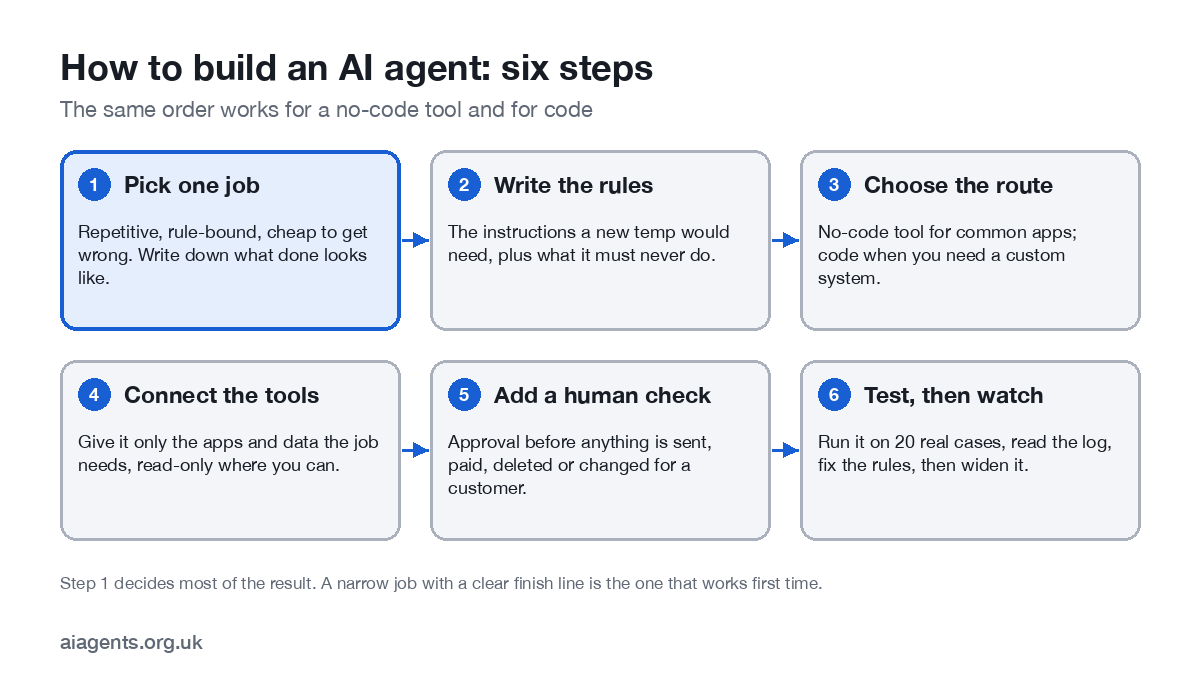
To build an AI agent, pick one repetitive job, write down the rules a new starter would need, choose a tool, connect only the apps the job needs, put a person in front of anything irreversible, and test it on 20 real cases before you trust it. You do not need to code: the assistant you already pay for, or a workflow tool such as Zapier, Make or n8n, will build most small-business agents. This guide walks through the six steps, the five routes with UK prices, a worked example and the mistakes that make first agents fail.
Key facts
- Six steps: pick one job, write the instructions, choose the route, connect tools, add a human check, test.
- No code needed for most small-business agents: Zapier Agents (free tier), Make (free tier), n8n (from €20 a month or free to self-host).
- Already paying for ChatGPT, Claude or Copilot? Their agent modes run multi-step tasks on a schedule, with approvals.
- Do not start with OpenAI's Agent Builder (shuts 30 November 2026) or a custom GPT (no new ones after 26 October 2026).
- Coded agents cost roughly $1 to $20 per 1,000 runs on current mid and budget models.
- The step that decides success is the first: a narrow job with a clear finish line.
On this page
- What are you actually building?
- Step 1: which job should your first agent do?
- Step 2: how do you write the agent's instructions?
- Step 3: no-code or code, which route?
- Step 4: how do you connect tools safely?
- Step 5: where should a person approve?
- Step 6: how do you test an AI agent?
- A worked example: an invoice-chasing agent
- How much does it cost to build an AI agent?
- Building with code: the main frameworks
- What does UK GDPR require?
- Frequently asked questions
- Sources
What are you actually building?
An AI agent is a model with three things added: instructions (what job, what rules), tools (the apps and data it can use) and a loop that lets it plan, act, check the result and carry on until the job is done. OpenAI's practical guide to building agents describes the same three parts: model, tools and instructions. The difference from a chatbot is that an agent takes actions, not just writes text. If that distinction is new, read what an AI agent is and AI agent vs chatbot first.
Both OpenAI's and Anthropic's guidance start in the same place: use the simplest thing that works. If the job is the same every time, a fixed workflow with one AI step is cheaper and more reliable than a free-roaming agent. Save the agent for the parts that need judgement.
Step 1: which job should your first agent do?
Pick a job that is repetitive, follows written rules but needs a little judgement, and is cheap to get wrong. OpenAI recommends workflows involving judgement calls, messy rules or unstructured data such as emails and documents. For a first agent, add one more test: if it makes a mistake, can you fix it in five minutes?
| Good first agents | Bad first agents |
|---|---|
| Chasing overdue invoices, with you approving each reminder | Paying suppliers |
| Sorting the shared inbox and drafting replies | Replying to customers with no one checking |
| Qualifying website enquiries into your CRM | Deciding who gets a loan, a job or a refund |
| Monday report: pull figures from three apps into one summary | Anything touching payroll or HR records |
| Meeting prep: a one-page brief on who you are meeting | Changing prices or stock on a live shop |
More ideas, by department, are in 25 AI agent examples. Write down what "done" looks like before you build: "every invoice over 14 days has a drafted reminder by 9am" is testable; "help with credit control" is not.
Step 2: how do you write the agent's instructions?
Write the instructions you would give a capable temp on their first day. OpenAI suggests starting from the procedures and checklists you already have. Every good set covers six things: role, goal, steps, what it must never do, when to hand over to a person, and what to report. Here is a real-shaped example:
ROLE: You chase overdue invoices for Smith & Co Ltd.
GOAL: Every weekday at 9am, find invoices more than 14 days overdue and draft a polite reminder for each.
STEPS:
  1. List unpaid invoices from Xero that are more than 14 days past due.
  2. Skip any client tagged 'do not chase' or with an open dispute.
  3. Draft a reminder in our tone (template below), with the invoice attached.
  4. Send the drafts to Sarah in Slack for approval. Never send without approval.
NEVER: change an invoice, promise a discount, or contact anyone not on the invoice.
HAND OVER: if a client has replied, disputes the amount or is more than 60 days overdue, stop and message Sarah.
OUTPUT: a one-line summary in Slack: how many found, drafted, skipped and why.- Be specific about edge cases. The agent will meet the client with two invoices, the one who paid yesterday and the one who emailed to complain. Say what happens.
- Write the "never" list first. It is shorter than the "do" list and matters more.
- Give it your templates. A reminder email you have used for years beats one the model invents.
Step 3: no-code or code, which route?
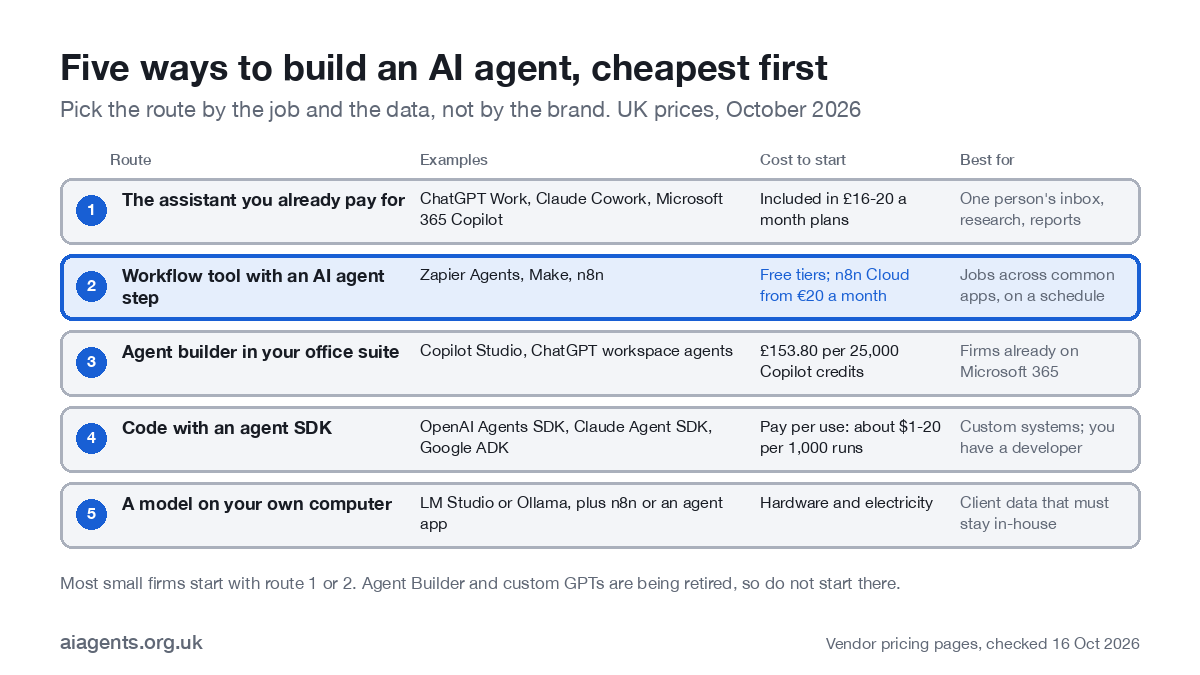
| Route | Examples | Cost (October 2026) | Choose it when |
|---|---|---|---|
| 1. The assistant you already pay for | ChatGPT Work, Claude Cowork, Microsoft 365 Copilot | Included in plans from about £16-20 a month; Microsoft 365 Copilot £23.10 per user a month ex VAT | The job is yours, runs a few times a week and lives in your email, files and calendar |
| 2. A workflow tool with an AI agent step | Zapier Agents, Make AI Agents, n8n AI Agent node | Zapier Agents free for 400 activities, Pro $33.33 a month; Make free for 1,000 credits, Core $12; n8n Cloud €20 a month or free to self-host | The job crosses several apps and must run reliably on a schedule |
| 3. An agent builder in your office suite | Microsoft Copilot Studio, ChatGPT workspace agents | Copilot Studio £153.80 a month per 25,000 credits; workspace agents on ChatGPT Business, typically 5-25 credits a run | Your team lives in Microsoft 365 or ChatGPT Business and wants a shared agent |
| 4. Code with an agent SDK | OpenAI Agents SDK, Claude Agent SDK, Google ADK, LangGraph | Free libraries; you pay the model per use | You need a custom system, unusual apps or full control, and have a developer |
| 5. A model on your own computer | LM Studio or Ollama with n8n or an agent app | Hardware you own, plus electricity | The data must not leave your premises |
Two things to avoid in 2026. OpenAI deprecated its visual Agent Builder on 3 June 2026 and switches it off on 30 November 2026. And you cannot create new custom GPTs after 26 October 2026; existing ones retire on 11 December 2026 and move to ChatGPT plugins. Read more in ChatGPT agents in 2026.
If your data has to stay in-house, route 5 is covered in self-hosted LLMs and the LM Studio guide. For n8n's plans in detail, see n8n pricing.
Step 4: how do you connect tools safely?
Tools are what make an agent useful and what make it risky. Each connection is a permission. Most tools now connect through built-in connectors or MCP, the open standard for plugging agents into apps.
- Least access. Connect only what the job needs. An invoice chaser needs to read invoices and draft emails, not edit your accounts.
- Read-only first. Start with read access; add write access one action at a time once the log looks right.
- Its own account. Where an app allows it, give the agent its own user, so its actions are labelled and you can switch it off without locking yourself out.
- Keys in one place. Store API keys in the tool's credential store, never in the instructions.
- Beware of what it reads. A web page or email can contain instructions aimed at the agent (prompt injection). An agent that reads outside content should not also be able to send or pay without approval.
Step 5: where should a person approve?
OpenAI's guide suggests rating every tool by risk and handing over to a person before high-risk actions or after repeated failures. In practice that gives three tiers:
| Risk | Examples | Approval |
|---|---|---|
| Low | Reading, searching, summarising, drafting | None; check the log |
| Medium | Updating your own CRM, filing, creating calendar holds | Spot checks; approve in batches |
| High | Sending to a customer, paying, deleting, changing a price or a record about a person | A person approves every time |
Most tools build this in. ChatGPT Work and workspace agents can ask for approval before sensitive actions; Claude Cowork has Manual, Auto and Skip approval settings, with Manual the default; in Zapier, Make and n8n you add an approval step that waits for a reply in Slack, Teams or email.
Step 6: how do you test an AI agent?
- Shadow run. Let it work on 20 real cases with every action going to you for approval. Do not fix as you go; note what went wrong.
- Read the log. For each case: right answer, wrong answer, or should have handed over? Anthropic's advice is to keep agents simple and make their planning visible, so you can see why it did what it did.
- Fix the instructions, not the output. Most errors are a missing rule. Add it and re-run the same 20 cases.
- Set stopping conditions. A maximum number of steps per run, a cost cap where the tool allows one, and a rule to stop and ask when unsure.
- Widen slowly. Move low-risk actions to no approval first. Keep a weekly look at the log for as long as the agent runs.
A worked example: an invoice-chasing agent
A five-person design studio loses a day a month chasing invoices. Using a workflow tool, the owner builds this in an afternoon:
- Trigger: every weekday at 9am.
- Step 1: fetch invoices more than 14 days overdue from the accounting app (read-only connection).
- Step 2 (the agent): for each one, check the client notes for disputes, pick the right template for 14, 30 or 45 days overdue, and draft the reminder.
- Step 3: post the drafts to Slack with Approve and Edit buttons.
- Step 4: on approval, send from the accounts mailbox and log the date against the invoice.
- Hand-over: anything disputed or over 60 days goes to the owner, not the agent.
After two weeks of approving every draft, she lets the 14-day reminders go without approval and keeps a person on the rest. The full walkthrough is in the invoice-chasing AI agent guide.
How much does it cost to build an AI agent?
- Free to test: Zapier Agents (400 activities a month), Make (1,000 credits), self-hosted n8n, Gemini Gems, and ChatGPT Work with limits in the free desktop app.
- Small paid plans: Zapier Pro $33.33 a month billed annually; Make Core $12; n8n Cloud Starter €20.
- Office suites: Microsoft 365 Copilot £23.10 per user a month ex VAT, which includes building internal agents; Copilot Studio £153.80 a month per 25,000 credits.
- Coded agents: 1,000 runs of 5,000 tokens in and 1,000 tokens out (a token is about three-quarters of a word) cost about $20 on a mid-tier model (OpenAI GPT-6.1 Sol or Claude Sonnet 5.5) and about $1 on a budget model (GPT-6 Luna or Claude Haiku 5.5), at October 2026 list prices.
- Your time: the real cost. Budget a day to build and an hour a week for the first month to read the log.
Every route, with worked examples, is in how much AI agents cost in the UK.
Building with code: the main frameworks
| Framework | From | Languages | Licence | Version (October 2026) |
|---|---|---|---|---|
| Agents SDK | OpenAI | Python, TypeScript | MIT | 0.24 (Python) |
| Claude Agent SDK | Anthropic | Python, TypeScript | MIT (Python) | 0.2 (Python, alpha) |
| Agent Development Kit (ADK) | Python | Apache 2.0 | 2.12 | |
| LangGraph | LangChain | Python, JavaScript | MIT | 1.2 |
| CrewAI | CrewAI | Python | MIT | 1.15 |
| Agent Framework | Microsoft | .NET, Python | MIT | 1.22 (1.0 shipped April 2026) |
All of them can call tools over MCP. For agents that need to talk to other agents, the A2A protocol reached version 1.0 in March 2026 and, like MCP, now sits with the Linux Foundation's Agentic AI Foundation.
What does UK GDPR require?
If your agent touches personal data, and most business agents do, UK GDPR applies from day one: a lawful basis, data minimisation, a record of what it does and, usually, a DPIA. If it makes decisions with a significant effect on a person without a human involved, Articles 22A to 22D apply. The ICO opened a call for evidence on agentic AI on 8 October 2026. The plain-English version is in AI agents and UK GDPR.
Frequently asked questions
How do I create an AI agent for free?
Use a free tier: Zapier Agents includes 400 activities a month, Make's free plan includes 1,000 credits, and n8n's Community Edition is free to self-host. ChatGPT Work is available with limits in the free desktop app, and Gemini Gems are free on every Gemini plan. Free tiers suit a test; a business job usually needs a paid plan.
Can I build an AI agent without coding?
Yes. Workflow tools such as Zapier, Make and n8n, and agent builders such as Microsoft Copilot Studio and ChatGPT workspace agents, let you build an agent by connecting apps and writing instructions in plain English. You need code only for a custom system or an unusual app.
How much does it cost to build an AI agent?
From nothing to a few hundred pounds a month for most small firms. A no-code tool runs from free to about £50 a month; Microsoft 365 Copilot is £23.10 per user a month ex VAT; a coded agent pays per use, roughly $1 to $20 per 1,000 runs on today's mid and budget models. Having one built for you starts around £1,500.
How long does it take to build an AI agent?
A first no-code agent for one narrow job takes an afternoon to build and two to four weeks to trust: build it, run it on 20 real cases with a person approving each action, fix the instructions, then widen it. A coded agent for a custom system takes longer, usually weeks.
Should I build my agent as a custom GPT or in OpenAI's Agent Builder?
No. OpenAI stops new custom GPTs after 26 October 2026 and retires existing ones on 11 December 2026. Agent Builder was deprecated in June 2026 and shuts down on 30 November 2026. Use ChatGPT plugins or workspace agents inside ChatGPT, or the Agents SDK in code.
What is the easiest way to create an AI agent?
Start with the assistant you already pay for. ChatGPT Work, Claude Cowork and Microsoft 365 Copilot can all run multi-step tasks on a schedule with approvals, with no set-up beyond connecting your apps. Move to a workflow tool when the job has to run reliably without you.
Next: see what each route costs in how much AI agents cost in the UK, or pick a first job from AI for small business.
Read next
- AI agent marketplaces: 23 stores reviewed with UK prices
- The best new AI agents on Product Hunt, reviewed
- n8n pricing explained (2026)
- Types of AI agents: the five you can buy, and the five in the textbook
- What is MCP? The Model Context Protocol, explained
Sources
- OpenAI, A practical guide to building agents (2025) - model, tools, instructions; guardrails; human hand-off
- Anthropic, Building effective agents (December 2024) - simplest solution first; workflows vs agents
- OpenAI, Deprecations (Agent Builder) - deprecated 3 June 2026, shuts 30 November 2026
- OpenAI Help, Custom GPT retirement and migration FAQ - 26 October and 11 December 2026
- Zapier, Pricing - Agents free and Pro, checked 16 October 2026
- Make, Pricing - checked 16 October 2026
- n8n, Pricing - checked 16 October 2026
- Microsoft UK, Copilot Studio pricing - £153.80 per 25,000 credits; Microsoft 365 Copilot £23.10
- OpenAI, API pricing - per-token prices, checked 16 October 2026
- Anthropic, Claude API pricing - per-token prices, checked 16 October 2026
- Anthropic Support, Schedule recurring tasks in Cowork - approval settings
- Agentic AI Foundation, A2A joins AAIF (17 August 2026) - A2A 1.0 and governance
Choose a small first implementation
Compare Make and n8n using the same workload, then try the reporting workflow. If somebody else will build it, use the implementation brief.