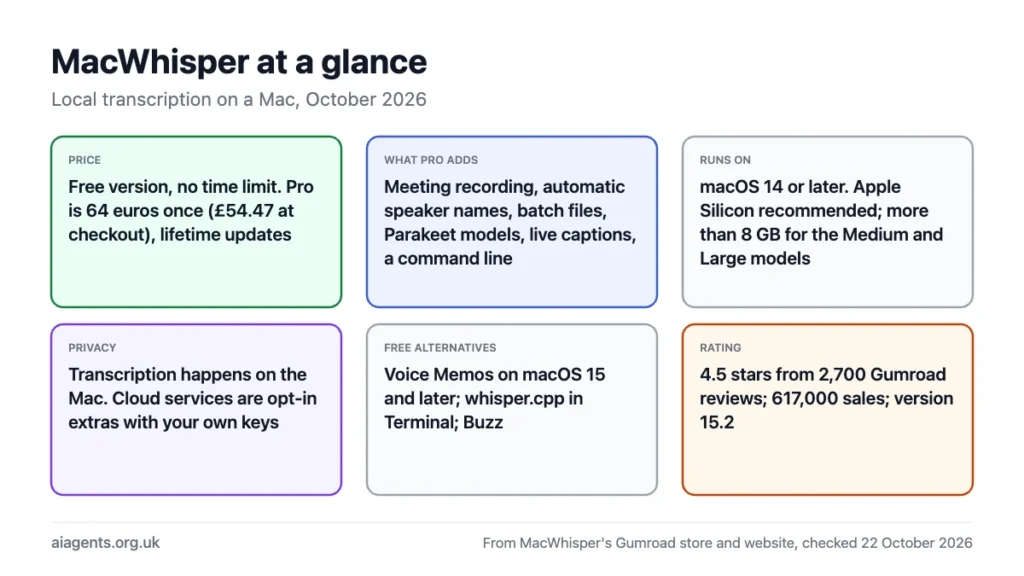
MacWhisper turns audio and video into text on your own Mac, with nothing uploaded, and the free version is enough for most people: drag in a file, pick a Whisper model, get a transcript with timestamps. Pro costs €64 once, no subscription, and adds the things that make it a work tool: meeting recording, speaker names, batch transcription, Nvidia's faster Parakeet models, live captions and a command line. It needs macOS 14 or later and works best on an Apple Silicon Mac with 16 GB. If you only need the odd voice note, macOS 15 already transcribes Voice Memos for free. This review covers what each tier does, what hardware it wants, and the free routes if you would rather not pay.
Key facts
- What it is: a native Mac app that transcribes audio and video files, recordings and meetings on the device using OpenAI's Whisper models, plus Nvidia Parakeet and Qwen3-ASR on Pro
- Made by: Jordi Bruin at Good Snooze, in the Netherlands
- Price: Free version with no time limit; Pro is €64 once with lifetime updates, shown as £54.47 at the Gumroad checkout on 22 October 2026
- Version: 15.2, with 617,000 sales on Gumroad and a 4.5-star rating from 2,700 reviews
- Runs on: macOS 14 Sonoma or later; Apple Silicon recommended, Intel works but slowly
- Memory: the developer says more than 8 GB for the Medium and Large models
- Privacy: transcription is done on your Mac; cloud services are optional add-ons you switch on yourself
- Official site: macwhisper.com
On this page
- What MacWhisper does
- Free vs Pro: what €64 buys
- Which model to pick, and what it needs
- Is it private? What leaves your Mac
- Free alternatives: Voice Memos, whisper.cpp, Buzz
- Who should buy it
- Frequently asked questions
What MacWhisper does
Drop an mp3, m4a, wav, mp4 or mov onto the window and MacWhisper writes out what was said, with timestamps, in any of about 100 languages. It can also record from your microphone, record whatever is playing through the Mac (which is how it captures Zoom, Teams, Webex and Discord calls), and replace Apple's dictation with Whisper for typing into any app. The transcript opens in an editor with the audio synced to the text, so you click a sentence and hear it. Exports cover plain text, Word, PDF, Markdown, HTML, CSV and the .srt and .vtt subtitle formats.
Under the hood it uses whisper.cpp, Georgi Gerganov's port of OpenAI's Whisper model that runs on the Mac's GPU through Metal, and on Apple Silicon it is quick: the developer quotes up to 30 times real time with Whisper and up to 300 times with Parakeet on Pro. A one-hour interview with the Large v3 Turbo model takes a few minutes on an M-series Mac. It is the same engine behind most of the local transcription apps on the Mac; what you pay for is the interface and the extras around it.
Free vs Pro: what €64 buys
| Feature | Free | Pro (€64 once) |
|---|---|---|
| Transcribe audio and video files | Yes | Yes |
| Record from microphone | Yes | Yes |
| Whisper models | All, some sizes limited | All, plus WhisperKit and distilled versions |
| Parakeet v2 and v3 (fast, accurate, English-first) | No | Yes, Apple Silicon only |
| Qwen3-ASR | No | Yes, macOS 26 and Apple Silicon |
| Record system audio and auto-record meetings | No | Yes |
| Speaker recognition | Add two speakers by hand | Automatic, with local models (Nvidia Nemotron 3 diarisation) or ElevenLabs and Deepgram |
| Live captions and live translation | No | Yes, from microphone or system audio |
| Batch transcription and watch folders | No | Yes |
| Command line tool and webhooks | No | Yes, plus Notion, Obsidian, n8n, Make and Zapier |
| Transcribe YouTube links | No | Yes |
| AI summaries and prompts | No | Yes, with your own key for OpenAI, Claude, Groq and others, or Ollama locally |
| Translate transcripts | Via Whisper, rough | Also with a free DeepL key |
| Dictation grammar clean-up | No | Yes, needs an AI service set up |
Pricing is the refreshing part. The website lists Pro at €64 a licence, pay once, lifetime updates; at the Gumroad checkout on 22 October 2026 that showed as £54.47. There is a 7-day refund if you are not happy, 25% off for journalists, students and non-profits by email, and volume prices from €54 a seat for five. The app is also on the iPhone and iPad as a separate download. Pro licence holders unlock features with a key; nothing is rented.
Which model to pick, and what it needs
MacWhisper offers the full Whisper family. Bigger is more accurate and slower, and the figures below are whisper.cpp's own for disk and memory. Start with Large v3 Turbo on any Apple Silicon Mac with 16 GB; drop to Small on an 8 GB machine.
| Model | Download | Memory while running | Good for |
|---|---|---|---|
| Tiny | 75 MB | About 270 MB | Quick drafts, clear English speech |
| Base | 142 MB | About 390 MB | Voice notes on an 8 GB Mac |
| Small | 466 MB | About 850 MB | The 8 GB sweet spot |
| Medium | 1.5 GB | About 2.1 GB | Accents, background noise |
| Large v3 and v3 Turbo | 2.9 GB | About 3.9 GB | Interviews, meetings, other languages; the default on 16 GB |
| Parakeet v3 (Pro) | Varies | Small | Fast, accurate English and European languages on Apple Silicon |
The developer's own note says the Medium and Large models want more than 8 GB of RAM, and that Intel Macs can be slow. Memory is shared with whatever else is open, so a 16 GB MacBook Air running Large alongside a browser is fine; the same Mac also running a local chat model through Ollama for summaries will feel it. If you are choosing a machine for this kind of work, which Mac to buy for local AI covers the trade-offs, and the memory calculator shows what else fits.
Is it private? What leaves your Mac
By default, nothing. The feature list states that all transcription is done on the device and no data leaves the machine, which is why the app is popular with journalists, researchers and anyone transcribing interviews under UK GDPR. The cloud features are opt-in and clearly labelled: cloud transcription through OpenAI, ElevenLabs, Deepgram, Groq or Gladia; AI summaries through OpenAI, Anthropic, xAI or DeepSeek with your own API key; speaker recognition through ElevenLabs or Deepgram; and DeepL translation. Switch none of them on and the app is fully offline after the model download.
The private route for summaries is Pro's Ollama option, which sends the transcript to a model running on the same Mac. Gemma 4 or Qwen3.8 handles a one-hour transcript well on a 32 GB machine. For what the rules require when you record people, see AI agents and UK GDPR: tell participants you are recording, keep the files somewhere sensible, and delete them when the job is done.
Free alternatives: Voice Memos, whisper.cpp, Buzz
- Apple Voice Memos (free, built in). On macOS 15 Sequoia and later, Voice Memos transcribes recordings automatically, shows the words live while you record, and lets you search recordings by what was said. Apple's guide notes it is not available in every country or region. It is the right answer for voice notes and the occasional meeting, with no speaker labels, no file import and no subtitle export.
- whisper.cpp (free, open source, command line). The engine itself, MIT licensed. Four commands clone it, download a model, build it and transcribe a file. It only takes 16-bit WAV, so you convert with ffmpeg first. Right for anyone comfortable in Terminal, or for scripting hundreds of files.
- Buzz (free, open source). A cross-platform window around Whisper for file transcription and live recording, MIT licensed, with a paid Mac App Store build if you want automatic updates. Less polished than MacWhisper and without the meeting and speaker features, but free and offline.
- Dictation apps. If what you want is talking instead of typing rather than transcribing files, the open-source VoiceInk (from $25 one-off) and the free Handy do that with Whisper, and Superwhisper is the polished subscription option. MacWhisper covers dictation too, so it is worth trying before buying a second app.
git clone https://github.com/ggml-org/whisper.cpp.git
cd whisper.cpp
sh ./models/download-ggml-model.sh large-v3-turbo
cmake -B build && cmake --build build -j --config Release
./build/bin/whisper-cli -m models/ggml-large-v3-turbo.bin -f interview.wav
Who should buy it
Buy Pro if you transcribe for a living or for research: interviews, meetings, lectures, podcasts, subtitles. Speaker names, batch processing, system audio recording and the command line are the features that save hours, and €64 once is less than two months of the subscription services. One reviewer on the Gumroad page describes transcribing 130 hours of 1990s Greek television in a week using the command line tool with Claude writing the batch scripts, which is a fair picture of what Pro is for.
Stay on free if you transcribe a file now and then and do not need speakers labelled. Use Voice Memos if all you record is yourself. Use whisper.cpp if you would rather script it than click it.
Frequently asked questions
Is MacWhisper free?
Yes, there is a free version with no time limit that transcribes files and microphone recordings with Whisper models on your Mac. Pro is a one-off €64, about £54 at checkout, with lifetime updates and no subscription. It adds meeting recording, automatic speaker names, batch transcription, Parakeet models, live captions, a command line and AI summaries.
Does MacWhisper work offline?
Yes. After the model download, transcription runs entirely on your Mac and the developer states that no data leaves the machine. Cloud transcription, cloud AI summaries and cloud speaker recognition exist as optional extras you have to switch on with your own API keys; leave them off and the app is fully offline.
Which Mac do I need for MacWhisper?
Any Mac on macOS 14 Sonoma or later. Apple Silicon (M1 onwards) is recommended, and the developer says the Medium and Large models need more than 8 GB of memory. A 16 GB M-series Mac runs the Large v3 Turbo model comfortably; an 8 GB Mac should use Small or Base. Intel Macs work but can be slow, and Parakeet and Qwen3-ASR need Apple Silicon.
Can MacWhisper transcribe a Zoom or Teams meeting?
With Pro, yes. It records system audio, so it captures the call as you hear it, and it can start recording automatically when Zoom, Teams, Webex, Skype, Chime or Discord opens a meeting. Realtime transcription with speaker recognition works with the WhisperKit and Parakeet models. Tell the other participants you are recording.
Can my Mac transcribe audio without MacWhisper?
Yes. On macOS 15 and later, Voice Memos transcribes its recordings automatically and lets you search them by what was said, at no cost. For audio files you already have, the free open-source whisper.cpp does it from Terminal and Buzz does it in a window. Neither labels speakers or records meetings.
What is the difference between Whisper and Parakeet in MacWhisper?
Whisper is OpenAI's model, supports about 100 languages and comes in sizes from Tiny to Large. Parakeet is Nvidia's model, Pro-only and Apple Silicon-only, and the developer quotes up to 300 times real time at high accuracy, against about 30 times for Whisper. Use Parakeet for English and the main European languages when speed matters, and Whisper Large for everything else.
Read next
- Which Mac or mini PC to buy for local AI
- Ollama guide: run free AI models on your Mac
- Run a local LLM on your Mac: the complete guide
- AI agents and UK GDPR
Sources
- MacWhisper on Gumroad: prices, version 15.2, system requirements, full feature list, sales and ratings - read 22 October 2026
- macwhisper.com: €64 licence price, developer - read 22 October 2026
- whisper.cpp on GitHub: licence, model sizes and memory, build commands, Apple Silicon support - read 22 October 2026
- Apple Voice Memos User Guide: transcripts - read 22 October 2026
- Buzz on GitHub - read 22 October 2026


