A self-hosted LLM is an AI model you run on hardware you control instead of a provider's cloud, so your prompts and documents never leave your premises. In 2026 it is easier than ever: free tools such as Ollama and LM Studio run open models like Qwen3.8, Gemma 4 and OpenAI's gpt-oss on a £899 Mac mini or a gaming PC, and vLLM serves a whole team from one GPU server. It is rarely cheaper than an API for a small business, though. This guide covers when self-hosting is worth it, the tools, the models, hardware with UK prices, real running costs, UK GDPR and how to keep it secure, plus LLM hosting providers compared if you would rather rent.
Key facts
- Worth it when: data must stay in-house, you run it all day, or a smaller open model does the job.
- Tools: Ollama, LM Studio and Jan for one machine; vLLM or SGLang for a team; Open WebUI for staff logins.
- Models: Qwen3.8-27B, Gemma 4 and gpt-oss, all Apache 2.0.
- Memory: about 0.5-0.6 GB per billion parameters at 4-bit, plus headroom.
- Hardware: Mac mini from £899 (16 GB); Mac Studio M5 Max with 64 GB £3,099; Framework Desktop with 128 GB £3,449.
- Running cost: a Mac mini at full load uses about 2p an hour in electricity at the October 2026 price cap.
- Renting instead: gpt-oss-20b from $0.075 per million input tokens; GPU servers in AWS London from $0.615 an hour.
- Security: about 175,000 Ollama servers have been found exposed on the internet. Keep yours private.
On this page
- What is a self-hosted LLM?
- Should you self-host an LLM?
- Which tools do you use to self-host an LLM?
- Which open models are worth self-hosting?
- How much memory do you need?
- What hardware should you buy?
- How fast is a self-hosted LLM?
- Can you rent a GPU in the UK instead?
- LLM hosting providers compared (UK, 2026)
- Is self-hosting cheaper than an API?
- Self-host vs rented GPU vs managed API
- What does UK GDPR say about self-hosting?
- How do you keep a self-hosted LLM secure?
- A simple setup for a small office
- Frequently asked questions
- Sources
What is a self-hosted LLM?
A large language model is the engine inside tools like ChatGPT. Most people use one through a provider's app or API, which means every prompt travels to that provider's servers. Self-hosting means downloading an open-weight model, one whose files are published for anyone to run, and running it on a machine you control: a laptop, a Mac mini in the office, a GPU server in a cupboard or a server you rent.
You cannot self-host ChatGPT, Claude or Gemini; those models are never released. You can self-host strong open alternatives, including OpenAI's own gpt-oss models, released under the Apache 2.0 licence in August 2025.
Should you self-host an LLM?
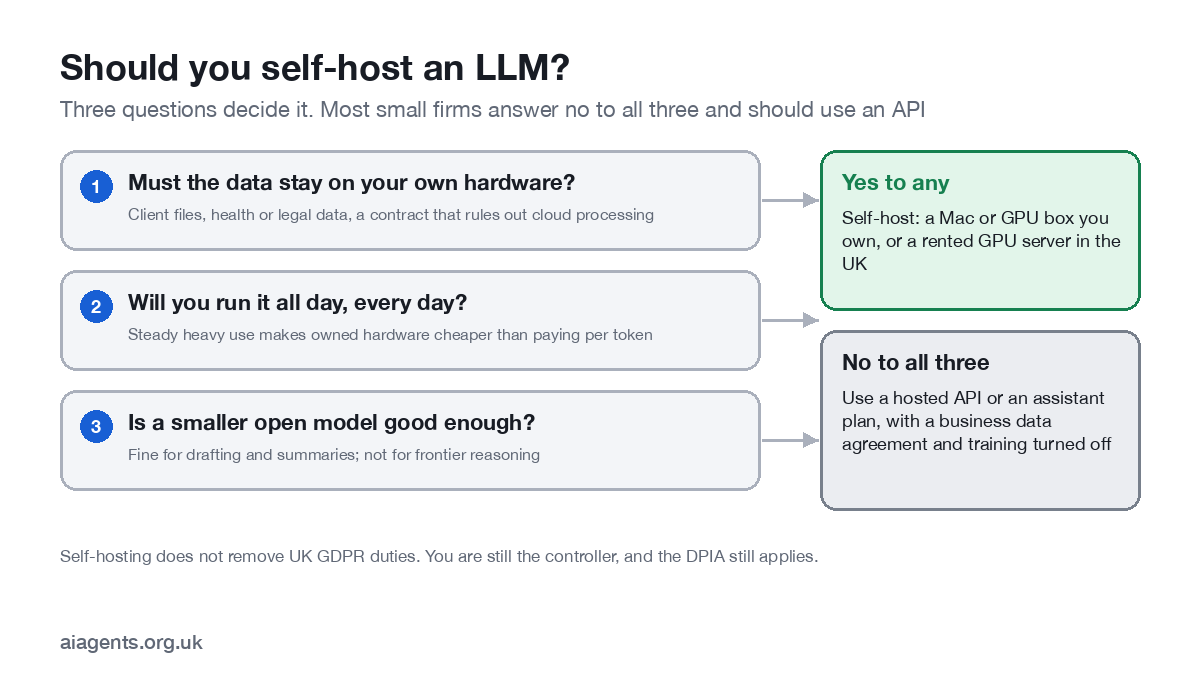
Self-host when client confidentiality, a contract or regulation rules out sending data to a cloud AI provider; when you will run the model constantly, for example classifying every incoming document; or when a smaller model is good enough for the job and you want a fixed cost.
Do not self-host when you need the best reasoning available, your use is occasional, or no one in the business wants to look after a server. A business plan from OpenAI, Anthropic, Google or Microsoft, with training switched off and a data processing agreement in place, is simpler and usually cheaper. Our AI agent cost guide compares the routes.
Which tools do you use to self-host an LLM?
| Tool | What it is for | Licence | Version (October 2026) |
|---|---|---|---|
| LM Studio | Desktop app to find, run and serve models; headless mode (llmster) for servers | Free for work; proprietary | 0.4.26 |
| Ollama | Command-line runner that other apps plug into; one machine or small server | MIT | 0.40.11 |
| Jan | Simple offline chat app with a local API | Apache 2.0 | 0.8.7 |
| llama.cpp | The engine under many of these; its llama-server is OpenAI-compatible | MIT | Build b11876 |
| vLLM | High-throughput server for many users on GPUs | Apache 2.0 | 0.32.0 |
| SGLang | High-performance serving for production workloads | Apache 2.0 | 0.5.22 |
| Open WebUI | ChatGPT-style web front end with staff accounts, roles and groups | Open WebUI licence (branding clause from 50 users) | 0.12.4 |
| LocalAI | OpenAI-compatible API that runs without a GPU | MIT | 4.9.0 |
Hugging Face's Text Generation Inference was archived in March 2026 and is in maintenance mode, so do not start a new project on it. For one person on a Mac, start with LM Studio or Ollama; our Ollama vs LM Studio vs Jan comparison helps you choose. For a team, a GPU server running vLLM with Open WebUI in front is the common pattern.
Which open models are worth self-hosting?
| Model | Size | Licence | Memory needed (approx.) |
|---|---|---|---|
| OpenAI gpt-oss-20b | 21B total, 3.6B active | Apache 2.0 | Runs within 16 GB |
| Qwen3.8-27B | 27B dense, 262K context | Apache 2.0 | 17.6 GB at 4-bit (measured) |
| Google Gemma 4 26B A4B | 25.2B total, 3.8B active | Apache 2.0 | About 16 GB at 4-bit |
| Google Gemma 4 31B | 30.7B dense | Apache 2.0 | About 19 GB at 4-bit |
| OpenAI gpt-oss-120b | 117B total, 5.1B active | Apache 2.0 | One 80 GB GPU |
| Mistral Small 4 | 119B total, 6.5B active | Apache 2.0 | Two GPUs in Mistral's example |
| DeepSeek V4 Flash | 304B | MIT | 90.9 GB at 2-bit (measured on a 128 GB machine) |
| Meta Llama 4 Scout | 109B total, 17B active | Llama 4 Community Licence | One H100 at 4-bit |
"Active" parameters matter for speed: a mixture-of-experts model such as gpt-oss-20b only uses 3.6 billion of its 21 billion parameters for each word, so it runs fast, but it still needs memory for all of them. Gemma 4 moved to the Apache 2.0 licence, which makes it as easy to use commercially as Qwen and gpt-oss.
How much memory do you need?
A model's weights need about 2 GB per billion parameters at full 16-bit precision. Quantisation shrinks that: about 1 GB per billion at 8-bit and 0.5 to 0.6 GB at 4-bit, which is the usual choice. Add room for the conversation (the context), the operating system and your other apps. If you are choosing a machine, my guide to which Mac or mini PC to buy for local AI compares 12 of them with UK prices.
- 16 GB: gpt-oss-20b, or 8-9B models with room to spare.
- 32 GB: the 26-31B class (Qwen3.8-27B, Gemma 4), the sweet spot for business writing.
- 64-128 GB: two models at once, long documents, or gpt-oss-120b on 96 GB or more.
- Bandwidth decides speed. Two machines with the same memory can differ several times in speed because of how fast that memory is.
On a Mac, the processor and graphics share one pool of memory, so a Mac with 64 GB can load models a PC would need a very expensive graphics card for. Our guide to running a local LLM on a Mac goes deeper.
What hardware should you buy?
| Machine | Memory | UK price (16 October 2026) | Notes |
|---|---|---|---|
| Mac mini M6 | 16 GB (up to 32 GB) | From £899 | 4 W idle, 70 W flat out; ideal for one person |
| Mac mini M5 Pro | 24 GB (up to 64 GB) | From £1,699 | Quiet office server for a small team |
| Mac Studio M5 Max | 36 GB or 64 GB (up to 128 GB) | £2,499 / £3,099 | Fast memory (up to 614 GB/s) |
| Mac Studio M5 Ultra | 96 GB (up to 512 GB) | From £5,499 | 1.2 TB/s; the biggest models on one desk |
| Framework Desktop (AMD Ryzen AI Max+ 395) | 64 GB / 128 GB | £1,959 / £3,449 | 128 GB version out of stock when checked |
| PC with NVIDIA RTX 5090 | 32 GB on the card | Card launched at £1,939; street prices vary widely | Fastest for models that fit; 575 W card |
| NVIDIA DGX Spark | 128 GB | Launched at $3,999; no official UK price found | Runs models up to 200B parameters |
Apple no longer sells the M4 Mac mini or the M3 Ultra and M4 Max Mac Studio in the UK store; check the current range before you buy. Graphics card prices rose sharply in September 2026 because of memory shortages, so compare several UK retailers.
How fast is a self-hosted LLM?
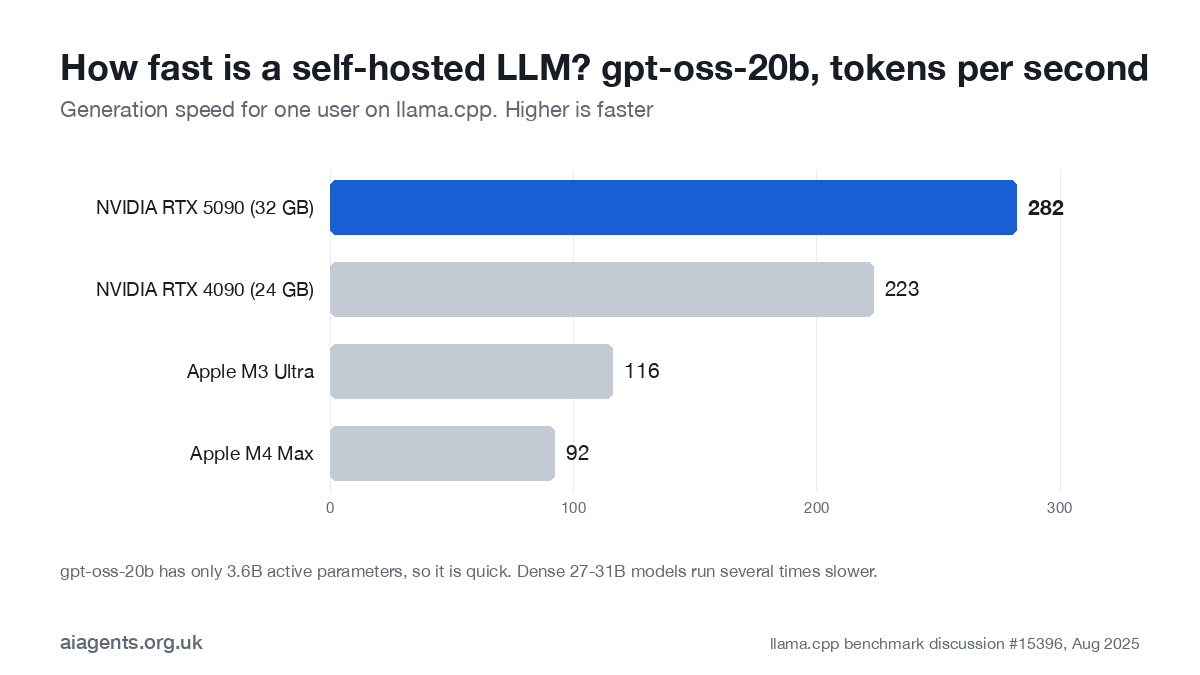
For gpt-oss-20b, a fast mixture-of-experts model, an RTX 5090 generates about 282 tokens a second, an M3 Ultra about 116 and an M4 Max about 92, according to the llama.cpp project's benchmark thread. All are far faster than anyone reads. Dense 27-31B models run several times slower, and the more people share one machine, the slower each gets, which is where vLLM's batching earns its keep. NVIDIA's DGX Spark trades speed for memory: LMSYS measured about 50 tokens a second on gpt-oss-20b under Ollama.
Can you rent a GPU in the UK instead?
| Provider | Example | Price | Where |
|---|---|---|---|
| AWS | g6.xlarge (NVIDIA L4, 24 GB) | $1.02 an hour | London (eu-west-2) |
| AWS | g5.xlarge (NVIDIA A10G, 24 GB) | $1.28 an hour | London |
| Hetzner | GEX45 (RTX PRO 4000 Blackwell, 24 GB) | €214 a month + €209 set-up, ex VAT | Helsinki |
| Scaleway | L4-1-24G | €0.79 an hour | Paris |
| RunPod | RTX 5090 / H100 | $1.19 / $3.99 an hour | Region varies |
| Lambda | H100 | $3.99 an hour | 14 regions, including Germany |
Renting gives you a private model without buying hardware, and you can switch it off when idle. For UK GDPR, AWS London keeps data in the UK, and EU and EEA countries such as Finland and France are covered by UK adequacy regulations. US-based providers are covered only through the UK Extension to the EU-US Data Privacy Framework, so check the provider is certified.
LLM hosting providers compared (UK, 2026)
You do not need to own hardware to run an open-weight model privately. There are four kinds of LLM hosting: GPU clouds that rent you a server by the hour, managed services that run the model and bill per token, the big clouds that do both, and European hosts. I checked each provider's official pricing and region pages on 25 October 2026. Dollar prices are converted at about £0.75 to the dollar. Prices exclude VAT unless the table says so.
| Provider | Type | Cheapest GPU or per-token price | UK or EU data location | Best for |
|---|---|---|---|---|
| RunPod | GPU cloud | RTX A5000 $0.27 an hour (about £0.20) | EU: yes (EU-RO-1 in its docs). UK: not listed | Cheap hourly GPUs for testing |
| Lambda | GPU cloud | V100 $0.79 an hour (about £0.59); H100 $3.99 | EU: Germany (europe-central-1). UK: no | Large single GPUs by the hour |
| Hugging Face Inference Endpoints | Managed endpoint | NVIDIA T4 on AWS $0.50 an hour (about £0.38) | EU: AWS Ireland (eu-west-1). UK: no | Deploying a Hub model without managing servers |
| Together AI | Managed, per token | gpt-oss-120b $0.15 in / $0.60 out per million tokens (about £0.11 / £0.45) | EU: dedicated endpoints only, on Scale and Enterprise plans | Wide choice of open models |
| Fireworks AI | Managed, per token | gpt-oss-120b $0.15 / $0.60 per million (about £0.11 / £0.45) | EU: Frankfurt and Iceland for dedicated deployments, quota on request; region-restricted deployments cost 1.5 times more | Fast serving of open and fine-tuned models |
| Groq | Managed, per token | gpt-oss-20b $0.075 / $0.30 per million (about 6p / 23p) | No EU-only option documented | Very fast replies |
| AWS Bedrock | Big cloud, per token | gpt-oss-20b in London $0.11 / $0.47 per million (about 8p / 35p) | UK: London (eu-west-2), in-region | UK data residency with a per-token bill |
| AWS EC2 | Big cloud, GPU server | g4dn.xlarge (NVIDIA T4, 16 GB) $0.615 an hour (about £0.46) | UK: London (eu-west-2) | Your own model server in the UK |
| Microsoft Azure | Big cloud, GPU server | NC4as T4 v3, Linux, $0.615 an hour (about £0.46) | UK: UK South | Firms already on Azure |
| Google Vertex AI | Big cloud, per token | gpt-oss-20b $0.075 / $0.30 per million (about 6p / 23p) | No for gpt-oss: served from the US (us-central1) | Google Cloud users who accept US processing |
| Hetzner | EU dedicated GPU server | GEX45 (24 GB) €214 a month + €209 set-up | EU: Helsinki; GEX131 also Falkenstein, Germany | Lowest fixed bill for 24/7 use |
| OVHcloud | EU GPU cloud and per-token API | Quadro RTX 5000 £0.34 an hour; L4 £0.68. AI Endpoints gpt-oss-20b €0.04 / €0.15 per million (shown incl. UK VAT) | EU: widest GPU choice in Gravelines, France; AI Endpoints run in the EU | Billing in pounds with EU hosting |
| Scaleway | EU GPU cloud | L4-1-24G €0.79 an hour | EU: Paris | Hourly L4 servers in France |
| Nscale | GPU cloud and per-token API | gpt-oss-20b $0.05 / $0.20 per million (about 4p / 15p) | Data centres in the UK (Loughton, Hayes) and Norway; serverless location not stated | Low token prices; ask where it runs |
| Civo | GPU cloud | A100 40 GB $1.09 an hour (about £0.82) | UK: GPUs only in London (LON1) | A UK-hosted GPU by the hour |
Two things stand out. In this list, only AWS, Azure and Civo show a GPU in a UK region on their official pages, and only AWS Bedrock serves gpt-oss per token from London. Several US services offer Europe only on dedicated or enterprise plans, so the cheapest per-token price usually means US processing. I left Vast.ai out because its pricing page shows no fixed prices.
Is self-hosting cheaper than an API?
Usually not, once you count the hardware. The electricity is cheap: at the Ofgem price cap for October to December 2026 (26.32p per kWh for households, with VAT removed from electricity bills until 31 March 2027), a Mac mini M6 flat out costs about 2p an hour and an RTX 5090 card about 15p an hour. Business tariffs are not covered by the cap and are often higher.
Our arithmetic: generating one million output tokens (roughly 750,000 words) with gpt-oss-20b on an RTX 5090 takes about an hour and costs about 15p in electricity for the card. Cheap hosted models such as OpenAI's gpt-6-luna and Anthropic's Claude Haiku 5.5 charge $0.50 for the same million output tokens, and Groq charges $0.30 for gpt-oss-20b itself. The saving is tens of pence per million tokens, so paying back £2,000 or more of hardware takes billions of tokens, before you count your time.
So self-host for control, privacy or a fixed predictable cost, not to save money on a small workload.
Self-host on your own server vs rented GPU vs managed API
Here is one job priced three ways. A five-person team sends 40 requests each per working day, with about 1,500 tokens in and 500 tokens out per request. Over 22 working days that is 4,400 requests: 6.6 million input tokens and 2.2 million output tokens a month. The model is gpt-oss-20b in every case. Prices are as of 25 October 2026.
Your own server: about £38 a month
A Mac mini M6 with 16 GB costs £899 at Apple UK, including VAT. Spread over three years, that is £899 / 36 = £24.97 a month. Electricity at the worst case of 70 W flat out, all month: 0.07 kW x 730 hours = 51.1 kWh, x 26.32p = £13.45. Total: about £38 a month, with £899 paid up front. The real power bill is lower, because it idles at about 4 W.
Wins when the data must not leave your premises, or use is heavy and steady. You also need someone to look after it. For a larger team, see the small office setup.
Rented GPU: about £135 a month
An AWS g6.xlarge in London, with one 24 GB NVIDIA L4, costs $1.0216 an hour. Run for office hours only: 8 hours x 22 days = 176 hours, x $1.0216 = $179.80, about £135. Left on all month it is 730 hours x $1.0216 = $745.77, about £559. Storage and data transfer are extra. A Hetzner GEX45 in Helsinki is a fixed alternative: €214 + (€209 set-up / 12) = about €231 a month in the first year, ex VAT, running 24/7.
Wins when you need a model, a fine-tune or settings that no API offers, or a contract asks for a single-tenant server, without buying hardware.
Managed API: about £1.32 a month
AWS Bedrock in London charges $0.11 per million input tokens and $0.47 per million output tokens for gpt-oss-20b. So 6.6 x $0.11 = $0.73, plus 2.2 x $0.47 = $1.03. Total $1.76, about £1.32 a month.
Wins when use is light or uneven, which covers most small firms. At this volume the API costs about 1% of a rented GPU in office hours.
UK GDPR and data residency by route
- Own server: no international transfer if it sits in the UK. Security is entirely your job; see how to keep it secure.
- Rented GPU or API: the host is your processor, so you need a written contract that covers UK GDPR processor terms.
- Check the routing, not just the region. Bedrock's global cross-Region inference can process a request in any supported AWS Region worldwide; choose in-Region London, or a geographic EU profile. Google says its global endpoint does not support data residency requirements.
- EU and EEA hosts such as Helsinki, Paris, Frankfurt, Iceland and Norway are covered by UK adequacy regulations.
- US services need the UK Extension to the Data Privacy Framework or UK transfer clauses. Together AI's privacy policy, for example, relies on standard contractual clauses for UK transfers, so ask for the UK Addendum.
Mixing routes with a self-hosted LLM gateway
You do not have to pick one route. A gateway is a small server you run in front of your models. LiteLLM's AI Gateway, open source under the MIT licence, gives your apps one OpenAI-compatible address for over 100 providers. It issues each team its own key with a budget and tracks spend. You can send confidential work to your own server and everything else to a UK-region API.
What does UK GDPR say about self-hosting?
- No international transfer. Under the ICO's guidance, a restricted transfer is one to a separate organisation outside the UK. A model running on your own UK premises involves none.
- You are still the controller. You decide why and how personal data is processed, so you still need a lawful basis, transparency and data minimisation.
- Security is your job. The security principle requires measures appropriate to the risk; the ICO suggests Cyber Essentials as a starting point. If you rent a server, your contract with the host must require proper security.
- DPIA. The ICO treats AI as innovative technology; combined with another factor, such as evaluating or scoring people, a DPIA is required.
- Guidance is moving. The ICO's AI guidance is under review after the Data (Use and Access) Act, and it opened a call for evidence on agentic AI on 8 October 2026.
The full checklist is in AI agents and UK GDPR.
How do you keep a self-hosted LLM secure?
The biggest risk is accidentally putting your model on the internet. Cisco Talos found 1,139 Ollama servers exposed online in 2025, about one in five serving models with no authentication. A 2026 study by SentinelOne and Censys found about 175,000 exposed Ollama hosts in 130 countries, around half able to run code or call other services.
- Keep it on localhost. Ollama listens on 127.0.0.1:11434 by default; setting OLLAMA_HOST=0.0.0.0 exposes it to the network.
- Put something in front. For office access, use a VPN or a reverse proxy with logins (Open WebUI provides accounts and roles).
- Use API keys where offered (llama-server and vLLM support --api-key), but vLLM's own documentation warns not to rely on the key alone.
- Firewall and rate limits on any server, and never open the model port on your router.
- Treat tools as the bigger risk. Once the model can use tools through MCP, the tools are what can do damage. See LM Studio plugins and MCP for safe settings.
A simple setup for a small office
For five to fifteen people who want a private assistant for drafting and document questions:
- Hardware: a Mac mini M5 Pro or Mac Studio with 64 GB, in the office, on a UPS.
- Model server: LM Studio in headless mode or Ollama, running a 26-31B model such as Qwen3.8-27B or Gemma 4.
- Front end: Open WebUI, so each person has a login and chats stay separated. Its branding clause only applies once you pass 50 users.
- Access: office network or VPN only. Nothing exposed to the internet.
- Automation: point a workflow tool such as n8n at the same server for scheduled jobs. That turns it into an agent; see how to build an AI agent.
- Paperwork: a short DPIA, an acceptable-use note for staff and a named person who applies updates.
Frequently asked questions
What is a self-hosted LLM?
A large language model you run on hardware you control, in your office, at home or on a rented server, instead of sending prompts to a provider such as OpenAI or Anthropic. You download an open-weight model and run it with software such as Ollama, LM Studio, llama.cpp or vLLM.
Is self-hosting an LLM cheaper than using an API?
Rarely, for a small business. Hosted open models are cheaper still: gpt-oss-20b costs $0.075 per million input tokens and $0.30 per million output tokens on Groq, while capable hardware costs from about £900 to several thousand pounds. Self-hosting pays off with heavy, steady use, or when the data must not leave your premises.
What is the best self-hosted LLM?
There is no single best. In October 2026 strong Apache 2.0 options include Qwen3.8-27B, Gemma 4 (26B A4B and 31B) and OpenAI's gpt-oss-20b and gpt-oss-120b. Pick the largest model that fits your memory with room to spare, and test it on your own tasks.
Can I run ChatGPT locally?
Not ChatGPT itself, which only runs on OpenAI's servers. OpenAI's open-weight models, gpt-oss-20b and gpt-oss-120b, can be run locally under the Apache 2.0 licence; gpt-oss-20b runs within 16 GB of memory.
How much RAM do I need to run an LLM?
Roughly 0.5 to 0.6 GB per billion parameters at 4-bit quantisation, plus room for the conversation and your other apps. In practice, 16 GB runs gpt-oss-20b, about 18 GB runs Qwen3.8-27B at 4-bit, and gpt-oss-120b needs about 80 GB.
Does self-hosting make me UK GDPR compliant?
No, but it simplifies things. Running the model on your own UK premises avoids an international transfer and a processor contract with an AI provider. You are still the controller, you still need a lawful basis and appropriate security, and a DPIA is likely if the AI is used to evaluate people.
What is the best LLM hosting provider for a UK business?
There is no single best. If data must stay in the UK, AWS is the simplest choice: Bedrock serves gpt-oss per token in London, and EC2 rents GPU servers there from $0.615 an hour. For the lowest fixed bill, Hetzner's GEX45 GPU server in Helsinki costs €214 a month plus a €209 set-up fee, ex VAT. Check the region and the contract before you send personal data.
How much does it cost to host your own LLM?
In my worked example for a five-person team, about £38 a month for a £899 Mac mini spread over three years plus electricity at full load, or about £135 a month for an NVIDIA L4 server in AWS London used in office hours. The same work through a managed API running gpt-oss-20b in London costs about £1.32 a month.
What is a self-hosted LLM gateway?
A server you run between your apps and your models, giving them one OpenAI-compatible address. LiteLLM's open-source gateway supports over 100 providers, gives each team its own key and budget, and tracks spend, so private work can go to your own server and the rest to a hosted API.
Related: Set up the most popular model runner with the Ollama guide.
This week: Reflection's 501B Beam went Apache 2.0 on 16 October and DeepSeek's V4.1 Flash 1017 is MIT; both are covered in local AI this week.
Next: set up the software with the LM Studio guide, or compare the costs of every route in how much AI agents cost in the UK.
Self-hosting is one of three routes to keeping your data out of other people's data centres; the private AI guide compares it with running a model on your own Mac and with no-retention cloud contracts.
Read next
- Which Mac or mini PC should you buy to run AI at home?
- OpenClaw explained: the free AI agent you run yourself
Sources
- OpenAI, Introducing gpt-oss (5 August 2025) - gpt-oss-20b and 120b, Apache 2.0
- Hugging Face, Qwen3.8-27B model card - size, licence, context
- Hugging Face, Gemma 4 31B model card - sizes and Apache 2.0 licence
- Hugging Face, Optimizing LLMs for speed and memory - memory per parameter
- Apple UK, Buy Mac mini and Mac Studio - UK prices, 16 October 2026
- Framework, Framework Desktop (UK) - UK prices and measured model memory
- llama.cpp, Performance of gpt-oss-20b (discussion #15396, August 2025) - tokens per second
- LMSYS, NVIDIA DGX Spark review (13 October 2025) - DGX Spark speed
- AWS, EC2 on-demand prices, EU (London) - g5 and g6 hourly prices
- Hetzner, GEX45 announcement (1 September 2026) - price and location
- Ofgem, Energy price cap 1 October to 31 December 2026 - 26.32p per kWh
- ICO, International transfers: a guide - restricted transfers
- ICO, When do we need to do a DPIA? - innovative technology
- SecurityWeek, 175,000 exposed Ollama hosts (30 January 2026) - exposure research
- Cisco, Detecting exposed LLM servers (1 September 2025) - 1,139 exposed servers
- vLLM, Security - API key limits
- AWS, Amazon Bedrock pricing - gpt-oss prices in London
- AWS, Bedrock model Regional availability - gpt-oss in eu-west-2
- AWS, Bedrock cross-Region inference - where requests are processed
- Lambda, On-demand instances - regions
- Groq, Supported models - gpt-oss prices
- Google Cloud, gpt-oss-20b on Vertex AI - supported regions
- Civo, Regions - GPU compute in LON1
- Fireworks AI, Regions - EU deployment regions


