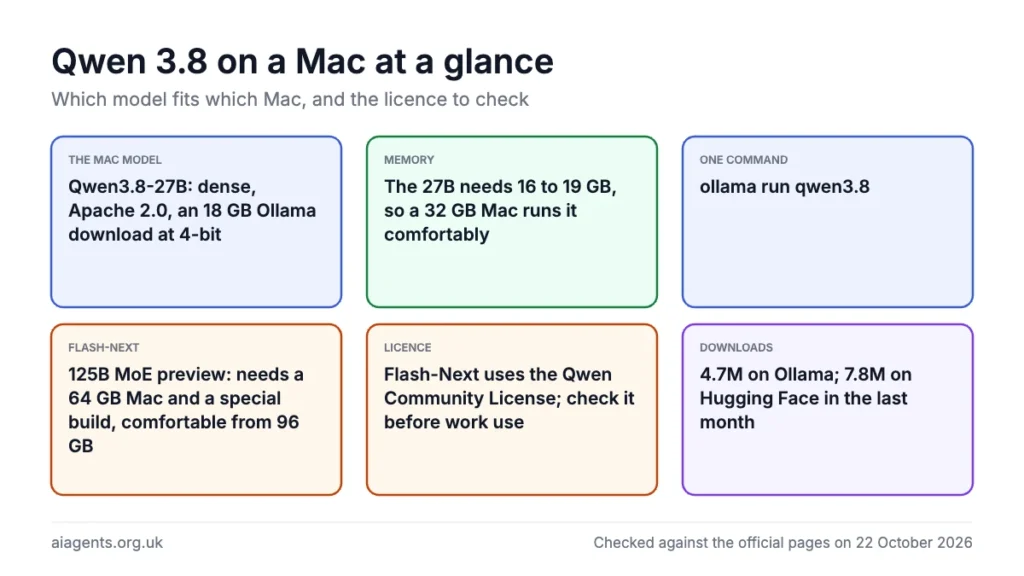
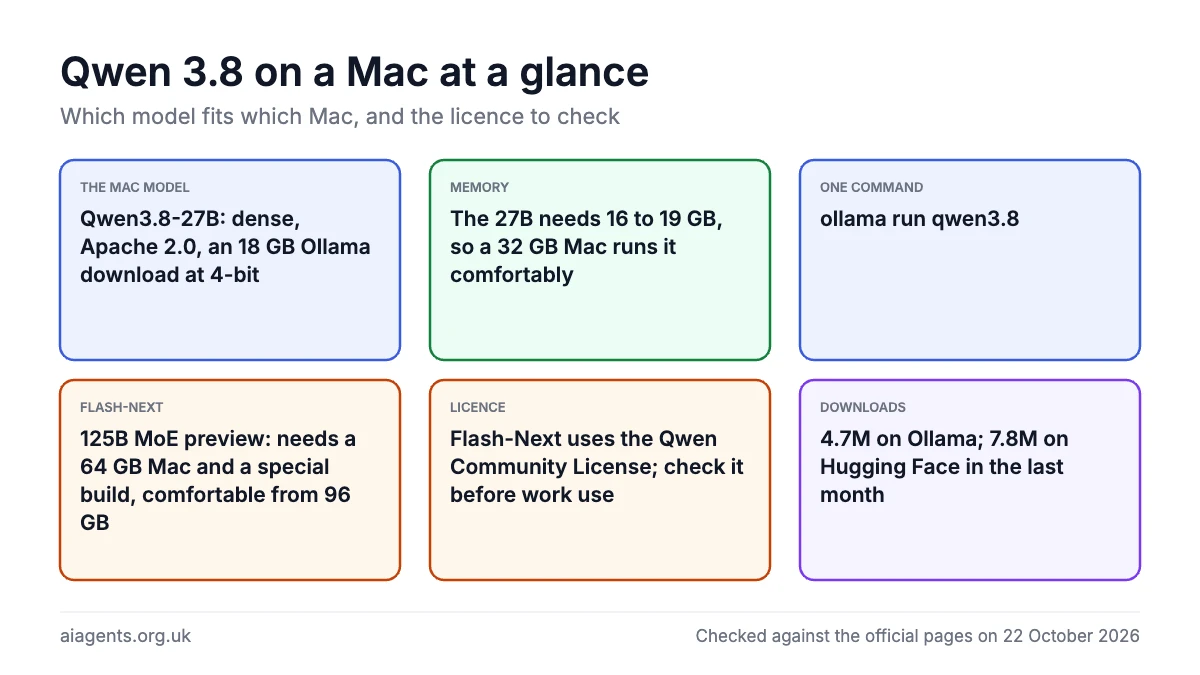
Qwen 3.8 is Alibaba's August 2026 model family, and two of its three headline models run on a Mac. Qwen3.8-27B is a dense 27B vision-language model under Apache 2.0: an 18 GB Ollama download at 4-bit that needs 16 to 19 GB of memory, so a 32 GB Mac runs it comfortably with one command. Qwen3.8 Flash-Next is a 125B mixture-of-experts preview of the Qwen4 architecture with a 51B n-gram table bolted on; it needs a 64 GB Mac and a special build that leaves that table on the SSD, is only comfortable from 96 GB, and comes under the more restrictive Qwen Community License. Qwen3.8-Max is the hosted flagship and not a Mac model at all. The 27B is also very widely used: Ollama's library counts 4.7 million downloads of it as of 22 October 2026. If you are not sure how much memory your Mac has, start with the memory calculator.
On this page
- What Qwen 3.8 is: the three models
- How many people use Qwen 3.8
- Which Mac runs which
- Run the 27B with Ollama
- Run it in LM Studio or with MLX
- Flash-Next on a 64 GB Mac
- How it compares: vendor benchmarks, with caveats
- Licence and safety: can you use it for work?
- What people say on Reddit and X
- Frequently asked questions
- Read next
- Sources
What Qwen 3.8 is: the three models
Qwen is the model family from Alibaba's Qwen team. The 3.8 generation arrived in three stages during August 2026, and the names matter because only two of the three are something you can run on a Mac. The team's pitch for the series is "substantial gains across coding, professional work, research, and long-horizon agentic tasks", plus native image and video understanding.
Qwen3.8-Max is the hosted flagship: a 2.4 trillion parameter mixture-of-experts vision model with 95 billion active per token, unveiled on 2 August 2026 and sold through Alibaba Cloud's API at 2 US dollars per million input tokens and 6 US dollars per million output (about £1.50 and £4.50, VAT not mentioned). A text-only version of its backbone is on Hugging Face under a separate "qwen3.8-max" licence, but it is far too big for a Mac.
Qwen3.8-27B is the one most Mac owners want: a dense (not mixture-of-experts) 27B vision-language model on the Qwen3.5 architecture. It reads images and video, has a native context of 262,144 tokens (extendable to a million with YaRN), and lets you switch thinking on or off per request and set reasoning effort to low, medium or xhigh. The weights went up on Hugging Face and ModelScope on 14 August 2026 under Apache 2.0.
Qwen3.8 Flash-Next is the odd one. Its model card calls it "an experimental preview of the architecture that will underpin Qwen4". It is a mixture-of-experts model with 125B parameters in the main network but only 6B active per token, and on top sits a 51B-parameter n-gram embedding table with 20 million entries indexed by two- and three-token sequences, plus 4B for a multi-token prediction layer. That adds up to about 180B stored parameters, which is why the BF16 download is around 355 GB. The weights were released on 26 August 2026 under the Qwen Community License 1.0, not Apache. The n-gram table is the trick that makes it possible on a 64 GB Mac.
How many people use Qwen 3.8
Nobody publishes a count of people running Qwen 3.8, but the public counters show a model in heavy use. The single best signal: Qwen's official Qwen3.8-27B repository on Hugging Face recorded 7,758,670 downloads in the last month as of 22 October 2026, and more than 17.5 million since it went up in August.
| Counter | Figure, 22 October 2026 |
|---|---|
| Qwen3.8-27B, official Hugging Face repository | 7,758,670 downloads last month; 17,567,015 in total; 18,192 likes |
| qwen3.8 in the Ollama library | 4.7 million downloads |
| qwen/qwen3.8-27b in LM Studio's catalogue | 1.5 million downloads |
| lmstudio-community MLX 4-bit build of the 27B | 3,846,997 downloads last month |
| Qwen3.8 Flash-Next, official Hugging Face repository | 2,706,809 downloads last month; 6,404 likes |
| qwen3.8-flash-next in the Ollama library | 212.7K downloads |
| Community versions of the 27B on Hugging Face | 1,535 quantisations, 683 fine-tunes, 250 adapters |
The LM Studio community's MLX build is the most Mac-specific number here, and the mlx-community 4-bit conversion adds another 881,565 downloads last month. A download is not a person, though: one user may fetch several builds, or the same build more than once. Flash-Next's smaller figures are no surprise for a model that needs at least 64 GB of memory.
For the whole Qwen family, Alibaba said in an emailed statement reported by Bloomberg in mid-August 2026 that Qwen had passed three billion downloads across platforms, from more than 460 open models with more than 300,000 derivatives. UK interest is climbing too. Semrush estimates qwen.ai's UK organic search traffic at 39.9K visits a month in October 2026, up 67% and now ahead of ollama.com's 38.3K; that is visits to the whole site, not users of the models. Google Trends also shows "qwen 3.8" as a breakout search in the UK over the last 90 days.
Which Mac runs which
Memory, not chip generation, decides this. The figures are the quantisers' published estimates, not my measurements: Unsloth lists the 27B at 16 to 19 GB total memory for 4-bit, 23 to 26 GB for 6-bit, 31 GB for 8-bit and 56 GB for BF16, and says 4-bit works on "a Mac with 24GB RAM". Flash-Next figures are the Atomic Chat builds that keep the n-gram table on the SSD.
| Mac memory | Qwen3.8-27B | Qwen3.8 Flash-Next | My pick |
|---|---|---|---|
| 8 GB | No | No | A smaller model from the Ollama models list |
| 16 GB | Only at 3-bit or lower with a short context (LM Studio says 16 GB minimum; Unsloth's 4-bit figure is 16 to 19 GB) | No | A smaller model |
| 24 GB | Yes at 4-bit (18 GB download) | No | 27B at 4-bit |
| 32 GB | Yes at 4-bit with room for context; 5-bit (19.8 GB) possible | No | 27B at 4-bit: the sweet spot |
| 36 to 48 GB | Yes at 6-bit (22 to 25 GB); 8-bit (30 GB) at 48 GB | No build fits under 64 GB | 27B at 6-bit or 8-bit |
| 64 GB | Yes at 8-bit with long context | Tightly: the IQ4_XS build needs 45.8 GB in memory plus 39.1 GB on the SSD | 27B at 8-bit daily; Flash-Next as an experiment |
| 96 GB | Yes at any quantisation, including BF16 (56 GB) | Yes: the Q4_K_M build needs 56.1 GB in memory plus 38.4 GB on the SSD; LM Studio's minimum is 96 GB | Flash-Next |
| 128 GB | Yes | Yes: the Q5_K_M build runs fully in memory; the 105 GB MLX routes are tight | Flash-Next via the GGUF build |
Two cautions. These are totals for the model plus a working context, so a tight fit means a short conversation. And published speeds vary enormously by engine: the same 27B at 4-bit has been measured at 47 tokens per second with MLX on a 128 GB M5 Max and at 14 through Ollama on an M3 Ultra in a separate test. Treat any single figure as one data point.
If you are buying, 32 GB is where the 27B becomes a daily tool and 64 GB is the floor for Flash-Next. The Mac mini M6, Mac mini M5 Pro, MacBook Pro M5 and Mac Studio M5 Max pages cover those tiers with UK prices, and which Mac to buy for local AI weighs them against each other.
Run the 27B with Ollama
Ollama is the simplest route, and on Apple silicon it now runs this model on Apple's MLX framework by default. That change came in Ollama 0.40.0 on 25 September 2026, whose release notes list qwen3.8 among the models that "run on MLX on Apple Silicon by default", so update first if you installed Ollama before then. If you have not installed it yet, the Ollama guide walks through it.
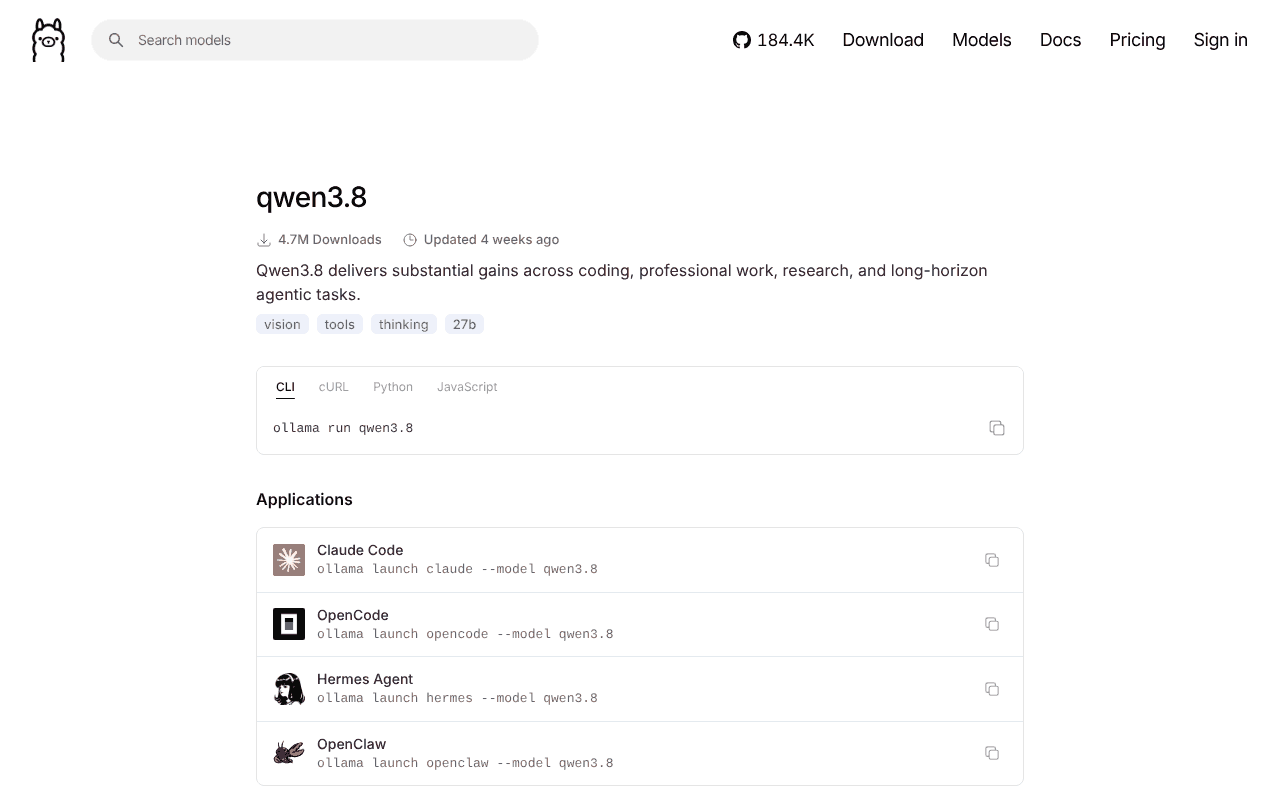
The library tag is qwen3.8, and its default is the 27B at 4-bit (Q4_K_M), an 18 GB download with a 256K context window that accepts text and images. One command pulls and starts it:
ollama run qwen3.8The library lists twelve tags. The ones that matter on a Mac, with Ollama's download sizes as of 22 October 2026:
qwen3.8:27b: 18 GB, Q4_K_M, the same build as the defaultqwen3.8:27b-mlx: 18 GB, MLX-nativeqwen3.8:27b-q8_0: 30 GB, 8-bit, for 48 GB Macs and upqwen3.8:27b-mtp-q4_K_M: 18 GB, 4-bit with the multi-token prediction layer for faster generationqwen3.8:27b-bf16: 56 GB, full precision, 96 GB Macs and up
To pull a specific one, use the full tag:
ollama run qwen3.8:27b-q8_0Thinking mode is on by default and can be disabled per request; in the API that is the think field set to false. The Ollama commands cheat sheet has the interactive toggles and the context-length setting, which you will want to raise before feeding it long documents. Because it is a vision model, you can include an image path in the prompt.
The model page also shows the launch command for coding agents:
ollama launch claude --model qwen3.8That hands the model to Claude Code as its backend; Claude Code with Ollama explains the setup, and the model page lists opencode, hermes and openclaw as alternatives to claude. If something refuses to connect, see the troubleshooting page.
Run it in LM Studio or with MLX
LM Studio lists the model as qwen/qwen3.8-27b, calls it a "state-of-the-art laptop size model capable of reasoning, tools calling, and image understanding", and states a 16 GB minimum. It offers a GGUF build and MLX builds at 4, 5, 6 and 8-bit; the community 4-bit MLX file is 16.1 GB. Search for it in the Discover tab, or from Terminal:
lms get qwen/qwen3.8-27bAdd --always-show-download-options to be asked which quantisation you want. The LM Studio guide covers the rest of the app, and Ollama vs LM Studio helps if you are choosing between them.
LM Studio also has an unusually fast path for this model. On 18 September 2026 it added Splash, an open-source Apple silicon engine from Inco AI built around Qwen3.8-27B with speculative decoding; Inco's tests on a 48 GB M5 Pro report 74 tokens per second on short prompts and 54 at a 32K context. It needs LM Studio Bionic 1.1.5 or newer, macOS 26.4, an M3 or newer chip and at least 36 GB of memory. Enable it under Settings, Runtime, Experimental backends, then download incoai/Qwen3.8-27B-Splash. See LM Studio Bionic explained.
MLX directly suits anyone who wants a local OpenAI-compatible server without an app. The mlx-community 4-bit conversion is 16.1 GB, and its card gives the commands:
uv tool install mlx-lm
mlx_lm.server --model "mlx-community/Qwen3.8-27B-4bit"
That is text only. For images use the mlx-vlm package instead:
pip install -U mlx-vlm
python -m mlx_vlm.generate --model mlx-community/Qwen3.8-27B-4bit --max-tokens 100 --temperature 0.0 --prompt "Describe this image." --image <path_to_image>
One published MLX benchmark on a 128 GB M5 Max MacBook Pro, reasoning off and multi-token prediction on, measured 47.0 tokens per second for the 4-bit build (15.5 to 15.7 GB resident) and 28.7 for the 8-bit (28.1 to 28.4 GB). A Mac with less bandwidth will be slower; the memory figures are the transferable part.
Flash-Next on a 64 GB Mac
On paper Qwen3.8 Flash-Next should not fit. Unsloth's memory table puts even its 1-bit build at 75 GB and the 4-bit at 96 to 114 GB, and recommends a 96 GB machine. The way round it is that 51B of the stored parameters are a lookup table, and the model reads only about 2.7 KB of it per token.
Atomic Chat, a free open-source local AI app, split its GGUF builds so the table sits alone in its own shard; llama.cpp memory-maps that shard from the SSD and only the rows actually looked up enter memory. At 36 tokens per second that is roughly 3 MB per second of disk reads.
The three builds in the AtomicChat/Qwen3.8-Flash-Next-GGUF repository, with the sizes from its model card:
| Build | In memory | On SSD | Total | For |
|---|---|---|---|---|
| AD-3.84bpw-IQ4_XS-M64 | 45.8 GB | 39.1 GB | 84.9 GB | 64 GB Macs |
| AD-4.27bpw-Q4_K_M-M64 | 56.1 GB | 38.4 GB | 94.5 GB | 80 or 96 GB Macs (the recommended build) |
| AD-5.00bpw-Q5_K_M-M64 | 56.1 GB | 54.4 GB | 110.5 GB | 128 GB Macs, fully in memory |
Atomic Chat measured 36.0 tokens per second generation and 517.9 prompt processing on a 64 GB M5 Max MacBook Pro. An independent test on an older 64 GB M1 Max with the IQ4_XS build got 17.6 and 181.7, and is honest about the cost: wired memory peaked at 46.6 GiB, free memory fell to about 0.1 GiB and swap grew over half an hour. On 64 GB this works, but close everything else first.
Both routes need one kernel setting, because macOS caps GPU memory at roughly three quarters of unified memory:
sudo sysctl iogpu.wired_limit_mb=57344The easy route is the Atomic Chat app itself (free, macOS 13.6 or later): search for AtomicChat/Qwen3.8-Flash-Next-GGUF in its Models tab and pick a quantisation from Download Options. The hands-on route is llama.cpp, which needs a build with Flash-Next support (the model card cites pull request 27742). The card's server command is:
./llama.cpp/build/bin/llama-server \
    -m Qwen3.8-Flash-Next-AD-4.27bpw-Q4_K_M-M64-00001-of-00033.gguf \
    --jinja -ngl 99 -c 8192 -fa on -fit off
-fit off is not optional, because llama.cpp's automatic memory fitting mis-sizes this architecture, and memory mapping must stay on or the table gets loaded and the first response fails with an out-of-memory error.
With 128 GB or more you have simpler options. Ollama's library has a qwen3.8-flash-next entry whose default MLX tag is 105 GB:
ollama run qwen3.8-flash-next:125b-mlxThe GGUF tag qwen3.8-flash-next:125b-a6b-q4_K_M is 120 GB, and LM Studio lists the model with a 96 GB minimum and a 119 GB Q4_K_M GGUF. The rapid-mlx 4-bit conversion uses 103 to 105 GB while serving, its card calls 192 GB "recommended", and as of 22 October 2026 it has no vision. So on a 128 GB Mac the Atomic Chat Q5_K_M build is the one that leaves headroom.
How it compares: vendor benchmarks, with caveats
Qwen's model cards do not benchmark against Gemma 4, so the table puts each vendor's own published figure for the same test side by side. That is the weakest kind of comparison: every row comes from a different harness, and Qwen's card footnotes that its scores "depend on evaluation harnesses and prompts".
| Benchmark | Qwen3.8-27B | Qwen3.8 Flash-Next | Gemma 4 31B | DeepSeek V4 Flash |
|---|---|---|---|---|
| GPQA Diamond | 89.2 | 91.7 | 84.3 | 88.1 |
| LiveCodeBench v6 | 90.3 | 91.9 | 80.0 | 91.6 |
| HLE (no tools) | 30.8 | 35.9 | 19.5 | 34.8 |
| SWE-bench Pro | 61.7 | 62.5 | not reported | 52.6 |
| Stored parameters | 27B dense | about 180B, 6B active | 31B dense | 284B, 13B active |
| Licence | Apache 2.0 | Qwen Community 1.0 | Apache 2.0 | MIT |
| Best for | A 32 GB Mac: the sweet spot | A taste of Qwen4 if you already have a 64 GB Mac | The main alternative on a 32 GB Mac | Not a practical Mac model (about 167 GB of weights) |
Qwen's Flash-Next card lists a DeepSeek-V4-Flash-0731 snapshot at 90.8 on GPQA Diamond and 56.0 on SWE-bench Pro, several points above DeepSeek's own card, which shows how much the harness moves these numbers. DeepSeek V4 Flash is not a practical Mac model anyway: its weights are about 167 GB even in DeepSeek's mixed FP4 and FP8 format.
For a 32 GB Mac the real contest is the 27B against Gemma 4 31B, and on the vendor numbers the Qwen is ahead on every shared row. Its vision scores are a separate reason to pick it: 91.1 on OmniDocBench 1.5, the document-reading benchmark, is what matters for a model that reads your PDFs and screenshots. Flash-Next beats the 27B by small margins on the agentic tests; it is a taste of the Qwen4 architecture for people who already have a 64 GB Mac, not a reason to buy one.
The newest rival on a Mac is Recursive Flint, released on 21 October 2026: a 40B coding model with about 2.5B active per token. On Recursive's own chart it ran about ten times faster than Qwen3.8-27B on a 48 GB M4 Pro, 131.22 tokens a second against 13.01, but scored lower on Terminal-Bench 2.1, 54.9 against 73.0. Recursive Flint on a Mac compares the two in full.
Licence and safety: can you use it for work?
Qwen3.8-27B is Apache 2.0. Both the Hugging Face card and Ollama's licence file show it, and Apache 2.0 allows commercial use, modification and redistribution with attribution. For a UK business that wants a capable local model without a lawyer, this is the one.
Qwen3.8 Flash-Next is under the Qwen Community License 1.0. Its grant is broad, free and explicitly includes commercial use, sublicensing, hosting and fine-tuning; the conditions are what differ from Apache. A commercial product with more than 100 million monthly active users or 20 million US dollars in monthly revenue must prominently display the model name. More important for small companies: if you or an affiliate operate a "Model as a Service" business (giving third parties access to inference or fine-tuning) or an "AI Work Assistant" business, defined as an independent product primarily designed for AI-assisted coding or office productivity, you must obtain a separate licence from Qwen before any commercial use. Internal use is exempt as long as you do not make the model, its outputs or its capabilities available to third parties. If you are building the next coding assistant, email Qwen first; if you are using it inside your own company, you are fine.
On safety, a model is a file of numbers. Run through Ollama, LM Studio, Atomic Chat or MLX, it has no network access of its own and your prompts stay on the Mac. The questions that remain are about the training, not the plumbing: whose values shaped the model's refusals, and whether that matters for your use. Is it safe to run Chinese AI models on your Mac? goes through that, and AI agents and UK GDPR covers personal data at work.
What people say on Reddit and X
These are individual users' opinions and experiences, not tests I have run. Each quote is verbatim from the thread or post linked.
- On long agent jobs: "one of the few local models I trust to run, unsupervised, for long periods of time" - a user in r/LocalLLaMA, August 2026 thread
- On speed across Macs: "Base M4, 32GB: 5 to 6 tok/s. Entry tier. It runs." - one user on X, in a round-up of Mac speeds, August 2026 post
- On real work on an older Mac: "Still feels like unusable for real work with some slightly bigger goal." - an M1 Max 64 GB owner in r/LocalLLaMA, August 2026 thread
- Against Gemma 4: "Gemma4-31B writes better but Qwen3.8-27B is better for analysis, reasoning and tool calls." - a user in r/LocalLLM, September 2026 thread
- Against DeepSeek V4 Flash: "it seems like Qwen 3.8 Flash next is taking much longer to actually finish anything" - a user in r/LocalLLaMA, October 2026 thread
- On the Flash-Next licence: "Pretty permissive for local/internal use, fine-tuning and derivatives, but it’s definitely not Apache/MIT" - a user in r/LocalLLM, August 2026 release thread
The praise is mostly about how much the 27B gets done on long coding and agent jobs for a model that fits a 32 GB Mac. The complaints cluster around time: slow generation on base and older chips, and long thinking that several threads call overthinking. Censorship comes up mainly in comparisons; one r/LocalLLaMA user says both models have guardrails, Gemma 4 around hacking and Qwen around subjects censored in China.
Frequently asked questions
What is the Ollama command for Qwen 3.8?
The command is ollama run qwen3.8, which pulls the 27B model at 4-bit (an 18 GB download) and starts a chat. For the 8-bit build use ollama run qwen3.8:27b-q8_0, a 30 GB download. Update to Ollama 0.40.0 or later first so the model runs on MLX on Apple silicon.
How much memory does Qwen 3.8 27B need on a Mac?
Qwen 3.8 27B needs 16 to 19 GB of total memory at 4-bit, which Unsloth says works on a Mac with 24 GB of RAM. Unsloth lists 23 to 26 GB for 6-bit, 31 GB for 8-bit and 56 GB for full BF16. A 32 GB Mac runs the 4-bit model with comfortable room for a long context. A published MLX benchmark measured 15.5 to 15.7 GB resident for the 4-bit build.
Can I run Qwen 3.8 on a 16 GB Mac?
Only by dropping to a 3-bit or lower quantisation with a short context, and even then it will be slow and tight. LM Studio lists 16 GB as the minimum for the 27B, but the 4-bit build alone needs 16 to 19 GB. A smaller model is a better experience on a 16 GB Mac; the Ollama models list on this site shows which fit.
Can a 64 GB Mac run Qwen3.8 Flash-Next?
Yes, with Atomic Chat's IQ4_XS build, which keeps 45.8 GB in memory and leaves the 39.1 GB n-gram table on the SSD. You need to raise the GPU memory limit with the sysctl command and close other apps. Measured speeds are 36 tokens per second on a 64 GB M5 Max and about 18 on a 64 GB M1 Max.
Is Qwen 3.8 free for commercial use?
Qwen3.8-27B is Apache 2.0, so yes. Qwen3.8 Flash-Next is under the Qwen Community License 1.0, which permits commercial use but requires a separate licence from Qwen if you run a model-as-a-service or an AI coding or office assistant business, and requires attribution in products above 100 million monthly users or 20 million US dollars in monthly revenue. Internal use inside your own company is exempt.
Is Qwen 3.8 better than Gemma 4?
On each vendor's own published scores, Qwen3.8-27B is ahead of Gemma 4 31B on every shared benchmark. Qwen scores 89.2 against 84.3 on GPQA Diamond, 90.3 against 80.0 on LiveCodeBench v6 and 30.8 against 19.5 on HLE without tools. Those figures come from different test harnesses, so treat the gap as indicative rather than exact. Both are Apache 2.0 and both fit a 32 GB Mac at 4-bit.
Does Qwen 3.8 understand images?
Yes. Qwen3.8-27B and Flash-Next are both vision-language models that read images and video, and the Ollama tags accept text and image input. The 27B's card reports 91.1 on OmniDocBench 1.5, a document-reading benchmark. The rapid-mlx conversion of Flash-Next is the exception: as of 22 October 2026 its vision tower is not enabled.
How many people use Qwen 3.8?
Nobody publishes a user count, but the download counters are large. As of 22 October 2026, Qwen's official Qwen3.8-27B repository on Hugging Face shows 7,758,670 downloads in the last month, and Ollama's library shows 4.7 million downloads of qwen3.8. A download is not a person, because one user can download several builds.
Read next
- Can my Mac run this model? Local LLM memory calculator
- The 30 most downloaded Ollama models and which Macs run them
- Ollama on a Mac: install, models, updating and uninstalling
- Ollama commands cheat sheet
- LM Studio guide
- Is it safe to run Chinese AI models on your Mac?
- Claude Code with Ollama
- Recursive Flint on a Mac: the fast 40B coding model
- Which Mac or mini PC to buy for local AI
Sources
- Qwen3.8-27B model card, Qwen on Hugging Face: architecture, context, licence, vendor benchmarks, downloads last month and model tree counts - checked 22 October 2026
- Qwen3.8-Flash-Next model card, Qwen on Hugging Face: parameter counts, n-gram table, licence, vendor benchmarks - checked 22 October 2026
- Qwen Community License 1.0, Qwen on Hugging Face: licence terms and thresholds - checked 22 October 2026
- Qwen3.8-2.4T-A95B model card, Qwen on Hugging Face: the text-only Max backbone and its licence - checked 22 October 2026
- Qwen3.8 collection, Qwen on Hugging Face: upload dates - checked 22 October 2026
- Qwen3.8 README, QwenLM on GitHub: 14 August 2026 release note for the 27B - checked 22 October 2026
- qwen3.8 tags, Ollama library: tag names, download sizes, run commands - checked 22 October 2026
- qwen3.8:27b, Ollama library: Q4_K_M quantisation and Apache 2.0 licence blob - checked 22 October 2026
- qwen3.8-flash-next tags, Ollama library: Flash-Next tag names and sizes - checked 22 October 2026
- Ollama v0.40.0 release notes, GitHub: MLX default on Apple silicon and qwen3.8 listing - checked 22 October 2026
- CLI reference, Ollama docs: ollama launch integrations and image input - checked 22 October 2026
- Qwen3.8-27B-4bit, mlx-community on Hugging Face: 16.1 GB size, mlx-lm and mlx-vlm commands, downloads last month - checked 22 October 2026
- Qwen3.8-27B-MLX-4bit, lmstudio-community on Hugging Face: size, licence and downloads last month - checked 22 October 2026
- qwen/qwen3.8-27b, LM Studio model catalogue: 16 GB minimum, available builds, download count - checked 22 October 2026
- qwen/qwen3.8-flash-next, LM Studio model catalogue: 96 GB minimum - checked 22 October 2026
- Qwen3.8-Flash-Next-GGUF, lmstudio-community on Hugging Face: 119 GB Q4_K_M size - checked 22 October 2026
- lms get, LM Studio CLI docs: command syntax and quantisation selection - checked 22 October 2026
- Splash Engine: the fastest local Qwen3.8 on Apple Silicon, LM Studio blog: Splash requirements and Inco's speed figures - checked 22 October 2026
- Qwen3.8-Flash-Next-GGUF, AtomicChat on Hugging Face: build sizes, SSD table, sysctl and llama.cpp commands - checked 22 October 2026
- How to run Qwen 3.8 Flash-Next locally, Atomic Chat: memory tiers, M5 Max speeds, app route - checked 22 October 2026
- Atomic Chat: platform support and price - checked 22 October 2026
- Qwen3.8-Flash-Next-4bit, rapid-mlx on Hugging Face: MLX memory tiers, M3 Ultra speeds, vision status - checked 22 October 2026
- Qwen3.8 guide, Unsloth docs: 27B memory per quantisation and the 24 GB Mac note - checked 22 October 2026
- Qwen3.8-Next guide, Unsloth docs: Flash-Next memory per quantisation - checked 22 October 2026
- Qwen3.8-27B-GGUF, Unsloth on Hugging Face: GGUF file sizes - checked 22 October 2026
- 125B Qwen3.8-Flash-Next hits 18 tok/s on M1 Max 64GB, lilting.ch: independent 64 GB test and memory pressure - checked 22 October 2026
- Qwen MLX benchmarks, NathanMaine on GitHub: M5 Max 128 GB MLX speeds and resident memory - checked 22 October 2026
- Run Qwen 3.8 27B locally, TerminalBytes: M3 Ultra Ollama speed figure - checked 22 October 2026
- Gemma 4 31B model card, Google on Hugging Face: Gemma benchmarks and licence - checked 22 October 2026
- DeepSeek-V4-Flash model card, DeepSeek on Hugging Face: parameters, MIT licence, benchmarks - checked 22 October 2026
- Qwen 3.8 vs DeepSeek V4 Flash, Yotta Labs: DeepSeek V4 Flash weight size - checked 22 October 2026
- Alibaba releases Qwen3.8-Flash-Next, Gigazine: 26 August 2026 release date - checked 22 October 2026
- Alibaba releases Qwen3.8-Flash-Next, DataNorth: release date and licence confirmation - checked 22 October 2026
- Qwen3.8-Max lands with a bang, The Batch, DeepLearning.AI: Max launch date, parameters and API pricing - checked 22 October 2026
- Best local LLMs for your Mac in October 2026, Towards AI: the 24 GB, 64 GB and 128 GB framing (public preview only; the full article is behind Medium's paywall) - checked 22 October 2026
- Qwen/Qwen3.8-27B, Hugging Face Hub API: downloads last month, total downloads and likes - checked 22 October 2026
- Qwen/Qwen3.8-Flash-Next, Hugging Face Hub API: downloads last month and likes - checked 22 October 2026
- qwen3.8, Ollama library: download count - checked 22 October 2026
- qwen3.8-flash-next, Ollama library: download count - checked 22 October 2026
- Alibaba AI downloads pass three billion, The Star (Bloomberg), 17 August 2026: Alibaba's emailed statement on open models and derivatives - checked 22 October 2026
- Alibaba's Qwen passes 3 billion downloads, eWeek, 18 August 2026: three billion downloads attributed to Alibaba via Bloomberg - checked 22 October 2026
- Semrush Traffic Analytics and Domain Overview (estimates): qwen.ai and ollama.com UK organic search traffic, October 2026 - checked 22 October 2026
- Google Trends, United Kingdom, past 90 days: "qwen 3.8" shown as a breakout search - checked 22 October 2026
- Qwen3.8-27B: slower tokens, faster and better results, r/LocalLLaMA, 18 August 2026: user comment on long agent jobs - checked 22 October 2026
- Post on Qwen 3.8 27B speeds across Macs, X, 16 August 2026: user-reported speed on a base M4 - checked 22 October 2026
- The best setup for Qwen 3.8 27B on Mac Studio 64 GB RAM, r/LocalLLaMA, 16 August 2026: user experience on an M1 Max - checked 22 October 2026
- Any credible comparisons among Gemma 4 31b, Qwen3.8 27b and Muse-Glimmer 30b?, r/LocalLLM, 24 September 2026: user comparison with Gemma 4 and overthinking comment - checked 22 October 2026
- Qwen 3.8 Flash Next, DeepSeekV4 Flash and Time, r/LocalLLaMA, 14 October 2026: user comparison with DeepSeek V4 Flash - checked 22 October 2026
- Qwen3.8-Flash-Next MoE 125B A6B available in HF, r/LocalLLM, 26 August 2026: user view of the Flash-Next licence - checked 22 October 2026
- Gemma4 31B vs Qwen3.8 27B: why the huge difference in benchmarks?, r/LocalLLaMA, 26 August 2026: user comment on guardrails and censorship - checked 22 October 2026
- Qwen 3.8 27B released! Please share your experience, r/LocalLLaMA, 14 August 2026: early user reports of long thinking - checked 22 October 2026


