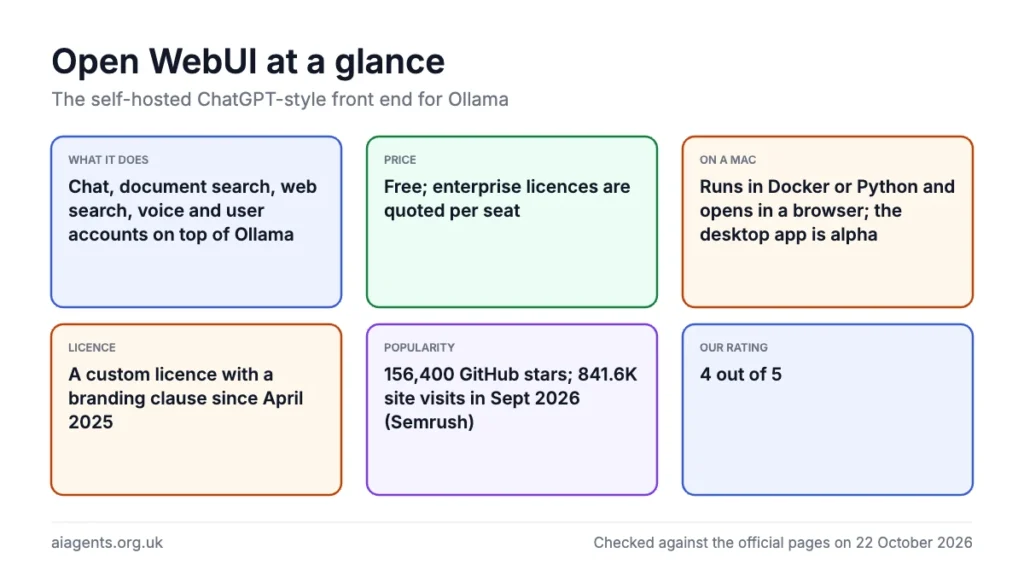
Open WebUI is the most capable free chat front end you can put in front of Ollama: document chat, web search, voice, image generation hooks, user accounts and MCP tools, for nothing, from a project with 156,400 GitHub stars. The catch on a Mac is that it is a server application: you run it in Docker or as a Python package and open it in a browser, the native desktop app is still early alpha, and since April 2025 it ships under a custom licence with a branding clause rather than plain BSD. For one person who wants a simple window, Ollama's own app or Msty is less work; for a private ChatGPT shared by a household or a small team, this is the one to learn. My rating: ★★★★☆ 4/5.
Key facts
- What it does: A self-hosted web interface for chatting with local models through Ollama, or cloud models through OpenAI-compatible APIs, with document knowledge bases, web search, voice, user accounts and plugins.
- Made by: Open WebUI Inc., created by Tim Jaeryang Baek; PitchBook lists a San Francisco, USA address.
- Price: Free. Enterprise licences are quoted per seat, sold only to organisations, with no published price.
- Free plan or trial: The whole product is free as-is with no user limit, as long as the Open WebUI branding stays.
- Runs on: macOS, Windows or Linux via Docker or Python 3.11 or 3.12, then any browser. An early-alpha desktop app exists for macOS 12 or later, Windows 10 or later and Linux.
- Open source: Partly. BSD-3-Clause up to v0.6.5; from v0.6.6 (19 April 2025) the Open WebUI License adds a branding clause the project says is not OSI-approved.
- Best for: A private, multi-user, ChatGPT-style app on a Mac or home server, if you can run a Docker container or a Python command.
- Users: No active-user count published. The company claims 338M+ downloads; PyPI logged 1,302,921 downloads in the last month (October 2026).
- Our rating: ★★★★☆ 4/5
On this page
- What is Open WebUI?
- How many people use it
- How to install it on a Mac
- What it costs
- The licence: what changed in 2025
- What I like
- What I'd want fixed
- Updates and the common complaints
- What people say on Reddit and X
- Who should use it?
- Is it safe to use? Privacy and data
- Using it in the UK
- Alternatives to Open WebUI
- My verdict
- Frequently asked questions
- Read next
- Sources
What is Open WebUI?
Open WebUI is a web application that gives local language models a chat screen like ChatGPT's. It began in October 2023 as "Ollama WebUI" and still finds a local Ollama on its own, but now talks to anything with an OpenAI-compatible API. You run it on your Mac or a server, then open it in a browser.
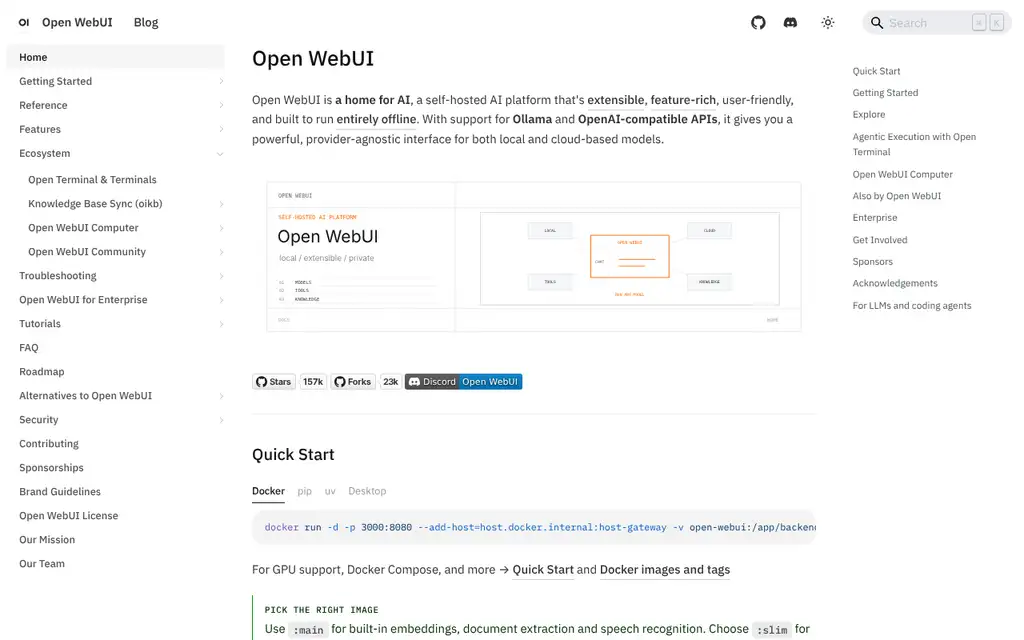
It moves fast. The latest release, v0.12.3, came out on 16 October 2026, two days after v0.12.2, and the docs say the team aims for weekly releases. It is made by Open WebUI Inc., and the licence names Tim Jaeryang Baek as creator.
The features a Mac user will care about, from the features page and README:
- Multi-model chat: any Ollama model, two side by side to compare, switching mid-conversation.
- Documents and RAG: upload files to a Knowledge base, type # in the chat box to attach it, and the model answers from your documents.
- Web search: twenty providers, from self-hosted SearXNG to paid services such as Brave.
- Voice: speech to text (a local Whisper model by default), text to speech, hands-free voice calls.
- Image generation: hooks for GPT-Image, Gemini, ComfyUI and Automatic1111, which do the drawing.
- User accounts: the first account is the admin and new users wait as "Pending" until approved; roles, groups, SSO and two-factor sign-in are built in.
- Tools, functions and MCP: Python tools and functions run inside the chat, and MCP servers connect over Streamable HTTP (see What is MCP?).
- Newer additions: Channels, Notes, Memory, Skills, and Open Terminal, a sandboxed shell for the model in Docker.
How many people use it
Open WebUI publishes no count of active users. The company's home page claims more than 338 million downloads and over 519,000 community members, with no date or method given, and a May 2026 company blog post says it "is deployed across Fortune 500 companies and organizations of all sizes worldwide". These are the counters I could check myself.
| Measure | Figure | Source and date |
|---|---|---|
| GitHub stars | 156,400, plus 22,800 forks and more than 870 contributors | GitHub, 22 October 2026 (the company's blog gave 146k+ stars on 19 July 2026) |
| Python package downloads | 1,302,921 in the last month | pypistats.org, 22 October 2026 |
| Docker Hub pulls | 845,773 since the mirror opened on 23 February 2026 | Docker Hub, 22 October 2026 |
| Mac desktop app installs | 849 in 30 days, 2,117 in 90 days, 5,497 in a year | Homebrew cask analytics, 22 October 2026 |
| Website visits | 841.6K visits and 521.6K unique visitors in September 2026, both down on August; 4.2K UK organic search visits a month, up 5% | Semrush estimates, September and October 2026 |
Downloads count installs and updates, not people. The main Docker images live on GitHub's registry, ghcr.io, which publishes no pull count, and the docs describe Docker Hub as a mirror of only some tags, so its figure is a floor; the Homebrew numbers cover only the alpha desktop app. Site visits are not app users either, but for scale Semrush puts anythingllm.com at 563.6K visits and msty.ai at 53.5K in the same month, and estimates 1,900 UK searches a month for "open webui".
How to install it on a Mac
Open WebUI does not run models. Install the Ollama Mac app first (the Ollama guide walks through it), pull a model (see the Ollama commands cheat sheet), then choose one of three routes.
You need Docker Desktop (at least 4 GB of RAM) or Python 3.11 or 3.12, not 3.13. The standard image is a 1.62 GB download; the 197 MB slim image idles at about 300 MiB of RAM but needs external services for documents and voice. The local embedding model adds roughly 500 to 800 MB and Whisper 300 to 500 MB, on top of the model itself, so check the memory calculator first.
Route 1: Docker (the official default). Generate a secret key, which keeps everyone signed in when the container is recreated, then run the container.
openssl rand -hex 32docker run -d -p 3000:8080 --add-host=host.docker.internal:host-gateway -v open-webui:/app/backend/data -e WEBUI_SECRET_KEY=your-secret-key --name open-webui --restart always ghcr.io/open-webui/open-webui:mainReplace your-secret-key with the output of the first command, open http://localhost:3000 and choose Create Admin Account. The -v flag keeps chats, users and settings in a Docker volume that survives updates; the docs say never to run without it.
Two Mac warnings. Docker Desktop for macOS has no GPU support, so skip the bundled :ollama image and let the container talk to Ollama's native app, which uses the Apple GPU. And on Apple Silicon, the docs say the x86 image under Rosetta can hang forever after the database migrations, so check that DOCKER_DEFAULT_PLATFORM is not set to linux/amd64.
Connecting to Ollama is the step that trips people up. Inside Docker, Open WebUI looks for Ollama at http://host.docker.internal:11434, which only works if Ollama listens on 0.0.0.0 rather than 127.0.0.1. For the Mac menu-bar app, the Ollama FAQ says to set the variable with launchctl and restart the app; the network-exposure setting added in Ollama 0.9.5 does the same job.
launchctl setenv OLLAMA_HOST "0.0.0.0:11434"A 403 error is a different problem, Ollama's OLLAMA_ORIGINS check; the Ollama troubleshooting FAQ explains it.
Route 2: Python, with pip or uv. No Docker, lighter, and the one I would try first on a Mac you use for other things. With Python 3.11:
pip install open-webui
open-webui serve
It runs at http://localhost:8080 and uses http://localhost:11434 for Ollama, so no OLLAMA_HOST change is needed. The uv route avoids managing Python yourself: install uv (brew install uv), then run one line. Keep the DATA_DIR part, or uvx may put your database in a temporary folder that is deleted on exit.
DATA_DIR=~/.open-webui uvx --python 3.11 open-webui@latest serveRoute 3: the desktop app (early alpha). The native app at github.com/open-webui/desktop (version 0.0.20, released 6 May 2026, also a Homebrew cask) supports macOS 12 or later on Apple Silicon and Intel, includes an optional llama.cpp engine so it can run models without Ollama, and is licensed AGPL-3.0, separately from the main project. Its README says "Early Alpha. Things move fast and stuff might break."
brew install --cask open-webuiWhat it costs
Nothing, for you. The enterprise page says Open WebUI is "free to use as-is" for everyone, and installing needs no account. There is no Pro tier, no seat limit and no paywall beyond two things that need an enterprise licence: Terminals (the enterprise version of Open Terminal) and the right to change the branding.
Enterprise pricing is quote-only. The page asks for your seat count and a work email, and says it "cannot accommodate individual users". Enterprise plans add custom branding, SLA support and long-term support releases; no price appears on openwebui.com or in the docs as of 22 October 2026.
The hidden cost on a Mac is Docker Desktop, free for personal use and for businesses with fewer than 250 employees and under US$10 million a year in revenue. Above that, Docker Pro is $9 per user per month billed annually (about £7; VAT not mentioned) or $11 monthly (about £8).
The licence: what changed in 2025
Open WebUI used to be plain open source: the docs say the codebase "up to and including v0.6.5 is BSD-3-Clause". From v0.6.6, released on 19 April 2025, it moved to its own "Open WebUI License".
The current LICENSE file keeps the three BSD conditions and adds a fourth: licensees are "strictly prohibited from altering, removing, obscuring, or replacing any Open WebUI branding" unless the deployment has 50 or fewer end users in any rolling 30-day period, has written permission from the copyright holder, or holds an enterprise licence. Breaking this is "a material breach of license".
For an individual nothing changes, and the docs say deployments with 50 or fewer users "may fully rebrand if they choose".
For a company, internal use with the branding intact is free at any size. Co-branding, white-labelling for customers or selling it as a service needs an enterprise licence, and forks must say they are unofficial. The docs say the clause answers groups "stripping out the branding, repackaging our work as their own", and admit that "Open WebUI v0.6.6+ is not an OSI-approved open source license". You can fork from v0.6.5, though a German integrator's October 2026 analysis argues that is rarely worth losing upstream security fixes for.
What I like
- Free with no seat limit, and no account needed to install.
- Finds a local Ollama on its own and lets you pull models from inside the interface.
- Proper multi-user design: admin approval, groups, permissions, SSO if you ever need it.
- Document knowledge bases, web search, voice and MCP tools in one place, with a plugin community behind them.
- Nothing leaves your Mac by default, and the code is public so that claim can be checked.
- Unusually thorough documentation, down to offline-mode and database-recovery guides.
What I'd want fixed
- No stable native Mac app. The desktop app is early alpha, so Docker or Python is still the real path.
- Heavy for one person: a 1.62 GB image plus hundreds of megabytes of RAM for embeddings and Whisper before any model loads.
- Weekly releases and automatic database migrations that the docs themselves say "can be hard to undo".
- The custom licence. It is fair to individuals, but "not OSI-approved" matters if you care about open source on principle.
- Quiet outbound calls: a version check and Hugging Face model downloads unless you set OFFLINE_MODE.
- Community-only support unless you are an organisation buying an enterprise licence.
Updates and the common complaints
Updating a Docker install is three commands: remove the container (your data stays in the volume), pull the new image, then run the same docker run line you used to install. Pulling alone changes nothing.
docker rm -f open-webui
docker pull ghcr.io/open-webui/open-webui:main
The docs also give a one-off Watchtower command, using a maintained fork, with a warning worth repeating: "Automated updates can break your deployment if a release includes breaking changes or database migrations."
docker run --rm -v /var/run/docker.sock:/var/run/docker.sock nickfedor/watchtower --run-once open-webuiThat warning is behind most complaints I found. Database migrations run at start-up and are not transactional on SQLite, so an interrupted upgrade can leave a half-changed schema that fails on every restart. Rolling back the container does not undo a migration, the guide warns, so take a backup first. In GitHub issue #21464 (February 2026) chats would not load after v0.8.2 until a fix landed, and an August 2026 discussion reports an endless loading loop after v0.11.0.
Other recurring reports are the Ollama connection failing on first run (usually the 0.0.0.0 point above), the x86 image hanging on Apple Silicon, and memory use. For memory, the docs suggest RAG_EMBEDDING_ENGINE=ollama and switching off background jobs such as titles, tags and autocomplete; on a Raspberry Pi that cut idle memory from over 1 GB to about 200 MB.
What people say on Reddit and X
These are individual users' opinions, not tested facts, picked to show the range from fans to people who left.
- On sharing it: "LM Studio is for individuals, OpenWebUi is for groups" - a user in r/OpenWebUI, replying to a sysadmin who had rolled it out at work, May 2026 thread
- On a Mac at home: "It really is a much more robust and secure way to access Ollama from my phone." - a user in r/ollama running it in Docker on a Mac, reached over Tailscale, April 2026 thread
- As a front end: "Using Open WebUI on my MacBook as the interface and it’s connecting to my DGX Spark running as a Gemma 4 server." - one user on X, April 2026 post
- On updates: "After 0.9, my Open WebUI got fully broken." - a user in r/OpenWebUI who later blamed a bug affecting non-local models and patched it; another replied they had had "No problem since something like 0.6", May 2026 thread
- On bloat: "It tries to be everything, and fails to be good at all of it." - a user in r/LocalLLM, under a post by someone moving to LibreChat, May 2026 thread
- On the licence: one r/LocalLLaMA user proposed an MIT fork of v0.6.5, "back when it was still properly open source"; a reply countered: "OpenWebUI is free for 50+ commercial use as long as you keep the branding." - December 2025 thread
The praise is mostly about reach: one install that serves a team, a phone or another computer. The complaints cluster around weight and change, from releases that break a working set-up to a licence some long-time users still resent.
Who should use it?
Use Open WebUI if more than one person will use your local AI, or you want it on more than one device. A Mac mini in the cupboard can serve the whole house with a login and chat history for each person, and the docs show how to add it to an iPhone home screen through Safari.
For a small business, Open WebUI plus Ollama is the cheapest route to a private assistant with real access controls; the self-hosted LLM for a team guide covers the server side.
Skip it if you are one person who wants a chat window: Ollama's own app, Msty, LM Studio and AnythingLLM all open from the Applications folder. PromptQuorum's review agrees that Open WebUI is for shared, self-hosted use, not "zero server setup".
Is it safe to use? Privacy and data
The FAQ says Open WebUI "runs entirely on local hardware and does not make external calls by default" and that "Open WebUI does not collect your data". Chats, uploads and settings live on your Mac, in the Docker volume or the DATA_DIR folder. Connect a cloud model and your prompts go to that provider.
"By default" is doing some work there. On first use of document search or voice, Open WebUI downloads embedding and Whisper models from Hugging Face, and it runs a version check. OFFLINE_MODE=true stops both, though the offline-mode guide notes it does not block web search, cloud providers or tools you configure; for that you need a firewall.
Community plugins run real Python on your machine, and the Essentials guide warns that popularity "is not a security review", so read the code first. And Open WebUI has no built-in HTTPS, so keep it on localhost or your home network unless you know how to put TLS in front of it.
Using it in the UK
There is no UK presence, UK pricing or UK support line; Open WebUI Inc. is American and free users get support on Discord and GitHub. That matters less for self-hosted software. Under UK GDPR you are the controller and the data sits on your own hardware, the easiest position to be in.
The AI agents and UK GDPR guide covers what you still owe the people whose data you put into it.
Costs are in US dollars where they exist at all, with no mention of VAT. Docker Desktop's free-use threshold is also in dollars, and most UK small businesses sit under it.
Alternatives to Open WebUI
Four alternatives to Open WebUI are worth knowing, all Mac desktop apps: Ollama's own app, Msty Studio, AnythingLLM and LM Studio. Prices are as of 22 October 2026 and none of the pages mentions VAT.
| Tool | What it is | Price | Pick it when |
|---|---|---|---|
| Ollama app | Ollama's own chat window for macOS and Windows, launched July 2025. | Free | You want the least setup and one user. |
| Msty Studio | Desktop app from CloudStack LLC with workspaces and knowledge features. | Free tier; Aurum $149 a year (about £112) or $349 lifetime (about £262) | You want a polished single-user app and will pay for extras. |
| AnythingLLM | MIT-licensed desktop app from Mintplex Labs with document chat, agents and Ollama support. | Free | You want RAG and agents without a server. |
| LM Studio | Desktop app with a chat window, a local server and the Bionic agent. | Free; Bionic+ $20 a month (about £15) | You would rather not run Ollama at all. |
I have written up Msty, AnythingLLM and LM Studio Bionic separately, and Ollama vs LM Studio covers the runner question. AnythingLLM is the closest free rival for documents and agents on a single Mac, and the only one of the four under an OSI-approved licence; none matches Open WebUI's multi-user controls.
My verdict
| Area | Score |
|---|---|
| Usefulness | 5/5 |
| Getting started | 3/5 |
| Value for money | 5/5 |
| Trust and privacy | 4/5 |
| UK fit | 3/5 |
| Overall | ★★★★☆ 4/5 |
Five for usefulness and value because nothing free comes close on features or user management; four for trust, with marks off for the quiet downloads and the non-OSI licence. Getting started loses two points on a Mac: Docker or Python, a 0.0.0.0 change to Ollama, and a desktop app that is not ready. UK fit is middling only for the lack of UK pricing or support.
Frequently asked questions
Is Open WebUI free?
Yes. The full product is free for personal and business use with no user limit and no account required to install it. Enterprise licences exist for organisations that want to change the branding, get an SLA or use the hosted Terminals feature, and those are quoted per seat with no published price.
Is Open WebUI open source?
Partly. Everything up to v0.6.5 is BSD-3-Clause. From v0.6.6 on 19 April 2025 it uses the Open WebUI License, which keeps the BSD terms and adds a clause forbidding removal of the Open WebUI branding except for deployments with 50 or fewer users, written permission, or an enterprise licence. The project says this is not an OSI-approved open source licence.
How many people use Open WebUI?
Open WebUI does not publish an active-user count. Its home page claims more than 338 million downloads and over 519,000 community members, and on 22 October 2026 the GitHub repository had 156,400 stars while the Python package recorded 1,302,921 downloads in the last month. Downloads count installs and updates rather than people, so the true number of users is unknown but clearly large.
Do I need Docker to run Open WebUI on a Mac?
No, but it is the route the project recommends. You can also install it with pip on Python 3.11 or 3.12 and run open-webui serve, or use uvx with a DATA_DIR set so your data is not lost. A native desktop app for macOS 12 or later, also available as the Homebrew cask open-webui, exists but is labelled early alpha as of October 2026.
Does Open WebUI need Ollama?
Not strictly, but on a Mac it is the natural pairing. Open WebUI does not run models itself; it connects to Ollama or to any OpenAI-compatible API such as OpenAI, Anthropic, vLLM or llama.cpp. If Ollama is running on the same Mac, Open WebUI finds it automatically.
Does Open WebUI send my data anywhere?
Not your chats or documents. The FAQ says it makes no external calls by default and does not collect your data; everything is stored on your machine. It does download embedding and Whisper models from Hugging Face when first needed and runs a version check, both of which OFFLINE_MODE=true switches off. Anything you connect yourself, such as a cloud model or a web search provider, receives whatever you send it.
How much memory does Open WebUI use on a Mac?
Open WebUI's slim image idles at about 300 MiB, according to the docs. The full image adds roughly 500 to 800 MB for the local embedding model and 300 to 500 MB for Whisper when those features are used. The docs call a 1 GB container very low for document search and suggest 2 GB or more. The model itself runs in Ollama and needs its own memory on top.
What is the difference between Open WebUI and Ollama?
Ollama runs the models and exposes them on port 11434. Open WebUI is a web interface that sits in front of Ollama and adds chat history, user accounts, document search, web search, voice and tools. Ollama now has its own simple chat app for macOS, so you only need Open WebUI when you want those extra features or more than one user.
Read next
- Ollama on a Mac: install, models, cloud pricing, updating and uninstalling
- Ollama commands cheat sheet
- Ollama troubleshooting: port 11434, could not connect, slow answers
- Msty review
- AnythingLLM review
- LM Studio Bionic explained
- Ollama vs LM Studio
- Can my Mac run this model? Memory calculator
- Self-hosted LLM for a team
- What is MCP?
Sources
- Open WebUI home page, Open WebUI Inc.: claims of 338M+ downloads and 519K+ community members, enterprise links - checked 22 October 2026
- Open WebUI documentation home, Open WebUI: image sizes, slim image memory, accelerator acknowledgements, desktop app link - checked 22 October 2026
- Quick Start, Open WebUI docs: Docker, pip and uv commands, ports, secret key, admin account, Docker Hub as a partial mirror of ghcr.io - checked 22 October 2026
- Starting with Ollama, Open WebUI docs: automatic Ollama connection, host.docker.internal, pulling models from the interface - checked 22 October 2026
- Updating Open WebUI, Open WebUI docs: update commands, Watchtower fork, migration and backup warnings - checked 22 October 2026
- Essentials, Open WebUI docs: plugins, task models, RAG defaults, web search, embedding memory, plugin security warning - checked 22 October 2026
- Features, Open WebUI docs: multi-model chat, knowledge bases, vector databases, voice, image engines, RBAC, MCP - checked 22 October 2026
- Web search providers, Open WebUI docs: list of twenty providers and the Google PSE note - checked 22 October 2026
- FAQ, Open WebUI docs: no external calls by default, data collection statement, Docker GPU support on macOS, weekly release aim, HTTPS note - checked 22 October 2026
- Running Open WebUI in offline mode, Open WebUI docs: OFFLINE_MODE, HF_HUB_OFFLINE, version check, what still connects out - checked 22 October 2026
- Environment variable reference, Open WebUI docs: OLLAMA_BASE_URL defaults, embedding model, CUSTOM_NAME polling - checked 22 October 2026
- Reduce RAM usage, Open WebUI docs: memory figures for embeddings, Whisper and reranking, Raspberry Pi measurement, minimal configuration - checked 22 October 2026
- Performance and RAM, Open WebUI docs: 1 GB container warning, pypdf memory, background tasks - checked 22 October 2026
- Connection errors, Open WebUI docs: OLLAMA_HOST=0.0.0.0 steps, backend versus browser connections - checked 22 October 2026
- Startup and Docker failures, Open WebUI docs: Apple Silicon emulation hang and native arm64 advice - checked 22 October 2026
- Database migration, Open WebUI docs: migration failure symptoms and recovery warnings - checked 22 October 2026
- Open WebUI as an app, Open WebUI docs: adding it to an iPhone home screen through Safari - checked 22 October 2026
- Open WebUI License page, Open WebUI docs: v0.6.5 and v0.6.6 cut-off, 19 April 2025, not OSI-approved, 50-user rebranding, reasons given - checked 22 October 2026
- LICENSE file, open-webui/open-webui on GitHub: copyright line, clause 4 wording, three exceptions, material breach - checked 22 October 2026
- LICENSE_HISTORY, open-webui/open-webui on GitHub: MIT and BSD-style periods - checked 22 October 2026
- open-webui/open-webui repository, GitHub: 156.4k stars, 22.8k forks, contributor count, README feature list - checked 22 October 2026
- Releases, open-webui/open-webui on GitHub: v0.12.3 on 16 October, v0.12.2 and v0.12.1 on 14 October, release notes - checked 22 October 2026
- Issue #21464, open-webui/open-webui on GitHub: chats not loading after the v0.8.2 upgrade, February 2026 - checked 22 October 2026
- Discussions, open-webui/open-webui on GitHub: sidebar loading loop after v0.11.0 upgrade, August 2026 - checked 22 October 2026
- open-webui/desktop repository, GitHub: early alpha warning, macOS 12 or later, llama.cpp engine, AGPL-3.0, no telemetry, RAM requirements - checked 22 October 2026
- Desktop releases, open-webui/desktop on GitHub: v0.0.20 on 6 May 2026 - checked 22 October 2026
- open-webui cask, Homebrew: cask name, version 0.0.20, macOS 12 requirement, install counts for 30, 90 and 365 days - checked 22 October 2026
- Enterprise, Open WebUI docs: free as-is, quote per seat, work email rule, no individual users, branding and Terminals requirements - checked 22 October 2026
- Sponsorships, Open WebUI docs: GitHub Sponsors link, no tiers listed - checked 22 October 2026
- Team, Open WebUI docs: Tim J. Baek as creator and founder, small core team - checked 22 October 2026
- Careers, Open WebUI: Open WebUI Inc. legal entity - checked 22 October 2026
- Open WebUI company profile, PitchBook: formerly Ollama WebUI, San Francisco address - checked 22 October 2026
- FAQ, Ollama docs: launchctl setenv on macOS, OLLAMA_HOST default binding, OLLAMA_ORIGINS defaults - checked 22 October 2026
- macOS, Ollama docs: Sonoma or later, GPU on M-series, CPU-only on Intel - checked 22 October 2026
- Ollama v0.9.5 release notes, GitHub: network exposure setting in the macOS app - checked 22 October 2026
- Ollama's new app, Ollama blog: macOS and Windows chat app, July 2025 - checked 22 October 2026
- Install Docker Desktop on Mac, Docker docs: 4 GB RAM minimum, supported macOS releases - checked 22 October 2026
- Docker Subscription Service Agreement, Docker: free use thresholds of 250 employees and US$10 million revenue - checked 22 October 2026
- Pricing, Docker: Pro at $9 annual or $11 monthly per user - checked 22 October 2026
- Installing uv, Astral docs: Homebrew and installer commands - checked 22 October 2026
- Pricing, Msty: free tier, Aurum $149 a year, $349 lifetime - checked 22 October 2026
- anything-llm repository, GitHub: MIT licence, 67.3k stars, Mac desktop app, Ollama support - checked 22 October 2026
- Pricing, LM Studio: free plan, Bionic+ $20 a month - checked 22 October 2026
- Open WebUI review, PromptQuorum: October 2023 first commit as Ollama WebUI, verdict on single-user versus shared use - checked 22 October 2026
- Open WebUI License 2026: what the branding clause means for businesses, WZ-IT: analysis of the clause for companies and the cost of forking - checked 22 October 2026
- Open WebUI + OpenRouter: Interface and Inference for Enterprise AI, Open WebUI blog: 31 May 2026 statement on Fortune 500 deployments - checked 22 October 2026
- Sovereign AI, Open WebUI blog: 146k+ GitHub stars at the time of writing, 19 July 2026 - checked 22 October 2026
- open-webui download statistics, PyPI Stats: 1,302,921 downloads in the last month - checked 22 October 2026
- openwebui/open-webui, Docker Hub: 845,773 pulls, repository created 23 February 2026, organisation profile lists Open WebUI Inc. - checked 22 October 2026
- Semrush Traffic Analytics and Domain Overview (estimates): September 2026 website visits for openwebui.com, anythingllm.com and msty.ai, October 2026 UK organic search traffic for openwebui.com and UK search volume for "open webui" - checked 22 October 2026
- I really like OpenWebUI, r/OpenWebUI: user comment on individuals versus groups, 12 May 2026 thread - checked 22 October 2026
- Using Ollama Gemma4 models via OpenWebUI on my phone, r/ollama: Docker on a Mac with phone access, 9 April 2026 thread - checked 22 October 2026
- Post on X: Open WebUI on a MacBook as the front end to a remote Gemma 4 server, 9 April 2026 - checked 22 October 2026
- Open WebUI is completely broken now, r/OpenWebUI: breakage after v0.9 and replies, 14 May 2026 thread - checked 22 October 2026
- Open WebUI is dead to me, now time to recode, r/LocalLLM: bloat and licence complaints, 6 May 2026 thread - checked 22 October 2026
- Anyone else in a stable wrapper, MIT-licensed fork of Open WebUI?, r/LocalLLaMA: fork proposal and branding-clause replies, 17 December 2025 thread - checked 22 October 2026


