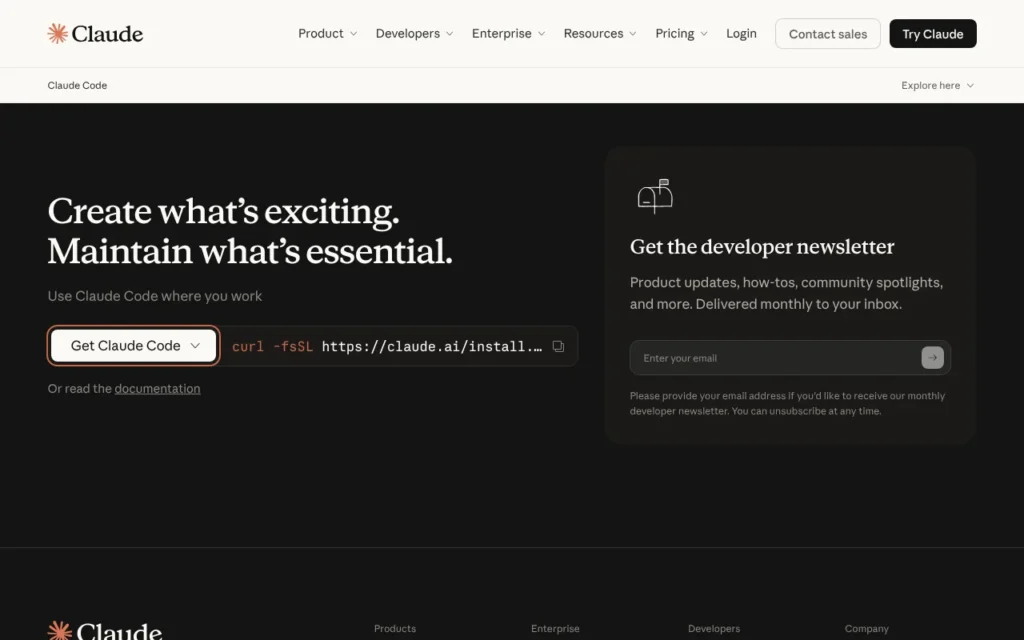
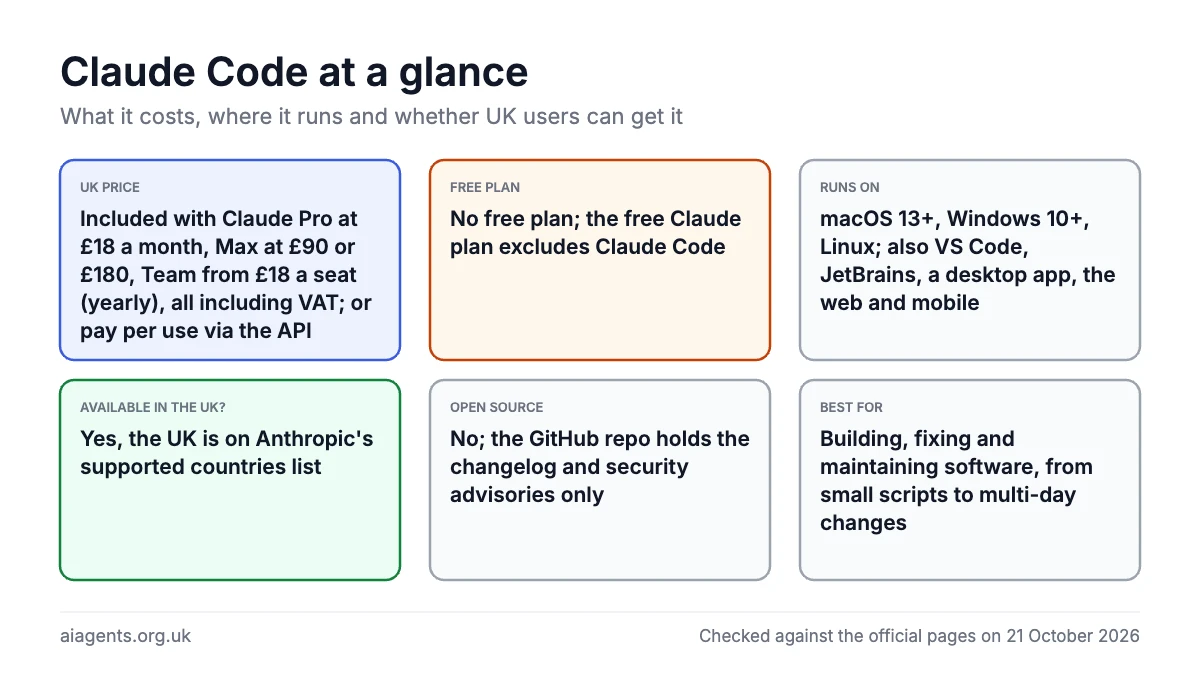
Claude Code is Anthropic's AI coding agent: you describe a job in plain English, and it reads your project, edits the code and runs commands to finish it. It suits developers, and non-developers willing to learn a few basics, who want software built or fixed. There is no free version: it comes with Claude Pro at £18 a month including VAT in the UK, or pay-as-you-go API billing. It works in the UK. Know this first: it acts on your computer, and by default a second AI model, not you, decides which of its actions are safe.
Key facts
- What it is: An AI coding agent that reads your project, edits files, runs commands and handles Git, steered in plain English
- Made by: Anthropic, a US company (Anthropic Ireland, Limited is the data controller for UK users)
- Price: Included with Claude Pro at £18 a month, Max from £90, Team from £18 a seat (yearly), all including VAT, or pay per use via the API, as of 17 October 2026
- Free plan or trial: No free plan; the free Claude plan excludes Claude Code. Trials only on sales-assisted Enterprise
- Runs on: macOS 13+, Windows 10 (1809)+, Ubuntu 20.04+, Debian 10+, Alpine 3.19+; also VS Code, JetBrains, a desktop app, the web and mobile
- What you need: A paid Claude plan or Anthropic Console account, an internet connection, 4 GB of RAM and a project folder
- Open source: No. The GitHub repo holds the changelog and security advisories, but the code is proprietary
- Available in the UK: Yes, the UK is on Anthropic's supported countries list
- Best for: Building, fixing and maintaining software, from small scripts to multi-day changes
- Official site: claude.com/product/claude-code
On this page
- What is Claude Code?
- What do people use Claude Code for?
- What's new in Claude Code in October 2026?
- Claude Code pricing: how much does it cost in the UK?
- What do you need to run Claude Code?
- How to install and set up Claude Code
- How to use Claude Code: first things to try
- Can Claude Code use a local LLM?
- Claude Code commands and shortcuts cheat sheet
- Tips for better results and lower usage
- Claude Code skills, plugins, hooks and subagents
- Best Claude Code tutorial videos
- Official Claude Code links
- Is Claude Code safe? Privacy, security and UK GDPR
- Claude Code vs Cursor, Codex and other alternatives
- Who should use Claude Code?
- Frequently asked questions
What is Claude Code?
Claude Code is an AI agent for software work. A chatbot hands you code to paste; Claude Code edits your files, runs the code to check it and reports back.
- You start it in a project folder, from the terminal (the text window where you type commands), the Claude desktop app, VS Code or a browser.
- You type what you want, such as "add a contact form to this website".
- It plans the change, edits the files and runs tests.
- It checks with you before risky steps, depending on the permission mode, and can save your work with Git (the tool developers use to track changes).
It only runs Anthropic's models. As of 17 October 2026 the default is Opus 5.5, with Sonnet 5.5 and Haiku 5.5 also available, and Fable 5.1 on Max and up (Pro pays for it with usage credits). Anthropic does not support other companies' models, so there is no official private, local-model option. There is an unofficial one: Ollama can point Claude Code at a model on your own Mac (see can Claude Code use a local LLM? below), and our Ollama guide covers the models. For documents and research rather than code, Anthropic's Claude Cowork, now part of the main Claude app, is the closer fit.
What do people use Claude Code for?
Mostly code, but a growing share of other work. Anthropic studied about 400,000 Claude Code sessions from about 235,000 people between October 2025 and April 2026 (published 16 June 2026). It found:
- Code is most of it: writing new code was 25% of sessions, fixing code 26%, and testing or running other agents 5%.
- The rest surrounds the code: running software was 17%, planning or exploring 14%, and data analysis or documents 13%.
- Less bug fixing: fixing fell from 33% to 19% of sessions over the seven months. Document writing and data analysis roughly doubled, from about 10% to 20%.
- Who uses it: after software jobs, the biggest groups were business and finance; arts, design and media; and management.
- You do not need to code: in sessions that produced code, people outside software jobs at least partly succeeded 88% of the time, against 89% for software workers.
It is also more hands-off than chat. The median Claude Code session that produced a blog post or article had one human prompt, against 13 rounds in chat and Cowork (Economic Index report, June 2026).
What non-developers use it for
- Marketing: Austin Lau, an Anthropic growth marketer who had never opened a terminal, built a Figma plugin for ad variations and a Google Ads copy workflow. Anthropic says each ad went from 30 minutes to 30 seconds (26 January 2026).
- Data and internal tools: Anthropic's data scientists build React apps that chart model performance without being fluent in TypeScript, and its legal team built prototype "phone tree" systems to route colleagues to the right lawyer (24 July 2025).
- Documents and compliance: Swiss bank Pictet checked more than 50 internal directives against current regulations in hours, a job planned as two weeks' work for three people. Another Pictet team automated a weekly newsletter that took three hours a week (Anthropic customer story).
What users say (individual opinions)
- Notes: "I am using Claude code to manage my obsidian vault," wrote roland35 on Hacker News (11 October 2025). They dictate tasks and paste in "pictures of my hand written meeting notes".
- Marketing and PDFs: another Hacker News user uses it "for Marketing tasks that require some code, but also other tasks like writing, design, creating pretty PDFs", though "it does feel like I'm driving a Ferrari to pick up some groceries sometimes" (1 September 2025).
- Research: "Claude Code isn't just for developers. It's for anyone who needs to gather, synthesise, and transform information - then apply their own judgement," wrote Akash Joshi on The Writing Dev (7 February 2026).
If the work lives in files, Claude Code can read, change and check it. Jobs to try:
| Job | Example prompt | Who it suits |
|---|---|---|
| Fix a bug with proof | the basket total is wrong when a discount code is used. write a failing test, fix it, then run all the tests | Developers |
| Analyse data | compare the supplier price lists in the quotes folder, flag any item up more than 10%, and save the result as a spreadsheet | Finance, operations, small-business owners |
| Check documents | check every policy in the policies folder against checklist.md and list the gaps in a table | Compliance, legal, HR |
| Write marketing copy | turn ads.csv into 15 new headlines per ad group within Google's character limits and save an upload-ready CSV | Paid search and content marketers |
| Tidy notes | read today's journal note, link every person and book mentioned, and file it in the right folder | Obsidian and Markdown note-takers |
| Automate a weekly job | summarise each link in links.md in two sentences and draft this week's newsletter in newsletter.md | Anyone with a repeat writing task |
What's new in Claude Code in October 2026?
- 23 October: version 2.1.310, the latest as of 24 October, lets Enterprise owners control who can use cloud sessions and Remote Control by custom role, brings the Monitor tool to Bedrock, Vertex and Foundry, and stops background clean-up deleting recent files such as pasted images (changelog).
- 22 October: version 2.1.309 closed several sandbox and permission gaps, including sandboxed commands on macOS and Linux running shell start-up files outside the sandbox. It also stopped
/rewindrestoringsed -iedits. The same day Anthropic gave Agent Skills, the SKILL.md format Claude Code skills use, to the Agentic AI Foundation under the Linux Foundation, saying 1 million skills have been published and nearly 280 million installed (Anthropic). - 21 October: version 2.1.307 added
@claude review stop(alsooffandpause) to Code Review, which ends an "always review" subscription on a pull request without starting a new review. - 18 to 21 October: versions 2.1.303 to 2.1.306. Version 2.1.304 (19 October) brought
/auto-mode-setup, a guided setup that reads your project and recent sessions to teach auto mode about your environment, to Bedrock, Vertex, Foundry and sessions with telemetry turned off (Pro, Max and Team have had it since version 2.1.228), plus a warning on Pro and Max when resuming an old conversation would use a noticeable share of your five-hour allowance. Version 2.1.306 (21 October) fixed a false "Not logged in" error in cloud sessions. - 16 October: version 2.1.302 lets you choose which model runs auto mode's local safety checks (not the server-side ones).
- 15 October: Code Review became generally available on Team and Enterprise. Several agents check each GitHub pull request (a proposed code change) for bugs, usually in 6 to 10 minutes, Anthropic says. Eligible Enterprise organisations can claim at least $10,000 (about £7,500) of review credits by 15 January 2027.
- 14 October: version 2.1.299 added idle compaction, which summarises long idle conversations so your next message uses less allowance. Version 2.1.300 improved OpenTelemetry tracing (still in beta), for companies that monitor Claude Code activity.
- 9 October: version 2.1.296 lets you pin every workflow subagent (the helper agents a workflow starts) to one model, a simple cost control.
- 7 October: Claude Haiku 5.5 launched and became Claude Code's default Haiku model in version 2.1.293.
- 5 October: Anthropic disclosed a high-severity flaw (CVE-2026-103435) that let file writes escape the project folder, fixed in May in version 2.1.129.
- Late September: Opus 5.5 (22 September) and Sonnet 5.5 (28 September) launched. Version 2.1.283 (25 September) made auto mode the starting mode on every plan (Pro, Max and Team had it from August), and version 2.1.277 (18 September) lets Claude Code read an AGENTS.md file when a project has no CLAUDE.md.
Claude Code pricing: how much does it cost in the UK?
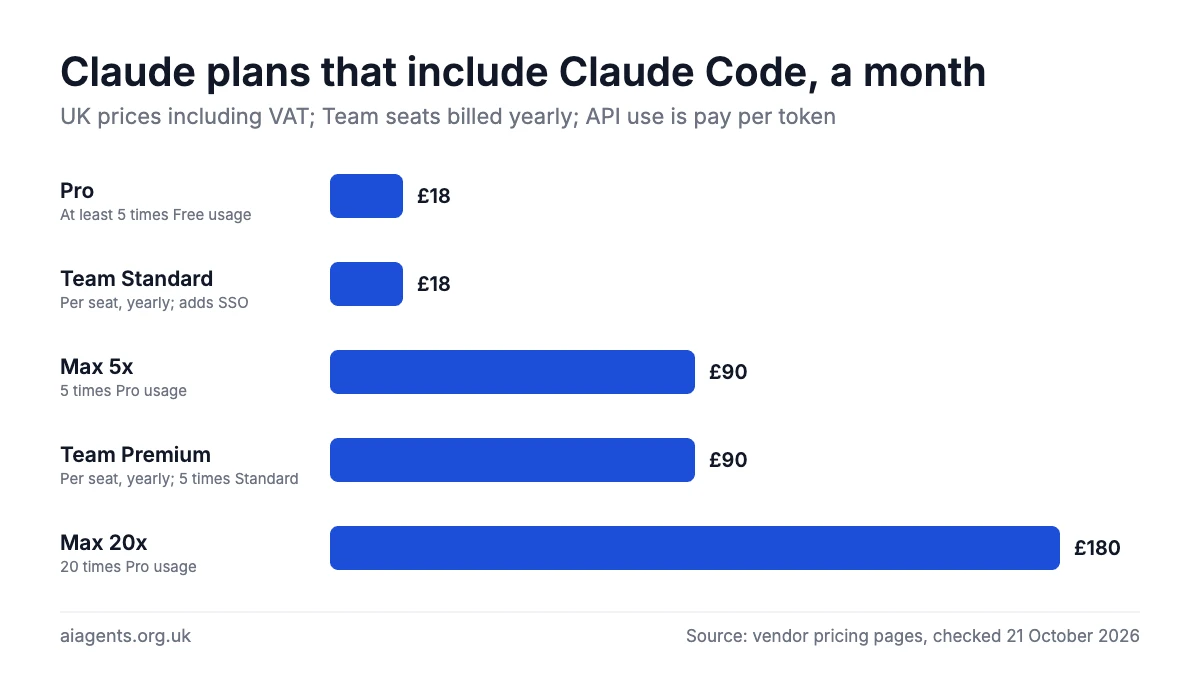
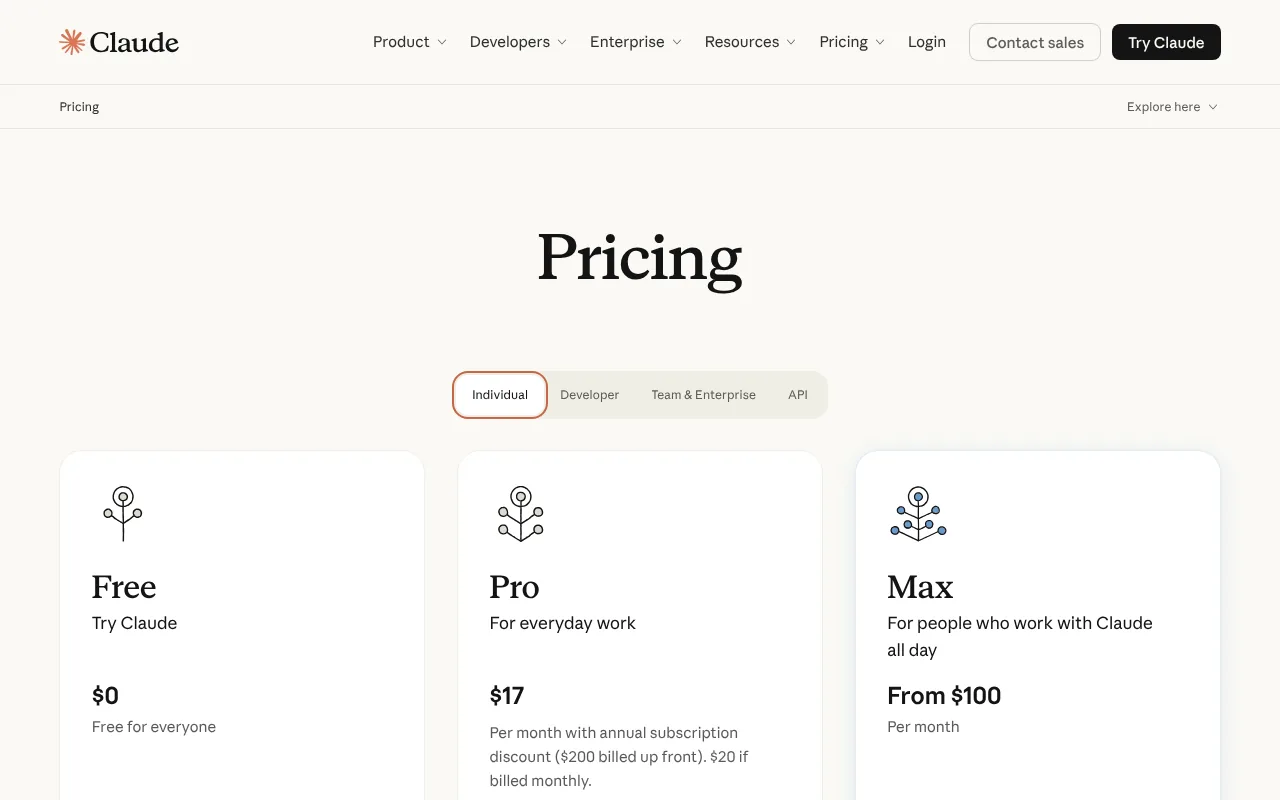
Claude Code comes with every paid Claude plan, or you pay per use through an Anthropic Console (API) account. Anthropic shows UK visitors pound prices, including 20% VAT, for Pro, Max and Team. Enterprise and API prices are in US dollars, excluding tax, converted here at $1 = £0.75. Prices are as of 17 October 2026.
| Plan | Price | In pounds | What you get |
|---|---|---|---|
| Free | $0 | £0 | Chat only, no Claude Code |
| Pro | $20 a month, or $200 a year | £18 a month, or £180 a year, VAT included | Claude Code, at least 5 times Free usage |
| Max 5x | $100 a month | £90, VAT included | 5 times Pro usage, plus $100 a month of API credits (not for Claude Code) |
| Max 20x | $200 a month | £180, VAT included | 20 times Pro usage, plus $200 a month of API credits (not for Claude Code) |
| Team, Standard seat | $20 a seat a month yearly, $25 monthly | £18 or £22.50, VAT included | More than Pro, plus SSO; 2 to 150 seats |
| Team, Premium seat | $100 a seat a month yearly, $125 monthly | £90 or £113, VAT included | 5 times a Standard seat |
| Enterprise | $20 a seat a month yearly, plus usage at API rates | about £15 a seat plus usage | 20-seat minimum, audit logs, custom retention |
| API (Console) | Pay per token | See below | No plan limits |
Usage limits in plain terms. Your allowance refills every five hours on a rolling basis, paid plans add a weekly cap, and chats and Claude Code share one pool. There is no fixed message count: big projects and stronger models use more. At the limit you wait, upgrade, or turn on usage credits at API rates. Type /usage to check where you stand.
API prices per million tokens (tokens are small chunks of text):
| Model | Input | Output |
|---|---|---|
| Opus 5.5 (default) | $4 (about £3) | $20 (about £15) |
| Sonnet 5.5 | $2 (about £1.50) | $10 (about £7.50) |
| Haiku 5.5 (prompts up to 100K tokens) | $0.10 (about 8p) | $0.50 (about 38p) |
| Fable 5.1 | $10 (about £7.50) | $50 (about £37.50) |
Costs that catch people out:
- Anthropic puts the average enterprise cost at about $13 (about £10) per developer per active day, or $150 to $250 (about £113 to £188) a month.
- Code Review and fast mode (double price on Opus 5.5) cost extra.
- Long sessions resend the whole conversation, so
/clearbetween jobs.
For the wider picture, see what AI agents cost in the UK.
What do you need to run Claude Code?
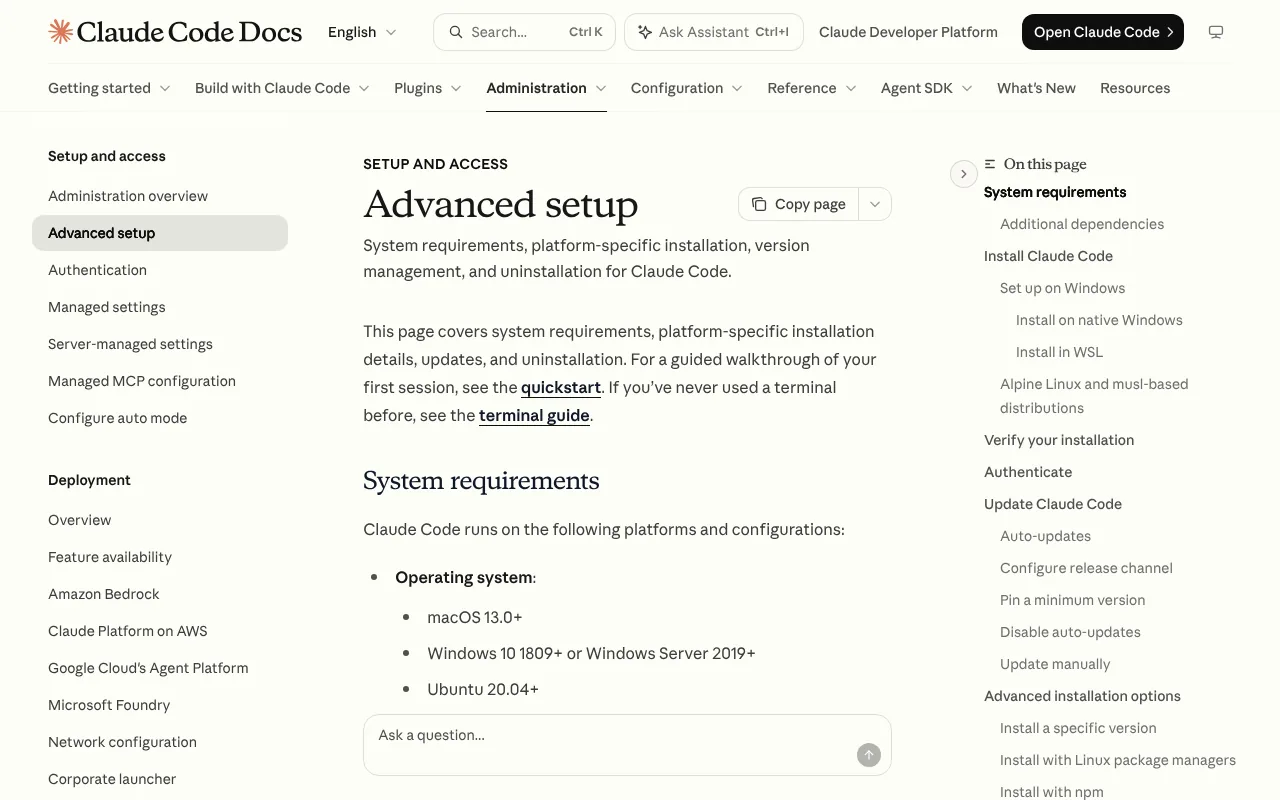
- A computer: macOS 13 or later, Windows 10 (version 1809) or later, or a recent Ubuntu, Debian or Alpine Linux, with 4 GB of RAM. Apple Silicon, Intel and ARM all work.
- An account: Pro, Max, Team, Enterprise or an Anthropic Console account, and you must be 18 or over. Amazon Bedrock, Google Cloud and Microsoft Foundry also work.
- An internet connection: Claude Code does not work offline.
- Optional extras: Git for Windows, a GitHub account and VS Code.
- Skills: no coding needed, but knowing how to open a terminal helps. The desktop app avoids the terminal entirely.
How to install and set up Claude Code
Anthropic recommends its native installer, which updates itself and needs no Node.js.
How to install Claude Code on Mac
- Open Terminal: press Cmd and Space, type Terminal, press Return.
- Paste the official command and press Return. It shows no progress while it downloads.
curl -fsSL https://claude.ai/install.sh | bash- Open a new Terminal window and check it worked. Success is a version number followed by "(Claude Code)".
claude --version- Move into your project folder and start it.
cd ~/Documents/my-project
claude- Log in through your browser and confirm you trust the folder when asked. The Claude Code prompt appears.
Homebrew also works (brew install --cask claude-code), but does not update itself, so run brew upgrade claude-code now and then.
How to install Claude Code on Windows
- Open PowerShell from the Start menu. The prompt starts with
PS C:\. You do not need Administrator rights. - Paste this and press Enter.
irm https://claude.ai/install.ps1 | iex- In the older Command Prompt (no
PSat the start), use this instead.
curl -fsSL https://claude.ai/install.cmd -o install.cmd && install.cmd && del install.cmd- Install Git for Windows if you can (otherwise Claude Code runs commands through PowerShell).
- Open a new window and run
claude --version. A version number means success. - Go to your project with
cd, typeclaudeand log in through your browser.
WinGet also works: winget install Anthropic.ClaudeCode. The safety sandbox does not run on native Windows, so use WSL 2 (Windows Subsystem for Linux) if you want it.
Linux, the desktop app and the web
On Linux, use the Mac command or Anthropic's apt, dnf and apk repositories. The Claude desktop app (Mac, Windows, Linux in beta) includes Claude Code with no terminal: sign in and click the Code tab. Or use a browser at claude.ai/code, where tasks run in Anthropic's cloud.
How to use Claude Code in VS Code
- Check you have VS Code 1.94.0 or later.
- Open Extensions (Cmd+Shift+X on Mac, Ctrl+Shift+X on Windows), search "Claude Code" and click Install.
- Click the Spark icon at the top right of an open file.
- Click Sign in and approve in your browser.
Proposed edits appear as diffs you accept or reject. The same extension works in Cursor.
How to update Claude Code
The standard install updates itself in the background and uses the new version the next time you start Claude Code. To check which version you have, or to update Claude Code straight away:
claude --version
claude update
Homebrew and WinGet installs do not update themselves: run brew upgrade claude-code or winget upgrade Anthropic.ClaudeCode. The latest version is listed in the changelog on GitHub (2.1.310 as of 24 October 2026). Type /config to switch to the "stable" release channel, which runs about a week behind and skips releases with major regressions.
How to uninstall Claude Code
On Mac or Linux:
rm -f ~/.local/bin/claude
rm -rf ~/.local/share/claude
On Windows, in PowerShell:
Remove-Item -Path "$env:USERPROFILE\.local\bin\claude.exe" -Force
Remove-Item -Path "$env:USERPROFILE\.local\share\claude" -Recurse -Force
Otherwise use brew uninstall --cask claude-code, winget uninstall Anthropic.ClaudeCode or npm uninstall -g @anthropic-ai/claude-code. To wipe settings and history too, delete ~/.claude and ~/.claude.json after removing the VS Code extension and desktop app.
How to use Claude Code: first things to try
Be specific: "fix the login bug where users see a blank screen" beats "fix the bug".
- Get a tour:
what does this project do? - Create a memory file:
/initwrites a CLAUDE.md with your build and test steps, which Claude reads every session. - Plan first: press Shift+Tab to reach plan mode, then type
plan how to add online booking to this site - Build something small:
create a one-page website for a florist in Leeds with opening hours, prices and a contact form - Tidy business data:
read sales-2026.csv and save total sales by month to summary.csv - Fix and test:
write tests for the auth module, run them, and fix any failures - Save your work:
commit my changes with a descriptive message
How to run Claude Code in terminal
Open a terminal, cd into your project and type claude. Use claude -p "explain this script" for a one-off answer, claude -c to continue your last conversation and /exit to leave.
How to remove MCP from Claude Code
MCP connects Claude Code to tools such as Google Drive or Jira (our MCP guide explains it). To remove a server, list what is connected, then delete it by name.
claude mcp list
claude mcp remove <name>
If the name exists in more than one scope (local, project or user), say which:
claude mcp remove <name> --scope projectInside a session, /mcp lets you switch servers off instead.
Can Claude Code use a local LLM?
Officially, no. Anthropic's gateway documentation says it does not support routing Claude Code to non-Claude models through any gateway. Unofficially, yes: Ollama has an Anthropic-compatible API, lists Claude Code as an integration on its own site, and can start Claude Code pointed at a model running on your Mac. Anthropic will not help if it breaks, and small local models are far weaker than Claude at agentic coding, but it works for private experiments and for code that must not leave your machine.
- Install Ollama and download a model that supports tool calling (our Ollama guide explains both), then install Claude Code as above.
- Run the command below and pick a model. Ollama recommends a context window of 64K tokens or more for repositories, which needs a lot of memory: on a 16 GB Mac, Ollama's cloud models are the practical choice, which means your code leaves your machine again.
ollama launch claudeTo set it up by hand, point Claude Code at the local Ollama server with three environment variables, then start it with an Ollama model:
export ANTHROPIC_AUTH_TOKEN=ollama
export ANTHROPIC_API_KEY=""
export ANTHROPIC_BASE_URL=http://localhost:11434
claude --model qwen3.8:27b
Anthropic's documentation says requests sent with a gateway credential like this do not count against a claude.ai subscription. Ollama says basic chat, file edits and tool calling work with compatible models, while hosted web search and some advanced tool controls do not. If you want a coding agent that supports local models properly, Kilo Code and the Codex CLI are the supported routes.
Claude Code commands and shortcuts cheat sheet
Every entry is checked against Anthropic's commands, interactive mode and CLI reference pages as of 24 October 2026. Type / in a session for the full list, which varies by plan.
Slash commands
| Command | What it does |
|---|---|
/init | Writes a starter CLAUDE.md for the project |
/memory | Opens CLAUDE.md and memory files; turns auto memory on or off |
/clear | Starts a new conversation; project memory stays |
/compact [focus] | Summarises the conversation to free space, such as /compact keep the test results |
/plan [task] | Switches to plan mode, optionally with a task |
/model | Changes the model and saves it as your default |
/usage | Shows cost, plan limits and what is using them (also /cost) |
/code-review | Checks your changes for bugs; add --fix to apply fixes (also /review) |
/rewind | Restores code, conversation or both to an earlier prompt (also /undo) |
/resume | Reopens an earlier conversation |
/permissions | Sets allow, ask and deny rules |
/mcp | Lists MCP servers; enables, disables or reconnects them |
/plugin | Browses, installs and switches plugins on or off |
/agents | No longer a menu: ask Claude to create subagents, or edit .claude/agents/ |
/doctor | Checks your setup and offers fixes |
Keyboard shortcuts and terminal commands
| Key or command | What it does |
|---|---|
Shift+Tab | Cycles modes: Manual, accept edits, plan, auto |
Esc | Stops Claude mid-task; work so far is kept |
Esc Esc | Clears your draft; on an empty prompt, opens the rewind menu |
Ctrl+C | Interrupts; when idle, press twice to quit |
@ | Mentions a file, with autocomplete |
! | Runs a shell command yourself; Claude reads the output |
Ctrl+G | Opens your prompt, or a plan, in your text editor |
Shift+Enter or \ then Enter | Adds a new line |
claude -p "question" | Answers once and exits; also reads piped input |
claude -c | Continues the latest conversation in this folder |
claude -r "name" | Resumes a session by name or ID; on its own, opens a picker |
claude --model sonnet | Sets this session's model: opus, sonnet, haiku or fable |
claude --permission-mode plan | Starts in a chosen mode, such as plan, manual or auto |
claude update | Updates now |
claude doctor | Checks the install and settings without starting a session |
Two things in older tutorials have changed. The # memory shortcut went in version 2.0.70 (15 December 2025), so ask Claude to "remember" instead. And /agents has not opened a menu since version 2.1.198.
Tips for better results and lower usage
From Anthropic's best practices and managing costs guides, as of 24 October 2026:
- Keep CLAUDE.md short. Run
/init, then cut. Anthropic suggests under 200 lines and asks of each line: "Would removing this cause Claude to make mistakes?" Move occasional procedures into skills, which load only when used. - Plan only when it helps. Use plan mode for changes across several files or unfamiliar code. Anthropic's rule: "If you could describe the diff in one sentence, skip the plan."
- Give Claude a check it can run. Tests, a build or a screenshot to compare let it catch its own mistakes. Ask to see the test output, not just a claim that it worked.
- Clear rather than compact.
/compactreads the whole conversation, so it is a large request itself;/clearcosts nothing. After two failed corrections, clear and write a better first prompt. - Match the model to the job. Anthropic says Sonnet handles most coding tasks well and costs less than Opus, so save Opus for complex design and multi-step reasoning. Lower
/effortfor simple tasks. - Use checkpoints, but keep Git. Each prompt creates a checkpoint you can restore with
/rewind. Checkpoints cover only Claude's own file edits, not shell commands, so commit before risky work. - Check your usage. On a paid plan,
/usagesuggests a fix for anything behind 10% or more of recent usage. Ask side questions with/btwto keep them out of the conversation.
Claude Code skills, plugins, hooks and subagents: what they are
Four features let you shape how Claude Code works, and they come up in most tutorials. All four are set up with plain files in your project or home folder.
- Skills. A skill is a folder with a SKILL.md file of instructions, saved in
.claude/skills/for one project or~/.claude/skills/for all of them. Type/skill-nameto run one, or let Claude load it when its description matches your request. The step-by-step version is in how to install and use skills in Claude Code. Our weekly chart of the top 20 agent skills tracks the most popular, and are agent skills safe? explains what to check before you install one. - Plugins. A plugin bundles skills, subagents, hooks and MCP servers so they install as one unit. Type
/pluginin a session to browse Anthropic's official marketplace. A plugin runs with your user permissions, so read what is in it first; see our Claude plugin directory review. - Hooks. Commands that run at set moments, such as a code formatter after every edit or a check before a file is written. They are listed in your settings file.
- Subagents. Helper agents, each with its own instructions and tools, that Claude Code can hand part of a job to. They are Markdown files in
.claude/agents/. Developers can build their own agents on the same machinery with the Claude Agent SDK.
Plan mode (Shift+Tab) sits alongside these: Claude Code reads and plans but changes nothing until you approve the plan, which is the safest way to start a big change.
Best Claude Code tutorial videos
Video: Futurepedia on YouTube.
Futurepedia's walkthrough takes a non-coder from first prompt to a live website, covering plan mode, CLAUDE.md, MCP and GitHub.
| Video | Channel | Length | Uploaded | Best for |
|---|---|---|---|---|
| Full Claude Code Tutorial for Non-Technical Beginners in 2026 (step-by-step) | Futurepedia | 40:52 | 30 April 2026 | Non-coders building a first project end to end |
| How to Install Claude Code on Windows and Mac (Beginner Step by Step, 2026) | AI with Ashlee | 6:56 | 11 October 2026 | Fastest first install, terminal or desktop app |
| How to Install Claude Code in Terminal on macOS (Step by Step) 2026 | Checkmark Academy | 2:58 | 30 July 2026 | A quick Mac terminal install |
| Claude Code Tutorial 2026: Install in VS Code + Models, Modes & Settings Explained! | Web Tech Knowledge | 5:19 | 17 October 2026 | Using it inside VS Code |
| Getting started with Claude Code Projects | Claude (official) | 4:33 | 9 October 2026 | Projects beta: parallel cloud tasks |
| Claude Code Full Course 2026 : Everything You Need to Know (No Coding Needed) | GenAI Unplugged | 5:12:02 | 12 October 2026 | Going deep on skills, hooks, MCP and subagents |
Watch AI with Ashlee's seven-minute install first, then Futurepedia's build. Treat the GenAI Unplugged lesson on running it free through OpenRouter with caution: Anthropic does not support non-Claude models.
Official Claude Code links
| Link | What it's for |
|---|---|
| Product page | Overview and where it runs |
| Documentation | The full official docs |
| Install and setup | Requirements, install, update and uninstall |
| Quickstart | Your first session, step by step |
| Pricing | Plans, usage and API prices |
| Changelog | What changed in each version |
| Security advisories | Published vulnerabilities and fixes |
| Data usage | Training, retention and telemetry |
| Status page | Check for outages |
| Claude Code 101 | Anthropic's 12-lesson introductory course |
Is Claude Code safe? Privacy, security and UK GDPR
It is as safe as the permissions you give it. Claude Code can reach anything your user account can, so treat it like a new hire with your laptop.
Permissions. Terminal and VS Code sessions now start in auto mode (on Pro, Max and Team since August 2026, on every plan since version 2.1.283): a separate classifier model reviews each action and blocks ones it judges unsafe, instead of asking you. Manual mode starts read-only and asks before every edit or command.
Where your data goes. Prompts, the code it reads and its replies go to Anthropic, encrypted in transit. Anthropic's privacy policy (effective 10 September 2026) names Anthropic Ireland, Limited as the controller for UK users and says data goes to US servers under UK adequacy rules and standard contractual clauses. Anthropic's API offers US-only or global processing, with no UK option. Claude Code also keeps plain-text transcripts on your computer, for 30 days by default.
Training. On Free, Pro and Max, Anthropic lists model training as opt-out, so assume it is on until you switch Model Improvement off. On, sessions can train future models and are kept for five years; off, 30 days. On Team, Enterprise and the API, Anthropic says it does not train on your code or prompts unless your organisation opts in.
Known issues. Anthropic published several high-severity fixes in 2026, including a sandbox escape (25 June) and the folder-escape flaw (5 October). Keep auto-updates on.
Practical settings:
- For client or sensitive work, start in Manual mode:
claude --permission-mode manual - Block secret files in your project's
.claude/settings.json:
{
  "permissions": {
    "deny": ["Read(./.env)", "Read(./secrets/**)"]
  }
}- Turn on the sandbox with
/sandbox(Mac, Linux or WSL 2) to limit which files and websites commands can reach. - On Pro or Max, switch off Model Improvement at claude.ai/settings/data-privacy-controls.
- Set
CLAUDE_CODE_DISABLE_NONESSENTIAL_TRAFFIC=1to stop usage metrics, error reports and surveys. - Only connect MCP servers you trust. Anthropic does not security-audit them.
If you handle customers' personal data, use Team or Enterprise rather than a personal Pro account, and read our guide to AI agents and UK GDPR.
Claude Code vs Cursor, Codex and other alternatives
In the Stack Overflow Developer Survey 2026 (published 6 October), 65.5% of those answering its coding-agent question used Claude Code, ahead of GitHub Copilot (58.7%), OpenAI Codex (29.5%), Cursor (25.5%), Google Antigravity (16.0%) and Kilo Code (3.2%). Prices are as of 17 October 2026.
| Tool | Price from | Where it runs | Models | Open source | Best for |
|---|---|---|---|---|---|
| Claude Code | Pro, £18 a month including VAT | Terminal, IDEs, desktop, web, Slack | Claude only | No | Handing off whole tasks |
| Cursor | Free; Plus $8 (about £6) | Its own editor, plus cloud agents | Grok; others at API list price from Premium ($30) | No | Hands-on editing with AI help |
| OpenAI Codex | ChatGPT Free (limited); Plus £20 a month (UK, including VAT) | Web, CLI, IDE, desktop, iOS | OpenAI's GPT-6 family, or local models via Ollama or LM Studio | CLI only (Apache 2.0) | Businesses already on ChatGPT |
| GitHub Copilot | Free (limited); Pro $10 (about £7.50) | VS Code, JetBrains, Visual Studio, CLI, GitHub | Several, including Claude and OpenAI | No | Teams already on GitHub |
| Google Antigravity | Free tier; business from $30 a seat | Desktop app, CLI, IDE, SDK | Google Gemini | No | Trying an agent for free |
| Kilo Code | Free; pay model rates or Kilo Pass from $19 (about £14) | VS Code, JetBrains, CLI | Any provider, or local via Ollama or LM Studio | Yes (MIT) | Private local models |
Claude Code vs Cursor
Cursor is an AI code editor that also runs its own agents, locally and in the cloud; Claude Code is an agent you hand a job to. SpaceX has owned Cursor since 14 August 2026, and it is now sold through the X Subscription. Its cheapest paid plan covers only Grok models. Pick Cursor if you want to stay hands-on.
Claude Code vs Codex
OpenAI Codex is the closest rival: a terminal agent with desktop, web and editor versions. It is cheaper to start, because every ChatGPT plan includes it, Free among them, and its command-line tool is open source. On 7 October OpenAI said Codex and ChatGPT Work together had 40 million active users. Pick whichever matches the subscription you already pay for. If code must never leave your machine, Kilo Code or the Codex CLI with a local model is the supported route. Claude Code can be pointed at a local Ollama model, but Anthropic does not support that setup. Our guide to Claude Code with Ollama covers how to do it, which models cope and what you give up.
Claude Code vs OpenCode and Base44
Two other names come up in searches. OpenCode is an open-source terminal coding agent that works with many model providers, including local models, so it suits developers who want a free, provider-neutral tool without Anthropic's support behind it. Base44 is a no-code app builder owned by Wix: you describe an app and it builds and hosts it, with no code to look after. It is not a coding agent, so compare it with Claude Code only if you want a finished app rather than control over the code.
Who should use Claude Code?
It suits developers handing off tests and bug fixes, small-business owners building simple sites and internal tools, and GitHub teams wanting every change reviewed. Our guide to AI agents for UK small businesses has more ideas.
Skip it if everything must stay on your own computer and you want a supported setup (see how to run AI agents on your Mac), if you want a free tool, or if your work is mostly documents and email, where Claude Cowork fits better.
Frequently asked questions
What is Claude Code?
Claude Code is Anthropic's AI coding agent. You describe a task in plain English, and Claude Code reads your project, edits the code, runs commands and tests, and can commit changes with Git. Claude Code runs in the terminal, VS Code, JetBrains editors, the Claude desktop app, a browser and the Claude mobile apps, using only Anthropic's Claude models.
How much does Claude Code cost in the UK?
Claude Code is not free. As of 17 October 2026, Claude Code comes with Claude Pro at £18 a month including VAT. Max costs £90 or £180 a month, Team seats start at £18 on yearly billing, and Enterprise is $20 (about £15) a seat plus usage. You can also pay per token through the API.
How do I install Claude Code on Windows?
Open PowerShell and run irm https://claude.ai/install.ps1 | iex. In Command Prompt, use Anthropic's install.cmd command, or install Claude Code with winget install Anthropic.ClaudeCode. Then open a new window and run claude --version to check it worked. You need Windows 10 version 1809 or later, and Git for Windows is recommended.
How do I install Claude Code on Mac?
Open Terminal and run curl -fsSL https://claude.ai/install.sh | bash. The installer shows no progress, so wait for it to finish, then open a new window and run claude --version. A version number means Claude Code is installed. You need macOS 13 or later and a paid Claude plan or Anthropic Console account. Homebrew works too, but does not update Claude Code automatically.
Claude Code vs Cursor: which should I use?
Choose Claude Code if you want to hand over whole tasks and let an agent edit and test across your project. Choose Cursor if you prefer working in a code editor, with AI suggestions and its own agents alongside. Cursor has a free plan, while Claude Code needs a paid Claude plan or API credit. You can also run Claude Code inside Cursor through Anthropic's extension.
Claude Code vs Codex: what is the difference?
Both are coding agents with terminal, desktop, web and editor versions. Claude Code uses Anthropic's Claude models and needs a paid Claude plan or API credit. OpenAI Codex uses OpenAI's models, comes with every ChatGPT plan including Free, and has an open-source command-line tool. If your business already pays for ChatGPT or Claude, start with the one you have.
How do I remove an MCP server from Claude Code?
Run claude mcp list to see connected servers, then claude mcp remove <name> to delete one. If Claude Code has the same server saved in more than one scope, add --scope local, --scope project or --scope user to remove the right copy. Inside a Claude Code session, /mcp lets you switch servers off without deleting them.
Is Claude Code free?
No. Claude Code is not free: the free Claude plan does not include it. The cheapest way in is Claude Pro at £18 a month including VAT in the UK (£180 a year), or pay-as-you-go API billing through an Anthropic Console account. There is no trial except on sales-assisted Enterprise plans. Every paid plan has a usage allowance that refills every five hours, with a weekly cap on top.
Can you use Claude Code with Obsidian?
Yes. An Obsidian vault is a folder of Markdown files, so open a terminal in the vault and run claude to search, summarise, link or tidy your notes, in plan mode first if you want to approve every change. Obsidian's community plugin directory also lists several plugins that connect the two, such as Claude Code Connector and Claude Code Sync. They are made by independent developers, not Anthropic or Obsidian, so read what each one can access before installing it.
What does "API error: rate limit reached" mean in Claude Code?
On a Claude plan it usually means you have used your five-hour or weekly allowance: type /usage to see when it resets, wait, or turn on usage credits at API rates. On an API key it means your Console account hit its requests-per-minute or tokens-per-minute limit for your usage tier: slow the work down, or move up a tier by adding credit. Short bursts of this error can also happen when Anthropic's servers are busy; check status.claude.com.
Can Claude Code use a local LLM such as Ollama?
Not officially: Anthropic does not support routing Claude Code to non-Claude models through any gateway. Unofficially, yes. Ollama's Anthropic-compatible API lets you run ollama launch claude and pick a local or cloud Ollama model, or set ANTHROPIC_BASE_URL to http://localhost:11434 by hand. It suits private experiments; for a supported local-model coding agent, use Kilo Code or the Codex CLI.
What are the most useful Claude Code commands?
Start with /init to create a CLAUDE.md memory file, /plan before a big change, /clear between jobs, /compact to shrink a long conversation, /model to switch models, /rewind to undo changes and /usage to check your allowance. Press Shift+Tab to change permission mode, Esc to stop Claude and Esc twice to rewind. In the terminal, claude -c continues your last conversation.
Can non-developers use Claude Code?
Yes. In Anthropic's study of about 400,000 Claude Code sessions, published in June 2026, people outside software jobs at least partly succeeded in 88% of sessions that produced code, against 89% for software workers. Common non-code jobs include data analysis, document checks, marketing copy and tidying notes. You can also use it in the Claude desktop app instead of the terminal.
How can I make Claude Code use less of my allowance?
Type /clear between unrelated jobs, because every message resends the whole conversation. Keep CLAUDE.md under about 200 lines, use Sonnet for most coding and save Opus for hard problems, and plan big changes first so Claude does not build the wrong thing. On a paid plan, type /usage to see what is using your limits and what to change.
Read next
- Cursor review: is the SpaceX-owned editor still worth it?
- Kilo Code review: the open-source coding agent
- Claude Cowork review: Anthropic's agent for office work
- What is MCP? The standard that connects agents to your tools
- OpenClaw: the free AI agent you run yourself
- Claude Code with Ollama and a local model
- LM Studio Bionic explained
Sources
- Claude Code product page, Anthropic - checked 17 October 2026
- Claude Code overview, Anthropic docs - checked 17 October 2026
- Advanced setup: requirements, install and uninstall, Anthropic docs - checked 17 October 2026
- Quickstart, Anthropic docs - checked 17 October 2026
- Use Claude Code in VS Code, Anthropic docs - checked 17 October 2026
- Connect Claude Code to tools via MCP, Anthropic docs - checked 17 October 2026
- Model configuration, Anthropic docs - checked 17 October 2026
- Manage costs effectively, Anthropic docs - checked 17 October 2026
- Choose a permission mode, Anthropic docs - checked 17 October 2026
- Security, Anthropic docs - checked 17 October 2026
- Configure permissions, Anthropic docs - checked 17 October 2026
- Sandboxing, Anthropic docs - checked 17 October 2026
- Data usage, Anthropic docs - checked 17 October 2026
- Monitoring usage with OpenTelemetry, Anthropic docs - checked 17 October 2026
- How Claude remembers your project (CLAUDE.md and AGENTS.md), Anthropic docs - checked 17 October 2026
- Projects, Anthropic docs - checked 17 October 2026
- Code Review, Anthropic docs - checked 17 October 2026
- Code Review costs and usage, Anthropic docs - checked 17 October 2026
- Other LLM gateways, Anthropic docs - checked 22 October 2026
- Claude Code integration, Ollama docs - checked 22 October 2026
- Code Review is now generally available, Claude blog - checked 17 October 2026
- Plans and pricing, Claude - checked 17 October 2026
- What is the Pro plan?, Claude Help Centre - checked 17 October 2026
- What is the Max plan?, Claude Help Centre - checked 17 October 2026
- Using Claude Code with your Pro or Max plan, Claude Help Centre - checked 17 October 2026
- Is my data used for model training?, Anthropic Privacy Centre - checked 17 October 2026
- Claude Code changelog, GitHub - checked 17 October 2026
- Claude Code version release dates, npm registry - checked 17 October 2026
- Claude Code security advisories, GitHub - checked 17 October 2026
- Advisory GHSA-5j29-h97v-84ch, GitHub - checked 17 October 2026
- Anthropic newsroom - checked 17 October 2026
- Supported countries, Anthropic - checked 17 October 2026
- Privacy policy, Anthropic - checked 17 October 2026
- Consumer terms, Anthropic - checked 17 October 2026
- Data residency, Claude Platform docs - checked 17 October 2026
- The results of the 2026 Developer Survey are here, Stack Overflow blog - checked 17 October 2026
- AI data 2026, Stack Overflow Developer Survey - checked 17 October 2026
- Cursor pricing - checked 17 October 2026
- SpaceX completes its $60 billion Cursor acquisition, Advisor Perspectives - checked 17 October 2026
- Codex pricing, OpenAI - checked 17 October 2026
- OpenAI Codex repository, GitHub - checked 17 October 2026
- OpenAI says Codex and ChatGPT Work have 40M active users, Runtime Wire - checked 17 October 2026
- GitHub Copilot - checked 17 October 2026
- GitHub Copilot plans - checked 17 October 2026
- Google Antigravity - checked 17 October 2026
- Google Antigravity pricing - checked 17 October 2026
- Kilo Code pricing - checked 17 October 2026
- Kilo Code repository, GitHub - checked 17 October 2026


