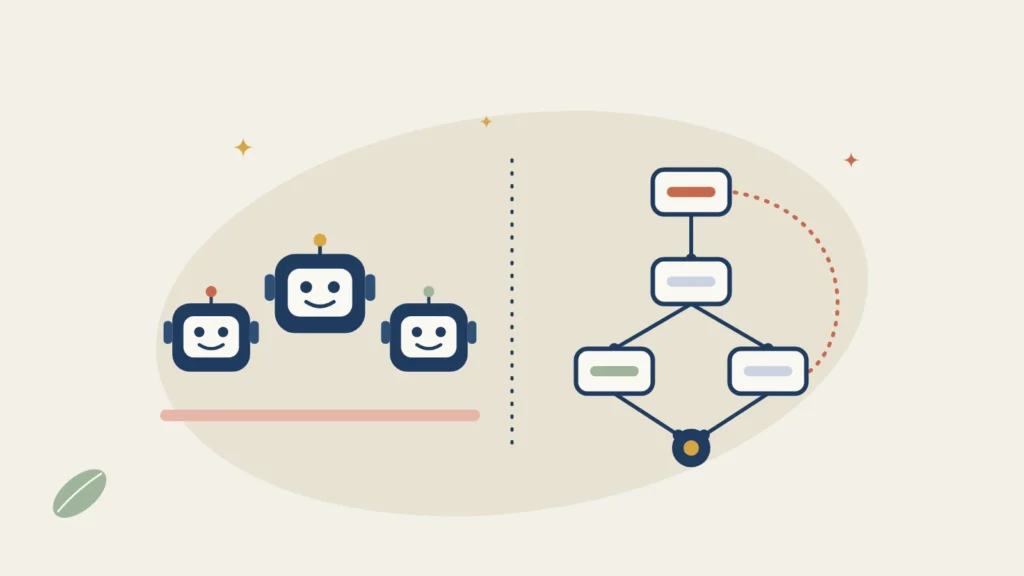
CrewAI and LangGraph are both free, open-source Python frameworks for building AI agents, and both are released under the MIT licence. CrewAI is quicker to start: you describe a team of agents by role and goal, and it runs them in order. LangGraph gives you more control: you draw the workflow as a graph, and it saves its progress so a long job can pause, wait for a person and carry on. Pick CrewAI for a working prototype this week; pick LangGraph when the workflow has to be predictable, auditable or long-running. This guide compares how they work, what the hosted versions cost and what UK businesses should check about data.
Key facts
- Licence and price: both MIT licensed and free to use, change and run on your own machines. You pay only for the AI model behind them
- Latest versions: CrewAI 1.15.43 (19 November 2026); LangGraph 1.2.23 (19 November 2026). Both need Python 3.10 or later
- How you build: CrewAI uses agents with a role, a goal and tasks, grouped into a crew. LangGraph uses nodes and edges that share one state
- Hosted versions: CrewAI AMP has a free plan with 50 workflow runs a month, then a quoted Enterprise plan. LangChain's LangSmith is free for one seat, then $39 a seat a month on Plus (about £30 ‡), before VAT
- Local models: both can run on a model on your own Mac through Ollama, so nothing leaves your machine
- UK data: LangSmith offers an EU region; CrewAI Enterprise can run in your own cloud account. The free open-source versions send data only to the model you choose
On this page
- What is the difference between CrewAI and LangGraph?
- CrewAI vs LangGraph compared
- How much do CrewAI and LangGraph cost?
- Can you run them on your own Mac?
- UK GDPR: where does your data go?
- Which should you choose?
- Frequently asked questions
What is the difference between CrewAI and LangGraph?
They solve the same problem, getting several AI agents to work through a job together, from opposite ends.
CrewAI thinks in people. You write each agent like a job description: a role ("UK tax researcher"), a goal and a short backstory, plus the tools it may use. You give the crew a list of tasks and choose a process: sequential, where tasks run in order, or hierarchical, where a manager agent hands out the work. For jobs that need firmer control, CrewAI Flows let you set out the steps and pass data between them. CrewAI is built separately from LangChain, so it does not pull in that ecosystem.
LangGraph thinks in flowcharts. You define a shared state, add nodes (steps that read and update that state) and connect them with edges, including conditional edges that choose the next step. A checkpointer saves the state after each step, which is what lets a workflow pause for a person to approve something, survive a crash and carry on, or be replayed from an earlier point. LangGraph comes from LangChain, works with LangChain's model and tool integrations, and also has a JavaScript version.
In plain terms ‡: CrewAI asks "who is on the team and what are their jobs?", and LangGraph asks "what are the exact steps and what happens when one fails?".
CrewAI vs LangGraph compared
| CrewAI | LangGraph | |
|---|---|---|
| Made by | CrewAI, Inc. | LangChain |
| Licence | MIT, free | MIT, free |
| Latest version (checked 19 Nov 2026) | 1.15.43 | 1.2.23 |
| Languages | Python 3.10 to 3.13 | Python 3.10+, plus LangGraph.js |
| Building blocks | Agents, tasks, crews, Flows | State, nodes, edges, checkpointers |
| Best at | Role-based teams of agents, fast prototypes | Precise, long-running workflows with approval steps |
| Pause for human approval | Yes, human input on tasks and in Flows | Yes, interrupts with saved state |
| MCP tools | Yes | Yes, through LangChain's MCP adapters |
| Local models (Ollama) | Yes | Yes |
| Hosted platform | CrewAI AMP: Free (50 runs a month) or Enterprise (quoted) | LangSmith: Developer free, Plus $39 a seat a month, Enterprise quoted |
| Learning curve ‡ | Gentler: working crew in an afternoon | Steeper: you design the graph yourself |
How much do CrewAI and LangGraph cost?
The frameworks cost nothing. Your real bill is the AI model the agents call, from OpenAI, Anthropic, Google or a free local model, and that depends on how much text the agents read and write. Multi-agent crews can use a lot, because every agent sends its own prompts. For typical model prices in pounds, see how much AI agents cost in the UK.
You only pay the framework makers if you use their hosted platforms to run, monitor and share agents. Prices are in US dollars and exclude VAT; VAT-registered UK businesses account for VAT under the reverse charge (see VAT on AI subscriptions).
- CrewAI AMP Free: $0, with 50 workflow executions a month, two automations, the visual editor, tracing and community support.
- CrewAI AMP Enterprise: quoted, with executions "sized to workflow", SSO, role-based access, enterprise connectors and the option to run in your own cloud account or on your own servers.
- LangSmith Developer: $0 for one seat and 5,000 traces a month, then pay as you go.
- LangSmith Plus: $39 a seat a month with 10,000 traces, unlimited seats and one small hosted agent server included. Extra servers are billed on the computing time and memory they use.
- LangSmith Enterprise: quoted, with self-hosted or hybrid set-ups and support agreements.
Can you run them on your own Mac?
Yes. Both frameworks run on a Mac and both can talk to a model served by Ollama on the same machine, so prompts and documents never leave it. In CrewAI you point an agent's model at Ollama's local address; in LangGraph you use LangChain's Ollama chat model inside a node. Small local models are less reliable at choosing tools than the big cloud models, so test with the exact model you plan to use ‡. For which Mac and how much memory, see running AI agents on your Mac and the memory calculator.
UK GDPR: where does your data go?
With the open-source frameworks, your data goes wherever you send it: to the model provider you choose and to any tools the agents call. Neither framework needs its maker's servers to run. The hosted platforms are different, because they store traces of what your agents did, which can include customer names, emails and documents. That makes the platform a data processor for you. This is not legal advice; AI agents and UK GDPR has the full checklist.
- LangSmith offers an EU region at eu.smith.langchain.com, hosted on Google Cloud. Choose it when you sign up if your traces will hold personal data.
- CrewAI AMP Enterprise can run in your own cloud account or on your own servers, which keeps the data under your control. Ask CrewAI where Free-plan data is stored before you put personal data through it ‡.
- Either way, sign the provider's data processing agreement, switch off any training on your data, and keep a person approving anything an agent sends to a customer.
Which should you choose?
- You want a working multi-agent prototype quickly: CrewAI. Describe the roles and tasks and run it.
- The workflow must follow exact steps, pause for approval or run for hours: LangGraph, because its saved state makes that dependable.
- Your team writes JavaScript or TypeScript: LangGraph, which has a JavaScript version. CrewAI is Python only.
- You already use LangChain: LangGraph fits straight in.
- You do not want to write code at all: neither. Look at no-code builders in how to build an AI agent or Make vs n8n.
A common path ‡ is to sketch the idea in CrewAI, then rebuild the parts that matter in LangGraph once you know exactly what the steps are. Both are free to try, so building the same small task in each is the quickest way to decide.
Frequently asked questions
Is CrewAI better than LangGraph?
Neither is better overall. CrewAI is faster to learn and suits role-based teams of agents. LangGraph gives you more control over each step and saves progress, which suits long-running workflows that need human approval. Both are free and MIT licensed.
Is CrewAI free?
Yes. The CrewAI framework is open source under the MIT licence and free to use. Its hosted platform, CrewAI AMP, has a free plan with 50 workflow executions a month and a quoted Enterprise plan. You still pay for the AI model your agents use.
Is LangGraph free?
Yes. LangGraph is open source under the MIT licence. LangChain's hosted platform, LangSmith, is free for one seat with 5,000 traces a month; the Plus plan costs $39 a seat a month before VAT.
Does CrewAI use LangChain?
No. CrewAI is built separately from LangChain, so you can use it without installing the LangChain ecosystem. LangGraph is made by LangChain and works with its integrations.
Can CrewAI and LangGraph use local models?
Yes. Both can use a model running on your own computer through Ollama, so your data stays on the machine. Test tool use carefully, because small local models are less reliable at it than large cloud models.
Read next
- How to build an AI agent: a step-by-step guide, with or without code
- What is MCP?
- Run a local LLM on your Mac: the complete guide to private AI agents
- AI agents and UK GDPR: what the ICO expects
Sources
- crewai on PyPI: version 1.15.43, released 19 November 2026, Python 3.10 to 3.13 - checked 19 November 2026
- langgraph on PyPI: version 1.2.23, released 19 November 2026, MIT licence - checked 19 November 2026
- CrewAI pricing: Free and Enterprise plans - checked 18 November 2026
- LangChain pricing: LangSmith Developer, Plus and Enterprise, Agent Server rates - checked 18 November 2026
- LangSmith regions FAQ: EU region - checked 18 November 2026
- CrewAI documentation and LangGraph documentation: concepts, human input, checkpointing, Ollama
‡ = not stated on an official page we opened, or our own reading rather than the source's words.