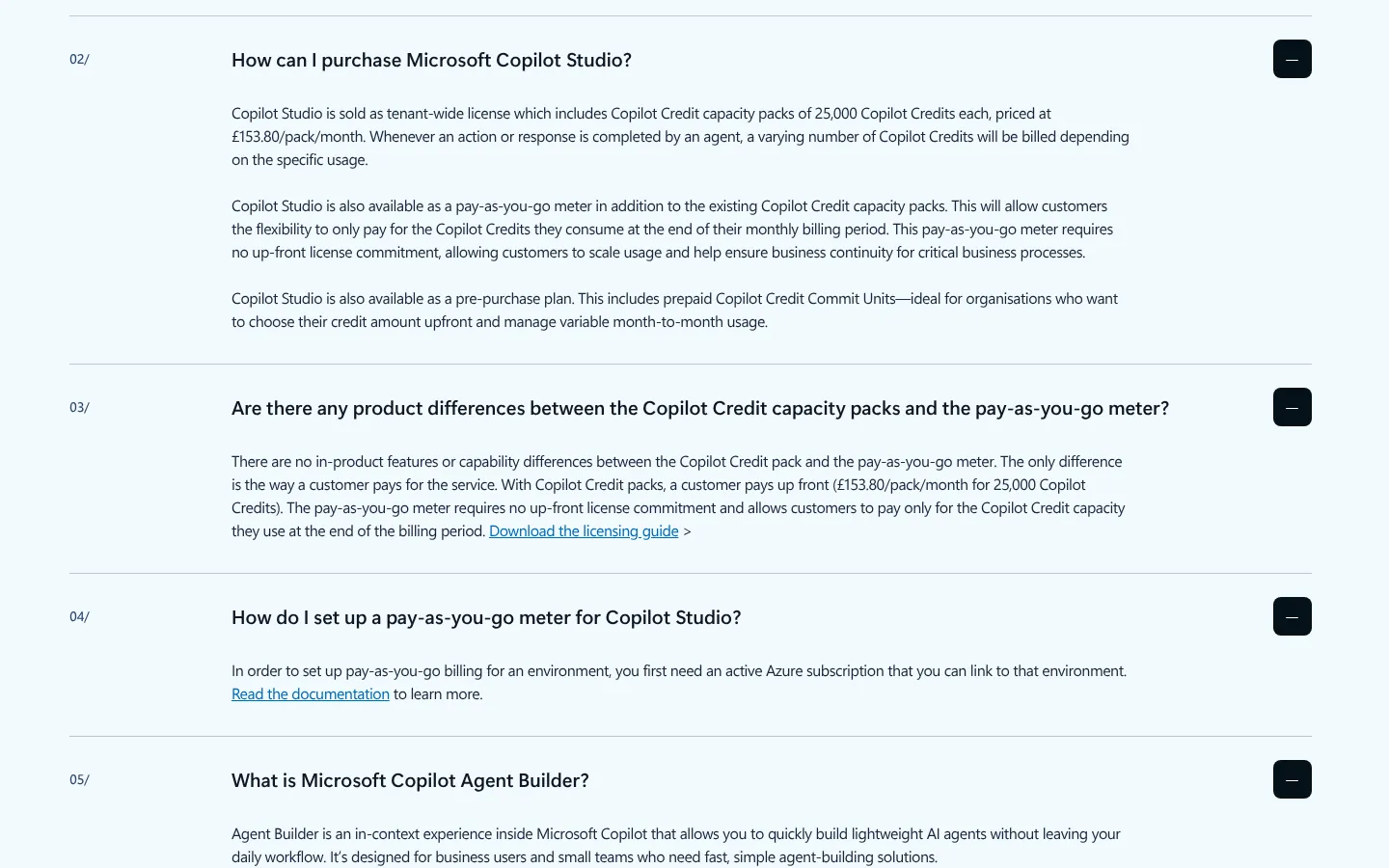
Microsoft Copilot Studio is Microsoft's low-code tool for building AI agents that answer questions and carry out tasks in Teams, Microsoft 365 Copilot, websites and other channels. In the UK it costs £153.80 a month for 25,000 Copilot Credits, or $0.01 a credit pay-as-you-go, as of 29 October 2026. Staff with a Microsoft 365 Copilot licence can build and use internal agents at no extra cost.
Key facts
- What it is: Microsoft's low-code studio for building AI agents and workflows and publishing them to Teams, Copilot, websites and more.
- Credit pack (UK): £153.80 a month for 25,000 Copilot Credits, shared across the organisation.
- Pay-as-you-go: $0.01 a credit (about 0.75p) through Azure; prepaying for a year saves up to 20%.
- With Microsoft 365 Copilot (£23.10 a user a month, paid yearly): internal agents cost licensed staff no credits.
- VAT: the £23.10 price excludes VAT, says Microsoft; the £153.80 pack price has no VAT note.
- Free trial: build and test, but not publish.
- UK data: Microsoft lists the UK regions as "UK South (London), UK West (Cardiff, Durham)"; generative AI may be processed in the UK or the EU Data Boundary, which excludes the UK.
On this page
- What is Copilot Studio?
- Copilot Studio pricing: how much does it cost in the UK?
- How do Copilot Credits work?
- Copilot licensing: what does Microsoft 365 Copilot include?
- Who is Copilot Studio for?
- How do you build your first agent in Copilot Studio?
- What are the limits of Copilot Studio?
- Does Copilot Studio keep data in the UK?
- Copilot Studio vs Copilot agents in Microsoft 365
- Copilot Studio vs other agent builders
- Frequently asked questions
- Read next
What is Copilot Studio?
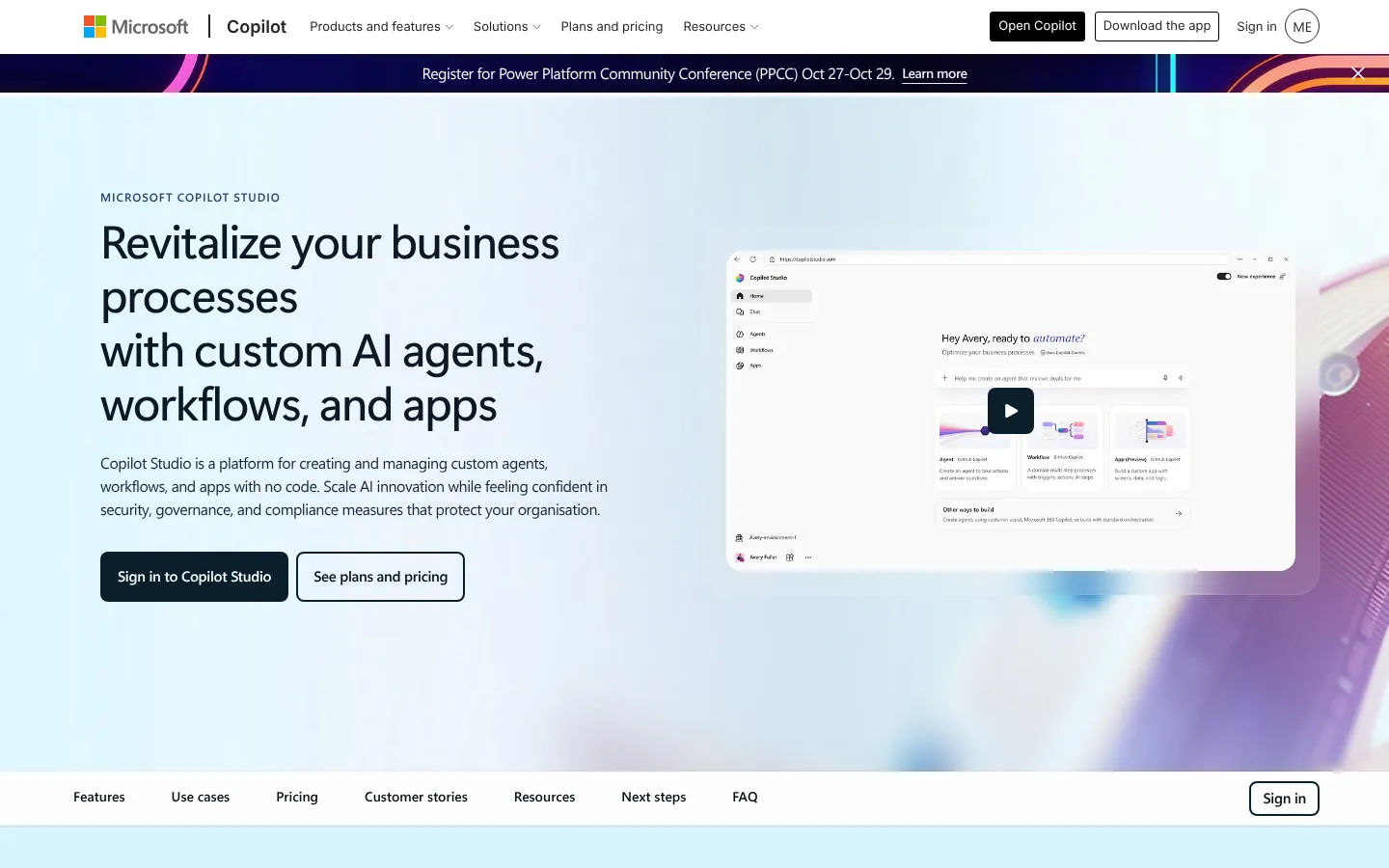
Microsoft Learn calls Copilot Studio "a graphical, low-code studio for building and managing AI-powered agents and workflows". You describe an agent in plain English, connect knowledge, test and publish.
It builds agents, which hold conversations and complete tasks, workflows, which are drag-and-drop automations, and agent flows, a Power Automate-style format an agent can call as a tool. If the difference between a chatbot and an agent is new to you, my guide to what an AI agent is covers it.
Everything runs on a "harness", the engine behind the scenes, which decides what an agent can do and how it is billed:
- GitHub Copilot harness: multi-step reasoning work, including Word, Excel, PowerPoint and PDF files. Microsoft says customer data is not sent to the GitHub Copilot service.
- Customer Conversation harness: customer chat and phone agents that can hand over to a person.
- Standard harness: rule-based agents that follow topics you design.
It runs in a browser at copilotstudio.microsoft.com. Microsoft's UK product page claims "90% of the Fortune 500 has used Copilot Studio".
Copilot Studio pricing: how much does it cost in the UK?
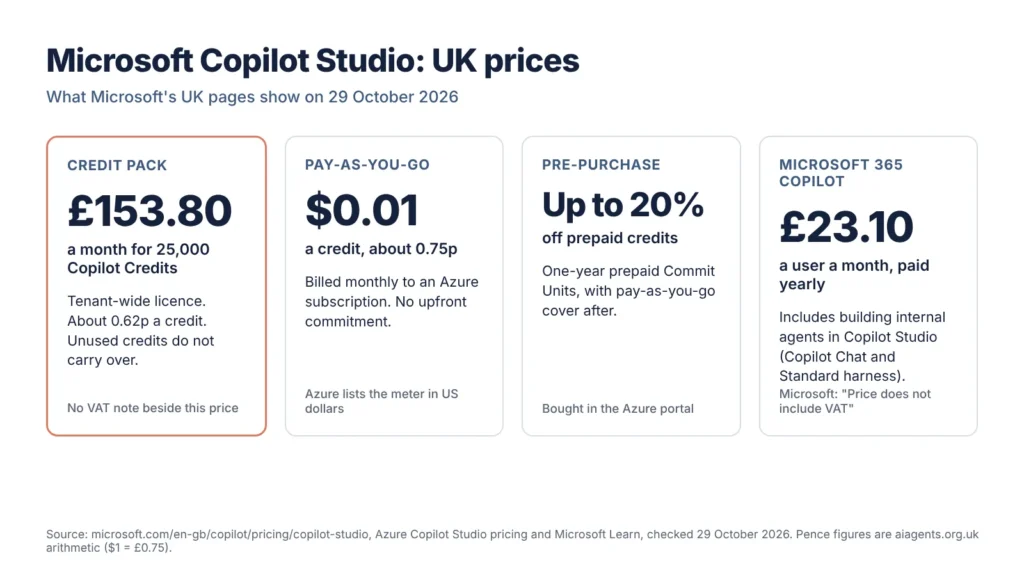
Copilot Studio costs £153.80 a month for each pack of 25,000 Copilot Credits on Microsoft's UK site, or $0.01 (about 0.75p) a credit on pay-as-you-go, as of 29 October 2026. You can also prepay for a year and save up to 20%.
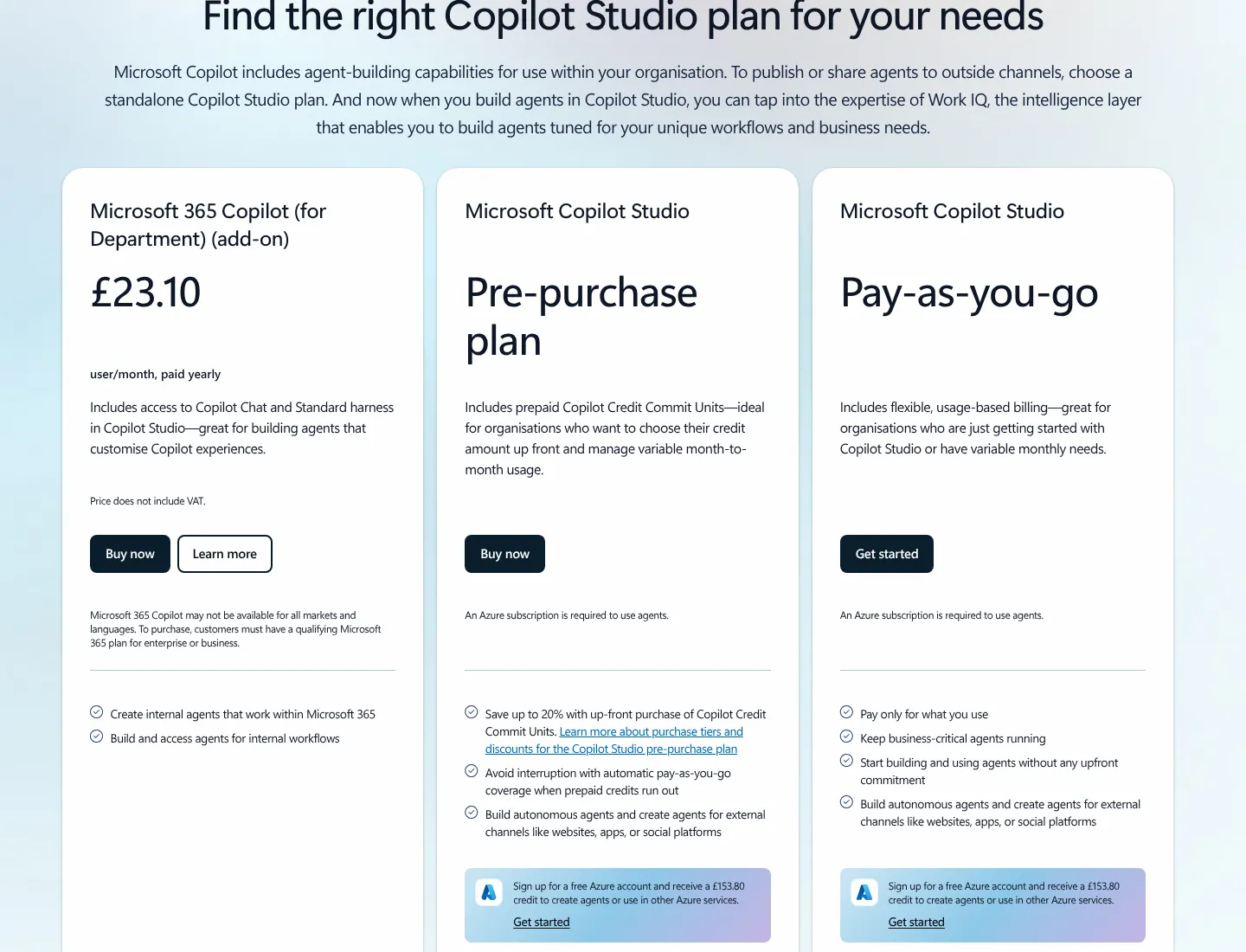
Microsoft's UK page lists three ways to pay for credits, plus the Microsoft 365 Copilot licence.
| Option | UK price, 29 October 2026 | How you pay | Suits |
|---|---|---|---|
| Copilot Credit pack | £153.80 a pack a month for 25,000 credits (about 0.62p a credit) | Up front, each month | Steady use |
| Pay-as-you-go | $0.01 a credit (about 0.75p) | Monthly, through Azure | Starting out |
| Pre-purchase plan | Saves up to 20% | One-year prepaid Commit Units in the Azure portal | Known budgets |
| Microsoft 365 Copilot | £23.10 a user a month, paid yearly | Per user, on top of a qualifying Microsoft 365 plan | Internal agents for licensed staff |
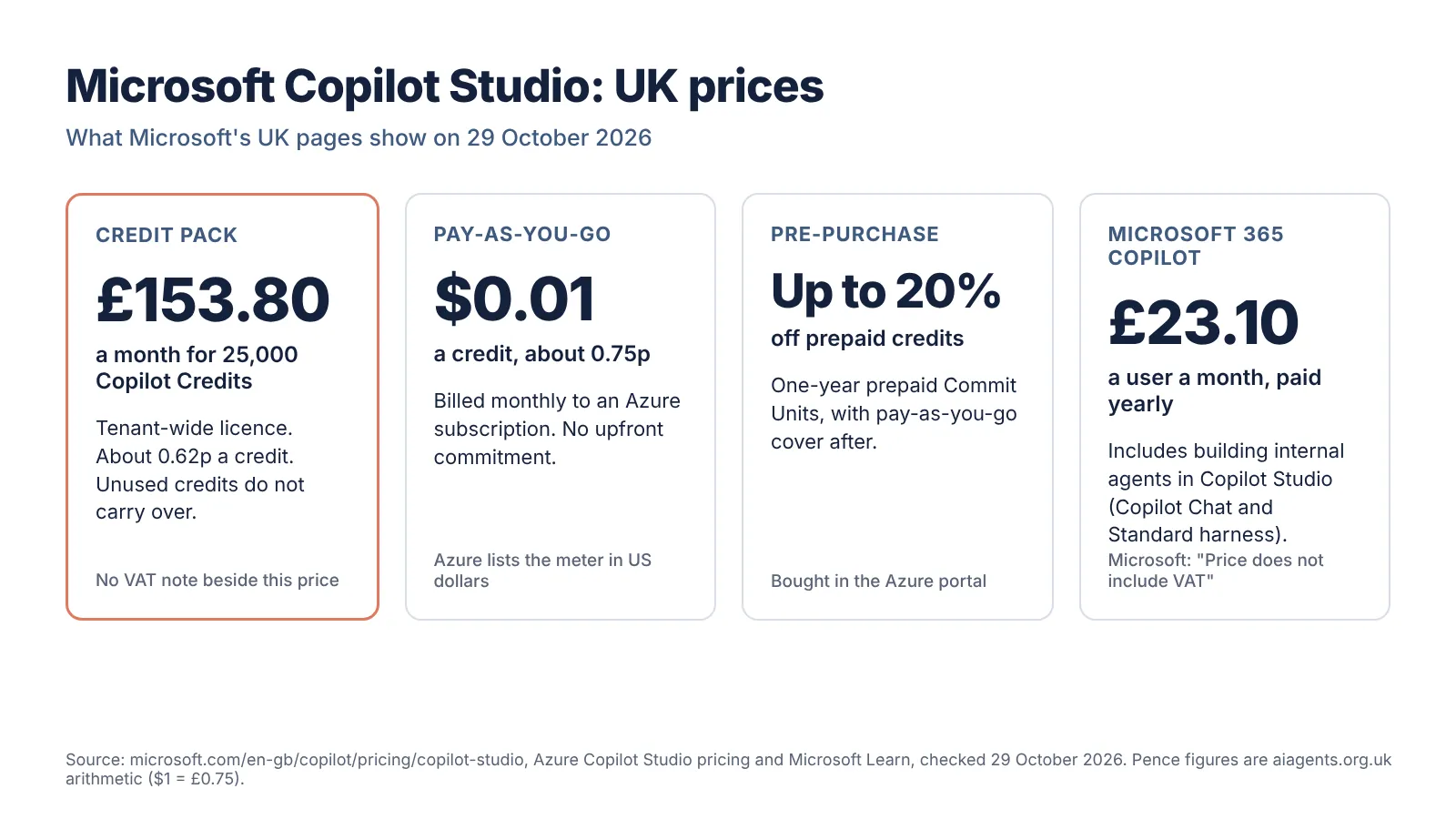
VAT, as Microsoft states it. Under the £23.10 Microsoft 365 Copilot price, the UK page says "Price does not include VAT." It prints no VAT note beside the £153.80 pack price, in either the FAQ or the comparison table. Microsoft's other UK business prices exclude VAT, so budget for 20% on top unless your quote says otherwise.
Pay-as-you-go is set in dollars. Azure lists $0.01 a credit; its pound view shows £0.01, rounded to the penny, and Azure calls its prices estimates converted from US dollars. At about 0.75p, pay-as-you-go costs roughly a fifth more per credit than a pack.
How do Copilot Credits work?
A Copilot Credit is Microsoft's unit for agent usage. Every answer, action or tool call an agent makes uses a fixed number of credits, and one user question can use several at once. Microsoft switched the unit from "messages" to Copilot Credits on 1 September 2025, with no change to pack sizes or the pay-as-you-go rate.
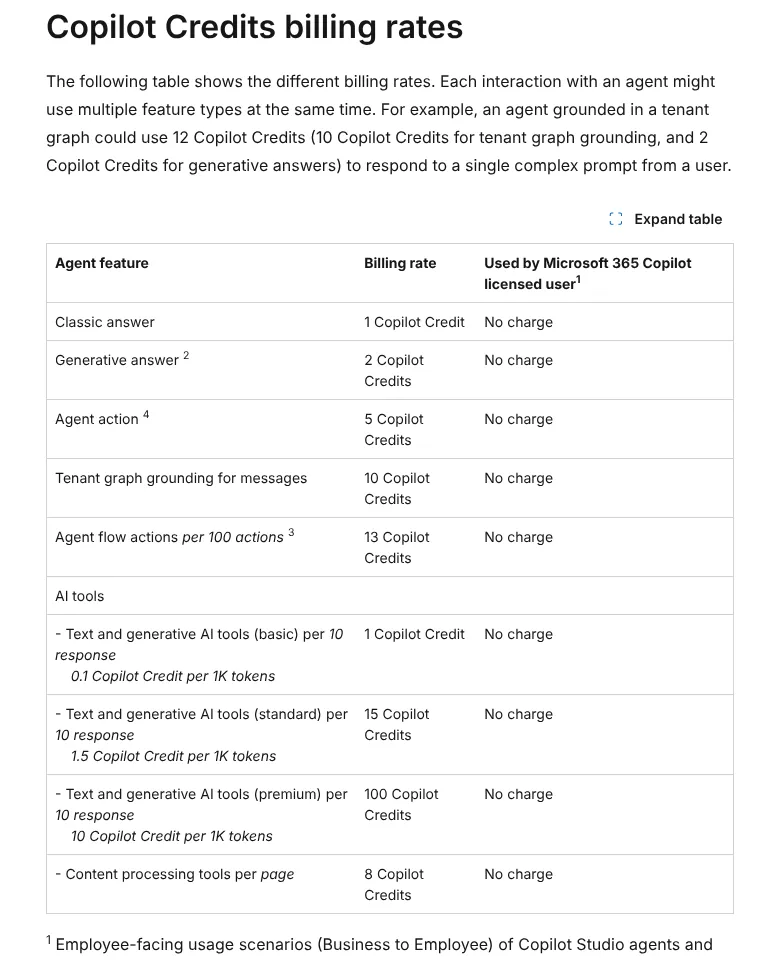
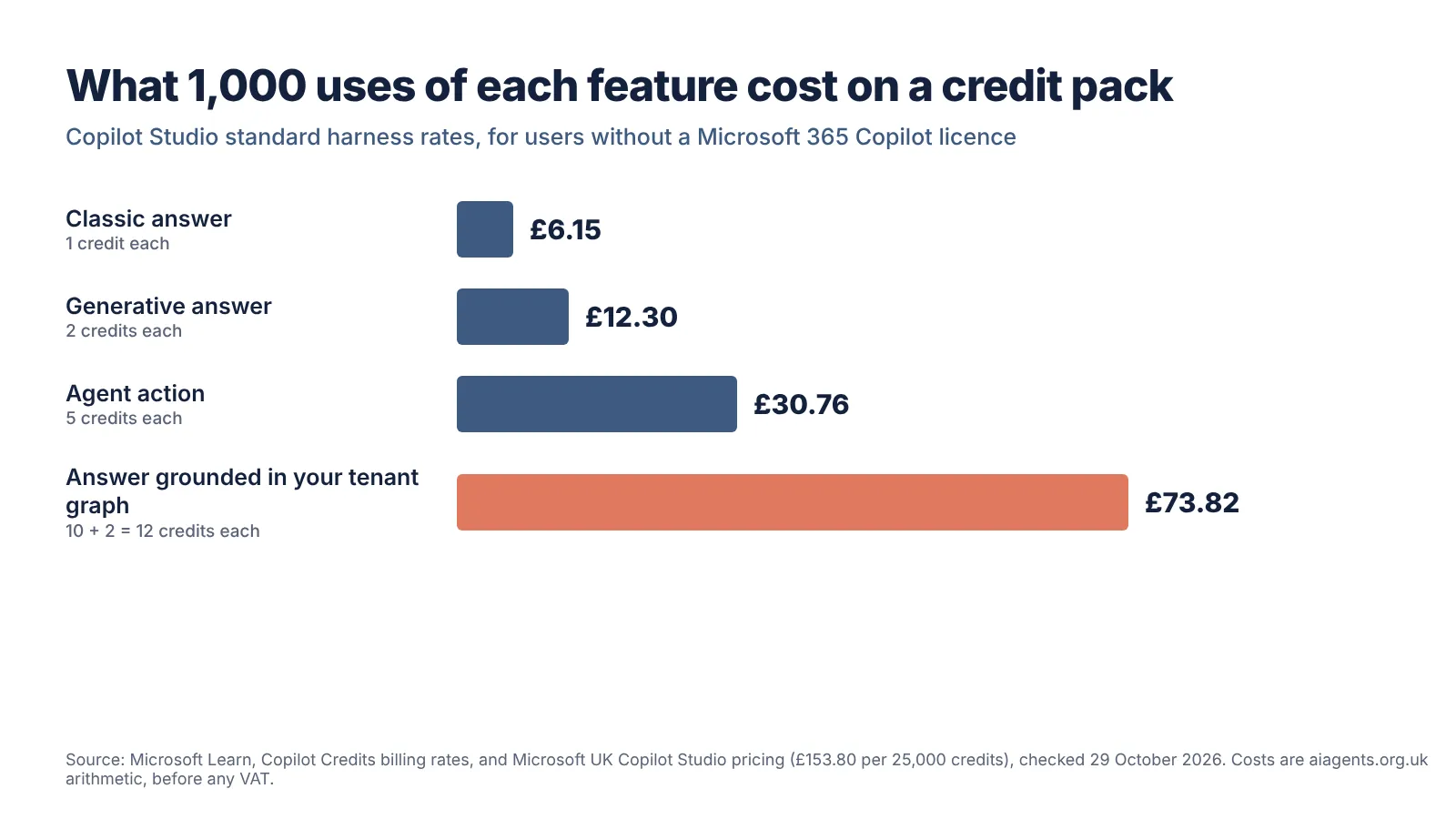
These are the standard harness rates on Microsoft Learn, checked 29 October 2026. The pound column is my arithmetic at the pack price of £153.80 for 25,000 credits.
| Feature | Credits | Cost per 1,000 on a pack | Microsoft 365 Copilot licensed user |
|---|---|---|---|
| Classic answer (a reply you wrote yourself) | 1 | £6.15 | No charge |
| Generative answer (written by AI from your knowledge) | 2 | £12.30 | No charge |
| Agent action (a trigger, a reasoning step or a topic change) | 5 | £30.76 | No charge |
| Tenant graph grounding (searching your Microsoft 365 data) | 10 | £61.52 | No charge |
| Agent flow actions | 13 per 100 actions | £0.80 per 1,000 actions | No charge when the agent calls the flow |
Reasoning models add 10 credits per 1,000 tokens on top of the feature rate, so Microsoft advises short instructions and non-reasoning models where possible.
A worked example. Microsoft's website support agent example uses 7,200 credits a day. Over 30 days that is 216,000 credits: nine packs at £1,384.20 a month before any VAT, or about $2,160 (about £1,620) pay-as-you-go, by my arithmetic. A question grounded in your tenant data uses 12 credits, about 7.4p.
The GitHub Copilot harness is billed differently. It charges for tokens, tools and the harness, and billing "starts when you start building", including tests. Microsoft gives estimated ranges, not fixed rates.
When credits run out, Microsoft disables custom agents at 125% of prepaid capacity and blocks new agent flow runs once capacity is used. Pay-as-you-go environments are not cut off. Admins can cap each agent monthly in the Power Platform admin centre, under Licensing, Copilot Studio, Manage Agents.
Copilot licensing: what does Microsoft 365 Copilot include?
A Microsoft 365 Copilot licence lets licensed people build internal agents in Copilot Studio and use them without spending credits. You need a standalone Copilot Studio plan, or pay-as-you-go, to publish to outside channels such as your website or to serve people without a licence.
Microsoft's UK FAQ says the included version covers internal agents on the Copilot Chat and Standard harness "at no additional cost". Microsoft's pages disagree on the GitHub Copilot harness. The UK FAQ lists it as a standalone-plan feature; the UK comparison table says "Requires Copilot Credits" in the Microsoft 365 Copilot column; and Microsoft Learn says "A Microsoft 365 Copilot license lets you use Copilot Studio to build agents for the GitHub Copilot harness." Check with Microsoft or your reseller.
"No charge" covers employee-facing agents running under a licensed user's identity, within fair usage limits. Computer-using agents, and agent flows started by other triggers, are charged.
UK licence prices on 29 October 2026, all marked by Microsoft as excluding VAT:
- Microsoft 365 Copilot: £23.10 a user a month, paid yearly, on top of a qualifying Microsoft 365 plan.
- Microsoft 365 Copilot Business (an add-on for Microsoft 365 business plans): £16.10 a user a month paid yearly, or £13.80 under Microsoft's current offer, including agent creation in Agent Builder and Copilot Studio (Copilot Chat or Standard harness).
- Copilot Chat: free with eligible Microsoft 365 plans; agents are "priced on a metered basis".
- Copilot Studio for Teams: in some Microsoft 365 plans; Teams-only classic agents, capped at 10 sessions per user every 24 hours.
The standalone Copilot Studio user licence is free, but needs a tenant credit pack first. My guide to what AI agents cost in the UK sets this per-use model against flat-fee tools.
Who is Copilot Studio for?
Copilot Studio suits organisations that already run on Microsoft 365, have someone to act as admin, and want agents in Teams or on their website that draw on SharePoint, Dataverse or business systems. It is a poor fit for a sole trader without a work account.
- Staff help desks for people with Microsoft 365 Copilot, whose use costs no credits.
- Website customer chat with hand-over to a person.
- Processes with approvals, such as IT requests.
- Regulated teams that want environments, connector rules and staged releases.
Look elsewhere if you have no Microsoft 365 work account, want a fixed monthly bill, or run on Google Workspace or Salesforce. My guide to AI agents for UK small businesses compares simpler starting points.
How do you build your first agent in Copilot Studio?
Describe the agent in plain English, add knowledge, test it and publish it to a demo website. These steps follow Microsoft's standard harness quickstart, checked 29 October 2026. First, ask your admin to fund the environment and cap the agent monthly.
- Get access. Sign in at copilotstudio.microsoft.com with a work or school account, or start the free trial, which cannot publish.
- Describe the agent. On Home, turn off New experience to get the standard harness, then describe what the agent should do in up to 1,024 characters. Copilot Studio drafts a name, description and instructions, and suggests triggers, channels, knowledge sources and tools.
- Add knowledge. In the Knowledge section, select Add next to a suggested source; the quickstart adds Microsoft's own Copilot Studio documentation.
- Test and adjust. Ask a question in the test chat, change the instructions on the Overview page and ask again.
- Rewrite the greeting. Select the introductory message to open the Conversation Start topic and explain what the agent does. Teams and Microsoft 365 agents can show up to 10 suggested prompts.
- Give it an icon. Microsoft asks for a PNG under 72 KB, no larger than 192 x 192 pixels.
- Publish. Select Publish, confirm, then open the three-dot menu and choose Go to demo website. Check who can sign in before you share the link.
After launch, the agent's Monitor page shows the credits it has used. If you build on the GitHub Copilot harness instead, testing uses credits.
What are the limits of Copilot Studio?
Copilot Studio limits what one agent can hold and how fast it can answer. Microsoft Learn figures for standard harness agents, 29 October 2026:
| Limit | Figure |
|---|---|
| Knowledge sources per agent | 500 across all types |
| File upload | 512 MB a file, 500 files |
| SharePoint sites with generative orchestration | 25 site URLs per agent |
| SharePoint files for generative answers without a Microsoft 365 Copilot licence in the tenant | Under 7 MB |
| Generative AI messages, 1-10 packs | 50 a minute, 1,000 an hour, per environment |
| Generative AI messages, trial or developer environments | 10 a minute, 200 an hour |
| Generative AI messages, pay-as-you-go | 100 a minute, 2,000 an hour |
| Model response stream | Times out after five minutes |
Documents labelled confidential or password-protected are not indexed, though they show as ready. Uploaded sources sync every four to six hours, and SharePoint list queries read only the first 2,048 rows.
Does Copilot Studio keep data in the UK?
Mostly, for storage. Microsoft Learn lists the United Kingdom regions as "UK South (London), UK West (Cardiff, Durham)". For UK environments it lists Azure OpenAI as "In region* or in EU Data Boundary" and Bing search as "United States". In region means the UK.
Exceptions include support and legal transfers, global services such as Microsoft Entra ID, and an agent's name, description and logo. Conversation logs sit in the region of the user's Exchange mailbox.
The "Move data across regions" setting in the Power Platform admin centre lets prompts leave the UK when a model is not deployed locally, capacity is full or there is a reliability problem. Microsoft says it does not retain that data or use it to train Azure OpenAI models. Leave it off and some features may not work, and Microsoft warns some models may process data elsewhere anyway.
The EU Data Boundary does not cover the UK. It covers EU and EFTA countries. For Copilot Studio, Microsoft says: "if a customer provisions a tenant with a billing address in the EU or EFTA, that tenant will be in-scope for the EU Data Boundary if the customer also creates all of its environments within a geographic region inside the EU Data Boundary."
Anthropic's Claude models are off by default in the UK and excluded from Microsoft's in-country processing commitments; an admin can opt in. Microsoft expects UK in-country processing for Microsoft 365 Copilot by the end of 2026, but has not said this covers Copilot Studio.
For connectors to non-Microsoft systems, Microsoft says the agent maker is responsible. My guides to AI agents and UK GDPR and free AI policy and DPIA templates cover the paperwork.
Copilot Studio vs Copilot agents in Microsoft 365
Copilot agents in Microsoft 365 are the agents people use inside the Copilot app and Teams, including ones built quickly in Agent Builder. Copilot Studio is the heavier tool for agents that need connectors, workflows, outside channels or a proper test-and-release process.
| Agent Builder in Microsoft 365 Copilot | Copilot Studio | |
|---|---|---|
| Where you build | microsoft365.com/chat, office.com/chat and Teams desktop or web; not mobile | copilotstudio.microsoft.com |
| Actions on outside services | No | Yes, through connectors and tools |
| Who can use the agent | People in your organisation | Staff or customers, depending on the harness and channel |
| Credits | Generative answers are not charged unless they search your tenant graph | Charged by feature, except for licensed users' internal use |
You can copy an Agent Builder agent into Copilot Studio later, as a separate snapshot.
Microsoft's ready-made agents, such as Researcher, Cowork and Autopilot, are a third route. My guides to Microsoft Copilot agents in the UK and Copilot Autopilot cover those, and my Microsoft Agent Store review covers partner agents you can install instead of building.
Copilot Studio vs other agent builders
Copilot Studio is the strongest choice when your people, files and permissions already sit in Microsoft 365. ChatGPT Business, Salesforce Agentforce and Google Workspace Studio make more sense for teams built around those platforms. These are the prices each vendor's UK page showed on 29 October 2026.
| Builder | Maker | UK price, 29 October 2026 | How it is charged | Best fit |
|---|---|---|---|---|
| Copilot Studio | Microsoft | £153.80 per 25,000 credits a month, or $0.01 a credit | Credits per answer and action | Microsoft 365 organisations |
| Agent Builder | Microsoft | With Microsoft 365 Copilot, £23.10 a user a month paid yearly, excluding VAT | Per user | Simple internal agents |
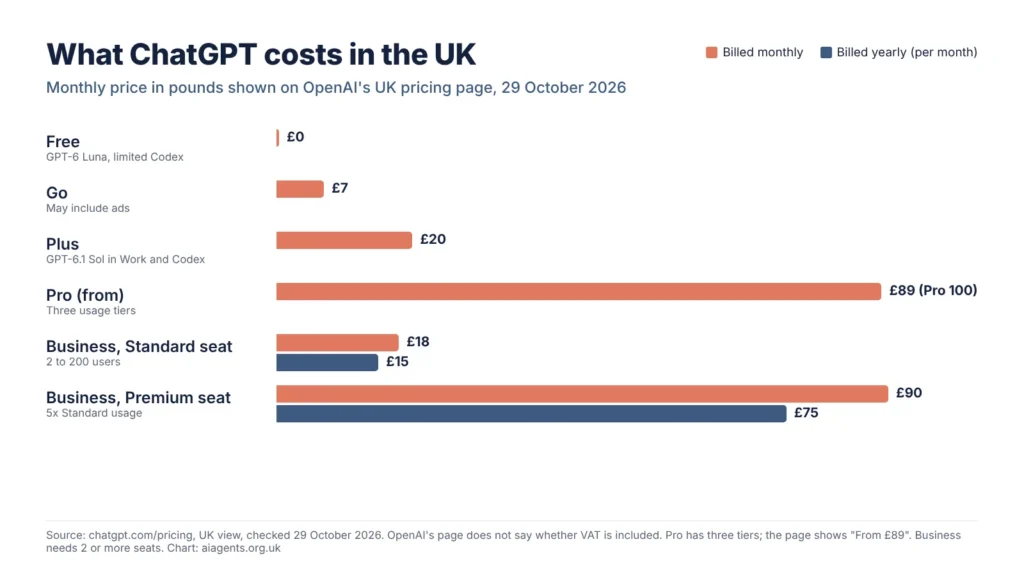
| ChatGPT Business | OpenAI | Standard seat £15 a month billed annually or £18 monthly; Premium £75 or £90 | Per seat, 2-200 people | Teams living in ChatGPT |
| Agentforce | Salesforce | Flex Credits £400 per 100,000; Agentforce User Licence £4 a user a month, which needs Flex Credits; £1.60 a conversation for existing Conversations customers | Credits, per user or per conversation | Salesforce users |
| Workspace Studio | Part of Google Workspace plans; an AI expanded access add-on gives more automations | Per user, through Workspace | Google Workspace users |
The OpenAI and Salesforce pages I read do not say whether pound prices include VAT. Copilot Studio is strong on governance, channels and Microsoft 365 data. Its weaknesses are credits that are hard to forecast, three harnesses billed differently and documentation that does not always agree. My Salesforce Agentforce guide and ChatGPT vs Claude vs Gemini vs Copilot comparison go deeper on the rivals.
Frequently asked questions
How much does Copilot Studio cost in the UK?
Copilot Studio costs £153.80 a month for a pack of 25,000 Copilot Credits on Microsoft's UK site, as of 29 October 2026. Pay-as-you-go through Azure costs $0.01 a credit, about 0.75p, and prepaying for a year saves up to 20%. Microsoft gives no VAT note beside the pack price.
Is Copilot Studio free with Microsoft 365 Copilot?
Partly. A Microsoft 365 Copilot licence, £23.10 a user a month paid yearly excluding VAT, lets licensed staff build and use internal agents at no extra cost. Publishing to websites and serving unlicensed people need Copilot Credits, and Microsoft's UK comparison table marks the GitHub Copilot harness as requiring Copilot Credits.
Is there a free trial of Copilot Studio?
Yes. You can sign up for a Copilot Studio trial with a work or school account, then build agents and test them in the test chat panel. Microsoft says you cannot publish an agent on the trial, and personal email addresses are rejected. Microsoft Learn does not give the trial length, but says you can extend it by 30 days when it expires.
What is the difference between Copilot Studio and Agent Builder?
Agent Builder is the quick, guided way to make an agent inside Microsoft 365 Copilot and Teams, using instructions and Microsoft 365 knowledge. Copilot Studio adds connectors, actions on outside services, workflows, external channels such as websites, and test and production environments. You can copy an Agent Builder agent into Copilot Studio.
Does Copilot Studio keep data in the UK?
Copilot Studio stores data for UK environments in UK South and UK West, with some exceptions. Generative AI for UK environments may be processed in the UK or in the EU Data Boundary, which does not include the UK, and Bing search data in the United States.
What happens when Copilot Studio credits run out?
On prepaid packs, Microsoft disables custom agents when the tenant reaches 125% of its capacity, and new agent flow runs stop once capacity is used. Unused credits do not carry over. Pay-as-you-go environments avoid the cut-off, because extra use is billed to Azure.
Read next
- Microsoft Copilot agents in the UK
- Microsoft Copilot Autopilot
- Microsoft Agent Store review
- Salesforce Agentforce in the UK
- How much do AI agents cost in the UK?
- AI agents and UK GDPR
Sources
- Copilot Studio plans and pricing, Microsoft UK (plan cards, comparison table and FAQ) - checked 29 October 2026
- Microsoft Copilot Studio product page, Microsoft UK - checked 29 October 2026
- Microsoft Copilot Studio pay-as-you-go pricing, Azure (UK) - checked 29 October 2026
- Copilot pricing for business, Microsoft UK - checked 29 October 2026
- Copilot pricing for enterprise, Microsoft UK - checked 29 October 2026
- Copilot Studio overview, Microsoft Learn (updated 27 October 2026) - checked 29 October 2026
- Harnesses in Copilot Studio, Microsoft Learn - checked 29 October 2026
- Billing rates and management, Microsoft Learn (updated 28 October 2026) - checked 29 October 2026
- Billing for agents powered by the GitHub Copilot harness, Microsoft Learn - checked 29 October 2026
- Licensing for agents powered by the standard harness, Microsoft Learn - checked 29 October 2026
- Get access to Copilot Studio (trial and Teams plan), Microsoft Learn - checked 29 October 2026
- Quickstart: create and deploy an agent, Microsoft Learn - checked 29 October 2026
- Quotas and limits, Microsoft Learn (updated 28 October 2026) - checked 29 October 2026
- Data locations in Copilot Studio, Microsoft Learn - checked 29 October 2026
- Geographic data residency in Copilot Studio, Microsoft Learn - checked 29 October 2026
- Move data across regions for Copilots and generative AI features, Microsoft Learn - checked 29 October 2026
- What is the EU Data Boundary?, Microsoft Learn - checked 29 October 2026
- Anthropic as a subprocessor for Microsoft Online Services, Microsoft Learn - checked 29 October 2026
- In-country data processing for Microsoft 365 Copilot, Microsoft Copilot Blog (editor's note 3 April 2026) - checked 29 October 2026
- Choose between Agent Builder and Copilot Studio, Microsoft Learn - checked 29 October 2026
- Agent Builder overview, Microsoft Learn - checked 29 October 2026
- ChatGPT pricing, Business tab, OpenAI (UK view) - checked 29 October 2026
- Agentforce pricing, Salesforce UK - checked 29 October 2026
- Google Workspace pricing (UK) - checked 29 October 2026