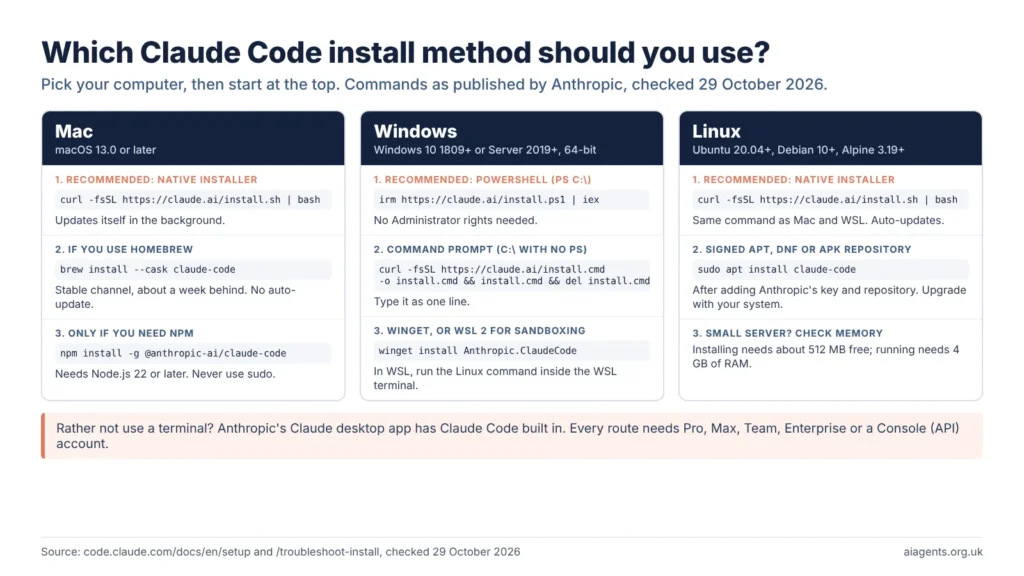
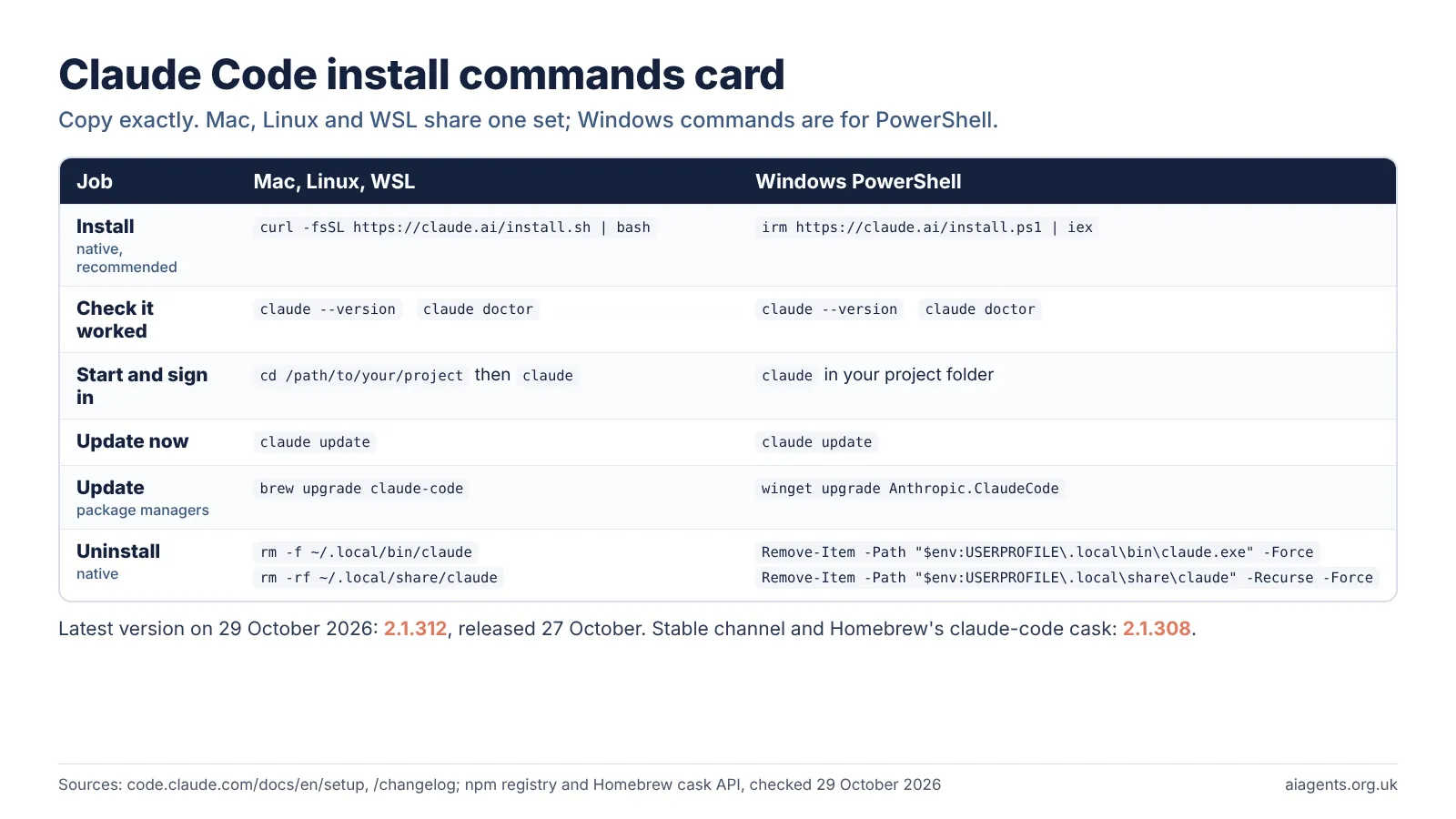
Claude Code installation takes one command: on a Mac, Linux or WSL run curl -fsSL https://claude.ai/install.sh | bash, and in Windows PowerShell run irm https://claude.ai/install.ps1 | iex. Then type claude in your project folder and sign in with a paid Claude plan, from £18 a month in the UK, or an API key. The latest version is 2.1.312.
Key facts
- Quickest install: Anthropic's native installer, one command, recommended by Anthropic and updates itself in the background.
- Runs on: macOS 13.0+, Windows 10 1809+, Ubuntu 20.04+, Debian 10+ and Alpine 3.19+, with 4 GB of RAM.
- Other official routes: Homebrew, WinGet, apt, dnf, apk and npm (Node.js 22+).
- Account needed: Pro, Max, Team, Enterprise or a Console (API) account; not the free plan.
- Cheapest UK plan: Claude Pro at £18 a month or £180 a year, including VAT, as of 29 October 2026.
- Latest version: 2.1.312, released 27 October 2026; stable channel 2.1.308.
- Most common error:
command not found: claude: open a new terminal, then fix your PATH.
On this page
- What do you need before installing Claude Code?
- Which Claude Code installation method should you use?
- How do you install Claude Code on a Mac?
- How do you install Claude Code on Windows?
- How do you install Claude Code on Linux?
- Can you still install Claude Code with npm?
- How do you sign in: Claude plan or API key?
- What happens the first time you run Claude Code?
- How do you update Claude Code to the latest version?
- How do you uninstall Claude Code?
- Installing Claude Code: common errors and fixes
- Which Claude CLI commands should you know?
- Frequently asked questions
- Read next
- Sources used
What do you need before installing Claude Code?
You need a supported operating system, 4 GB of RAM, an internet connection and a paid Claude account. Node.js is no longer required for the recommended installer.
Anthropic's Advanced setup page lists the requirements as of 29 October 2026:
- Operating system: macOS 13.0 or later; Windows 10 version 1809 or later, or Windows Server 2019 or later; Ubuntu 20.04+, Debian 10+ or Alpine Linux 3.19+.
- Hardware: 4 GB of RAM or more, and an x64 or ARM64 processor. 32-bit Windows is not supported.
- Network: an internet connection. The installer downloads from downloads.claude.ai.
- Location: one of Anthropic's supported countries. The United Kingdom is on the list.
Prefer no terminal? The Claude desktop app has Claude Code in its Code tab. My Claude Code guide explains what the tool does; this page covers getting it installed and working.
Which Claude Code installation method should you use?
Use the native installer unless you have a reason not to. It is the only method Anthropic labels "Recommended", and it keeps itself up to date without extra settings.
| Method | Works on | Updates itself? | Release channel |
|---|---|---|---|
| Native installer (recommended) | Mac, Linux, WSL, Windows | Yes, in the background | Latest by default; stable on request |
| Homebrew | Mac with Homebrew | No: run brew upgrade claude-code | claude-code is stable; claude-code@latest is latest |
| WinGet | Windows | No: run winget upgrade Anthropic.ClaudeCode | Not stated |
| apt, dnf, apk | Debian, Ubuntu, Fedora, RHEL, Alpine | No: updates come with system upgrades | Stable or latest, chosen by repository |
| npm | Any supported platform with Node.js 22+ | Yes, if npm's global folder is writable | Not stated |
Claude Code install methods compared, from code.claude.com/docs/en/setup, 29 October 2026. Homebrew and WinGet can update automatically if you set CLAUDE_CODE_PACKAGE_MANAGER_AUTO_UPDATE to 1.
How do you install Claude Code on a Mac?
Open Terminal, paste Anthropic's one-line installer, press Return, then open a new Terminal window and type claude. The whole job takes one command.
- Open Terminal (Cmd and Space, type Terminal, press Return).
- Paste the install command and press Return. It "shows no progress while it downloads".
- When it finishes, open a new Terminal window.
- Check it worked. A working install prints a version number followed by "(Claude Code)".
- Move into your project folder and start Claude Code, then sign in when asked.
curl -fsSL https://claude.ai/install.sh | bashclaude --versioncd /path/to/your/project
claude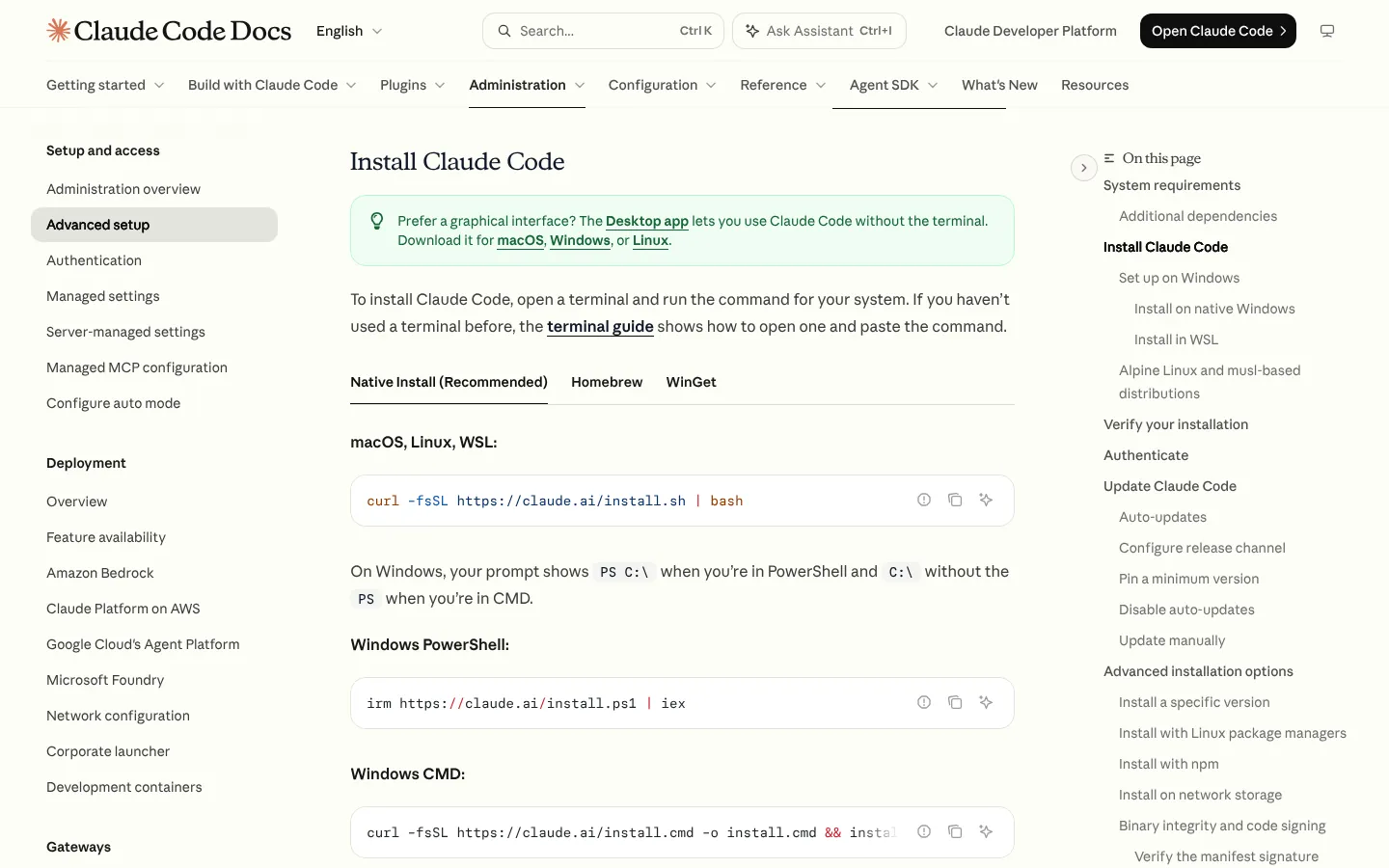
Installing Claude Code with Homebrew
If you already use Homebrew, this works too. The claude-code cask follows the stable channel, which Anthropic says is "typically about a week behind and skips releases with major regressions". The claude-code@latest cask gets each release as it ships.
brew install --cask claude-codeHomebrew installs do not update themselves, so run brew upgrade claude-code now and then, or brew upgrade claude-code@latest if you installed that cask. If Homebrew says the cask "is unavailable", your Homebrew index is out of date: run brew update and try again.
A Mac older than macOS 13 shows a dyld error, and Homebrew will not help, as it downloads the same program.
How do you install Claude Code on Windows?
On Windows, run the installer from PowerShell; you do not need Administrator rights. You can also use Command Prompt, WinGet, or install inside WSL if you want Linux tools or sandboxing.
Check your shell first: the prompt shows PS C:\ in PowerShell and C:\ without the PS in Command Prompt (CMD).
In PowerShell:
irm https://claude.ai/install.ps1 | iexIn Command Prompt:
curl -fsSL https://claude.ai/install.cmd -o install.cmd && install.cmd && del install.cmdThen open a new window and run claude --version.
- Git for Windows is optional but recommended. Without it, Claude Code runs commands through PowerShell. Download it from git-scm.com.
- WinGet works too:
winget install Anthropic.ClaudeCode. It does not update itself, so runwinget upgrade Anthropic.ClaudeCodeperiodically.
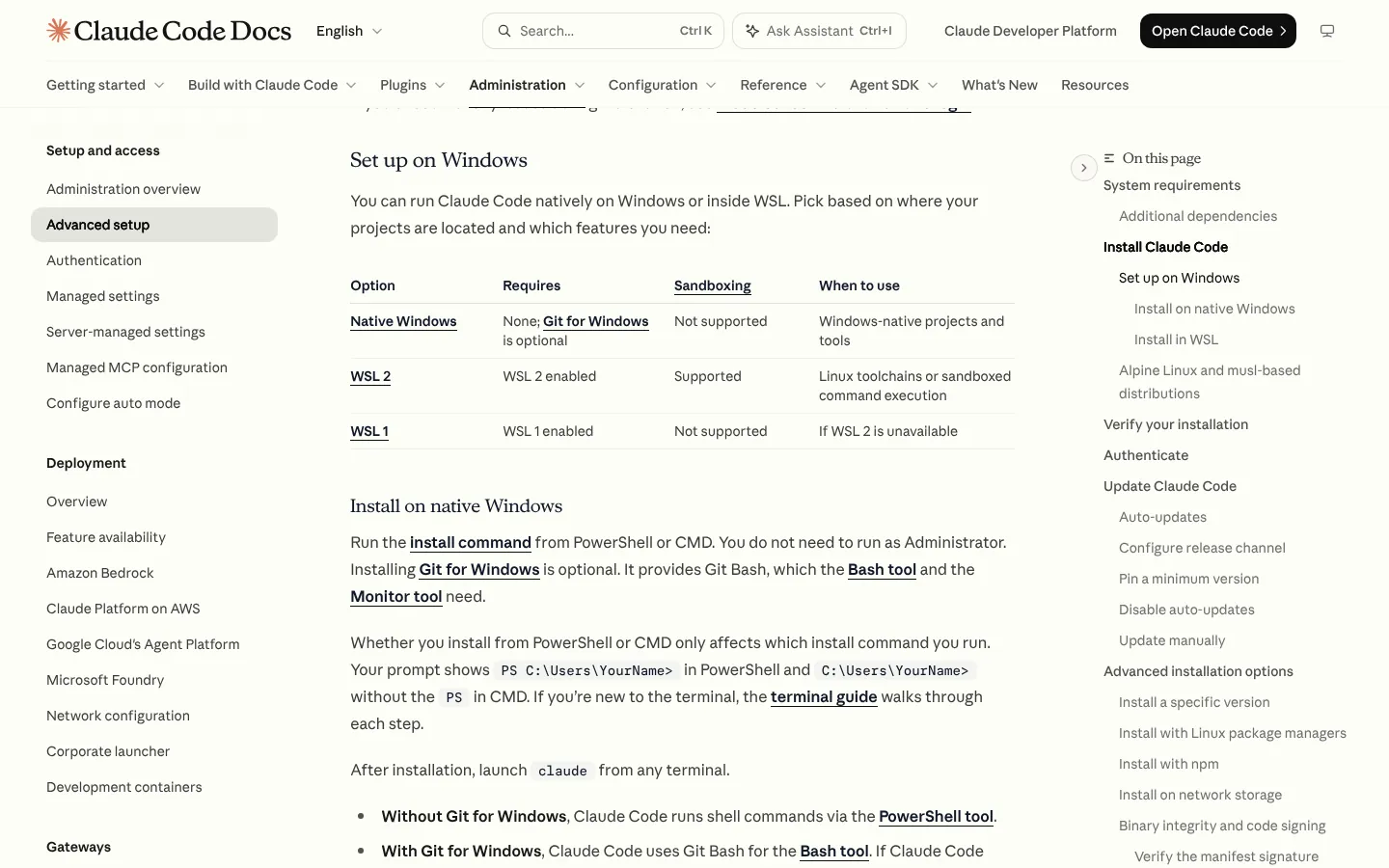
Native Windows or WSL?
Choose native Windows for Windows projects and tools. Choose WSL 2 for Linux toolchains or if you want sandboxing, which runs commands in a restricted environment: Anthropic's table says sandboxing is "Not supported" on native Windows and WSL 1, and "Supported" on WSL 2.
In WSL, open your Linux distribution and run the Linux command, curl -fsSL https://claude.ai/install.sh | bash, inside the WSL terminal, not in PowerShell. WSL setups do not need Git for Windows. If WSL 1 prints Exec format error, Anthropic's fix is to convert the distribution to WSL 2 from PowerShell:
wsl --set-version <DistroName> 2How do you install Claude Code on Linux?
On Linux, the same one-line installer used on a Mac works. For servers you manage with a package manager, Anthropic also runs signed apt, dnf and apk repositories.
curl -fsSL https://claude.ai/install.sh | bashThe repositories offer a stable channel, about a week old, and a latest channel. They do not update through Claude Code: updates arrive with your normal system upgrades. For Debian and Ubuntu, Anthropic's apt steps are:
sudo install -d -m 0755 /etc/apt/keyrings
sudo curl -fsSL https://downloads.claude.ai/keys/claude-code.asc \
  -o /etc/apt/keyrings/claude-code.asc
Anthropic suggests checking the key with gpg --show-keys before continuing. Then:
echo "deb [signed-by=/etc/apt/keyrings/claude-code.asc] https://downloads.claude.ai/claude-code/apt/stable stable main" \
  | sudo tee /etc/apt/sources.list.d/claude-code.list
sudo apt update
sudo apt install claude-code
Upgrade later with sudo apt update && sudo apt upgrade claude-code. Fedora and RHEL users add a claude-code.repo file and run sudo dnf install claude-code; Alpine users add the apk key and run apk add claude-code. The full dnf and apk steps are on the setup page.
On Alpine, first run apk add bash curl libgcc libstdc++ ripgrep. On a small cloud server, a Killed message means it ran out of memory: Anthropic says installing needs "roughly 512MB of free memory", and suggests adding swap space or a larger instance.
Can you still install Claude Code with npm?
Yes. Anthropic still documents the npm package, but as an advanced option rather than the main route. It needs Node.js 22 or later and installs the same native program as the installer.
npm install -g @anthropic-ai/claude-codeAnthropic warns: "Do NOT use sudo npm install -g". To upgrade, use npm install -g @anthropic-ai/claude-code@latest rather than npm update -g. On npm 12, if claude prints "claude native binary not installed", Anthropic's simplest fix is to switch to the native installer and remove the npm package.
How do you sign in: Claude plan or API key?
Most people sign in with a Claude subscription through the browser the first time they run claude. The alternative is a Claude Console account, which bills per token through the API.
Anthropic's setup page is clear: "Claude Code requires a Pro, Max, Team, Enterprise, or Console account. The free claude.ai plan does not include Claude Code access." Subscriptions share one usage allowance across chat and Claude Code; my guide to Claude usage limits explains the five-hour and weekly windows. The UK prices below come from my Claude pricing UK guide, recorded from Anthropic's UK pricing page on 29 October 2026.
| Plan | UK price, including VAT | Claude Code? |
|---|---|---|
| Free | £0 | No |
| Pro | £18 a month, or £180 a year | Yes |
| Max 5x | £90 a month | Yes |
| Max 20x | £180 a month | Yes |
| Team, Standard seat | £18 a seat a month billed yearly, or £22.50 monthly | Yes |
| Team, Premium seat | £90 a seat a month billed yearly, or £113 monthly | Yes |
| Enterprise | US$20 a seat a month (about £15), billed annually with a 20-seat minimum, plus usage at API rates | Yes |
| Claude Console (API) | Pay per token, for example Sonnet 5.5 at $2 input and $10 output per million tokens (about £1.50 and £7.50) | Yes |
Claude plans that include Claude Code, as of 29 October 2026. Dollar prices converted at $1 = £0.75.
How each sign-in works:
- Claude subscription: run
claude, sign in in the browser window that opens, and the terminal shows "Login successful". - Console account: sign in with your Claude Console credentials instead, billed per token. Anthropic's cost page puts enterprise use at about $13 (about £10) per developer per active day on average.
- API key: set the
ANTHROPIC_API_KEYenvironment variable before starting. Claude Code asks once whether to use it; if you approve, it skips the login prompt.
Watch for an old API key: an approved ANTHROPIC_API_KEY outranks your subscription login, so a forgotten key can bill the API instead of your plan. Type /status inside Claude Code to see which method is active.
What happens the first time you run Claude Code?
The first time, Claude Code asks you to sign in and to trust the folder you started it in. After that, the prompt appears with the version, model and folder shown above it.
- Start it in a project folder with
claude. - Sign in through your browser. On a Mac the login is saved in the Keychain; on Linux in
~/.claude/.credentials.json, and on Windows in%USERPROFILE%\.claude\.credentials.json. - Answer the workspace trust dialog. Only trust folders whose contents you know.
- Ask something simple, such as
what does this project do?. Claude reads files as it needs them. - Try a small change. If Claude asks before editing, choose Yes; Shift+Tab changes how much it may do unasked.
Type /help for commands, /login to switch accounts and /logout to sign out. To extend it later, see my guides to Claude Code skills and adding MCP servers.
How do you update Claude Code to the latest version?
A native install updates itself in the background, and the new version takes effect next time you start Claude Code. To update straight away, run claude update.
claude updateHomebrew, WinGet and Linux package installs need their own upgrade commands, listed in the table above.
Latest version, verified: 2.1.312, released on 27 October 2026, is the top entry in Anthropic's Claude Code changelog. On 29 October 2026 the npm registry listed 2.1.312 as "latest" (published 27 October at 18:36 UTC) and 2.1.308 as "stable", and Homebrew showed the claude-code cask at 2.1.308 and claude-code@latest at 2.1.312.
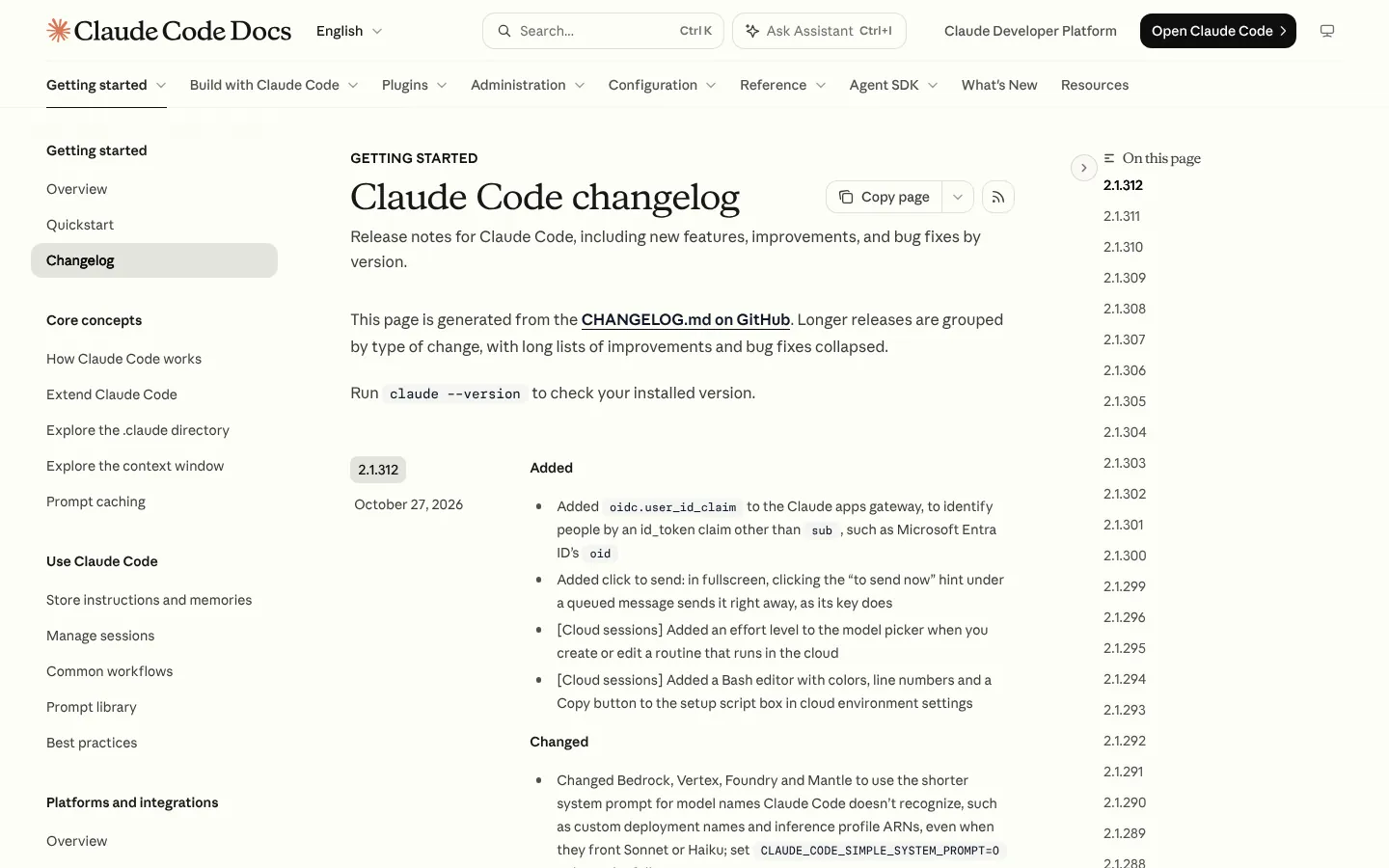
To switch channel, type /config and pick "latest" (the default) or "stable", or install stable directly:
curl -fsSL https://claude.ai/install.sh | bash -s stableHow do you uninstall Claude Code?
Delete the program files for your install method. Removing settings and history is a separate, optional step.
Native install on a Mac, Linux or WSL:
rm -f ~/.local/bin/claude
rm -rf ~/.local/share/claude
Native install on Windows, in PowerShell:
Remove-Item -Path "$env:USERPROFILE\.local\bin\claude.exe" -Force
Remove-Item -Path "$env:USERPROFILE\.local\share\claude" -Recurse -Force
Other methods: brew uninstall --cask claude-code (or brew uninstall --cask claude-code@latest), winget uninstall Anthropic.ClaudeCode, sudo apt remove claude-code or npm uninstall -g @anthropic-ai/claude-code.
To wipe settings, MCP servers and session history too, delete ~/.claude and ~/.claude.json. Remove the VS Code extension, JetBrains plugin and desktop app first, or they recreate the folder.
Installing Claude Code: common errors and fixes
Most installation errors come from one of three causes: the install folder is not on your PATH, the command is for a different shell, or the download was blocked. Anthropic's Troubleshoot installation and login page matches each message to a fix.
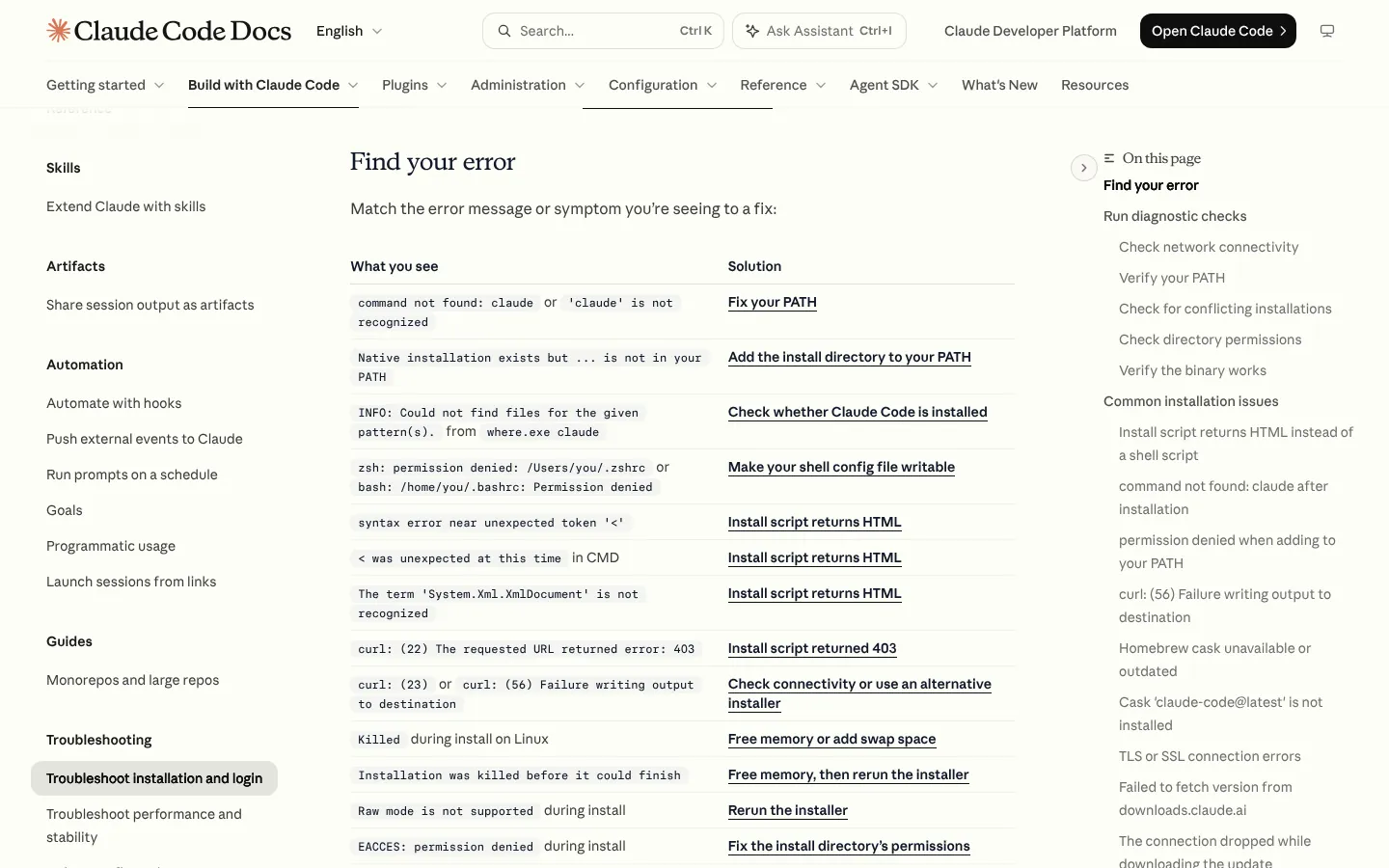
| What you see | What it means | Fix |
|---|---|---|
command not found: claude or 'claude' is not recognized | The install folder is not on your PATH | Open a new terminal; if it persists, add the folder to PATH (below) |
syntax error near unexpected token '<' or a 403 | The installer got a web page, not the script | Retry later; check region and proxy; or use Homebrew or WinGet |
'irm' is not recognized | You are in CMD, not PowerShell | Use the CMD command, or open PowerShell |
The token '&&' is not a valid statement separator | You are in PowerShell, not CMD | Use irm https://claude.ai/install.ps1 | iex |
Claude Code does not support 32-bit Windows | You opened Windows PowerShell (x86) | Open Windows PowerShell without x86 |
API Error: 403 Request not allowed | Subscription inactive or missing Console role | Check claude.ai/settings or ask your admin |
This organization has been disabled | An old API key overrides your plan | Remove ANTHROPIC_API_KEY from your shell profile |
Common Claude Code installation and login errors, from code.claude.com/docs/en/troubleshoot-install, 29 October 2026.
Fix your PATH
The installer puts Claude Code in ~/.local/bin on a Mac or Linux, or %USERPROFILE%\.local\bin on Windows. On a Mac using Zsh, the default shell, Anthropic's fix is:
echo 'export PATH="$HOME/.local/bin:$PATH"' >> ~/.zshrc
source ~/.zshrc
For Bash on Linux, use ~/.bashrc in place of ~/.zshrc. Windows users add the folder to their User PATH; the troubleshooting page has the PowerShell commands.
Then restart the terminal, and any editor whose built-in terminal you use.
Login fails in WSL, SSH or a container
If no browser opens, or it lands on a localhost error, press c to copy the login URL, open it on your own computer and paste the code it shows at the "Paste code here" prompt. For anything else, claude doctor prints a read-only health check of your install and settings.
Which Claude CLI commands should you know?
After installing, a handful of Claude CLI commands cover almost everything: claude to start, claude --version and claude doctor to check, claude update to update, and claude auth to manage sign-in.
claude auth statusshows whether you are signed in and how.claude setup-tokencreates a long-lived token for scripts and CI; it needs a Claude subscription.
Want to run it without Anthropic's models? My guide to Claude Code with Ollama covers pointing it at a local model, with the trade-offs.
Frequently asked questions
Is Claude Code free to install?
The program is free to download, but you cannot use it without a paid account. Anthropic says Claude Code needs Pro, Max, Team, Enterprise or a Claude Console account, and the free Claude plan does not include it. The cheapest route in the UK is Claude Pro at £18 a month including VAT, as of 29 October 2026.
Do I need Node.js to install Claude Code?
No. The recommended native installer, Homebrew, WinGet and the Linux repositories do not need Node.js. Only the npm install method does, and it requires Node.js 22 or later. Even then, npm installs the same native program, which does not use Node.js when it runs.
Should I use the native installer or Homebrew on a Mac?
Use the native installer unless you manage everything through Homebrew. The native install updates itself in the background. Homebrew installs do not, so you must run brew upgrade claude-code yourself. The claude-code cask also follows the stable channel, which Anthropic says is typically about a week behind the latest release.
Can I install Claude Code on Windows without WSL?
Yes. Claude Code runs natively on Windows 10 version 1809 or later. Run the PowerShell installer, no Administrator rights needed. Git for Windows is optional but lets Claude Code use Git Bash. Choose WSL 2 instead if you want sandboxing, which Anthropic says is not supported on native Windows.
How do I check which version of Claude Code I have?
Run claude --version in a terminal. It prints a version number followed by (Claude Code). On 29 October 2026 the latest release was 2.1.312, from 27 October, and the stable channel was on 2.1.308. Run claude update to move to the newest version straight away.
Read next
- Claude Code explained: UK pricing, install and first steps
- Claude pricing UK: every plan in pounds
- Claude usage limits explained
- How to install and use skills in Claude Code
- Claude MCP: how to add MCP servers
- How to run Claude Code with Ollama and a local model
Sources
- Advanced setup, Claude Code documentation, Anthropic: system requirements, every install, update, release channel, version and uninstall command - checked 29 October 2026
- Quickstart, Claude Code documentation, Anthropic: first session, account types, Console workspace - checked 29 October 2026
- Troubleshoot installation and login, Claude Code documentation, Anthropic: error messages, PATH fixes, Windows, WSL, Linux memory, login fixes - checked 29 October 2026
- Authentication, Claude Code documentation, Anthropic: login flow, credential storage, authentication precedence - checked 29 October 2026
- Security, Claude Code documentation, Anthropic: workspace trust dialog - checked 29 October 2026
- CLI reference, Claude Code documentation, Anthropic: claude auth, claude install, claude doctor, claude setup-token - checked 29 October 2026
- Manage costs effectively, Claude Code documentation, Anthropic: average cost per developer per active day - checked 29 October 2026
- Get started with the desktop app, Claude Code documentation, Anthropic: Code tab, plans required - checked 29 October 2026
- Claude Code changelog, Anthropic: version 2.1.312, 27 October 2026 - checked 29 October 2026
- @anthropic-ai/claude-code on npm (registry data): latest 2.1.312 published 27 October 2026, stable 2.1.308, Node.js 22 or later - checked 29 October 2026
- claude-code and claude-code@latest casks, Homebrew: versions 2.1.308 and 2.1.312 - checked 29 October 2026
- Supported countries and regions, Anthropic: United Kingdom listed - checked 29 October 2026
- Claude pricing UK, aiagents.org.uk: UK plan prices including VAT and API prices, recorded from claude.com/pricing on 29 October 2026 - checked 29 October 2026