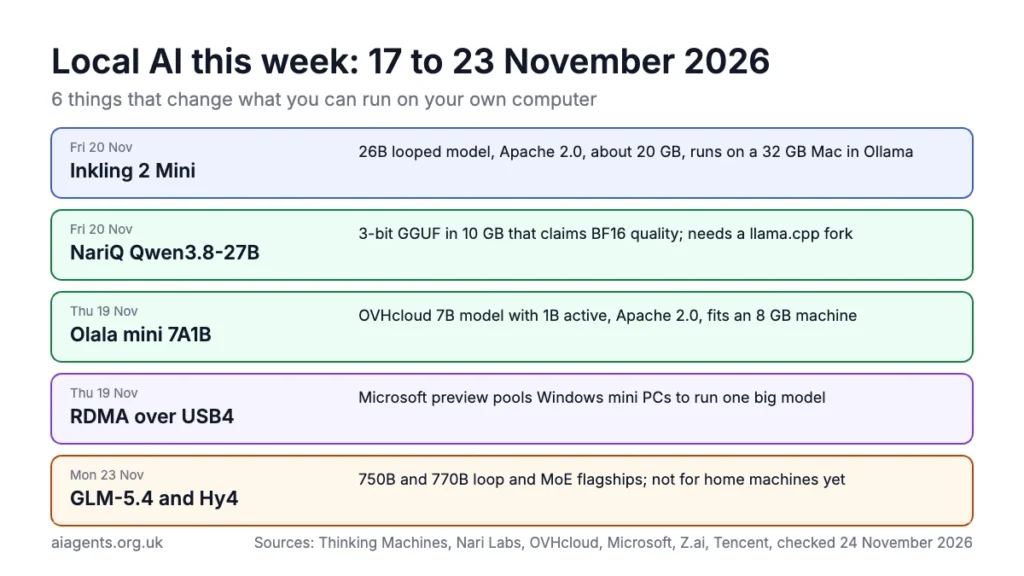
The biggest local AI story this week is Inkling 2 Mini, released by Thinking Machines Lab on 20 November: a 26.4B open-weight model under Apache 2.0 that ships as a 20 GB file, runs on a 32 GB Mac through Ollama, and leads every open model under 100B on the agentic coding benchmarks its maker chose. Around it: Nari Labs squeezed Qwen3.8-27B into a 10 GB GGUF it says matches the full-precision model on long agent tasks; OVHcloud published Olala mini, a 7B European model with 1B active parameters for an 8 GB machine; Open WebUI 0.13.4 let your own computer's Ollama or LM Studio models appear in a hosted Open WebUI; Microsoft previewed linking Windows PCs over USB4 to run models too big for one of them; and Z.ai and Tencent put out loop transformers and 770B flagships that are not for home machines yet. Here is what each one means for what you can run on your own computer, checked against the makers' own pages on 24 November 2026.
This week in numbers
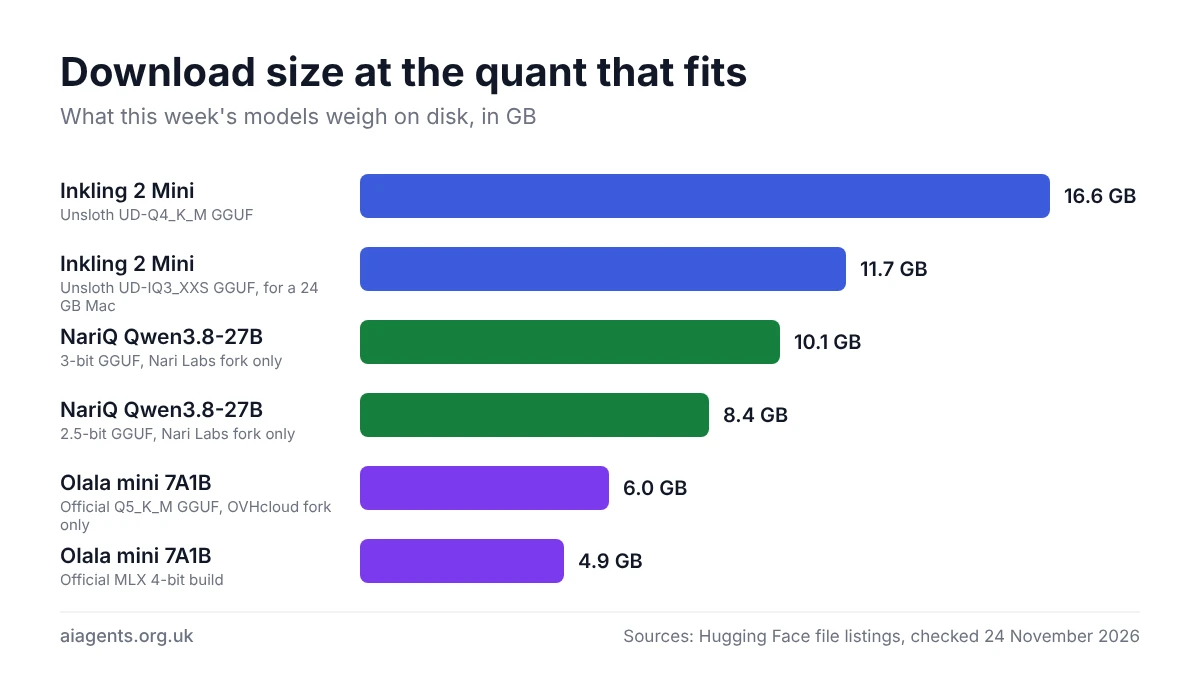
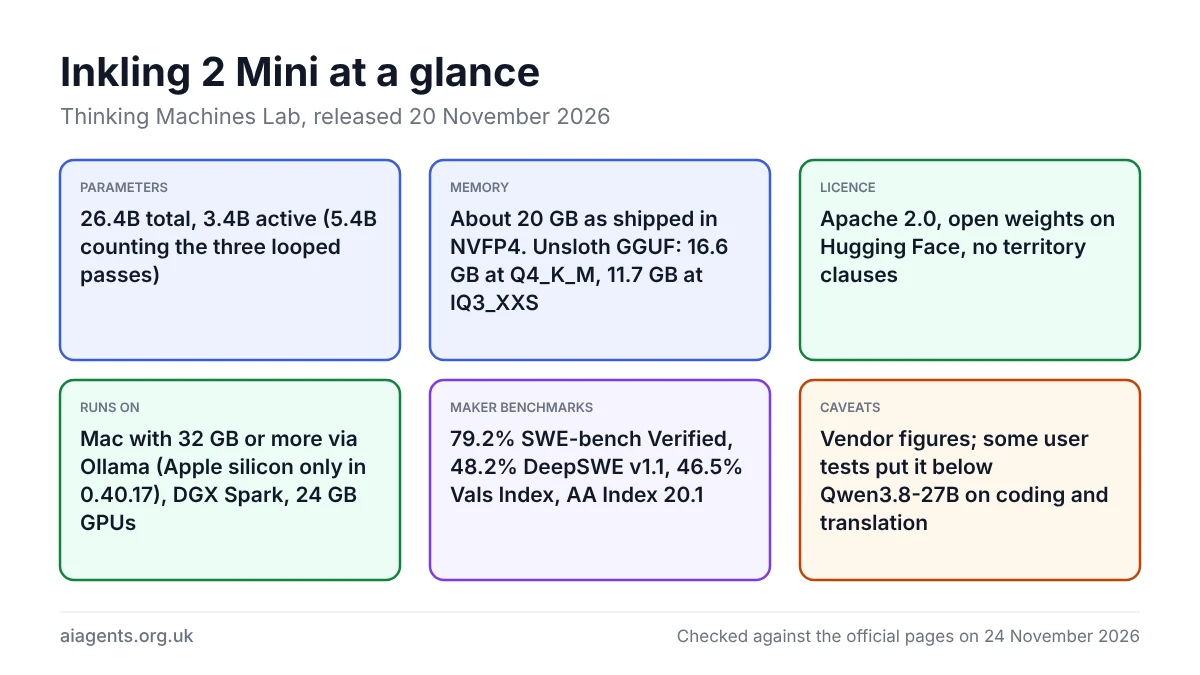
- Inkling 2 Mini (20 November): 26.4B total, 3.4B active (5.4B counting the looped layers), text and images, 1-million-token context, Apache 2.0. About 20 GB as shipped; Unsloth's Q4_K_M GGUF is 16.6 GB and the IQ3_XXS is 11.7 GB. In Ollama at 18 to 20 GB, Apple silicon only in 0.40.17. 79.2 per cent on SWE-bench Verified, by the maker's count.
- NariQ Qwen3.8-27B (20 November): 3-bit, 2.5-bit and 2-bit GGUFs at 10.1 GB, 8.4 GB and 6.8 GB, Apache 2.0, against 53.8 GB in BF16. Needs Nari Labs' llama.cpp fork, so not in Ollama or LM Studio.
- OVHcloud Olala mini 7A1B (19 November): 6.8B total, about 1B active, 32K context, 37 languages, Apache 2.0. GGUF from 6.0 GB, MLX 4-bit at 4.9 GB. Needs OVHcloud's forks for now.
- Open WebUI 0.13.4 (17 November): Tether replaces Direct Connections; needs Tether 0.1.14 or later.
- Microsoft RDMA over USB4 (19 November): developer preview; three 128 GB Ryzen AI Max mini PCs ran Qwen3-235B-A22B at about 18.5 tokens a second at 4-bit. Windows Insider build still to come.
- GLM-5.4 (23 November) and Tencent Hy4: about 750B and 770B parameters. GLM-5.4 weights are promised later; Hy4 is open under Tencent's Apache-derived licence but needs well over 400 GB at 4-bit.
- For a 16 GB Mac: NariQ's 8.4 GB file if you will build the fork; Olala mini with room to spare. Inkling 2 Mini wants 32 GB, or 24 GB with the 11.7 GB GGUF and a short context.
On this page
- Inkling 2 Mini: a 26B model that thinks three times per token
- NariQ: Qwen3.8-27B in a 10 GB file
- Olala mini: OVHcloud's 7B model for an 8 GB machine
- Open WebUI 0.13.4: your Mac's models in a hosted Open WebUI
- Microsoft RDMA over USB4: pooling Windows mini PCs
- GLM-5.4 and Tencent Hy4: loops and 770B flagships
- Also this week
- What it means for a UK reader
- Frequently asked questions
- Sources
Inkling 2 Mini: a 26B model that thinks three times per token
Thinking Machines LabModelApache 2.032 GB MacIn OllamaGGUF20 November
Thinking Machines Lab, Mira Murati's company, released Inkling 2 Mini on 20 November under Apache 2.0. It is a mixture-of-experts model with 26.4 billion parameters, 3.4 billion of them active per token, and a looped transformer: 12 of its 24 layers run three times for every token, so it does 48 layers' worth of work from 24 layers of weights and 5.4 billion effective active parameters. It takes text and images, has a one-million-token context, and was trained and shipped in 4-bit NVFP4 with the last four layers in 8-bit, so the whole checkpoint is about 20 GB with no quantisation step. The maker's numbers are 79.2 per cent on SWE-bench Verified, 48.2 on DeepSWE v1.1 and 46.5 on Vals Index, which it says leads every open-weight model under 100B; on Artificial Analysis' index it ties Qwen3.8-27B at 20.1. Those are vendor figures, and the r/LocalLLaMA thread that reached 1,692 upvotes includes user tests putting it below Qwen3.8-27B on some coding and translation jobs.
48 layers' worth of work from 24 layers of weights: the looped middle block is why a 20 GB file behaves like something bigger.
The one idea behind this week's biggest release
Can you run it on a Mac? Yes, with 32 GB. Ollama's library has inkling-2-mini at 18 to 20 GB with vision, tools and thinking; the 0.40.17 notes say Apple silicon only, with PC support to follow. Unsloth's GGUFs, posted on 20 November and past 1.29 million downloads by the 23rd, run from 16.6 GB at Q4_K_M down to 11.7 GB at IQ3_XXS and 9.1 GB at Q2_K_XL, plus a 0.6 GB vision projector; the 11.7 GB file is the route for a 24 GB Mac with a short context. The model card lists llama.cpp and the Llama desktop app for GGUFs, so LM Studio needs a runtime pack that knows the new inkling2_loop architecture before it will load one. Set-up is in the Ollama guide.
Can you run it on a Mac? Yes on 32 GB with one command in Ollama. 24 GB works with the 11.7 GB GGUF and a short context. 16 GB is a stretch.
NariQ: Qwen3.8-27B in a 10 GB file
Nari LabsQuantisationApache 2.016 GB Macllama.cpp fork only20 November
Nari Labs released NariQ v1 on 20 November: GGUF files of Qwen3.8-27B, the model most people run on a 32 GB Mac, at 3, 2.5 and 2 bits per weight, so 10.1 GB, 8.4 GB and 6.8 GB plus a 0.9 GB vision projector, under Apache 2.0. The method is trellis-coded quantisation calibrated on real coding-agent traces, and the claim, backed by a technical report on arXiv, is that the 3-bit and 2.5-bit files match the 53.8 GB BF16 original on long agent tasks: 41.0 against 39.8 per cent on DeepSWE v1.1 and 63.8 against 62.6 on Terminal-Bench 2.1 for the 3-bit, with the 2-bit file clearly worse. The catch is that the files only run on Nari Labs' own llama.cpp fork, so nothing loads in Ollama or LM Studio and you will be building from source. It reached 162 points on Hacker News, and if the format is merged upstream it is the most useful thing that happened this week for a 16 GB Mac.
Can you run it on a Mac? Yes on 16 GB, but only by building Nari Labs' llama.cpp fork from source. Not in Ollama or LM Studio yet.
Olala mini: OVHcloud's 7B model for an 8 GB machine
OVHcloudModelApache 2.08 GB machineMade in EuropeForks only19 November
OVHcloud announced Olala, its first family of language models, on 17 November and put Olala mini 7A1B on Hugging Face on 19 November under Apache 2.0. It has 6.8 billion parameters with about one billion active, 256 experts per layer and a hybrid of Mamba-3 and attention in which only 7 of 36 layers keep a KV cache; the context is 32K tokens with 128K promised. It was trained from scratch on 12.8 trillion tokens on three European public supercomputers, thinks before answering with four effort levels, was trained to call tools across many turns and covers 37 languages. OVHcloud's own comparison puts it ahead of similar models on instruction following and behind on maths and science, and the card says plainly that it should read facts through tools rather than answer from memory.
On a Mac it is small: the official GGUFs are 6.0 GB at Q5_K_M, 6.3 GB at Q6_K and 6.9 GB at Q8_0, and the MLX 4-bit build is 4.9 GB, so an 8 GB or 16 GB machine is fine, and OVHcloud quotes 50 tokens a second on a CPU with no GPU. But Ollama, LM Studio and the official llama.cpp and mlx-lm cannot load the architecture yet; every route uses one of OVHcloud's forks. For a UK small business the draw is a European, Apache 2.0, tool-calling model with its training documented down to the carbon estimate, which answers some of the questions in the self-hosted LLM guide.
Can you run it on a Mac? Yes on 8 GB or 16 GB, through OVHcloud's forks of llama.cpp or mlx-lm. Mainline Ollama and LM Studio cannot load it yet.
Open WebUI 0.13.4: your Mac's models in a hosted Open WebUI
Open WebUIToolFree and open sourceWorks with Ollama and LM Studio17 November
Open WebUI 0.13.4 on 17 November added Tether. Install the Tether app on your own computer, point it at Ollama, LM Studio or any OpenAI-compatible server, plus any MCP or OpenAPI tool servers, and those models and tools appear just for you in the model selector of whichever Open WebUI you connect to, from any device, with the addresses and keys never leaving your machine. It replaces Direct Connections and needs Tether 0.1.14 or later, 0.1.16 for MCP. The use case is one UK home users keep asking about: a 64 GB Mac Studio at home serving a team's Open WebUI on a cheap VPS. How the apps compare is in Ollama vs LM Studio vs Jan.
Worth updating? Yes if you run Open WebUI anywhere other than the machine with the models. If everything is on one Mac, nothing changes for you.
Microsoft RDMA over USB4: pooling Windows mini PCs
MicrosoftToolWindows 11 onlyDeveloper previewMini PCs19 November
Microsoft's USB team published a developer preview of RDMA over USB4 on 19 November. It extends the USB4 peer-to-peer networking already in Windows 11 so that PCs joined by a USB4 cable can read each other's memory with low latency, and ships a fork of llama.cpp whose RPC backend runs over that link, with tensor-parallel changes that split one model across several PCs. In Microsoft's lab three mini PCs with Ryzen AI Max processors and 128 GB each ran Qwen3-235B-A22B at about 18.5 tokens a second at 4-bit; AMD measured 21.98. Intel Core Ultra Series 3 machines were tested four at a time over Thunderbolt 4. You need 40 Gbps ports, one direct cable per pair of PCs, a registry key, test signing and a Windows Insider build still marked coming soon. It is the Windows answer to Apple's Harbor app from the previous week, and heise notes Macs have had RDMA over Thunderbolt 5 since macOS 26.2. Which box to buy is in the best Mac or mini PC for local AI.
Should you try it? Not yet. It needs a Windows Insider build that was still marked coming soon, plus test signing. Watch it if you own two or more USB4 mini PCs.
GLM-5.4 and Tencent Hy4: loops and 770B flagships
Z.aiTencentBig-lab newsNo weights yetToo big for home23 and 20 November
Z.ai released GLM-5.4 on 23 November, its first flagship built as a loop transformer: 28 layers of the roughly 750B GLM-5 base run twice per pass, with vision for reading screenshots and a one-million-token context. It is live for GLM Coding Plan subscribers, in ZCode and in Z.ai Chat; the API is coming soon, and Z.ai says it will open the weights after safety hardening, with no date and no licence named. Tencent's Hy4 flagship is on Hugging Face under the Tencent Hy License, an Apache 2.0 derivative with extra terms for services over 100 million monthly users: 770B total and 49B active, with the repo last updated on 20 November, the day r/LocalLLaMA picked it up, and Hy4-flash at 220B total and 12B active from 17 November. Neither is a home download; Hy4-flash alone would want about 130 GB at 4-bit. What the week shows is that two more labs reached the same answer as Thinking Machines, that looping layers buys depth without parameters, which is good news for the 26B class.
Can you run them? No. GLM-5.4 has no public weights, and Hy4 at 770B needs a rack, not a desk. The looping idea is what matters for smaller models.
Also this week
- LM Studio Bionic 1.2.2 (20 November): llama.cpp 2.79.0 and oMLX 0.5.0 runtime packs, skill installation on remote devices and automatic retries for stalled external-model replies. The LM Studio guide covers both apps.
- Kolibri 1.1 (23 November): Aleph Alpha's English-German open-weight model, Apache 2.0, now with official GGUFs and a llama.cpp implementation for CPU, CUDA and Metal; the smallest build wants a 24 GB GPU.
- OCRia-nano-1 (23 November): LlamaIndex's 8.1-million-parameter document parsing pipeline for CPUs, 59.2 on ParseBench-2 and 426 ms a page on one core. The licence is a modified Open RAIL-M: free for research and for companies under 2 million dollars of revenue, commercial licence above that.
- lookatmyquant (21 November): an MIT-licensed quantisation compiler claiming 12 times lower KL divergence than Q4_K_M at the same file size, with an Apple silicon runtime; its Inkling 2 Mini in 5.4 GB of memory was the top Hacker News story of the week at 597 points. Early and unmerged.
- Ollama (24 November): the 0.40.18 pre-release, just outside this week, fuses Inkling's residual mixing on Metal and bumps llama.cpp to b12651. No stable Ollama release between 17 and 23 November.
What it means for a UK reader
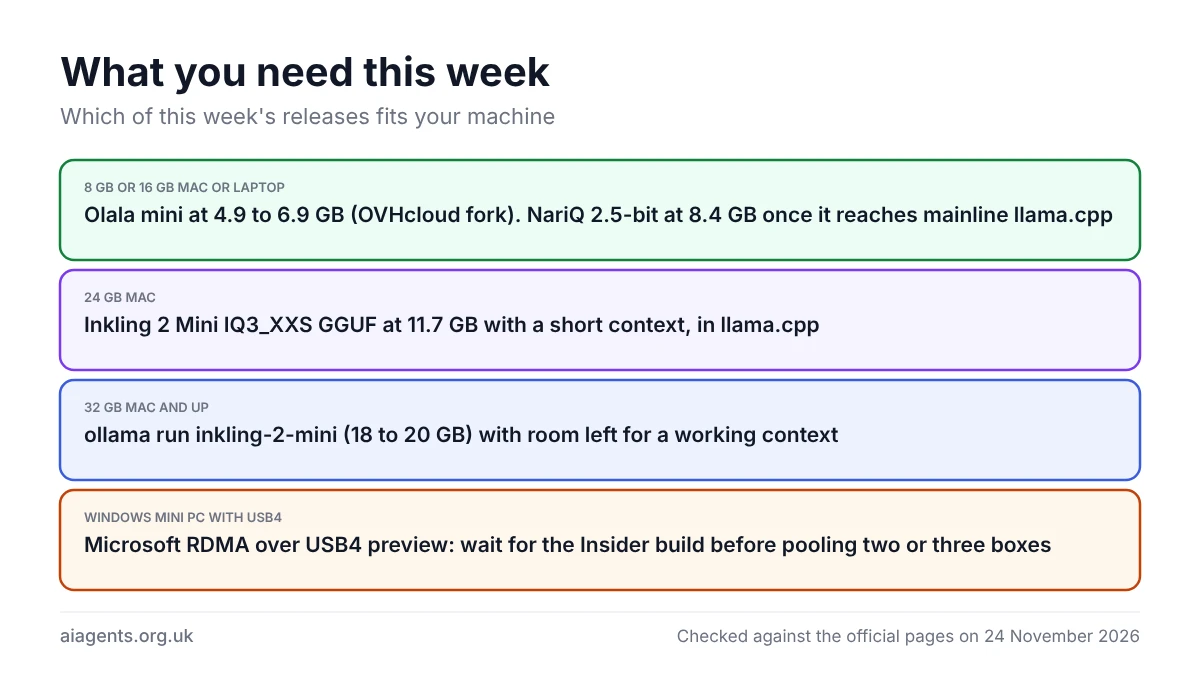
- 8 GB or 16 GB Mac or laptop: Olala mini at 4.9 to 6.9 GB is the new small model, if you will run OVHcloud's fork. NariQ's 8.4 GB Qwen3.8-27B is the bigger prize for 16 GB once the format lands in mainstream llama.cpp.
- 24 GB: Inkling 2 Mini's 11.7 GB IQ3_XXS GGUF with a short context is the experiment of the week.
- 32 GB and up:
ollama run inkling-2-mini. It is the first model of this size with a credible claim to agentic coding, and it leaves room for a context on 32 GB. - Mini PC owners: Microsoft's RDMA over USB4 preview is the first official path to pooling two or three Ryzen AI Max boxes on Windows; wait for the Insider build rather than the registry hack.
- Small business: Inkling 2 Mini, NariQ and Olala mini are plain Apache 2.0 with no territory clauses. OCRia-nano-1 has a revenue threshold, and GLM-5.4 has no licence yet because it has no weights yet. The data side is in AI agents and UK GDPR.
Frequently asked questions
How much memory does Inkling 2 Mini need on a Mac?
Thinking Machines and Ollama both say a Mac with 32 GB or more. The native checkpoint is about 20 GB and Ollama's build is 18 to 20 GB. A 24 GB Mac can try Unsloth's 11.7 GB IQ3_XXS GGUF in llama.cpp with a short context; a 16 GB Mac is limited to the 9.1 GB Q2_K_XL, which will be noticeably worse.
What is a looped transformer?
A transformer that runs the same block of layers more than once per token, reusing the weights. Inkling 2 Mini runs its middle 12 layers three times, and GLM-5.4 runs 28 layers twice. The model gets more computation per token without more parameters to store, so the file stays small while reasoning improves, at the cost of slower generation per token than a model of the same size run once.
Can I load NariQ or Olala mini in Ollama or LM Studio?
Not yet. NariQ's GGUFs need Nari Labs' llama.cpp fork, and Olala mini needs OVHcloud's forks of llama.cpp or mlx-lm because its Mamba-3 hybrid architecture is not in the mainline engines. Both are terminal jobs until the changes are merged upstream and the apps update their runtimes.
Does Microsoft's RDMA over USB4 work on a Mac?
No, it is a Windows 11 developer preview for USB4-capable PCs, and it needs a Windows Insider build that was not yet available on 24 November. Macs with Thunderbolt 5 have their own RDMA support in macOS 26.2, and Apple's Claris subsidiary is testing the Harbor app for pooling Macs.
More guides: pick the right machine in the best Mac or mini PC for local AI, set up the software with the Ollama guide or the LM Studio guide, compare the apps in Ollama vs LM Studio vs Jan, run an agent on it with how to run AI agents on your Mac, and see what it costs to go further in the self-hosted LLM guide.
Sources
- Thinking Machines Lab, Introducing Inkling 2 Mini (20 November 2026) and Hugging Face, thinkingmachines/Inkling-2-Mini model card: parameters, looping, precision, licence, hardware, benchmarks
- Hugging Face, unsloth/Inkling-2-Mini-GGUF and Ollama library, inkling-2-mini: file sizes, downloads, Ollama tags
- Ollama on GitHub, Releases: v0.40.17 notes and the v0.40.18 pre-release
- Hugging Face, nari-labs/Qwen3.8-27B-NariQ-GGUF: sizes, benchmarks, fork requirement
- OVHcloud, OVH announces Olala mini 7A1B (17 November 2026), Hugging Face, OVHaiLLM/Olala-v1.0-mini-7A1B model card, GGUF files and MLX files: architecture, release date, context, languages, runtime forks, file sizes
- Open WebUI on GitHub, v0.13.4 release notes: Tether
- Microsoft USB Blog, Introducing RDMA over USB4 on Windows (19 November 2026) and heise online, Microsoft brings USB4 networking to multiple Windows 11 PCs: preview contents, test results, requirements, macOS 26.2 note
- Z.ai, GLM-5.4: Toward Generalized Coding with Our First Loop Transformer (23 November 2026): architecture, availability, open-weights plan
- Hugging Face, tencent/Hy4 model card, tencent/Hy4-flash and the Tencent Hy License: parameters, context, licence terms
- LM Studio, Bionic changelog: 1.2.2 contents
- Aleph Alpha, Kolibri 1.1 (23 November 2026): licence, GGUF, hardware
- Hugging Face, llamaindex/OCRia-nano-1 model card: parameters, benchmarks, licence
- GitHub, ShinMegamiBoson/lookatmyquant: claims and licence
- r/LocalLLaMA, top posts of the week and Hacker News search: community reception and vote counts
More issues: see every issue of Local AI this week. Previous issue: 10 to 16 November 2026.