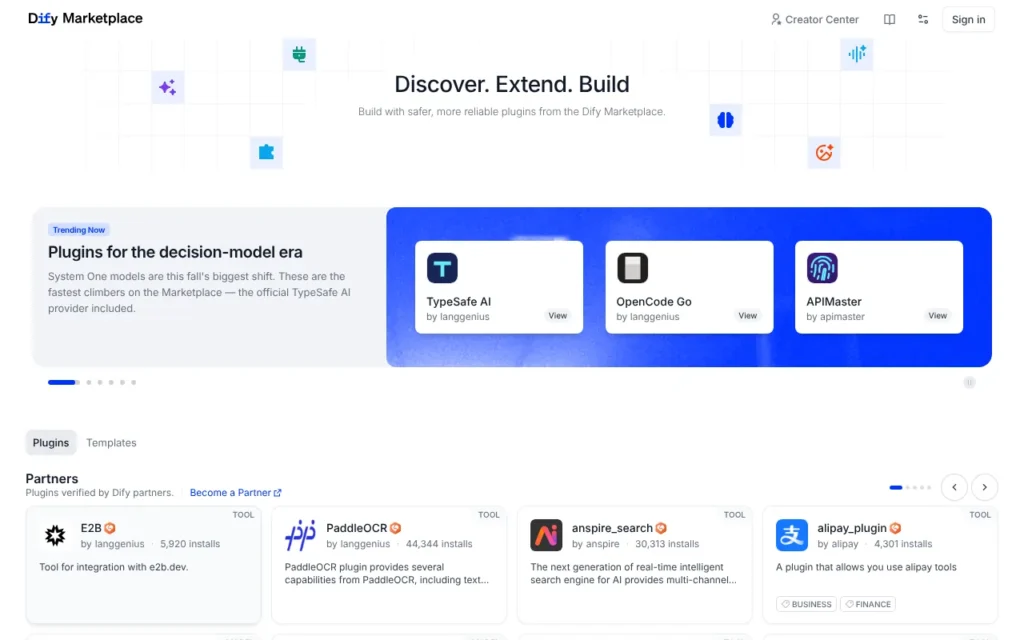
Dify Plugin Marketplace (often just called the Dify Marketplace) is LangGenius's free store of plugins and templates for Dify, an open-source platform for building AI agents and workflows. It suits small teams willing to build their own agent rather than buy one ready-made. It has about 1,050 plugins, from AI model connectors to Gmail and Slack tools, plus 352 templates. Every plugin is free, but you need a Dify workspace (free to start, or from $59 a month) and your own AI model costs. I rate it ★★★½☆ 3.5/5.
Key facts
- What it is: The official store of plugins, agent strategies and workflow templates for the Dify agent builder
- Made by: LangGenius, Inc., the US company behind Dify. No parent company
- Launched: February 2025, with Dify version 1.0. Templates were added in March 2026
- Size: About 1,050 plugins and 352 templates (24 October 2026). About 119,700 visits to marketplace.dify.ai in the three months to September 2026 (Similarweb)
- Price: All plugins and templates are free. Dify Cloud is free on the Sandbox plan, or from $59 a month (about £44)
- Best for: Small teams building their own AI agents and workflows
- Available in the UK: Yes. I found no country restrictions
- Seller commission: None. Only free plugins are allowed for now
- Our rating: ★★★½☆ 3.5/5
On this page
- What is Dify Marketplace?
- Who owns Dify Marketplace?
- How popular is Dify Marketplace?
- The most installed Dify plugins right now
- How much does Dify Marketplace cost?
- Hidden costs
- How to install a plugin from the Dify Marketplace
- Best agents to try on Dify Marketplace
- What do people build with Dify plugins?
- Selling your agent on Dify Marketplace
- What other people rate it
- What's good
- What's not so good
- Common Dify plugin problems and fixes
- Who is it for?
- Using it in the UK
- Interesting facts about Dify Marketplace
- Alternatives to Dify Marketplace
- Our rating
- Frequently asked questions
What is Dify Marketplace?
Dify is a platform for building AI apps, agents and workflows out of connected steps, called nodes. You can use it as a cloud service or run the free open-source version on your own server. The Marketplace is where you add extra abilities to it.
There are four main kinds of plugin. Model plugins connect AI models such as OpenAI or DeepSeek. Tool plugins let an agent do things, like send a Gmail message or post to Slack. Agent strategy plugins control how an agent reasons and picks tools. Extensions connect Dify to outside services. Since March 2026 the Marketplace also lists workflow templates that you can copy into Dify and adapt.
These are building blocks, not finished agents. You install them into your Dify workspace and wire them into your own agent.
Who owns Dify Marketplace?
- The Marketplace is run by LangGenius, Inc., a Delaware company in the US. It has a Japanese subsidiary, LangGenius K.K., in Tokyo.
- The founder and CEO is Luyu Zhang.
- Dify has offices in the San Francisco Bay Area, Tokyo, Shanghai and Suzhou. I found no single named headquarters.
- Dify was founded in March 2023. The Marketplace launched with Dify version 1.0 on 17 February 2025, and the template marketplace followed on 10 March 2026.
- LangGenius is private. It raised a $30 million Series Pre-A round in March 2026, led by HSG, and its press release valued it at $180 million.
How popular is Dify Marketplace?
The Marketplace is busy for a builder's store, and Dify itself is one of the biggest open-source AI projects.
- About 119,700 visits to marketplace.dify.ai in the three months to September 2026, according to Similarweb, down 18.32% on the month before.
- For the whole dify.ai domain, Similarweb counted about 964,000 visits in the three months to September 2026, with China the biggest source of traffic.
- On 24 October 2026 the Marketplace's own search listed 833 tools, 173 model plugins, 36 extensions and 14 agent strategies, plus 352 templates.
- The most installed plugin, DeepSeek's model connector, showed about 2.12 million installs on 24 October 2026. OpenAI's showed about 1.15 million.
- Dify's main GitHub project had about 152,400 stars on 16 October 2026. In March 2026 the company said Dify ran on more than 1.4 million machines, with 280 enterprises among its users.
The most installed Dify plugins right now
I sorted marketplace.dify.ai by installs at about 2pm UK time on 24 October 2026. Counts rise every day. All ten are published by LangGenius.
| Rank | Plugin | Type | What it does | Installs |
|---|---|---|---|---|
| 1 | DeepSeek | Model | DeepSeek's official models | 2.12 million |
| 2 | Tongyi | Model | Alibaba Cloud's Tongyi models | 1.76 million |
| 3 | Volcengine Ark | Model | Models hosted on ByteDance's Volcengine | 1.40 million |
| 4 | OpenAI-API-compatible | Model | Any server that uses OpenAI's API format | 1.35 million |
| 5 | OpenAI | Model | OpenAI's language, embedding and audio models | 1.15 million |
| 6 | Ollama | Model | Models you run yourself with Ollama | 1.03 million |
| 7 | Hunyuan | Model | Tencent's Hunyuan models | 981,000 |
| 8 | Dify Agent Strategies | Agent strategy | Function Calling and ReAct reasoning | 838,000 |
| 9 | SiliconFlow | Model | Access to many hosted models | 821,000 |
| 10 | Gemini | Model | Google's Gemini models | 720,000 |
Nine of the ten connect AI models. The most installed tools are Tavily search (420,000), JSON Process (377,000), Jina AI (237,000), MinerU file conversion (229,000) and Firecrawl (208,000). The most installed community plugin is Markdown Exporter (186,000). Data source and trigger plugins do not appear in the Marketplace search, so the true plugin total is slightly higher than the category counts above.
How much does Dify Marketplace cost?
Everything in the Marketplace is free. What you pay for is Dify itself, and the AI models and services your plugins connect to.
| Plan or fee | Price | What you get |
|---|---|---|
| Marketplace plugins and templates | Free | Any plugin or template in the store |
| Dify Community Edition | Free | The open-source version, which you install and run on your own server. One workspace |
| Dify Cloud Sandbox | Free | 200 message credits, 1 team member, 5 apps, 50 MB of knowledge storage |
| Dify Cloud Professional | $59 a month per workspace, or $590 a year (about £44 or £444) | 5,000 message credits a month, 3 team members, 50 apps, 5 GB storage |
| Dify Cloud Team | $159 a month per workspace, or $1,590 a year (about £120 or £1,195) | 10,000 message credits a month, 50 team members, 200 apps, 20 GB storage |
| Enterprise | Contact sales | Single sign-on, multiple workspaces, support and agreed service levels |
Dify's pricing page says prices exclude applicable taxes, which may be added at checkout. The Marketplace takes no commission, because plugins cannot be sold.
Hidden costs
- You need a Dify workspace to install anything. The free Sandbox plan has only 200 message credits, and paid cloud plans start at $59 a month (about £44).
- Model plugins use your own account with the AI provider. The OpenAI plugin asks for your OpenAI API key, and you are billed for the tokens you use.
- Some tools need a paid account elsewhere. The Firecrawl plugin needs a Firecrawl API key with enough balance on it.
- The Community Edition is free, but you supply and maintain the server it runs on.
- Prices are in US dollars and exclude taxes, which may be added at checkout.
How to install a plugin from the Dify Marketplace
You can install from the Marketplace, a public GitHub repository or a .difypkg file. Inside Dify the page is now called Integrations. Older versions call it Plugins. These steps follow the official docs as of 24 October 2026.
On Dify Cloud
- Open Integrations in your workspace and pick a category, such as Model Provider or Tools. The Marketplace list appears inside it.
- Click Install, then confirm. If installing from marketplace.dify.ai opens a different Dify, clear the saved address under Install Preference.
- Add your key. For a model plugin, click Setup on its card and enter your API key. Dify checks it before the models appear. Some popular providers can run on your plan's credits first (model providers docs).
- Authorise tools. Tools such as Google or GitHub need credentials under Integrations, then Tools, then Tool Plugin. Gmail connects through Google OAuth. Its listing tells you to create Google OAuth credentials using the callback address the plugin shows.
- Use it. In a workflow, click Add Node, then Tools, and choose an action (Tool node docs). Or add the tool to an Agent node and pick a strategy, Function Calling or ReAct.
On self-hosted Community Edition
- Run version 1.0 or later. Plugins arrived with v1.0.0, and its release notes explain how to move old tools and models into plugins. For later upgrades, follow each release's upgrade guide.
- Check the plugin daemon is running. It is one of the core containers that Docker Compose starts. Run
docker compose psand look forplugin_daemonshowing Up or healthy. - Install. If you browse marketplace.dify.ai outside Dify, set your server's address in Install Preference first. For GitHub, choose Install Plugin, then From GitHub, paste the address and pick a version. For a file, choose Via Local File.
- Expect signature checks. The setting
FORCE_VERIFYING_SIGNATUREistrueby default, so unsigned packages are refused. For production, Dify recommends signing them. For development or trusted internal use, its plugin FAQ says to addFORCE_VERIFYING_SIGNATURE=falsetodocker/.envand restart, only on servers you control. - Add keys and use it, as on Cloud.
To restart after changing docker/.env:
cd docker
docker compose down
docker compose up -d
On Cloud and self-hosted, the workspace owner and admins decide who can install, under Permissions at the bottom of the Integrations page. In Dify 1.18.0, released on 23 October 2026, only owners and admins can install if no rule is saved (release notes).
Best agents to try on Dify Marketplace
These are plugins rather than finished agents, chosen because they cover jobs most small businesses have. All are made or checked by the Dify team.
| Agent | Made by | What it does | Price |
|---|---|---|---|
| Dify Agent Strategies | LangGenius | Gives your agent its reasoning method, either Function Calling or ReAct, so it can choose and use tools. 838k installs | Free |
| Gmail | LangGenius | Reads, searches, drafts and sends Gmail messages, with attachments. about 18k installs | Free. Needs a Google account |
| Notion | LangGenius | Searches, creates and updates Notion pages and databases. 21.6k installs | Free. Needs a Notion account |
| Slack | LangGenius | Sends, schedules and manages Slack messages, channels and files. 16.8k installs | Free. Needs a Slack workspace |
| Firecrawl | LangGenius | Searches, crawls and scrapes websites for your agent to use. 207.8k installs | Free plugin. Needs a paid Firecrawl API key |
What do people build with Dify plugins?
The Marketplace's templates show which plugins people combine. Use counts are the Marketplace's own, as of 24 October 2026.
- A support bot over your own documents: Knowledge Retrieval: A Smart Chatbot (about 4,500 uses) needs only the OpenAI plugin and a knowledge base. Dify's blog shows how to embed one on your website. The most used template, Legal Research Agent (about 8,300 uses), adds a vector database and web search.
- A web research agent: Web Content Search and Summarization searches with Tavily, reads pages with Jina AI and returns a table of results. Tavily's own Competitive Landscape Intelligence template (about 2,700 uses) scores 4-6 market trends.
- An inbox and ticket assistant: the work ticket system template (about 2,600 uses) combines Gmail, Discord and OpenAI. It sorts each ticket by type, finds help articles and drafts a reply.
- A Slack or Discord bot: the Slack Bot extension (10,300 installs) passes Slack messages into a Dify chatbot. AI News Brief (about 2,100 uses) searches Tavily at a set time each day and posts a summary to a Slack channel. The Discord plugin covers webhooks and bots.
- Private models on your own machine: the Ollama plugin has over 1 million installs. There is also a community LM Studio plugin (74,000 installs) and OpenAI-API-compatible, which names LM Studio and llama.cpp. With self-hosted Dify and a local model, prompts can stay on your own hardware. See my self-hosted LLM guide.
- Documents and slides: the community Markdown Exporter (186,000 installs) turns text into Word, PowerPoint, Excel or PDF files. Visual Presentation Generator (about 3,100 uses) makes a slide deck from long text with Gemini.
Selling your agent on Dify Marketplace
- Who can list: Any developer. You submit a packaged plugin as a pull request to Dify's public plugins repository on GitHub, one plugin per request.
- Review: Automated checks look at the package contents, secrets, metadata, dependencies and outside web addresses. A Dify maintainer then reviews it, and passing the checks does not guarantee approval.
- Rules: You must provide a privacy policy, an English README and a risk level (Low, Medium or High). Medium and high risk plugins need documented security limits.
- Commission and payment: The Marketplace currently allows only free plugins, and no paid features inside them. There are no fees and no revenue share. Dify says rules for paid plugins will come later.
- Templates: Individuals and organisations can publish workflow templates through the Creator Center. Creators who join the Dify Affiliate Program can earn commission when people subscribe to Dify through their template links.
- Control: Dify can list, recommend, suspend or remove any plugin at its discretion.
What other people rate it
There are no ratings for the Marketplace on its own, so these scores are for Dify as a whole.
- G2: Dify.AI - 4.1/5 from 20 reviews, checked 16 October 2026.
- Capterra UK: Dify - no reviews yet, checked 16 October 2026.
What's good
- Every plugin and template is free, and the Marketplace Agreement says so in plain terms.
- Each plugin passes automated checks and a human review, and must come with a privacy policy and a declared risk level.
- Self-hosted Dify checks plugin signatures by default, so packages from outside the Marketplace cannot be installed without an admin's say-so.
- Official plugins cover everyday tools, including Gmail, Notion and Slack, and carry a "Verified by Dify" badge.
- Install counts on every listing show what other people actually use.
- You can run Dify yourself for free and keep your data on your own server.
What's not so good
- These are parts, not finished agents. You need to learn Dify's workflow builder to get value from them.
- User ratings are thin. All five popular plugins I checked said "No ratings yet".
- Much of the catalogue leans towards China. The three most installed plugins are DeepSeek, Tongyi and Volcengine model connectors, and some templates are written in Chinese.
- The real costs sit outside the store, in AI model and API charges that vary with use.
- Dify Cloud data may be processed in several countries, including the US and China, and no UK representative is named.
Common Dify plugin problems and fixes
These come from Dify's docs and from user reports on its forum and GitHub. Forum replies are individual advice, not official fixes.
- Install stuck or failing (self-hosted): in one forum thread, a Tongyi install on version 1.11.4 looped with "Task timed out but not properly terminated". Replies suggested the server could not reach the Python package index, or lacked CPU and memory. The docs ask for at least 2 CPU cores and 4 GiB of RAM, and offer
PIP_MIRROR_URLfor a different package mirror. Read the logs withdocker compose logs plugin_daemon. On Windows, keep Dify inside the WSL Linux file system. A Windows 11 user hit "failed to symlink file" with plugin files in a Windows folder. - "Plugin verification has been enabled... bad signature": self-hosted Dify refuses unsigned packages. Sign the package, or set
FORCE_VERIFYING_SIGNATURE=falseas shown above. Dify Cloud handles signatures itself. - "Failed to request plugin daemon": Dify cannot reach its plugin service. Run
docker compose psand checkplugin_daemonis up. In a forum thread with this error, replies suggested checking Redis, network or port clashes and available memory. If plugins install but every call fails, the environment docs point to a mismatched inner API key. - API key or connection errors: inside Docker, "localhost" means the container, not your computer. The Docker docs say to use your machine's local network address. The Ollama listing suggests
http://host.docker.internal:11434, and a GitHub issue shows the same fix for LM Studio. For Gmail, "Access token expired" means authorise it again. - Model plugin not in the model list: installing is not enough. Click Setup and add a key that passes Dify's check. For agents using Function Calling, pick a model that supports it. With Ollama, set "Function call support" to Yes for tool-capable models. Self-hosted users upgrading from before version 1.15 should move to 1.17.1 or later, which fixed models becoming unusable after the upgrade.
- No Marketplace or no Install button: check your role under Permissions. On your own server, check
MARKETPLACE_ENABLEDis stilltrue.
Who is it for?
It suits small businesses with someone who enjoys building, such as a technical founder, an operations lead or a freelancer setting up agents for clients. If you already use Dify, the Marketplace is the obvious place to add tools.
Skip it if you want an agent that works the day you sign up. Skip it too if you cannot manage API keys and usage costs.
Using it in the UK
- I found no country restrictions. You can browse the Marketplace without an account, and Dify Cloud has a free plan to start.
- Prices are in US dollars and exclude taxes, which may be added at checkout.
- Dify's privacy policy was updated on 30 June 2026. The data controller is LangGenius, Inc. It says data may be processed in the US, Australia, Canada, China, the EEA and the UK, with website servers in the US. Standard Contractual Clauses are the main safeguard for transfers from the UK and EEA. It names an EU representative in Ireland but no UK representative.
- If data location matters, the free Community Edition lets you run Dify on a server you choose.
- The Marketplace Agreement is governed by California law.
Interesting facts about Dify Marketplace
- The Marketplace opened in February 2025 with more than 120 plugins. By 24 October 2026 it had about 1,050.
- The most installed plugin is not OpenAI. DeepSeek's model connector had more than 2.1 million installs, against about 1.15 million for OpenAI.
- Plugins cannot charge money at all. The agreement says the Marketplace "currently permits only free plugins".
- Dify says it is the 51st most-starred open-source project on GitHub.
Alternatives to Dify Marketplace
- Smithery - pick it if you want MCP connectors that work with many agent apps, not just Dify.
- Apify Store - pick it if your agent mainly needs ready-to-run web scraping and data extraction tools.
- GPT Store - pick it if you want ready-made assistants you can use straight away on ChatGPT, with no building.
Our rating
| Area | Score |
|---|---|
| Choice | 4/5 |
| Pricing clarity | 4/5 |
| Getting started | 3/5 |
| Trust and safety | 4/5 |
| UK fit | 3/5 |
| Overall | ★★★½☆ 3.5/5 |
Dify Marketplace is a well-run, free store with real review checks. It is only worth it if you are ready to build your own agents in Dify and pay for the AI models behind them.
Frequently asked questions
Is Dify Marketplace free?
Yes. Every plugin and template is free, because the Marketplace does not allow paid plugins yet. You still need a Dify workspace, which is free on the Sandbox plan or from $59 a month (about £44), plus your AI model costs.
Is Dify Marketplace safe?
Plugins pass automated checks and a human review, and must include a privacy policy and a risk level. Dify still gives no warranty for third-party plugins, so stick to "Verified by Dify" listings where you can.
Can I use Dify Marketplace without coding?
Partly. Each plugin has an Install button, and templates can be copied into Dify, but you will need to set up API keys and build or adapt workflows yourself.
How do I install a plugin from the Dify Marketplace?
Open Integrations (called Plugins in older versions) in your Dify workspace, find the plugin and click Install. Then add its API key or sign in to the service it connects to. You can also install from a GitHub repository or a .difypkg file.
Which Dify plugins should I install first?
Start with one model plugin, such as OpenAI, Gemini or Ollama, plus Dify Agent Strategies if you are building an agent. Then add the tools your job needs, such as Tavily or Firecrawl for web research, or Gmail and Slack. As of 24 October 2026, DeepSeek is the most installed plugin, with about 2.12 million installs.
Why won't a plugin install on self-hosted Dify?
Usually the plugin daemon is not running, the server cannot download the plugin's packages, or the package fails Dify's signature check. Run docker compose ps, read the plugin_daemon logs, and only turn off signature checks on a server you control.
Read next
- AI agent marketplaces: the 20 biggest, reviewed - all 20 marketplaces compared
- How to build an AI agent, with or without code
- Self-hosted LLM: how to run your own AI model
Sources
- Dify Marketplace - checked 16 October 2026
- Dify Marketplace: templates - checked 16 October 2026
- Dify Marketplace search (plugin counts by category) - checked 24 October 2026
- Dify Marketplace templates API (template count) - checked 24 October 2026
- Dify Agent Strategies plugin - checked 16 October 2026
- Gmail plugin - checked 16 October 2026
- Notion plugin - checked 16 October 2026
- Slack plugin - checked 16 October 2026
- Firecrawl plugin - checked 16 October 2026
- OpenAI plugin - checked 16 October 2026
- Dify pricing - checked 16 October 2026
- Dify Marketplace Agreement - checked 16 October 2026
- Dify privacy policy - checked 16 October 2026
- Dify docs: Publish a Plugin to Marketplace - checked 16 October 2026
- Dify docs: Sign Plugins for Third-Party Signature Verification - checked 16 October 2026
- Dify blog: Dify v1.0, building a vibrant plugin ecosystem - checked 16 October 2026
- Dify blog: Creator Center and Template Marketplace - checked 16 October 2026
- Dify blog: Dify raises $30M - checked 16 October 2026
- Business Wire via Joplin Globe: Dify raises $30 million Series Pre-A - checked 16 October 2026
- Dify on GitHub - checked 16 October 2026
- Dify Affiliate Program Agreement - checked 16 October 2026
- Dify forum: The Dify Affiliate Program is here - checked 16 October 2026
- Similarweb: marketplace.dify.ai - checked 16 October 2026
- Similarweb: dify.ai - checked 16 October 2026
- G2: Dify.AI reviews - checked 16 October 2026
- Capterra UK: Dify - checked 16 October 2026
- Apify Store - checked 16 October 2026
- ChatGPT: Explore GPTs - checked 16 October 2026


