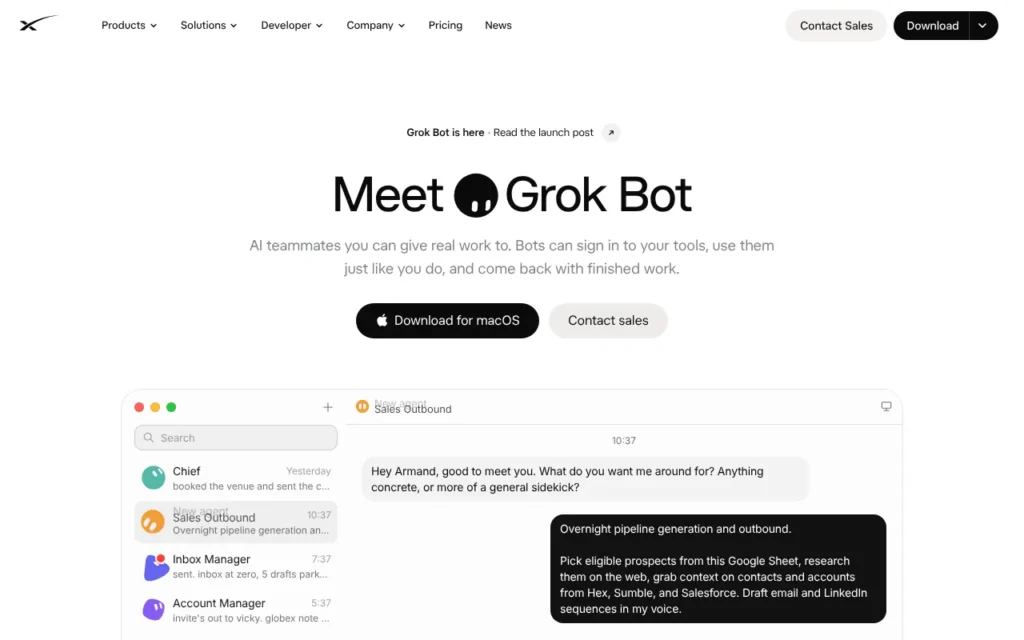
Grok Bot is SpaceXSI's always-on AI agent: named Bots with their own cloud computer that sign into your apps and keep working while you are away. It suits professionals and small teams who want help with inboxes, research and admin. It comes with the X Subscription from Premium at $30 a month (about £23, plus VAT), as of 24 October 2026. SpaceXSI publishes no UK restriction on Grok Bot itself, so UK users can sign up, though tagging @bot on X doesn't work here yet. The one thing to know: despite Elon Musk's promise to cover rogue purchases, the written terms make you responsible for everything a Bot does.
Key facts
- What it is: Named AI agents (Bots) that share a cloud computer, sign into your apps and work in the background
- Made by: SpaceXSI (legal name SpaceXAI LLC, formerly xAI), part of SpaceX, on Cursor's cloud
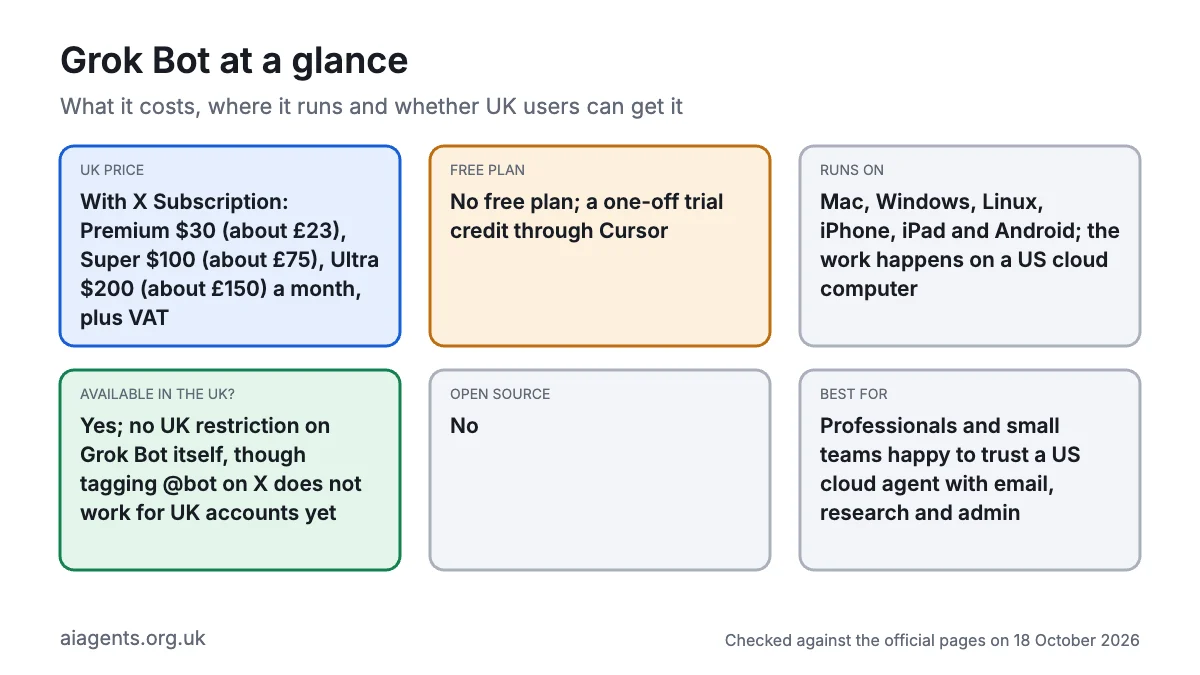
- Price: From X Subscription Premium at $30 a month (about £23); Super $100 (about £75); Ultra $200 (about £150); all plus VAT, as of 24 October 2026
- Free plan or trial: No free plan; a one-off trial credit, per Cursor's help pages
- Runs on: Mac, Windows, Linux, iPhone, iPad and Android; the work happens on a US cloud computer
- What you need: Premium or higher (or a paid Cursor plan) and cloud data storage switched on
- Open source: No
- Available in the UK: Yes, as of 24 October 2026; no UK restriction on Grok Bot itself, but tagging @bot on X isn't available for UK accounts yet
- Best for: Professionals and small teams happy to trust a US cloud agent with email, research and admin
- Official site: x.ai/bot
On this page
- What is Grok Bot?
- Is Grok Bot available in the UK?
- What's new in Grok Bot in October 2026?
- How much does Grok Bot cost in the UK?
- What do you need to run Grok Bot?
- How do you set up Grok Bot?
- How do you use Grok Bot? First things to try
- What do people use Grok Bot for?
- Best Grok Bot video tutorials
- Official Grok Bot links
- Will SpaceX refund a rogue Grok Bot purchase?
- Is Grok Bot safe? Privacy, security and UK GDPR
- Grok Bot problems and fixes
- Grok Bot vs ChatGPT Dots, Meta Muse and other agents
- Who should use Grok Bot?
- Frequently asked questions
What is Grok Bot?
Grok Bot is an AI agent, not a chatbot. You create Bots, each with a name, one job and a memory, and message them like colleagues from your desktop or phone. They work on a persistent cloud computer with a browser, files and a command line, so they carry on when your laptop is shut. They use app connectors where they exist, click through websites where they don't, and come back to you for approval.
SpaceXSI launched Grok Bot in beta on 11 August 2026, when it was still called SpaceXAI. The Bot computers run on the cloud of Cursor, the AI coding company SpaceX finished buying for $60 billion on 14 August (Bloomberg). Musk announced the SpaceXSI name, "SI" for superintelligence, on 4 October.
The detail that matters most: all your Bots share one computer, including its files and logins. Sign into a site for one Bot and every Bot can use it.
According to the official docs, Bots can:
- Work across apps and websites, with progress updates in the chat.
- Learn a task from a browser workflow you record, up to ten minutes long.
- Run routines on a schedule or after an event, such as a Slack message.
- Work as a team, messaging each other and handing work over.
- Use their own email address, and pick up tasks when you tag @bot on X (not yet for UK-based X accounts).
Grok Bot is separate from the Grok chatbot app.
Is Grok Bot available in the UK?
Yes. As of 24 October 2026, nothing on SpaceXSI's or X's official pages excludes the UK from Grok Bot itself, though tagging @bot on X isn't offered here yet.
What the official pages show:
- SpaceXSI's terms, updated 12 October, include Europe Specific Terms for consumers in the EEA, UK and Switzerland, with a 14-day right to withdraw.
- X's Premium help page lists a UK price for X Premium+, which includes Grok Bot.
- The terms bar sanctioned people and anyone in a US-embargoed country.
- SpaceXSI said the X Subscription would reach everyone globally within days (Teslarati, 13 October).
What isn't confirmed:
- SpaceXSI publishes no country list.
- Tagging @bot on X doesn't yet work for X accounts based in the UK, the EU, Iceland, Liechtenstein, Norway or Australia.
- Cursor picks the model for each task, with no model picker and no published list of providers.
- X Money is open only to select US users, so UK accounts can't pay with it. The docs don't say whether Stripe Link or Shop Pay checkout works for UK accounts.
- Bot computers run in the US, with no UK hosting by default.
What's new in Grok Bot in October 2026?
- 23 October: version 0.75.5 added a Vault for saved logins, cards and contact details, email forwarding from a Bot's inbox and fewer approval cards (changelog).
- 22 October: version 0.75.2 added Pages (reports, memos and dashboards a Bot keeps up to date), video creation and Shop Pay checkout. The phone apps began connecting to Calendar, Reminders, Contacts and Messages on iPhone and Android, each with its own Allow button (Digital Trends). SpaceXSI also launched a Partner Network for firms building on Grok (SpaceXSI).
- 20 October: SpaceXSI said its support Bot IncidentSweep closed 204 tickets in about 10 minutes during an incident on 18 September (SpaceXSI). On the results call the same day, Musk said SpaceX expects "wide deployment within a few weeks for enterprise customers".
- 21 October: Anthropic opened a US-only waitlist for Claude Duet, its own proactive agent, for Pro and Max subscribers.
- 20 October: On SpaceX's results call, president Gwynne Shotwell said Grok Bot had 800,000 paid weekly users earlier in October, more than double the month before (The Next Web).
- 16 October: iPhone in Canada reported new connectors for Robinhood, Coinbase, eToro and Trello, plus X Chat support so Bots can work with your X messages.
- 15 October: Musk promised that "SpaceX will make you whole" if a Bot makes a purchase mistake or leaks a card (Business Insider). He also told users to shop elsewhere after Amazon began blocking Grok Bot (Teslarati).
- 14 October: Ofcom said its investigation into X over Grok-made sexual images is still open.
- 12 October: The X Subscription launched, one plan for Grok, Cursor and X, with Grok Bot from Premium. SpaceXSI updated its terms and the Grok Bot Terms the same day.
- 11 October: Version 0.70.2 gave each Bot an email address, added payment by X Money or Stripe Link, and made Bots check for approval before buying or deleting.
- 8 October: The ICO said its formal investigation into Grok continues and opened a call for evidence on agentic AI.
- 7 October: Musk said SpaceX would use "the best back end model for any given task", naming Anthropic's Claude Opus 5.5, Midjourney and Suno (The Next Web).
- 4 October: Musk said SpaceXAI would become SpaceXSI (Teslanorth).
Earlier, Grok Bot opened to more Cursor and SuperGrok subscribers in late August, and Team Bots arrived on 26 September.
How much does Grok Bot cost in the UK?
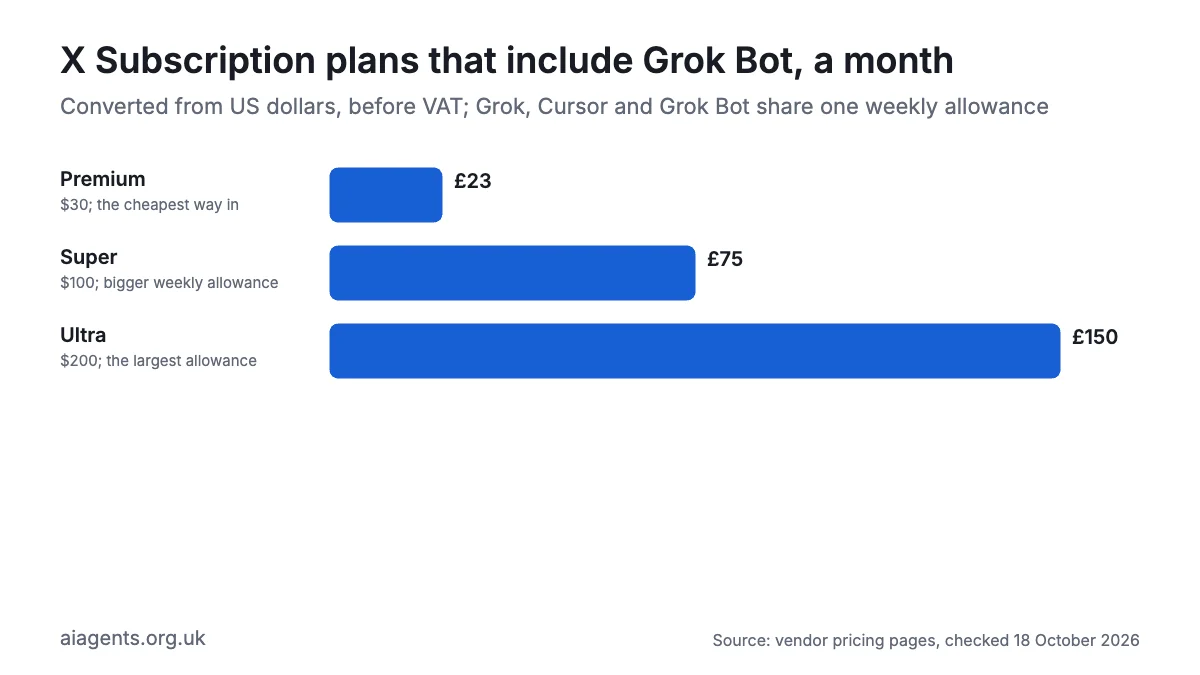
Grok Bot has no price of its own. It comes with the X Subscription from the Premium tier up. Prices below are from SpaceXSI's pricing page and plan docs, as of 24 October 2026.
Grok Bot UK prices in pounds, with VAT
Premium, the cheapest plan with Grok Bot, costs about £27 a month with 20% VAT, or about £270 a year. SpaceXSI's pricing page shows dollars even when opened from the UK, and says: "Prices shown do not include applicable taxes or fees (e.g. VAT)." Below, I convert at $1 = £0.75 and add 20% VAT, as of 24 October 2026.
| Plan | Monthly before VAT | Monthly with VAT | Yearly with VAT | Grok Bot? | Weekly usage |
|---|---|---|---|---|---|
| Free ($0) | £0 | £0 | £0 | No | Limited |
| Plus ($8, or $80 a year) | about £6 | about £7 | about £72 | No | Base level |
| Premium ($30, or $300 a year) | about £23 | about £27 | about £270 | Yes | 4 times Plus |
| Super ($100, or $1,000 a year) | about £75 | about £90 | about £900 | Yes | 15 times Plus |
| Ultra ($200, or $2,000 a year) | about £150 | about £180 | about £1,800 | Yes | 50 times Plus |
| Teams (from $30 a seat) | about £23 a seat | about £27 a seat | Not published | Yes | Each seat has its own pool |
| X Premium+ on X (older plan) | £31 (official UK price) | £37.20 | £375.60 | Yes | Linked allowance |
No Bot hours or credits. SpaceXSI publishes no Bot hours, credits or task limits, only these multiples of Plus. The pool resets weekly, and without prepaid credit your Bots stop until then (Cursor help).
Don't mix up the two Premiums. X's help centre lists X Premium at £8 a month in the UK. That social plan doesn't include Grok Bot. Grok Bot comes with Premium on the X Subscription ($30) or X Premium+ (£31, "plus any tax, e.g. VAT"). SpaceXSI doesn't say whether new customers can still buy Premium+.
"Grok Bot 0.75" is the app's version number, not a price; see the FAQ below.
Costs to watch:
- One shared pool. Grok, Cursor and Grok Bot share one weekly allowance (The New Stack).
- Extra usage. Beyond it you pay from prepaid credit, and a running task can overshoot your monthly limit.
- Outside models. In Cursor, models such as Claude are billed at API prices; SpaceXSI hasn't said whether Grok Bot's Claude tasks cost extra.
- Purchases. Anything a Bot buys goes on your card.
- Switching is permanent. Merged Cursor, SuperGrok and X Premium plans can't be split again.
For a wider view, see what AI agents cost in the UK.
What do you need to run Grok Bot?
- A plan with Grok Bot: X Subscription Premium or higher, a paid Cursor plan, or a linked SuperGrok or X Premium+ subscription.
- A device: a Mac (Apple silicon or Intel), Windows or Linux PC (x64 or Arm64), iPhone or iPad on iOS 18 or later, or Android 9 or later.
- Cloud data storage switched on. Grok Bot doesn't work with Cursor's Legacy Privacy Mode.
- Logins for the apps you connect. Work Google accounts may need an admin to approve the "Grok" app.
- No coding skills, just clear instructions. Grok Bot's terms frame it as a tool for business use.
How do you set up Grok Bot?
These steps follow SpaceXSI's Get started guide, updated 12 October.
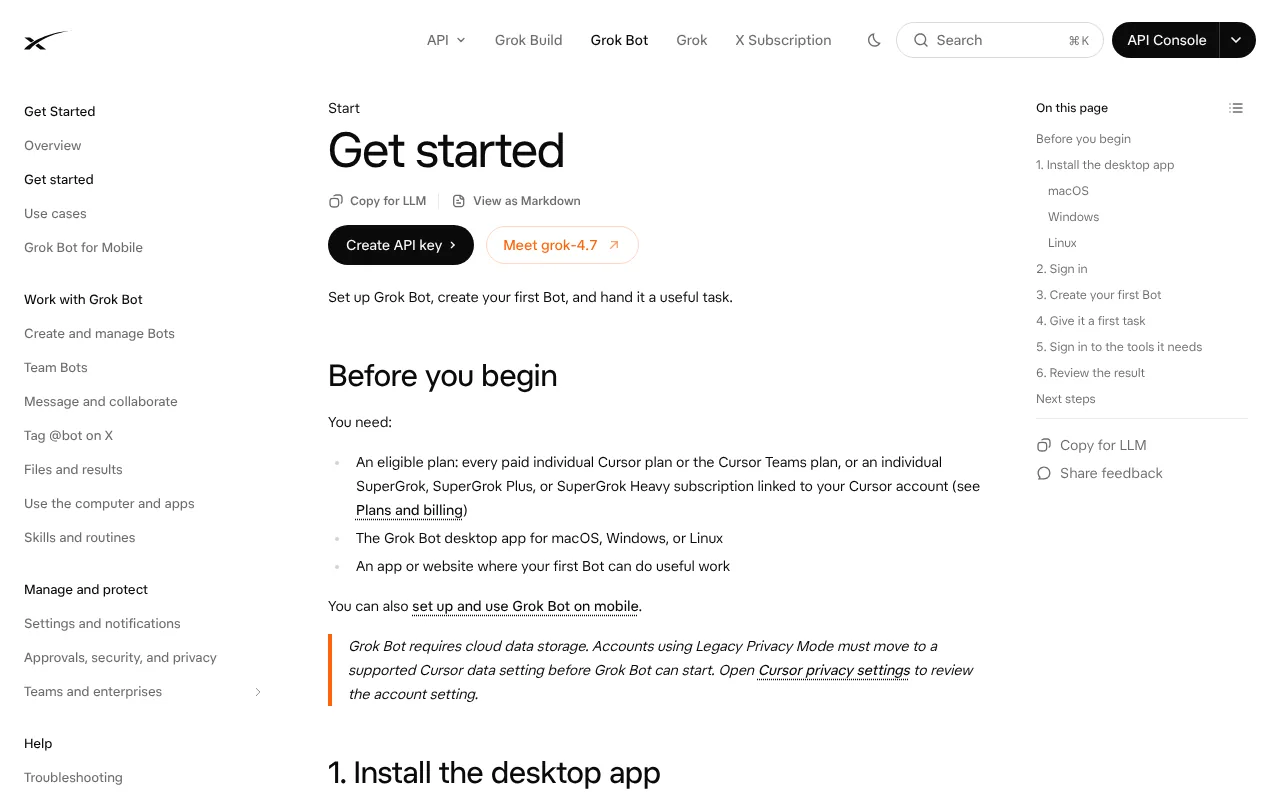
- Choose a plan. Subscribe to Premium or higher at x.com or grok.com, or use a paid Cursor plan. Success is a plan showing Grok Bot as included.
- Check your privacy setting. In your Cursor account privacy settings, leave Legacy Privacy Mode if you are on it, and turn on Privacy Mode to stop training on your data.
- Install the app. Download it from x.ai/bot for Mac, Windows or Linux, or get the Grok Bot phone app. On Linux, check which build you need:
uname -mx86_64 means the x64 build and aarch64 means Arm64.
- Sign in. Finish signing in through your browser, and link SuperGrok or X Premium+ if asked. Success is the app opening on your Bots.
- Set rules first. In Settings, then General, then Auto-review, add "Ask first" rules for sending, publishing, purchasing and deleting.
- Create your first Bot. Give it a short name and one job, such as "Inbox helper".
- Connect one app. Add one connector, such as Gmail, from Connect apps in the sidebar. For website logins, choose Take over, sign in yourself, then I'm done.
- Give it a small, real task. Success is a draft waiting for your approval.
How do you use Grok Bot? First things to try
Start where a mistake costs nothing.
- Morning inbox brief: "Every weekday at 8am, list the emails that need a reply today and draft answers. Send nothing."
- Calendar clash check: "Flag clashes in next week's calendar and suggest fixes. Don't send invites."
- Research on X: "Summarise what people on X said about UK energy tariffs this week, with links."
- Subscription audit: "List subscription receipts from my Gmail in a Google Sheet with the monthly cost. Cancel nothing."
- Teach a chore: "Watch me save this weekly report to Drive, then turn it into a skill I can review."
- Shopping shortlist: "Compare three UK shops selling this kettle and stop before checkout."
- Invoice inbox: "When an invoice reaches your email address, add it to my expenses sheet."
SpaceXSI's Grok Bot for Work guide has copyable set-ups for inbox, calendar and briefing Bots that wait for your confirmation before sending.
What do people use Grok Bot for?
Mostly office admin: inbox triage, briefings, sales research and support queues. At home, people use it for shopping, bookings and money. On SpaceX's results call on 20 October, Gwynne Shotwell said business use was growing fastest, with companies "using Grok bot as a force multiplier across sales, marketing, IT and engineering" (Motley Fool transcript).
SpaceXSI's own staff are the best-documented users. Its launch post describes Bots that update the CRM from call notes, process invoices from Gmail and reproduce bugs. Its support Bot IncidentSweep cleared 204 tickets in about 10 minutes on 18 September, after an engineer approved the batch (SpaceXSI).
Unless linked, the set-ups below come from SpaceXSI's use cases page and Grok Bot for Work guide, as of 24 October 2026.
| Use case | Example set-up | Plan needed | Watch out for |
|---|---|---|---|
| Inbox triage | "Inbox Manager" reads email, Slack and DMs and flags about three urgent items, at 9:05 and 4:05 on weekdays | Premium or higher | Bots act as you. Start read-only |
| Calendar and briefings | "Calendar EA" flags clashes and drafts invites only after you confirm; "Intel Scout" sends a brief at 8am and 5pm | Premium or higher | Memory goes stale. Make the Bot check the source before big decisions |
| Sales and recruiting research | Research 25 CRM accounts, or find 20 candidates, then draft outreach and stop at a review list | Premium; a Teams seat to share one Team Bot | Their details are personal data under UK GDPR |
| Expenses and invoices | "Expense Manager" matches receipts, flags policy exceptions and drafts one follow-up per person | Premium or higher | Ask for totals that reconcile to the source |
| Support queues | IncidentWatch spots ticket spikes; IncidentSweep closes matching tickets in one approved batch | Teams, from $30 a seat (about £23 plus VAT) | Check the exact message and ticket list before approving |
| Shopping and bookings | Musk's Bot ordered $241.34 (about £181) of Lego from Lego's site (The Next Web) | Premium or higher | Amazon blocks it and X Money is US-only. Keep "Ask first" on purchases |
| Personal money | Shane Mac gave a "Personal CFO" Bot read-only access to his bank accounts (WSJ via Mint) | Premium or higher | It posted his balances in his company Slack, mixing up chats with similar names |
| Small-firm back office | Bots that scan tender sites, research grants, draft proposals and run IT jobs | Premium; Super or Ultra for bigger weekly pools | One user's IT Bot bought software licences. Set a spending limit first |
What users say (individual opinions from the unofficial r/GrokBot forum, October 2026):
- "We co-create recipe plans and then it fills the online shopping trolley with what is required." (u/StuntMonkeh)
- "I own a small consulting corporation and have a whole team working for me." (u/Urban-Garlic, whose Bots cover tenders, grants and proposals)
- "I used it on the $60 cursor plan and it runs out in 2-3 hours of work" (u/OneWithTheSword)
Best Grok Bot video tutorials
Video: Max Rohowsky on YouTube.
Max Rohowsky covers getting Grok Bot, creating a first Bot, connecting apps and his daily Bot team in just over 12 minutes.
| Video | Channel | Length | Uploaded | Best for |
|---|---|---|---|---|
| Grok Bot Tutorial: Set Up AI Bots That Do Your Busywork (Full Walkthrough) | Max Rohowsky | 12:14 | 12 Oct 2026 | Clearest first setup |
| 5 HUGE Grok Bot Updates (It's SO Good Now) | Moritz, AI Systems | 20:06 | 13 Oct 2026 | The X Subscription, extra models and Bot email |
| ChatGPT's NEW Dots: Everything You Need To Know | Peter Yang | 17:55 | 29 Sept 2026 | Understanding ChatGPT Dots, the main rival |
Watch Max Rohowsky's walkthrough first, then the Moritz video for October's changes.
Official Grok Bot links
| Link | What it's for |
|---|---|
| Grok Bot homepage | Download the apps |
| Grok Bot docs | The full official guide |
| Get started | Install and create your first Bot |
| Pricing | X Subscription tiers |
| Changelog | Release notes |
| Approvals, security and privacy | Approval rules and data controls |
| Grok Bot Terms | Who is responsible for a Bot's actions |
| SpaceXSI Privacy Policy | What SpaceXSI collects |
| Status page | Outages |
| Help and support | Contact support |
Will SpaceX refund a rogue Grok Bot purchase?
Don't count on it. The promise lives in Musk's posts on X, not in any contract.
What Musk said. On 15 October Musk said SpaceX "will make you whole" if Grok Bot makes a purchase mistake or leaks your card. SpaceX didn't immediately respond to Business Insider, and there is no claim process.
What the written terms say. SpaceXSI's terms, updated 12 October, say: "We are not responsible for User Content or Agentic Actions." They cap liability at what you paid or $100, whichever is greater, except for gross negligence or wilful misconduct. The Grok Bot Terms make you "solely responsible for charges, commitments, communications" from a Bot, and tell you to review financial transactions yourself first.
The UK angle. The 14-day withdrawal right covers your subscription, not what a Bot buys. Chargeback and Section 75 are built around problems with the seller; whether they cover your own agent's mistake is untested.
Keep purchases behind an "Ask first" rule, use a low-limit card, and treat the promise as goodwill, not cover.
Is Grok Bot safe? Privacy, security and UK GDPR
Grok Bot has sensible approval tools, but it keeps your logins on a shared US computer, and UK regulators are investigating Grok. I would use it only for work you could defend if it went wrong.
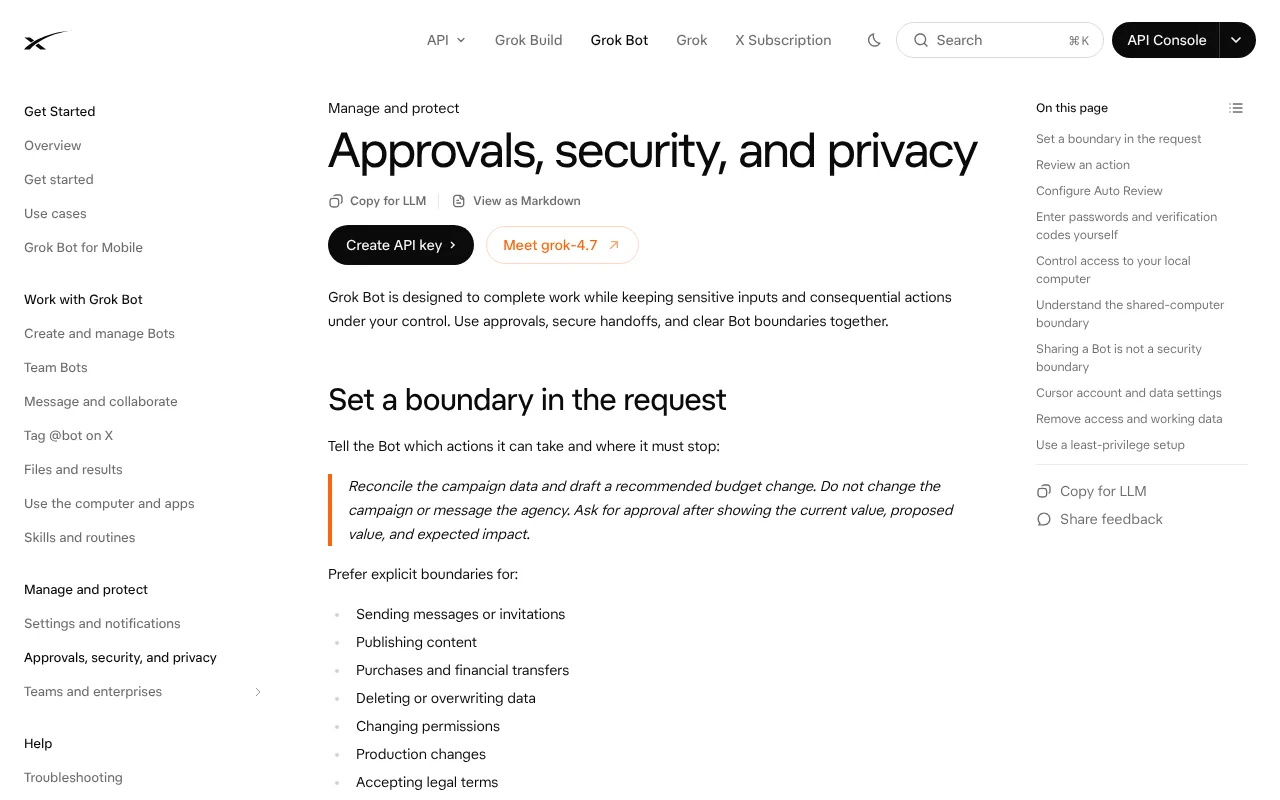
What it can reach. Bots act as you. Connectors include Gmail, Google Calendar, Drive, Slack (posting as you) and GitHub, and iPhone in Canada reports Robinhood and Coinbase connectors from 16 October. Elsewhere, Bots use the browser with your saved logins.
Approvals. Each action card offers Allow once, Always allow or Deny. Auto-review is itself an AI model, so SpaceXSI says not to rely on it alone.
Where your data goes. The security docs say Bot computers run in the US on Cursor's cloud, and any written residency commitment goes through your account team. Prompts go to model providers under zero-retention contracts, though flagged content may be kept for abuse checks, and there is no fixed list.
Training. Opt-out follows your Cursor privacy settings: with Privacy Mode on, Cursor says your data isn't used for training. The Grok Bot pages don't state the default, so check it.
Card photos. Musk has encouraged people to share card photos with their Bot. Don't. The docs say to enter passwords and codes through Take over, not chat. Version 0.75.5 (23 October) adds a Vault in Settings where Bots save logins and cards; SpaceXSI's security docs don't yet explain how it is protected.
Known incidents and scrutiny:
- Mid-October: a user posted what they said was the email, address and order number from Musk's own Grok Bot Lego order (The Next Web). Musk said the address was already public.
- Ofcom: opened an Online Safety Act investigation into X over Grok-made sexual deepfakes on 12 January 2026; on 14 October it said the case continues.
- ICO: opened formal investigations into X Internet Unlimited Company and X.AI LLC on 3 February 2026 over Grok's use of personal data, still ongoing on 8 October.
Neither names Grok Bot, but both concern the same SpaceX group.
UK GDPR. SpaceXSI's privacy policy doesn't name UK GDPR, but lists Lionheart Squared as its UK privacy contact. If your Bots handle customers' or staff's data, the legal duties are yours; our UK GDPR guide to AI agents explains them.
Safest settings: Privacy Mode on, "Ask first" rules for sending, buying and deleting, one connector at a time, no bank connectors, a monthly spending limit, and sign out of sites you no longer need.
Grok Bot problems and fixes
First, check the Grok Bot row on status.cursor.com. During an incident, wait: resetting won't help. Otherwise, fully quit and reopen the app, which Cursor's how-to page says clears most problems.
- Bot stuck or paused: Look for a question, approval card, sign-in or CAPTCHA it is waiting on, or send "Stop now". For "Couldn't Reach Grok Bot's Computer", try Retry, Update, then Recover; Reset last, as it can lose recent work. A routine that didn't run may be Paused, on the wrong time zone or signed out of an app (troubleshooting docs).
- "Can't reach the screen": If chat still works, Cursor's support team said on 22 October that some internet providers' DNS is to blame. Its fix is a public DNS such as 1.1.1.1 in your Wi-Fi settings, not more resets (Cursor forum).
- App sign-ins failing: On the connect card, choose Reopen or Retry and finish within about 10 minutes, or remove the app and add it again. Face ID and passkeys don't work on the Bot's computer, so use Take over and a password with a code. If a site blocks the Bot, turn on Route traffic through this computer in Settings, then Computer (Cursor FAQs).
- Approvals expiring or repeating: Approvals from routines or other Bots expire after about 10 minutes, so turn on that Bot's Notifications. If an action keeps asking, check your Auto-review rules: "Ask first" beats "Allow automatically".
- Cloud storage error: Grok Bot refuses accounts in Cursor's Legacy Privacy Mode, because it needs cloud data storage. Change the data setting in your Cursor account, or ask your admin.
- @bot silent on X: Tagging goes by the country X holds for your account, so a UK account gets no reply, VPN or not (SpaceXSI docs). Paste the post's link into a chat with your Bot instead; Bots can read X posts without an X connection.
- Usage limit reached: Your weekly pool is used up; the Bot isn't broken. Wait for the reset, buy prepaid credit at grok.com/dashboard/billing, or upgrade. Keep Auto Top-up off or set a monthly limit, though a running Bot can go slightly past it.
- Cancelling and the 14-day right: Cancel in Billing & invoices at grok.com/dashboard/billing at least 24 hours before renewal, or in X, Apple or Google if you paid there. Under the Europe-specific terms, UK consumers can also withdraw within 14 days by emailing support@x.ai with their full name, login, home address, order date and request date. The refund comes within 14 days, minus the days already used (Bundled Subscription Terms). Spent prepaid credit isn't refunded.
Grok Bot vs ChatGPT Dots, Meta Muse and other agents
As of 24 October 2026. Pound figures are rough conversions at $1 = £0.75.
| Agent | Price | Where it runs | UK availability | Privacy stance |
|---|---|---|---|---|
| Grok Bot | From $30 a month (about £23), plus VAT | Shared US cloud computer | Yes | Training opt-out in Cursor settings |
| ChatGPT Dots | UK Business Premium seat, £75 a month billed yearly, two-seat minimum | OpenAI's cloud computer | Business Premium only, not Pro | No training on business data by default |
| Meta Muse | Free; $20 or $100 a month (about £15 or £75) | Meta's cloud computer | No; US and Canada only | Trains on chats unless you opt out |
| Instinct | Invite-only beta; no published price | A cloud service you text or call | Waitlist; no country list | Trains on your data unless you opt out |
| OpenClaw | Free (MIT licence), plus model or hardware costs | Your own computer or server | Yes | Can stay on your hardware |
For UK readers, Grok Bot is a cheaper route to an always-on agent than ChatGPT Dots, with no business plan needed. Pick ChatGPT Dots if your firm already pays for ChatGPT Business. Pick OpenClaw or Hermes Agent to keep your data on hardware you control.
Who should use Grok Bot?
Grok Bot suits UK freelancers, founders and small sales or marketing teams who already use X or Cursor and want an agent working through inboxes, research and outreach overnight. Developers on a paid Cursor plan already have it. Small firms should read our UK small business guide first.
Skip it if you handle client, patient or legal data that shouldn't sit on US servers, need a written guarantee for purchases, or are uneasy about the UK investigations into Grok. For private work, start with running AI agents on your Mac.
Frequently asked questions
What is Grok Bot?
Grok Bot is an AI agent from SpaceXSI, the SpaceX company formerly called xAI. Its named Bots share a cloud computer, sign into your apps and work in the background on email, research and outreach. Grok Bot launched on 11 August 2026 and comes with the X Subscription from Premium.
Is Grok Bot available in the UK?
Yes. As of 24 October 2026, SpaceXSI lists no UK restriction on Grok Bot itself, its terms include rules for UK consumers, and X shows a UK price for Premium+, which includes Grok Bot. There is no official country list, though, and tagging @bot on X doesn't yet work for UK-based X accounts.
How much does Grok Bot cost in the UK?
Grok Bot comes with X Subscription Premium at $30 a month (about £23), Super at $100 (about £75) or Ultra at $200 (about £150), as of 24 October 2026. Prices exclude VAT, so Premium is about £27 with VAT. The older X Premium+ plan, which includes Grok Bot, costs £31 a month plus VAT.
Is Grok Bot free?
No. Grok Bot isn't in the free X Subscription or the $8 Plus plan; it starts with Premium at $30 a month. Cursor's help pages describe a trial as a one-off usage credit with a seven-day window. Developers already paying for Cursor get Grok Bot included.
Is Grok Bot safe?
Grok Bot has useful safeguards, including approval cards, Auto-review rules and secure sign-in through Take over. But every Bot shares one US cloud computer with your logins, and the terms make you responsible for its actions. Use Grok Bot for low-risk work, with "Ask first" rules on sending and buying.
Will SpaceX pay me back if Grok Bot makes a mistake?
Nothing guarantees it. Elon Musk posted on 15 October 2026 that SpaceX would cover Grok Bot purchase mistakes and leaked cards, but there is no written policy or claim process. SpaceXSI's terms say it isn't responsible for agentic actions, and the Grok Bot Terms make you solely responsible for a Bot's charges.
Does Grok Bot use Claude?
Elon Musk said on 7 October 2026 that Grok Bot would use the best model for each task, naming Anthropic's Claude Opus 5.5. SpaceXSI's docs confirm Grok Bot picks the model for each task but don't list providers. There is no model picker, though usage analytics show which model served each request.
Grok Bot vs ChatGPT Dots: which is better for UK users?
For individuals, Grok Bot is easier to get: about £23 a month plus VAT. ChatGPT Dots aren't offered on Pro in the UK and need a Business Premium seat at £75 a month billed yearly, with a two-seat minimum. Firms already on ChatGPT Business may prefer Dots.
What is Grok Bot 0.75?
Grok Bot 0.75 is the current version of the Grok Bot app, not a price. Version 0.75.2 arrived on 22 October 2026 with Pages, video creation and Shop Pay checkout. Version 0.75.5 followed on 23 October with a Vault for saved logins and cards, email forwarding and fewer approval cards. To update, open Settings, then Updates.
Is Grok Bot available in Europe?
SpaceXSI publishes no country list, but nothing on its pages excludes Europe as of 24 October 2026. Its terms include rules for consumers in the EEA, UK and Switzerland, and X lists Premium+, which includes Grok Bot, at €38 a month plus tax in France, Germany and Spain. Tagging @bot on X doesn't work for accounts based in the EU, Iceland, Liechtenstein or Norway.
How do I cancel Grok Bot and get a refund in the UK?
Cancel the X Subscription in Billing & invoices at grok.com/dashboard/billing at least 24 hours before renewal, or in X, Apple or Google if you paid there. Within 14 days of subscribing, UK consumers can also withdraw by emailing support@x.ai. SpaceXSI then refunds within 14 days, minus the value of the days already used.
Read next
- Claude Duet: Anthropic's proactive agent, and why it is US-only for now
- ChatGPT Dots: OpenAI's always-on agent and the UK
- Meta Muse: why you can't get it in the UK yet
- Personal AI assistants in the UK compared
- AI agents and UK GDPR
- Cursor review
Sources
- Grok Bot (SpaceXSI) - checked 18 October 2026
- Introducing Grok Bot (SpaceXSI) - checked 18 October 2026
- Grok Bot comes to more plans (SpaceXSI) - checked 18 October 2026
- Grok Bot changelog (SpaceXSI) - checked 18 October 2026
- SpaceXSI pricing - checked 18 October 2026
- The X Subscription: pricing (SpaceXSI docs) - checked 18 October 2026
- The X Subscription: overview (SpaceXSI docs) - checked 18 October 2026
- Grok Bot on The X Subscription (SpaceXSI docs) - checked 18 October 2026
- Who can combine accounts? (SpaceXSI docs) - checked 18 October 2026
- X Premium customers (SpaceXSI docs) - checked 18 October 2026
- Grok Bot overview (SpaceXSI docs) - checked 18 October 2026
- Grok Bot: get started (SpaceXSI docs) - checked 18 October 2026
- Grok Bot for mobile (SpaceXSI docs) - checked 18 October 2026
- Use the computer and apps (SpaceXSI docs) - checked 18 October 2026
- Skills and routines (SpaceXSI docs) - checked 18 October 2026
- Approvals, security and privacy (SpaceXSI docs) - checked 18 October 2026
- Grok Bot security (SpaceXSI docs) - checked 18 October 2026
- Grok Bot FAQ (SpaceXSI docs) - checked 18 October 2026
- Grok Bot for Work guide (SpaceXSI) - checked 18 October 2026
- Grok Bot plans and billing (Cursor help) - checked 18 October 2026
- Grok Bot FAQs (Cursor help) - checked 18 October 2026
- Connect plugins (Cursor help) - checked 18 October 2026
- Grok Bot how-tos (Cursor help) - checked 18 October 2026
- Grok Bot Terms (Cursor) - checked 18 October 2026
- Cursor Privacy Policy - checked 18 October 2026
- Cursor data use and Privacy Mode - checked 18 October 2026
- SpaceXSI Terms of Service - checked 18 October 2026
- SpaceXSI Privacy Policy - checked 18 October 2026
- About X Premium, with UK prices (X Help Center) - checked 18 October 2026
- Musk says SpaceX will cover Grok Bot purchase mistakes (The Next Web) - checked 18 October 2026
- Elon Musk says SpaceX will pay back anyone whose Grok agent makes a rogue purchase (Business Insider via DNYUZ) - checked 18 October 2026
- Grok Bot will use Claude, Midjourney and Suno models (The Next Web) - checked 18 October 2026
- The X Subscription bundles Cursor with Grok and X Premium (The New Stack) - checked 18 October 2026
- SpaceX combines Grok, Cursor and X into one plan (Teslarati) - checked 18 October 2026
- Amazon shuts out Grok Bot (Teslarati) - checked 18 October 2026
- Musk encourages users to give credit card info to Grok Bot (Cybernews) - checked 18 October 2026
- SpaceX signs up Apollo and Nvidia for a new Grok partner network (The Next Web, 22 October 2026) - checked 23 October 2026
- Grok Bot could manage your money (Cybernews) - checked 18 October 2026
- Grok Bot gets major update with X Chat support (iPhone in Canada) - checked 18 October 2026
- Elon Musk to rename SpaceXAI to SpaceXSI (Teslanorth) - checked 18 October 2026
- SpaceX completes $60 billion Cursor acquisition (Bloomberg via Advisor Perspectives) - checked 18 October 2026
- Ofcom update on X and the Grok investigation (Ofcom) - checked 18 October 2026
- Investigation into X and scope of the Online Safety Act (Ofcom) - checked 18 October 2026
- ICO announces investigation into Grok (ICO) - checked 18 October 2026
- ICO secures changes from leading AI developers as scrutiny extends to AI agents (ICO) - checked 18 October 2026


