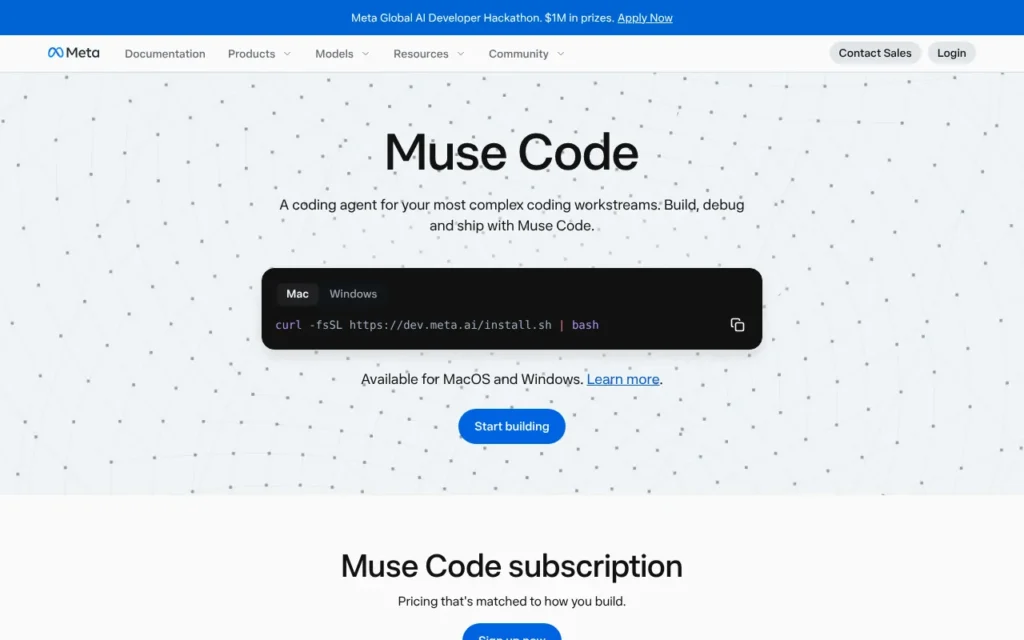
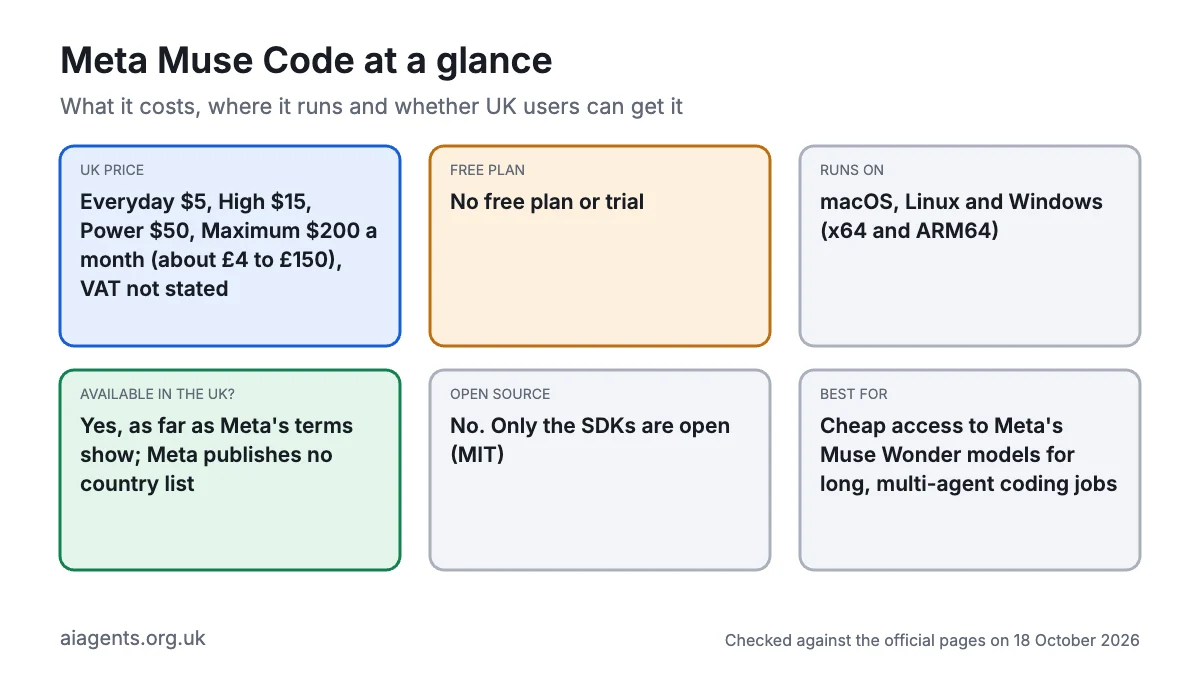
Meta Muse Code is Meta's terminal coding agent: you describe a job in plain English, and it plans, edits and tests code, with helper agents working in the background. It suits developers and confident hobbyists on Mac, Windows or Linux. Plans cost $5 to $200 a month (about £4 to £150), and there is no free plan. Unlike the Muse app, it appears to work in the UK, because Meta's terms don't block it. Know this first: subscriptions let Meta train on your code by default until you switch Contributor mode off.
Key facts
- What it is: A terminal coding agent that plans, edits files, runs commands and coordinates helper agents in the background
- Made by: Meta Platforms (Meta Superintelligence Labs)
- Price: Everyday $5, High $15, Power $50, Maximum $200 a month (about £4, £11, £38 and £150, VAT not stated), or pay per token, as of 18 October 2026
- Free plan or trial: No; Meta lists no free plan or trial
- Runs on: macOS, Linux and Windows (native on Windows since 16 September 2026, x64 and ARM64)
- What you need: A Meta account, a Meta Model API account with a payment card, to be 18 or over, and basic terminal skills
- Open source: No. The Muse Code program is proprietary; only its TypeScript and Python SDKs are open source (MIT)
- Available in the UK: Yes, as far as Meta's terms show as of 18 October 2026; the UK isn't on Meta's restricted list, but Meta publishes no country list
- Best for: Cheap access to Meta's Muse Wonder models for long, multi-agent coding jobs
- Official site: dev.meta.ai/products/muse-code
On this page
- What is Meta Muse Code?
- Is Meta Muse Code available in the UK?
- What's new in Meta Muse Code in October 2026?
- How much does Muse Code cost in the UK?
- What do you need to run Muse Code?
- How do you install Muse Code?
- How do you use Muse Code? First things to try
- Best Meta Muse Code video tutorials
- Official Meta Muse Code links
- Is Muse Code safe? Privacy, security and UK GDPR
- Muse Code vs Claude Code, Codex and other alternatives
- Who should use Muse Code?
- Frequently asked questions
What is Meta Muse Code?
Muse Code is an AI agent for software work. You open a terminal (the text window where you type commands) in a project folder, type muse and ask for a change. It plans the work, edits files, runs commands and checks with you, or with an automated reviewer, before risky steps.
What sets it apart is how it splits the work. Meta's launch post (5 August 2026) describes a simple main agent plus specialist background agents that stay alive for the whole session, instead of fresh helpers for every task. They keep what they have learned about your code, carry on and report back when ready. Big jobs can go to parallel sub-agents; ask for isolated Git worktrees (separate working copies of the project) when they will write, or they share your checkout. Every model call, tool run and edit is appended to a local event log, so a crashed session can pick up where it stopped.
On top of that sit Workflows (Meta's name for coordinated multi-agent runs), long-running goals, scheduled prompts and messages between sessions. Meta says its agents can also operate browsers, desktop and mobile apps.
It is built for Meta's own models: Muse Spark 1.2 (still the default in the docs), Spark 1.3, Muse Wonder and, on the two dearest plans, Muse Wonder Full. The changelog mentions other providers' models, but Meta documents only its own. It is a separate product from Meta Muse, Meta's personal agent app for the US and Canada. Muse Code launched in beta for Mac and Linux on 5 August 2026 and left beta, with monthly plans, around 1 September (Subscription Insider).
Is Meta Muse Code available in the UK?
Yes, as far as Meta's own documents show, as of 18 October 2026. The Muse consumer app is US and Canada only, but Muse Code is sold through Meta's developer platform, the Meta Model API, which has different rules.
- Not blocked. Meta's Geographic Use Policy (updated 12 October) restricts 20 countries and territories, including Russia, Iran and China, plus three regions of Ukraine. The UK and EU are not on it.
- UK customers are expected. The Model API terms (updated 9 October) include a section for EU and UK consumers, with a 14-day right to cancel.
- Where Meta AI works. Meta's help centre says the API is available in most places where Meta AI is available and billing is supported. Meta's help page names no countries, so this is a pointer rather than proof.
What isn't confirmed: Meta publishes no list of supported countries, and its subscription page warns that availability may vary by region. Prices show only in US dollars. Meta Platforms Ireland contracts with users in what Meta calls the European Region; the terms don't say plainly whether that includes the UK.
What's new in Meta Muse Code in October 2026?
The changelog is undated, so the version dates below come from the matching releases of Meta's Muse Code SDK on npm.
- 16 October (version 1.4.10): a security fix stops sandboxed commands reading or changing Muse Code's own settings folder. A new
/blendercommand rebuilds reference images as editable Blender scenes. - 15 October (1.4.9): a
--disable-request-user-inputflag stops the agent pausing to ask questions during unattended runs. - 14 October (1.4.8): switching off Contributor mode now opts out fully, including background requests. Auto-review now hands an action to you if it hasn't decided after 15 steps.
- 12 October: Meta released Muse Wonder and Muse Wonder Full, its strongest models. Wonder comes with every Muse Code plan and the API. Wonder Full is only for Muse Code subscribers on Power ($50) or Maximum ($200), and isn't on the API (TechCrunch, heise).
- 11 October (1.4.6): Contributor mode became subscriber-only and on by default for subscribers, with a notice after your first sign-in, before any Contributor request is sent.
- 8 October (1.4.4): a
session_retention_dayssetting deletes old sessions automatically.
Earlier: native Windows support arrived on 16 September, with no need for WSL (Windows Subsystem for Linux), on x64 and ARM64 PCs (Meta for Developers on X). Version 1.4.2 (30 September) fixed a flaw that let a hostile nested repository run commands outside the sandbox.
How much does Muse Code cost in the UK?
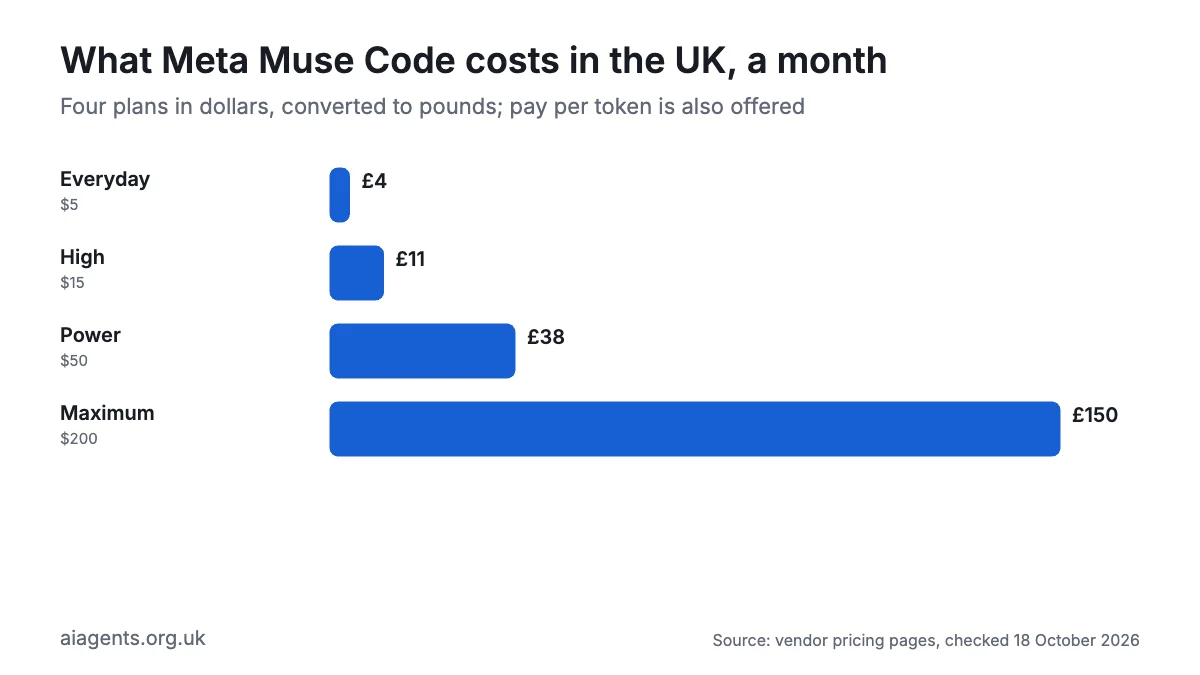
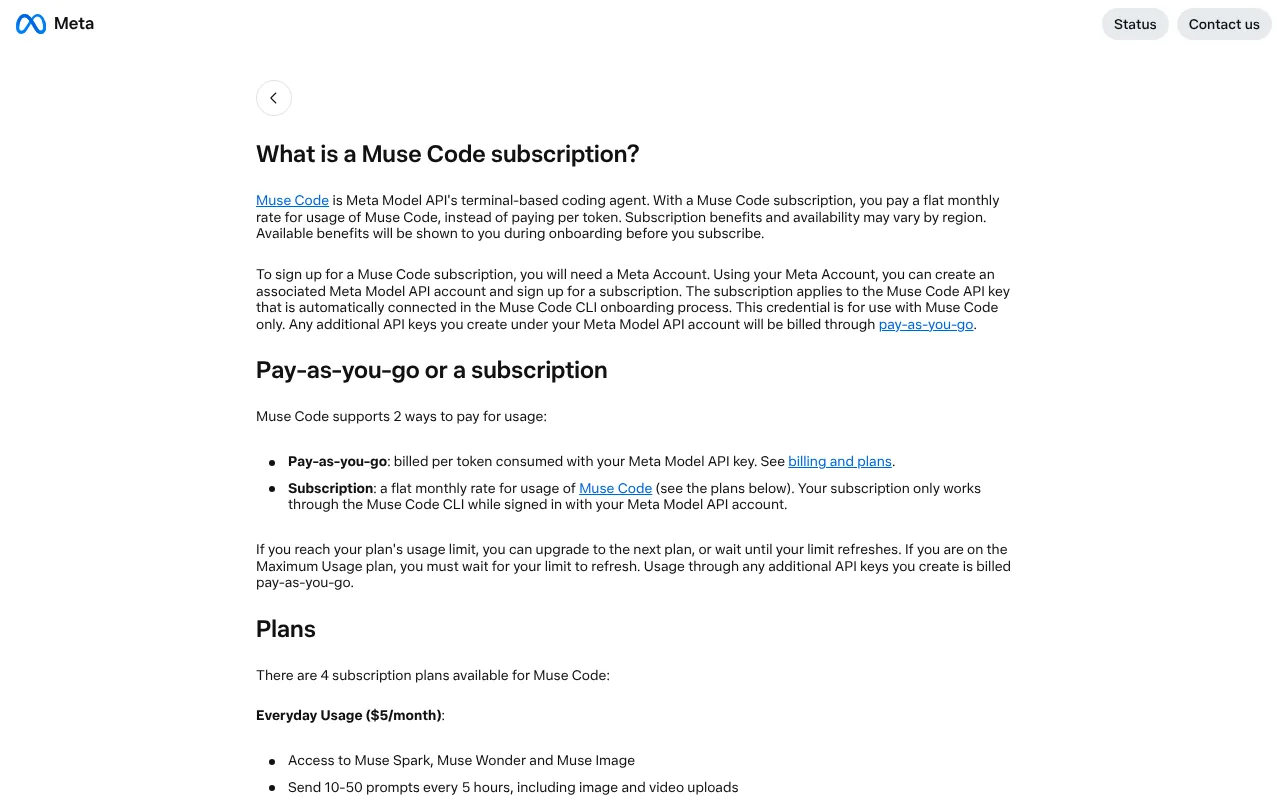
Muse Code is sold two ways: a monthly subscription, or pay-as-you-go billing per token (tokens are small chunks of text) through a Meta Model API key. Meta shows prices only in US dollars and doesn't say whether VAT is included, so budget for 20% on top in case it's added at checkout. Pound figures are conversions at $1 = £0.75, as of 18 October 2026.
| Plan | Price | In pounds | Usage | What's included |
|---|---|---|---|---|
| Everyday | $5 a month | about £4 | 10 to 50 prompts every 5 hours | Muse Spark, Muse Wonder, Muse Image, voice, web search |
| High | $15 a month | about £11 | 5 times Everyday | Adds more image and video inputs |
| Power | $50 a month | about £38 | 20 times Everyday | Adds Muse Wonder Full, early features, bigger uploads |
| Maximum | $200 a month | about £150 | 80 times Everyday | Everything in Power |
API prices per million tokens, if you would rather pay as you go:
| Model | Input | Output | Used to train Meta's models? |
|---|---|---|---|
| Muse Spark 1.3 | $1.25 (about 94p) | $4.25 (about £3.20) | No |
| Muse Spark 1.3 Contributor | $0.10 (about 8p) | $0.20 (about 15p) | Yes |
| Muse Wonder | $4 (about £3) | $20 (about £15) | No |
Costs and catches:
- Contributor mode buys you usage. Meta gives subscribers "more usage" for letting it train on their content, but doesn't say how much less you get with it off.
- Limits. At your limit you upgrade or wait for the refresh. Maximum subscribers can only wait, and other API keys bill per token.
- Refunds. Meta gives none for cancelled plans unless the law requires it, though UK consumers keep the 14-day cancellation right.
- Workflows can make up to 1,000 agent calls in one run, which eats an allowance fast.
Compare these with other tools in what AI agents cost in the UK.
What do you need to run Muse Code?
- A computer: macOS, Linux or Windows. Meta publishes no minimum versions or memory. Windows needs PowerShell 5.1 or newer on an x64 or ARM64 PC.
- Accounts: a Meta account, used to create a Meta Model API account, plus a payment card. You must be 18 or over.
- An internet connection: the models run in Meta's cloud.
- Git, if you want parallel agents working in separate worktrees.
- Skills: basic terminal use. Meta documents no desktop app or editor extension.
Platform gaps to know about:
- Windows: Meta's docs list no voice input or session messaging (a 1.4.0 changelog entry says voice is on), and the sandbox may show an admin (UAC) prompt the first time.
- Linux: the sandbox relies on bubblewrap, which the standard build bundles but the musl build (for systems such as Alpine) lacks, so shell commands fail there.
- Apple Silicon Macs: Meta's docs say the public package lacks the engine Workflows need, so multi-agent Workflows aren't available there.
How do you install Muse Code?
Meta's docs give a one-line installer that puts a muse program on your PATH (the list of folders your computer searches for commands). Meta's product page shows the same command ending in | bash; we follow the docs. It's good practice to read a script before you run it.
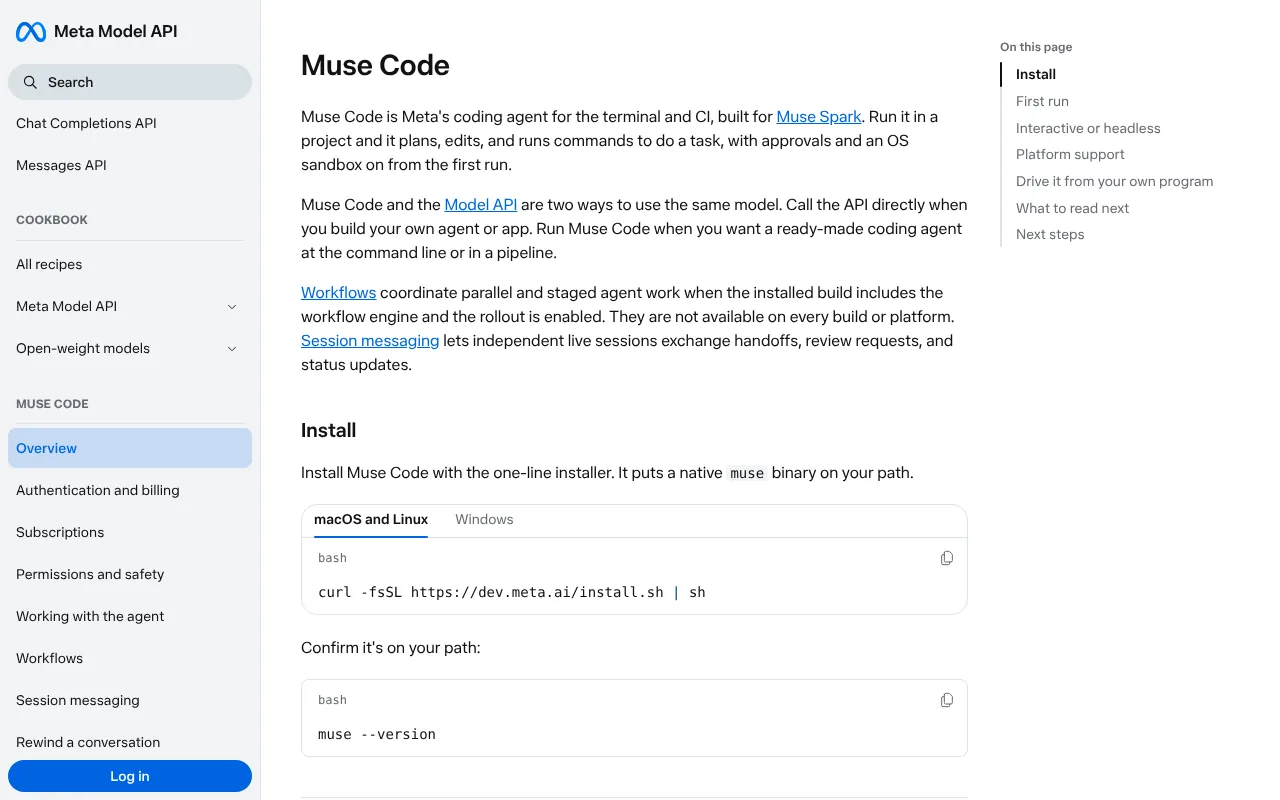
How to install Muse Code on Mac
- Open Terminal: press Cmd and Space, type Terminal, press Return.
- Paste Meta's command and press Return.
curl -fsSL https://dev.meta.ai/install.sh | sh- Open a new Terminal window and check it worked. Success is a version number.
muse --version- Move into your project folder and start it.
cd ~/Documents/my-project
muse- Choose whether to trust the folder. Trusting loads the project's own rules and skills, so only trust code you know.
- Pick "Sign in with your browser" and approve, or paste an API key.
- Choose a plan: type
/upgradeto open Meta's Accounts Center, select Muse Code and a plan, and pay. - Read the Contributor mode notice that appears after your first sign-in. For private code, switch Contributor mode off in
/settingsbefore your first prompt. Meta doesn't document the exact menu path.
How to install Muse Code on Windows
- Open PowerShell from the Start menu. You don't need Administrator rights.
- Paste this and press Enter.
irm https://dev.meta.ai/install.ps1 | iex- Open a new PowerShell window and run
muse --version. A version number means success. - Use
cdto move into your project, typemuseand sign in as on a Mac. Approve the one-off UAC prompt if the sandbox asks.
The agent runs its commands in PowerShell rather than Bash.
Linux and automated builds
On Linux, use the Mac command. For CI pipelines (servers that test code automatically), store your key as META_API_KEY and run a single prompt with muse exec:
META_API_KEY="$MUSE_KEY" muse exec "Run the test suite and summarise failures."Run muse logout to clear stored sign-ins. Meta's docs don't yet explain how to uninstall Muse Code.
How do you use Muse Code? First things to try
Be specific, and start with work that is easy to undo.
- Get a tour:
what does this project do? Don't change anything. - Write a memory file:
muse initcreates an AGENTS.md file of project rules, which Muse Code reads every session. It reads CLAUDE.md files too. - Plan first:
/plan add an online booking form to this site - Set a goal:
/goal get every test passing without changing the public API. Muse Code keeps going and reports progress until it's done or you press Esc. - Schedule a check:
/loop 30m run the tests and tell me what broke. Recurring jobs expire after seven days. - Work in parallel (Mac or Linux): open two terminals, start each with
muse -wso each gets its own worktree, name them with/name, then ask one:send my review session a request to check this commit for login bugs. - Move over from Claude Code or Codex:
muse skills import --from claudecopies skills, and/migratebrings across memory notes and MCP servers (our MCP guide explains those).
Best Meta Muse Code video tutorials
Video: freeCodeCamp.org on YouTube.
freeCodeCamp's three-hour course starts with the models and API; skip to 1:44:22 for installing the CLI, AGENTS.md, goals, approval modes, the sandbox and MCP.
| Video | Channel | Length | Uploaded | Best for |
|---|---|---|---|---|
| Meta Muse Code & Muse Spark Course - Build AI Agents, APIs, and Full-Stack Apps | freeCodeCamp.org | 3:00:33 | 26 August 2026 | Learning the CLI properly, including safety settings |
| Introducing Muse Wonder & Muse Wonder Full: frontier models for agentic tasks | AI at Meta (official) | 2:33 | 12 October 2026 | Meta's own intro to the new models |
| Meta's Claude Code clone is INSANELY cheap | Theo - t3.gg | 44:42 | 7 August 2026 | A developer's verdict on cost against Claude Code |
| I Tested Meta Muse Code With Unity CLI: Here’s What It Can Do! | Dilmer Valecillos | 27:22 | 31 August 2026 | A real game project with automated tests |
| Create A Website Using Muse Code.. (Better Then Claude Code) | TechKevin | 8:06 | 6 August 2026 | A quick first website build |
The community videos predate native Windows, so watch Meta's two-minute intro, then the freeCodeCamp install chapters, and don't copy any --yolo shortcut you see, which switches off every safeguard.
Official Meta Muse Code links
| Link | What it's for |
|---|---|
| Product page | Overview, plans and API prices |
| Documentation | Install commands and the full docs |
| Authentication and billing | Signing in, API keys and pay-as-you-go |
| Subscriptions | Plans, limits, Contributor mode and cancelling |
| Permissions and safety | Approval modes, the sandbox and network rules |
| Changelog | What changed in each version |
| Launch post | How the background agents work |
| Model API terms | Contract, training rules and UK consumer rights |
| Data Commitments | What Meta does with your content |
| Help centre | Account and billing support |
Is Muse Code safe? Privacy, security and UK GDPR
Out of the box it is well locked down, but its default data deal is a poor fit for client work.
Permissions. New sessions start in Auto-review: an automated reviewer, not you, approves eligible actions, and asks you when it can't. A separate sandbox (Seatbelt on Mac, bubblewrap on Linux, a Windows sandbox) lets commands write only to your project and a temporary folder, keeps .git read-only, and stops the first connection to each new website for review. If the sandbox can't start, Muse Code refuses to run commands. The --yolo flag removes all of this.
Gaps. MCP tools and hooks (scripts that run on events) aren't sandboxed. Meta warns that a pull request or fork can carry hostile AGENTS.md files, rules and skills, so don't trust those folders. Committed project memory in .agents/memory/ loads even when untrusted, so read it first.
Where your code goes. Prompts, code and files go to Meta's servers, encrypted in transit. Meta's Data Commitments and terms don't say which country processes them. On your computer, sessions are kept forever unless you set session_retention_days, and project memory saved in .agents/memory/ is committed to your repository.
Training. This is the big one. Paid plans start in Contributor mode: Meta may use your prompts, code, files and its replies to train future models, after removing links to your account, and may review them for safety and quality first. Switching off covers only future content. Meta's terms tell Contributor users not to submit personal, confidential or sensitive information. In Standard mode, and on standard API models, Meta says it doesn't train on your content and acts as your data processor. Some accounts can get Zero Data Retention, which rules out Contributor mode.
Known issues. The changelog lists dozens of security fixes since August, including the nested-repository escape fixed on 30 September and the settings-folder fix on 16 October. Keep Muse Code updated.
Liability. Meta caps its liability at the greater of 12 months' fees or $1,000 (about £750), but UK consumers keep their statutory rights.
The UK GDPR angle. If your code or test data holds customers' personal data, Meta's own terms rule out Contributor mode. Use Standard mode, check Meta's processor terms and subprocessor list, and read our guide to AI agents and UK GDPR.
Safest settings:
- Switch Contributor mode off before your first prompt on private or client code.
- Tighten approvals:
muse --approval-mode untrustedstops any shell command without a matching allow rule. - To decide everything yourself, pick the "Ask me" profile, or run
muse --approval-judge off. - Keep
--yolofor throwaway containers, as Meta advises, never a laptop with real passwords or keys. - Set
session_retention_days, and keep secrets out of.agents/memory/. - Only add MCP servers and hooks whose commands you have read.
Muse Code vs Claude Code, Codex and other alternatives
Prices are as of 18 October 2026, converted at $1 = £0.75 where no pound price exists.
| Tool | Price from | Where it runs | Models | Open source | Best for |
|---|---|---|---|---|---|
| Muse Code | $5 a month (about £4), VAT not stated | Terminal, CI, SDK | Built for Meta's Muse models | No (SDK only) | Cheap, long multi-agent jobs |
| Claude Code | Pro, £18 a month including VAT | Terminal, IDEs, desktop, web | Claude only | No | Handing off whole tasks |
| OpenAI Codex | ChatGPT Free (limited); Plus $20 (about £15) | Web, CLI, IDE, desktop | OpenAI, or local via Ollama or LM Studio | CLI only (Apache 2.0) | Businesses already on ChatGPT |
| Devin | Free; Pro $20 (about £15) plus VAT | Desktop app, CLI, cloud VMs, Slack | SWE-2, Claude, GPT, Gemini, Grok | No | Running many agents with cloud handoff |
| GitHub Copilot coding agent | Pro $10 (about £7.50) | GitHub, VS Code, JetBrains | Several, including Claude and OpenAI | No | Teams already on GitHub |
| Kilo Code | Free; Kilo Pass from $19 (about £14) | VS Code, JetBrains, CLI | Any provider, or local | Yes (MIT) | Private local models |
Muse Code is one of the cheapest ways to a frontier-class model: $5 buys Muse Wonder, where Claude Code starts at £18. In August, Meta's own charts put Claude Code ahead on all three coding benchmarks shown (VentureBeat). By 13 October, a LetsDataScience table mixing Meta and independent results had Wonder Full ahead of Claude Opus 5.5 on DeepSWE 1.1 (79.0 against 74.2) but behind on Terminal-Bench 4.0 (57.1 against 59.6).
Training by default isn't unique to Meta: Claude's Pro and Max plans do it too unless you opt out, and other tools have similar settings. Pick Claude Code or Codex for mature desktop and editor apps, Copilot if your team lives on GitHub, and Kilo Code if code must stay on your machine (see our Ollama guide). Pick Muse Code for cheap, long-running agent work.
Who should use Muse Code?
Muse Code suits developers and hobbyists who want a capable agent for about £4 a month, people running long refactors or test-fixing jobs, and Claude Code users who want a cheap second opinion on the same project, since it reads CLAUDE.md.
Skip it if you handle client or regulated code and can't guarantee Contributor mode stays off, you want an editor or desktop app, or everything must stay on your own computer (see how to run AI agents on your Mac). Windows users lose session messaging, and Apple Silicon Mac users lose Workflows for now.
Frequently asked questions
Is Meta Muse Code available in the UK?
Yes, as far as Meta's documents show on 18 October 2026. The UK isn't on the Meta Model API's restricted list, and the terms include rights for UK consumers. Meta publishes no full country list, though, and says Muse Code subscription benefits and availability may vary by region. The separate Meta Muse personal agent app is still only available in the US and Canada.
Is Muse Code free?
No. Muse Code has no free plan or trial. The cheapest subscription, Everyday, costs $5 a month (about £4) and allows 10 to 50 prompts every five hours. You can also pay per token through a Meta Model API key, from $0.10 per million input tokens on Contributor models. Meta shows Muse Code prices only in dollars and doesn't say whether VAT is included.
How do I install Muse Code on Windows?
Open PowerShell and run irm https://dev.meta.ai/install.ps1 | iex. You don't need Administrator rights or WSL, because Muse Code has run natively on Windows since 16 September 2026, on x64 and ARM64 PCs. Then open a new window, run muse --version, move into your project and type muse. Meta's docs say voice input and session messaging aren't available in Muse Code on Windows yet.
Does Muse Code train on my code?
By default, yes, on subscriptions. Muse Code plans start in Contributor mode, which lets Meta use your prompts, code, files and replies to train future models in return for more usage. Switch Contributor mode off in Muse Code's settings to stop it, but the change only covers future content. Standard API models, including Muse Wonder on the API, are not used for training.
How do I get Muse Wonder Full in Muse Code?
Muse Wonder Full, Meta's strongest model, is only available to Muse Code subscribers on the Power plan ($50 a month, about £38) or the Maximum plan ($200, about £150). Meta doesn't sell it through the Meta Model API. Muse Wonder, the smaller version, comes with every Muse Code plan from $5 and costs $4 per million input tokens on the API.
Muse Code vs Claude Code: which should I use?
Choose Muse Code if price matters most: $5 a month gets Muse Wonder, against £18 a month for Claude Pro. Choose Claude Code for a more mature product with editor, desktop and web apps and a longer track record on coding benchmarks. Muse Code subscriptions and Claude's Pro and Max plans both allow training on your data unless you opt out. Muse Code reads CLAUDE.md files, so you can try it on the same project.
What is the difference between Muse Code and Meta Muse?
Meta Muse is a personal agent app for email, bookings and shopping, available only in the US and Canada. Muse Code is Meta's coding agent for the terminal, sold through the Meta Model API, and it appears to work in the UK. Both run on Meta's Muse models, but Muse Code and Meta Muse have separate plans and prices.
Does Muse Code work with CLAUDE.md and AGENTS.md?
Yes. In each folder, Muse Code looks for AGENTS.md first, then CLAUDE.md, and uses the first one it finds, but only after you trust the workspace. Running muse init creates an AGENTS.md for you. Muse Code can also import Claude Code and Codex skills with muse skills import, and /migrate brings over memory notes and MCP servers.
Read next
- Claude Code: UK pricing, install guide and how to use it
- OpenAI Codex explained
- Kilo Code review: the open-source coding agent
- Meta Muse: Meta's personal AI agent and the UK
- AI agents and UK GDPR
Sources
- Muse Code product page, Meta - checked 18 October 2026
- Muse Code overview, Meta docs - checked 18 October 2026
- Authentication and billing, Meta docs - checked 18 October 2026
- Subscriptions, Meta docs - checked 18 October 2026
- What is a Muse Code subscription?, Meta help centre - checked 18 October 2026
- Permissions and safety, Meta docs - checked 18 October 2026
- Working with the agent, Meta docs - checked 18 October 2026
- Workflows, Meta docs - checked 18 October 2026
- Session messaging, Meta docs - checked 18 October 2026
- Configuration and context, Meta docs - checked 18 October 2026
- Extending and automating, Meta docs - checked 18 October 2026
- Muse Code changelog, Meta docs - checked 18 October 2026
- Muse Code SDK release dates, npm registry - checked 18 October 2026
- Muse Code SDK repository, GitHub - checked 18 October 2026
- Introducing Muse Code and Muse Spark 1.2, Meta - checked 18 October 2026
- Introducing Muse Wonder and Muse Wonder Full, Meta Newsroom - checked 18 October 2026
- Model API supported countries, Meta help centre - checked 18 October 2026
- Meta Model API Geographic Use Policy - checked 18 October 2026
- Meta Model API Terms of Service - checked 18 October 2026
- Data Commitments, Meta Model API - checked 18 October 2026
- Muse Code now native on Windows, Meta for Developers on X - checked 18 October 2026
- Muse Code on Windows, Chasing Next - checked 18 October 2026
- Meta adds native Windows support to Muse Code, Superpower Daily - checked 18 October 2026
- Meta launches Muse Code, TechCrunch - checked 18 October 2026
- Meta enters the AI coding wars with Muse Code, VentureBeat - checked 18 October 2026
- Meta adds monthly plans as Muse Code exits beta, Subscription Insider - checked 18 October 2026
- Meta releases its first frontier model, Muse Wonder, TechCrunch - checked 18 October 2026
- Meta's new top AI models: Muse Wonder competes with Claude, heise online - checked 18 October 2026
- Muse Wonder: developers get it now, the Muse app skips Europe, Notebookcheck - checked 18 October 2026
- Meta's Muse Wonder reaches the AI frontier, The Rundown - checked 18 October 2026
- Meta's best model skips the API, LetsDataScience - checked 18 October 2026
- Claude pricing, Anthropic - checked 18 October 2026
- Codex pricing, OpenAI - checked 18 October 2026
- Devin pricing, Cognition - checked 18 October 2026
- GitHub Copilot plans - checked 18 October 2026
- Kilo Code pricing - checked 18 October 2026


