NVIDIA OpenShell is a free, open-source runtime that runs AI agents such as Claude Code, Codex and OpenCode inside a locked-down sandbox, where a policy you write decides which files, websites and API keys each agent may use. Version 0.1.6 came out on 27 October 2026 under the Apache 2.0 licence, and it needs no GPU. OpenShell reached about 500 points on Hacker News in the past week (508 when I checked on 29 October 2026). Here is what it does, how it works, how to install it and how it compares with other agent sandboxes.
Key facts
- What it is: NVIDIA's open-source runtime that puts each AI agent in a sandbox and enforces a YAML policy on its files, network connections and credentials.
- Price and licence: free, under the Apache 2.0 licence.
- Latest version (29 October 2026): v0.1.6, released 27 October 2026. The 0.1 series began with v0.1.0 on 25 September 2026.
- Runs on: Linux (x86_64 and Arm), Apple Silicon Macs with Docker Desktop, and Windows through WSL 2 (experimental). It needs Docker 28 or later, Podman 5 or host virtualisation.
- GPU: not required. A
--gpuflag passes NVIDIA GPUs into a sandbox if you have them. - Popularity (29 October 2026): about 20,700 GitHub stars, about 2,000 forks and 142 contributors; 508 points and 218 comments on Hacker News.
- Defaults to know: all outbound network access is denied until a rule allows it, and anonymous telemetry is on until you switch it off.
On this page
- What is NVIDIA OpenShell?
- What problem does OpenShell solve?
- How does NVIDIA OpenShell work?
- What does OpenShell run on, and do you need an NVIDIA GPU?
- Is OpenShell ready to use? What ships now and what is roadmap
- How do you install NVIDIA OpenShell?
- OpenShell vs Docker, Claude Code, Codex, E2B and Akamai sandboxes
- Who should use NVIDIA OpenShell?
- Does an agent sandbox help with UK GDPR?
- Frequently asked questions
- Read next
- Sources and dates checked
What is NVIDIA OpenShell?
NVIDIA OpenShell is software that sits between an AI agent and your computer and decides what the agent is allowed to touch. NVIDIA's README calls it "the safe, private runtime for fleets of autonomous AI agents".
You write a policy, a short YAML file, listing which folders an agent can use, which websites and APIs it can reach, and where its API keys may go. OpenShell runs the agent in a sandbox and denies everything else.
It is not an agent itself. NVIDIA's docs list Claude Code, OpenCode, Codex and GitHub Copilot CLI as agents to run inside it, and its developer blog adds Pi and Hermes.
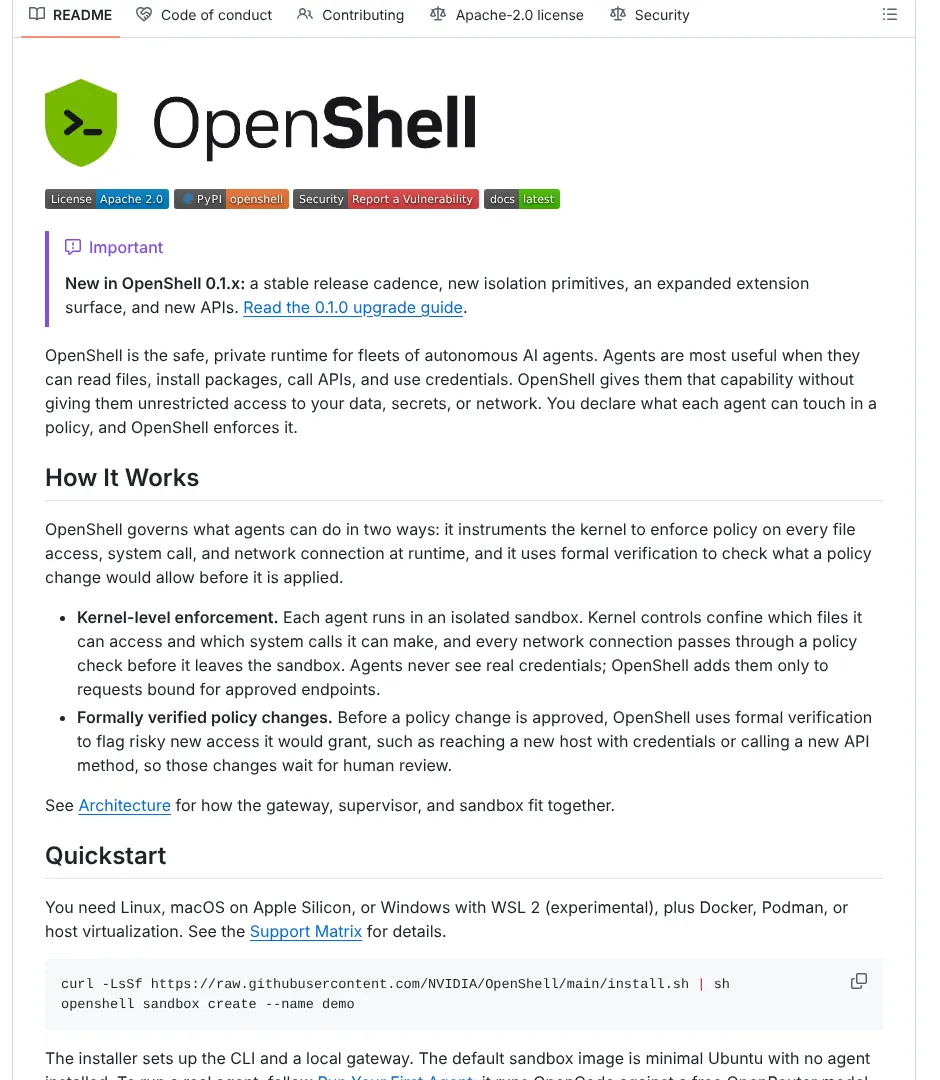
OpenShell first appeared at NVIDIA's GTC conference in March 2026. NVIDIA announced it on 16 March as part of NemoClaw, its stack for the open-source agent OpenClaw. NVIDIA's blog of 23 March said "OpenShell is in early preview". Since version 0.1.0 in September it has had a stable release cadence.
What problem does OpenShell solve?
It stops an AI agent doing more damage than its job requires. Agents are useful because they can read files, call APIs and use passwords, and that same access makes a mistake expensive.
NVIDIA's overview lists four failure modes it blocks:
- Data exfiltration: an agent uploads files to a site it should not reach.
- Credential theft: an agent reads SSH keys or cloud passwords on your disk.
- Unauthorised API use: an agent sends your data to a model provider you have not approved.
- Privilege escalation: an agent tries
sudoor similar tricks to gain more power.
These are not hypothetical. My guide to whether agent skills are safe covers fake skills that told agents to collect SSH keys and cloud passwords and send them to an attacker. A scanner checks a skill before you install it; a sandbox limits what any skill or bad instruction can reach once it runs.
How does NVIDIA OpenShell work?
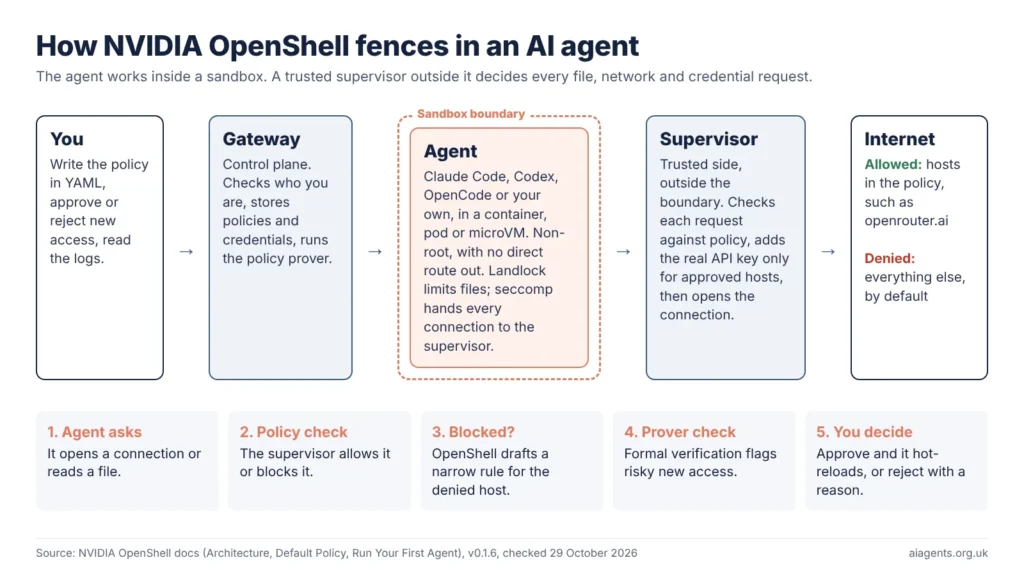
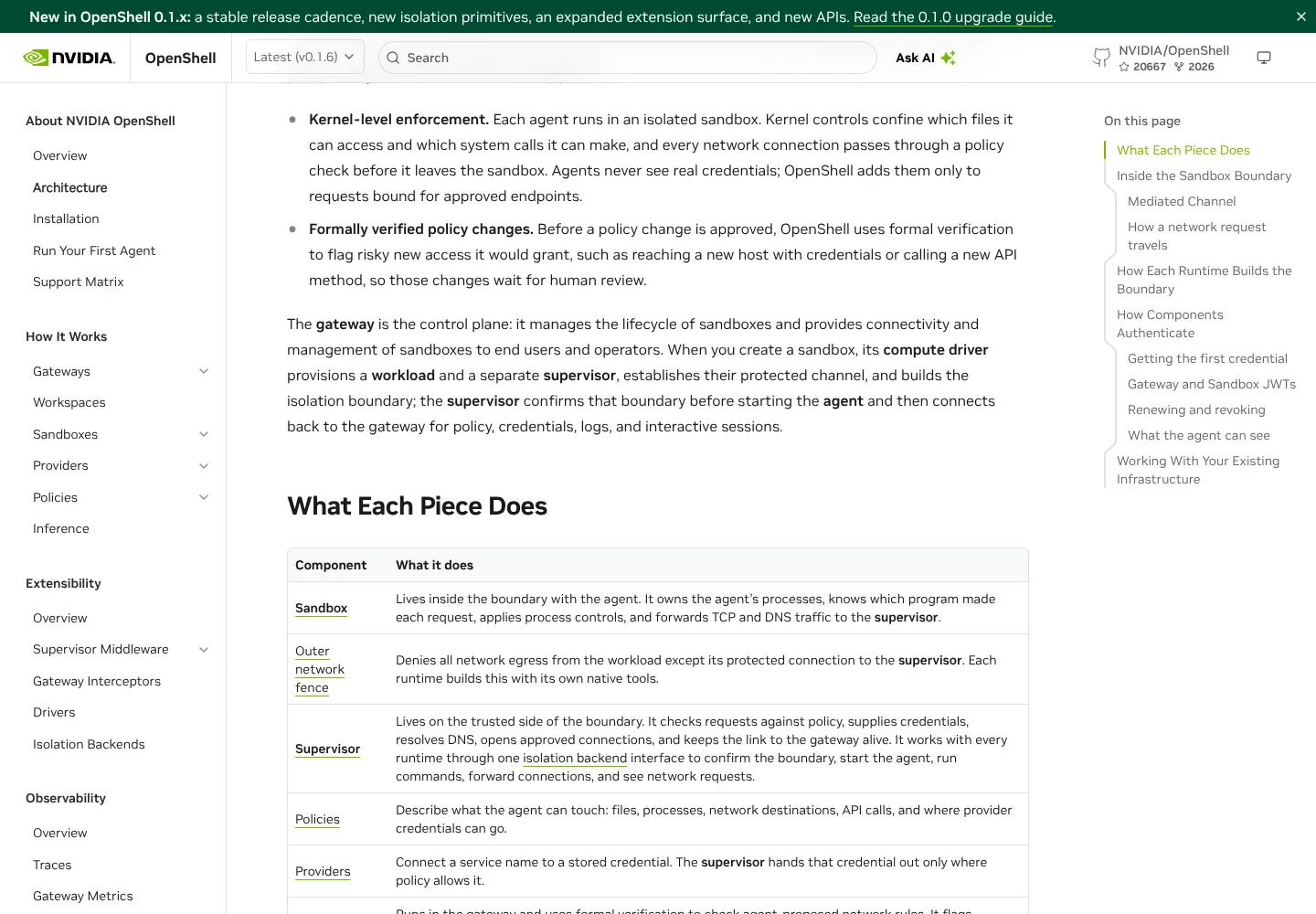
OpenShell splits every agent session into an untrusted side, where the agent runs, and a trusted side, which makes every decision. The agent never talks to the internet directly, and it never sees your real API keys.
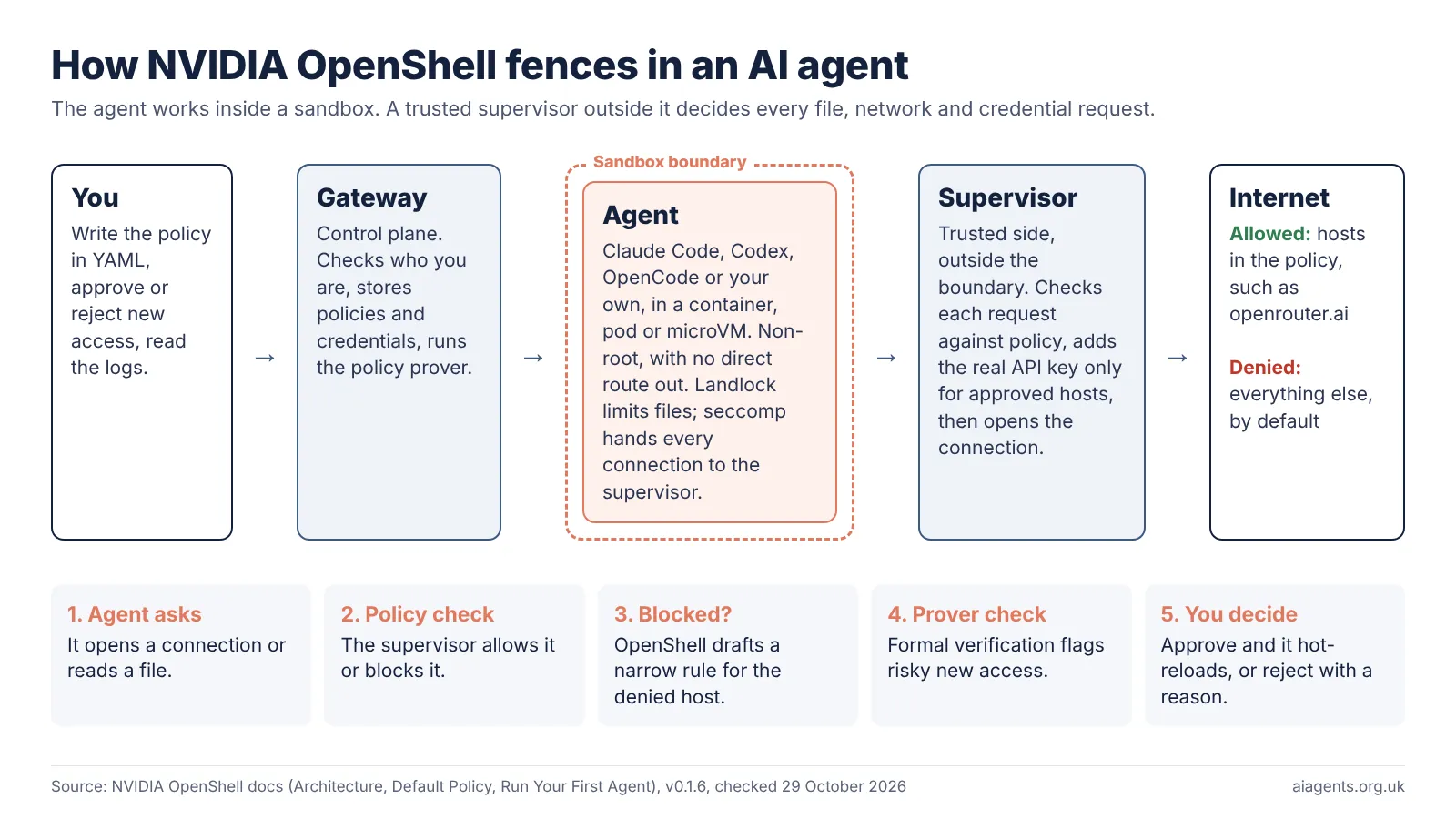
There are four parts, in NVIDIA's own terms:
- The gateway checks who you are, stores policies and credentials, and starts and stops sandboxes.
- The sandbox is where the agent runs, as a non-root user, inside a container, Kubernetes pod or small virtual machine. Landlock, a Linux kernel feature, limits which files it can open, and seccomp hands every network connection to the supervisor.
- The supervisor sits outside the sandbox. It checks each request against the policy and adds the real credential only for an approved endpoint.
- The policy prover uses formal verification, a mathematical check, to flag risky new access a policy change would grant. Any finding blocks automatic approval.
In Docker and Podman, the agent's container has networking turned off and talks to the supervisor over a private socket; in a virtual machine, the guest has no network device. NVIDIA says the agent "can't run before its controls are confirmed".
When the agent hits a website the policy does not allow, OpenShell denies the request and drafts a narrow rule for it. The prover checks the draft, and you approve or reject it. Approved network rules reload without a restart; file and process rules are fixed when the sandbox starts.
Out of the box, the default policy lets the agent read system folders such as /usr and /etc, write to its working folder and /tmp, and reach nothing on the internet at all.
What does OpenShell run on, and do you need an NVIDIA GPU?
You do not need an NVIDIA GPU. OpenShell runs on Linux and on Apple Silicon Macs, with Windows through WSL 2 marked experimental, and it needs a container engine or virtualisation rather than special hardware.
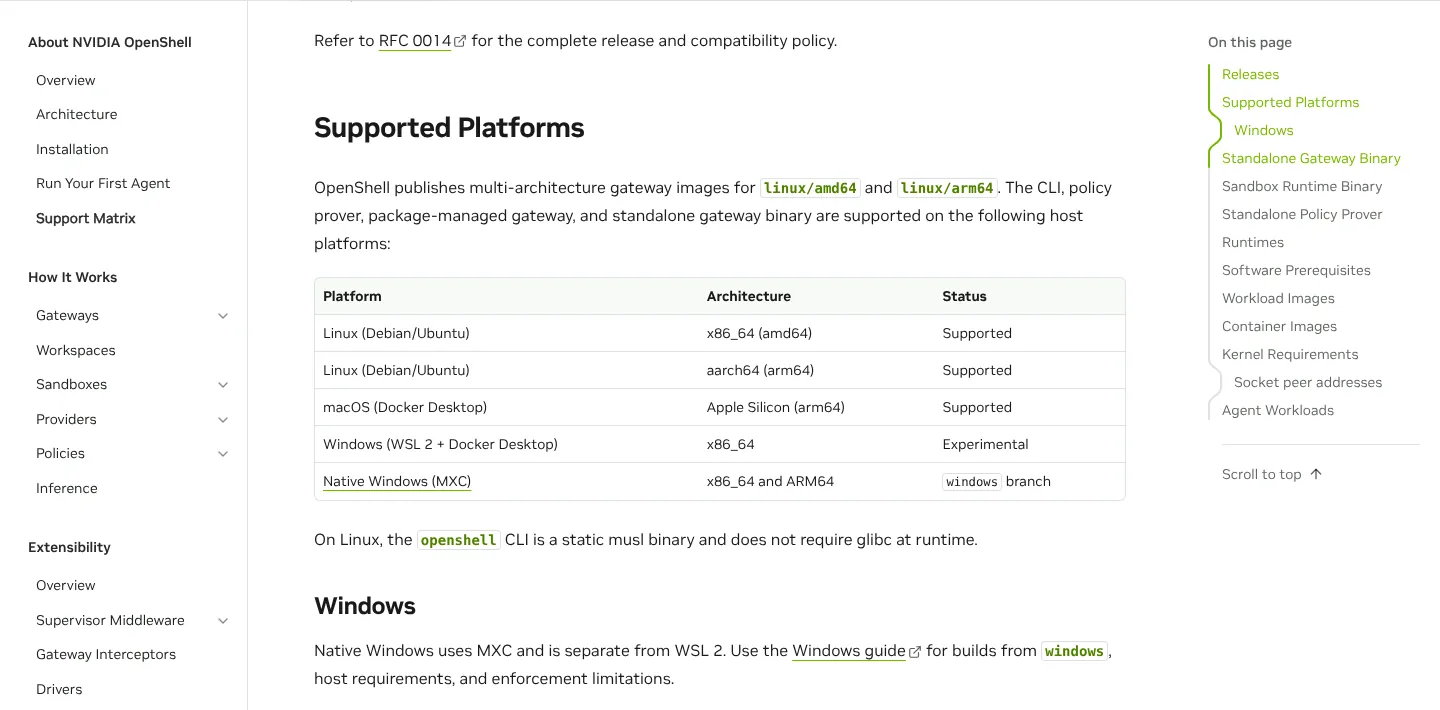
The Support Matrix for v0.1.6 lists:
- Supported: Linux (Debian and Ubuntu) on x86_64 and arm64, and macOS on Apple Silicon with Docker Desktop.
- Experimental: Windows on x86_64 through WSL 2 and Docker Desktop.
- In development: native Windows using Microsoft's MXC isolation, on a separate
windowsbranch. NVIDIA says it "is not production-qualified". - Runtimes: Docker Desktop or Docker Engine 28.0 or later, Podman 5.x, Kubernetes 1.29 or later with Helm 3, or a microVM using Apple's Hypervisor.framework or Linux KVM.
- Kernel: Linux 6.2 or newer with Landlock; on a Mac, that is Docker Desktop's Linux virtual machine.
GPUs are optional. Adding --gpu when you create a sandbox passes NVIDIA GPUs through Docker or Podman's CDI device support, or sets a GPU limit on Kubernetes. An agent that calls a cloud model, or a local model in Ollama on the host, needs no GPU in the sandbox.
Canonical's snap announcement of 1 June 2026 names NVIDIA DGX Spark, DGX Station and RTX PRO workstations among the hardware the snap targets; these are options, not requirements. My DGX Spark guide covers that machine.
Is OpenShell ready to use? What ships now and what is roadmap
OpenShell has shipped stable releases since 25 September 2026, but it is still a 0.x project that changes every week. Treat it as a tool for developers and early adopters.
As of 29 October 2026, v0.1.6 (27 October) is the latest stable release. GitHub shows 20.7k stars, 2k forks, 142 contributors, 103 releases and 389 open issues. The Hacker News post, submitted on 22 October, had 508 points and 218 comments.
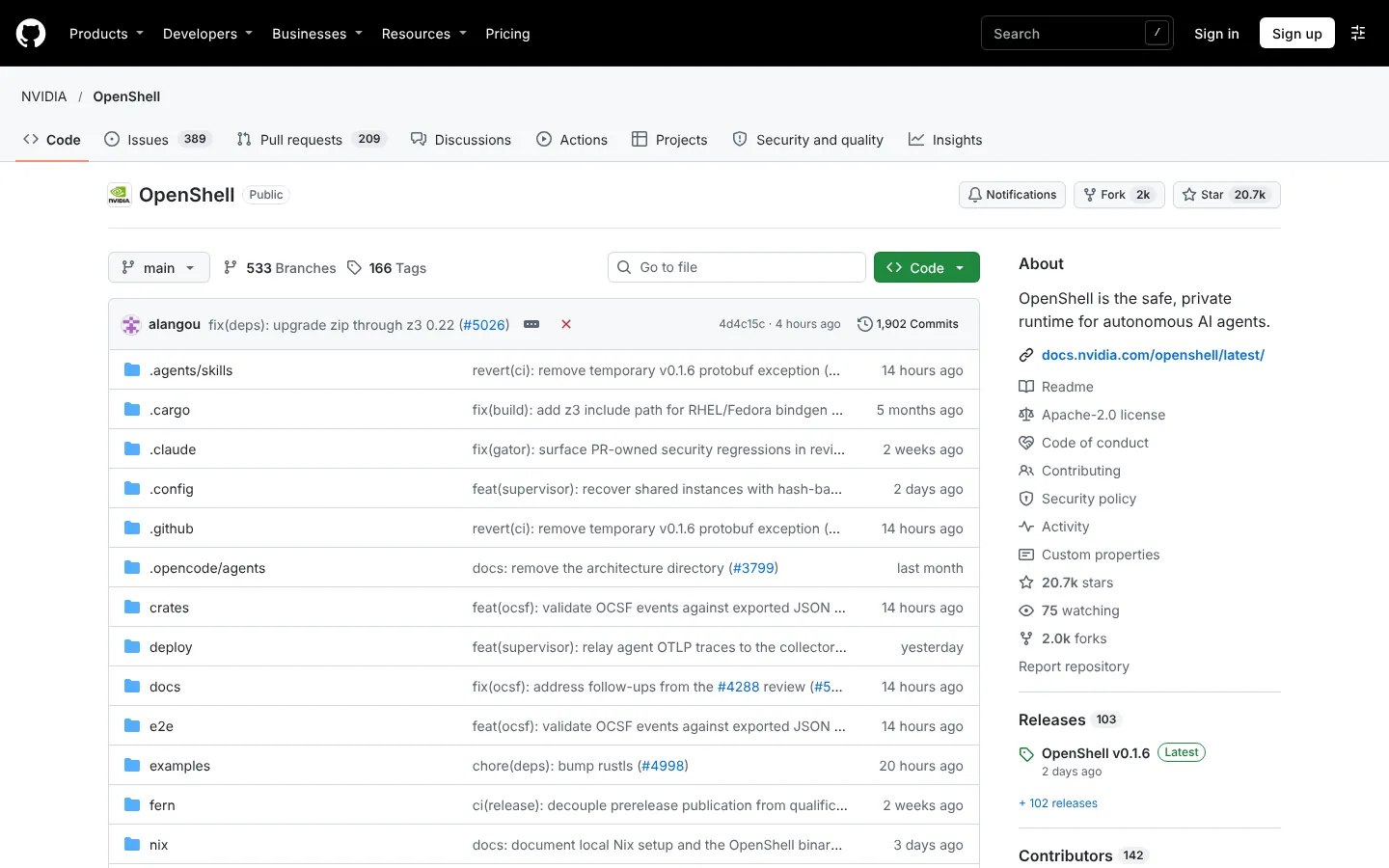
Stable builds generally ship weekly. Stable interfaces stay compatible across patch releases, but anything marked Experimental can change in a patch, and security fixes go only to the latest two minor releases.
| Feature | Status on 29 October 2026 |
|---|---|
| Sandboxes on Docker, Podman, Kubernetes and microVM | Shipping in stable releases |
| Policy prover and policy advisor | Shipping; the prover also runs as a standalone command for checks in CI |
| Credentials added only at approved endpoints | Shipping |
| Suspend and resume a sandbox | New in v0.1.6, on runtimes that support it |
| SDKs for Python, TypeScript, Go and Rust | Shipping |
| Windows through WSL 2 | Experimental |
| Native Windows (MXC) | In development on a separate branch; not production-qualified |
| Checking permissions across several agents working together | Roadmap: NVIDIA calls it "ongoing work" |
NVIDIA's developer blog of 28 September says Cadence uses OpenShell for chip design and Slack is building an agent platform on it. In March, NVIDIA said OpenShell will be integrated into SAP and ServiceNow platforms.
Two caveats. From v0.1.6, gateways refuse to start without OIDC, mTLS or JWT sign-in, unless you allow unauthenticated use for local development. And OpenShell sends anonymous telemetry by default, which NVIDIA says excludes prompts, file paths and credentials; turn it off with OPENSHELL_TELEMETRY_ENABLED=false on the gateway.
How do you install NVIDIA OpenShell?
One command installs the command-line tool, the policy prover and a local gateway on Linux or a Mac, once Docker, Podman or host virtualisation is ready. These commands are copied from NVIDIA's README and docs on 29 October 2026.
- Install OpenShell. On a Mac it uses Homebrew; on Debian or Ubuntu a .deb package; on Fedora or RHEL an RPM.
curl -LsSf https://raw.githubusercontent.com/NVIDIA/OpenShell/main/install.sh | sh- Check the gateway is running, then create a test sandbox. The default image is a minimal Ubuntu with no agent inside.
openshell status
openshell sandbox create --name demo- Run a real agent. NVIDIA's first-agent guide runs OpenCode against a free model on OpenRouter. Set
OPENROUTER_API_KEYfirst; OpenShell stores it and sends it only to openrouter.ai.
openshell profile import \
  --url https://raw.githubusercontent.com/NVIDIA/OpenShell/main/providers/openrouter.yaml

openshell provider create \
  --name openrouter \
  --type openrouter \
  --from-existing

openshell sandbox create \
  --name my-agent \
  --from ghcr.io/anomalyco/opencode:latest \
  --provider openrouter \
-- opencode -m openrouter/nvidia/nemotron-3.5-lightning:free- Approve new access as the agent asks for it. List what it was denied, then approve or reject each proposed rule.
openshell rule get my-agent --status pending
openshell rule approve my-agent --chunk-id <chunk-id>
On Ubuntu you can use the snap instead (it needs Docker Engine, not the Docker snap). After these two commands, NVIDIA's installation page shows how to register the gateway with openshell gateway add:
sudo snap install openshell
systemctl --user enable --now snap.openshell.user-gateway.service
The curl ... | sh line runs a script from the internet straight away. If you prefer, download install.sh from NVIDIA's repository, read it, then run it.
OpenShell vs Docker, Claude Code, Codex, E2B and Akamai sandboxes
OpenShell is the most policy-heavy of these options, and it keeps real API keys outside the sandbox by design. Docker Sandboxes also keep keys on the host, and Claude Code can mask keys you list. The sandboxes inside Claude Code and Codex are simpler and already on your machine, while E2B and Akamai run agent code in someone else's cloud.
| Option | Where it runs | How it isolates | Network control | Cost (29 October 2026) | Status |
|---|---|---|---|---|---|
| NVIDIA OpenShell | Your Mac, Linux machine or Kubernetes cluster | Landlock and seccomp inside a container, pod or microVM | All outbound denied until a rule allows it, per program | Free, Apache 2.0 | Stable v0.1.6, 27 October 2026 |
| Claude Code sandbox (Anthropic) | Your machine | Seatbelt on macOS; bubblewrap on Linux and WSL 2; not on native Windows | Domain allowlist through a local proxy; asks before new domains | Included with Claude plans, from £18 a month with VAT | Off by default; turn on with /sandbox |
| Codex sandbox (OpenAI) | Your machine | Seatbelt on macOS, bubblewrap on Linux, native Windows sandbox | Set by sandbox mode; full access removes the boundary | Included with ChatGPT plans; Free has limited use | On by default (workspace-write mode) |
| Docker Sandboxes | Your machine or Docker's cloud | MicroVMs | Network, file and MCP policies; central admin control is a paid feature | sbx CLI and local compute free; cloud pay as you go | Docker marks the section Experimental |
| E2B | E2B's cloud, or self-hosted from its open-source runtime | Firecracker microVMs | Internet open by default; allow and deny lists | Hobby free with $100 one-time credit; Pro $150 (about £112.50) a month plus usage | Commercial service |
| Akamai Agent Sandbox | Akamai Functions, through the Spin SDK | WebAssembly | Limits outbound connections; more reach controls planned | Not published | Beta, announced 27 October 2026 |
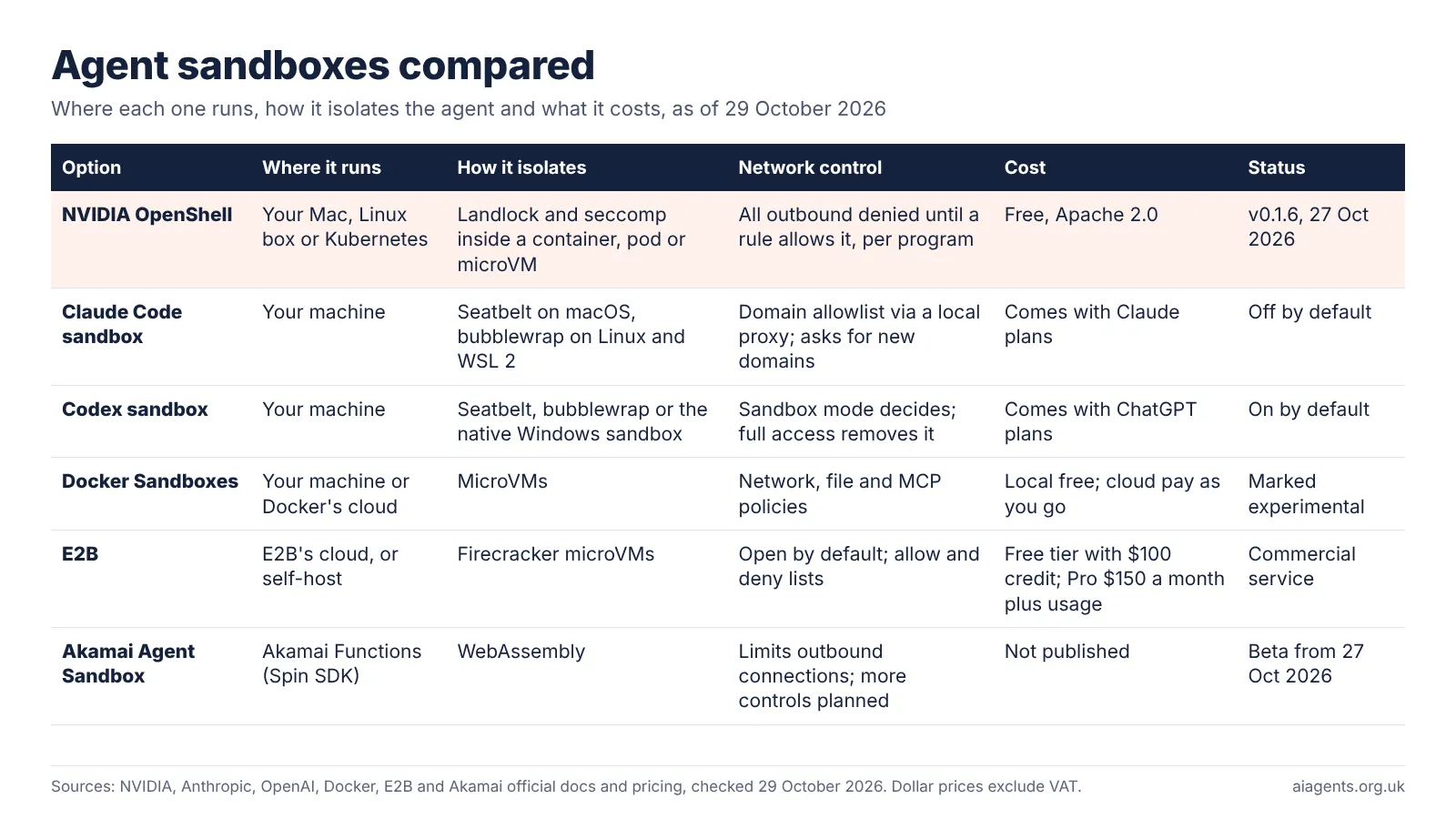
What matters in practice:
- Claude Code's sandbox is off until you turn it on. When on, writes are limited to your project, but Anthropic says reads stay broad by default, including
~/.sshand~/.aws/credentials, unless you add deny rules. - Codex sandboxes by default. OpenAI calls workspace-write "the default low-friction mode for local work".
- OpenShell builds secret handling in. The agent gets a placeholder, and the supervisor swaps in the real key only on the way to an approved host. Docker Sandboxes inject keys from the host in a similar way. Claude Code's sandbox can mask the keys and files you list in its settings; Codex's sandbox page does not describe this.
- Docker Sandboxes and E2B isolate with virtual machines. E2B leaves the internet open unless you restrict it.
- Akamai is newest. Its beta, announced on 27 October 2026, runs code that agents write in WebAssembly, and controls over what agents can reach are still to come.
They can also stack. NVIDIA's own docs list Claude Code and Codex as agents to run inside OpenShell, so you can keep each agent's own approval prompts and add OpenShell's fence around them. For the agents themselves, prices and training settings, see my AI coding agents comparison.
Who should use NVIDIA OpenShell?
Developers and small teams who let agents run unattended, run several at once or give them real API keys should look at OpenShell now. A non-technical business owner should ask their developer about it rather than install it.
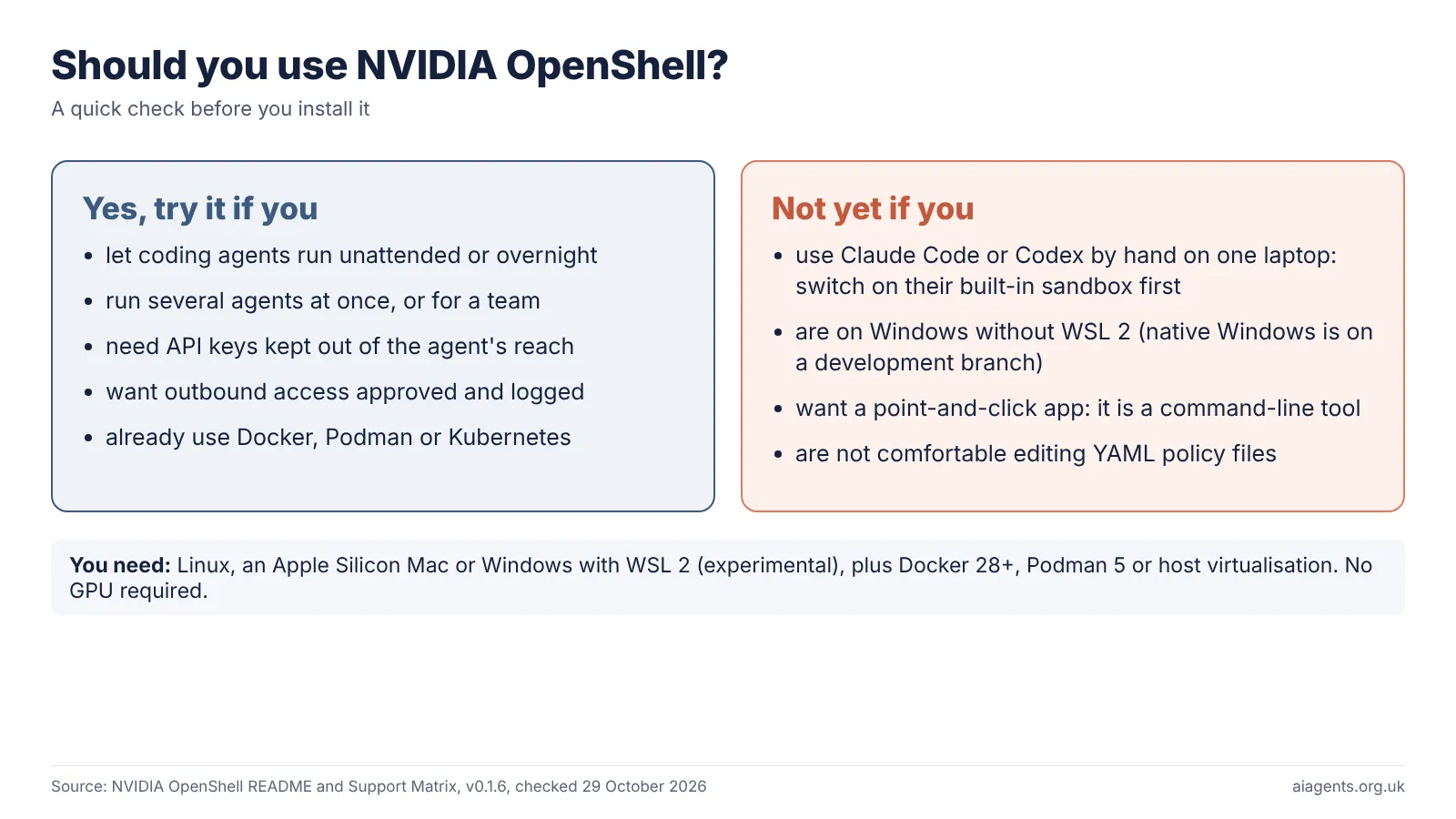
Check these in order:
- Does your agent run commands or touch files without you watching? If not, the built-in sandbox in Claude Code or Codex plus approval prompts is enough for now.
- Does it hold API keys, cloud passwords or client data? If yes, OpenShell's credential handling is the main reason to adopt it.
- Are you on Linux or an Apple Silicon Mac with Docker? If you are on Windows only, wait for native support or use WSL 2 and accept that it is experimental.
- Will someone own the policy? Somebody has to read each access request, or the fence is only as good as whoever clicks approve.
- Start with one agent and one project. Watch what it asks for for a week, then widen it.
It also suits always-on agents such as OpenClaw or Hermes Agent, which act on messages from outside.
Does an agent sandbox help with UK GDPR?
It helps with security, but it does not make an agent compliant on its own. UK GDPR expects appropriate technical measures, and limiting what an agent can read and send is one.
OpenShell runs on your own hardware, but if the agent calls a cloud model, that provider still receives what the agent sends. You still need a lawful basis and, for higher-risk uses, a DPIA. My guide to AI agents and UK GDPR covers those steps.
Frequently asked questions
What is NVIDIA OpenShell?
NVIDIA OpenShell is a free, open-source runtime that runs AI agents such as Claude Code, Codex or OpenCode inside a sandbox. A YAML policy decides which files the agent can open, which websites and APIs it can reach and where its API keys may be used. Everything else is denied. The latest version, as of 29 October 2026, is v0.1.6.
Is NVIDIA OpenShell free?
Yes. OpenShell is open source under the Apache 2.0 licence, so you can use it commercially without paying NVIDIA. Your costs are the computer or cloud server it runs on and any AI model the agent calls, such as a paid Claude or OpenAI plan or API usage.
Do I need an NVIDIA GPU to run OpenShell?
No. OpenShell runs on Linux and Apple Silicon Macs with Docker, Podman or host virtualisation, and Windows through WSL 2 is experimental. A --gpu flag can pass NVIDIA GPUs into a sandbox when an agent needs one, but agents that call cloud models or a local model on the host need no GPU.
Does OpenShell work on a Mac?
Yes, on Apple Silicon Macs. The installer uses Homebrew and runs the gateway as a Homebrew service. Sandboxes need Docker Desktop, or Apple's Hypervisor.framework for the microVM runtime. The kernel controls run inside Docker Desktop's Linux virtual machine rather than in macOS itself. Intel Macs are not on the support list.
Is OpenShell the same as NemoClaw?
No. NemoClaw is NVIDIA's bundle for the open-source OpenClaw agent, announced at GTC in March 2026, and it includes OpenShell along with NVIDIA's Nemotron models. OpenShell is the sandbox part, and it now works as a standalone project with any agent you put in its image, including Claude Code and Codex.
How is OpenShell different from Claude Code's sandbox?
Claude Code's sandbox is built in, off by default and uses Seatbelt or bubblewrap to limit writes and network domains. Reads stay broad and API keys are masked only if you configure it. OpenShell wraps any agent in a container or microVM, denies all network access by default and keeps provider API keys outside the sandbox as standard. You can run Claude Code inside OpenShell.
Read next
- Are agent skills safe to install?
- AI coding agents compared: Claude Code vs Codex vs Copilot vs Cursor and more, with UK prices
- Claude Code explained: UK pricing, install and how it compares
- OpenAI Codex explained: UK pricing and install on Mac and Windows
- OpenClaw explained: the free AI agent you run yourself
- AI agents and UK GDPR: what the ICO expects
Sources
- NVIDIA/OpenShell on GitHub - README, Apache 2.0 licence, stars, forks, contributors, issues - checked 29 October 2026
- OpenShell releases, GitHub - v0.1.6 marked Latest, upgrade notes, release tag dates - checked 29 October 2026
- Overview of NVIDIA OpenShell, NVIDIA docs - risks and controls, use cases - checked 29 October 2026
- Architecture, NVIDIA OpenShell docs - gateway, sandbox, supervisor, prover, runtimes - checked 29 October 2026
- Support Matrix, NVIDIA OpenShell docs - platforms, runtimes, kernel, release policy - checked 29 October 2026
- Installation, NVIDIA OpenShell docs - install commands, Mac and Linux services, snap, Windows - checked 29 October 2026
- Run Your First Agent, NVIDIA OpenShell docs - provider, sandbox and rule commands - checked 29 October 2026
- Default Policy, NVIDIA OpenShell docs - default file access, all outbound denied - checked 29 October 2026
- Sandboxes, NVIDIA OpenShell docs - GPU resources and the --gpu flag - checked 29 October 2026
- Inference, NVIDIA OpenShell docs - provider profiles, host-local Ollama - checked 29 October 2026
- Add Runtime Controls to AI Agents with NVIDIA OpenShell, NVIDIA Technical Blog (28 September 2026) - version 0.1.0, adopters, multi-agent work - checked 29 October 2026
- How Autonomous AI Agents Become Secure by Design With NVIDIA OpenShell, NVIDIA Blog (23 March 2026) - early preview, partners - checked 29 October 2026
- NVIDIA Announces NemoClaw for the OpenClaw Community, NVIDIA Newsroom (16 March 2026) - GTC announcement, NemoClaw installs Nemotron and OpenShell - checked 29 October 2026
- Securing AI agent workflows on Ubuntu with the new NVIDIA OpenShell snap, Canonical (1 June 2026) - snap install, hardware named - checked 29 October 2026
- OpenShell on Hacker News - submitted 22 October 2026, 508 points and 218 comments via the Hacker News API - checked 29 October 2026
- Sandboxing, Claude Code docs, Anthropic - off by default, Seatbelt and bubblewrap, read and network defaults, credential masking - checked 29 October 2026
- Sandbox, Codex docs, OpenAI - workspace-write default, Seatbelt, bubblewrap, Windows sandbox - checked 29 October 2026
- Docker Sandboxes, Docker docs and Docker Sandboxes security model - microVM isolation, policies, free local use, credentials kept outside the VM - checked 29 October 2026
- E2B pricing - Hobby free with $100 credit, Pro $150 a month plus usage - checked 29 October 2026
- Internet access, E2B docs and E2B runtime on GitHub - open by default, Firecracker microVMs, Apache 2.0 - checked 29 October 2026
- Akamai launches AI inference service and agent execution environment, Akamai (27 October 2026) - Agent Sandbox beta, WebAssembly isolation - checked 29 October 2026
- Claude Pro UK price: my AI coding agents comparison, from claude.com/pricing checked 25 October 2026