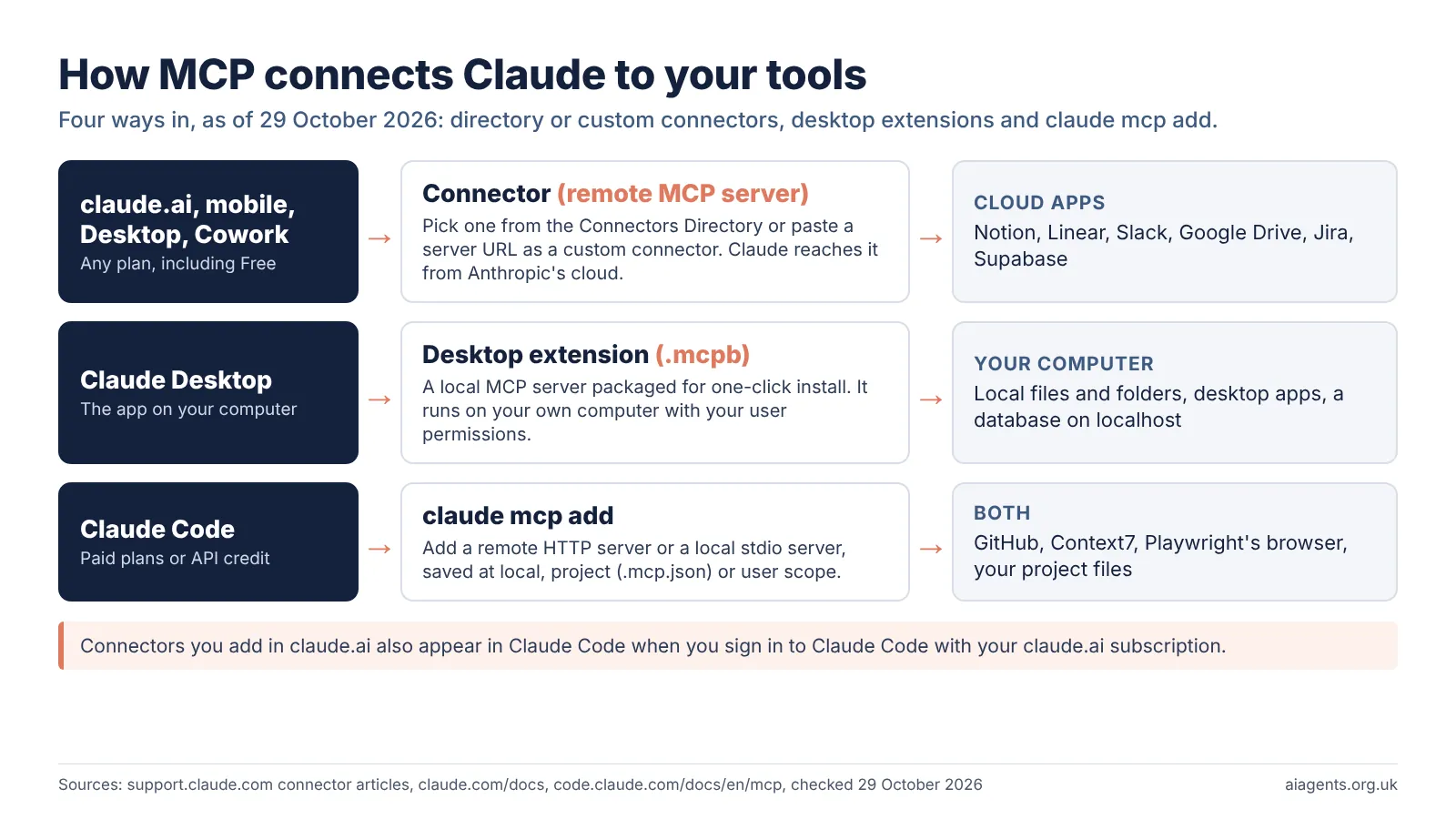
Claude MCP means giving Claude extra tools through the Model Context Protocol, and there are four ways to do it today: pick a connector from Anthropic's directory, paste a server URL as a custom connector, install a desktop extension in Claude Desktop, or run claude mcp add in Claude Code. Free plans get the first three, with one custom connector.
Key facts
- What it is: MCP servers give Claude tools and data. In Claude's apps they are called connectors.
- Four ways in: the Connectors Directory, a custom connector by URL, a desktop extension (.mcpb), or
claude mcp addin Claude Code. - Free plan: directory connectors, one custom connector and desktop extensions. Claude Code needs a paid plan or API credit.
- Claude Code scopes: local (default), project (a shared
.mcp.jsonfile) and user. - Price (UK): Pro is £18 a month including VAT. Anthropic lists no separate charge for connectors, but some services bill for use, such as Atlassian's Rovo credits.
- Verified is not audited: Anthropic says its Verified label "isn't a security audit".
- Testing: the official MCP Inspector runs with
npx @modelcontextprotocol/inspectorand needs Node 22.19.0 or newer.
On this page
- What is Claude MCP?
- How do you add MCP servers to Claude?
- How do you add a connector in claude.ai?
- How do desktop extensions work?
- How do you add an MCP server in Claude Code?
- Which Claude plans can use MCP?
- What are the best MCP servers for Claude?
- How do you test an MCP server with MCP Inspector?
- Is it safe to add MCP servers to Claude?
- Frequently asked questions
- Read next
- Sources used
What is Claude MCP?
MCP, the Model Context Protocol, is the open standard Claude uses to reach outside tools: an MCP server wraps a service such as Notion or GitHub, and Claude calls its tools. The official site calls it "a USB-C port for AI applications".
Anthropic created MCP as an open standard, and the latest version of the specification is dated 2026-07-28. My plain-English guide What is MCP? covers the history and how the protocol works, so this page sticks to the practical part: getting servers into Claude.
A connector is what Claude's apps call an MCP server once you add it. A desktop extension is a local MCP server packaged as one .mcpb file. Both are MCP underneath.
How do you add MCP servers to Claude?
There are four routes, and which one you use depends on where you use Claude and where the tool lives. Anthropic's rule of thumb is simple: cloud services you sign in to get a remote connector, and anything on your own computer gets a desktop extension or a local server.
- Connectors Directory. Anthropic's catalogue of ready-made connectors, such as Notion, Linear and Google Drive. One catalogue serves claude.ai, Claude Desktop, mobile, Cowork and Claude Code.
- Custom connector by URL. Paste the address of any remote MCP server. Anthropic has not reviewed it.
- Desktop extension. A one-click
.mcpbinstall in Claude Desktop that runs the server on your computer. - Claude Code. The
claude mcp addcommand adds remote or local servers from the terminal, with optional sharing through a project file.
| Route | Works in | Server runs | Who can add it (29 October 2026) |
|---|---|---|---|
| Connectors Directory | claude.ai, Desktop, mobile, Cowork, Claude Code | On the maker's servers | All plans; on Team and Enterprise an Owner enables it first |
| Custom connector (URL) | claude.ai, Desktop, Cowork, Claude Code | On the internet, reached from Anthropic's cloud | Free (one connector), Pro, Max; Owners on Team and Enterprise, plus Enterprise members with a library-management role |
| Desktop extension (.mcpb) | Claude Desktop and Claude Code | On your computer | Anyone signed in to Claude Desktop, unless an admin turns extensions off |
| claude mcp add | Claude Code only | On your computer or the internet | Anyone with Claude Code: paid plans or API credit |
How do you add a connector in claude.ai?
Open Customize > Connectors in claude.ai, browse the directory and select Connect, then sign in to the service. You then switch the connector on per conversation from the + button in the chat box.
- Go to Customize > Connectors and select the + next to Connectors to open the directory.
- Pick a connector and read its description and what it can read or write.
- Select Connect, sign in to the service and approve the permissions.
- In a chat, select +, hover over Connectors and toggle on the ones you want for that conversation.
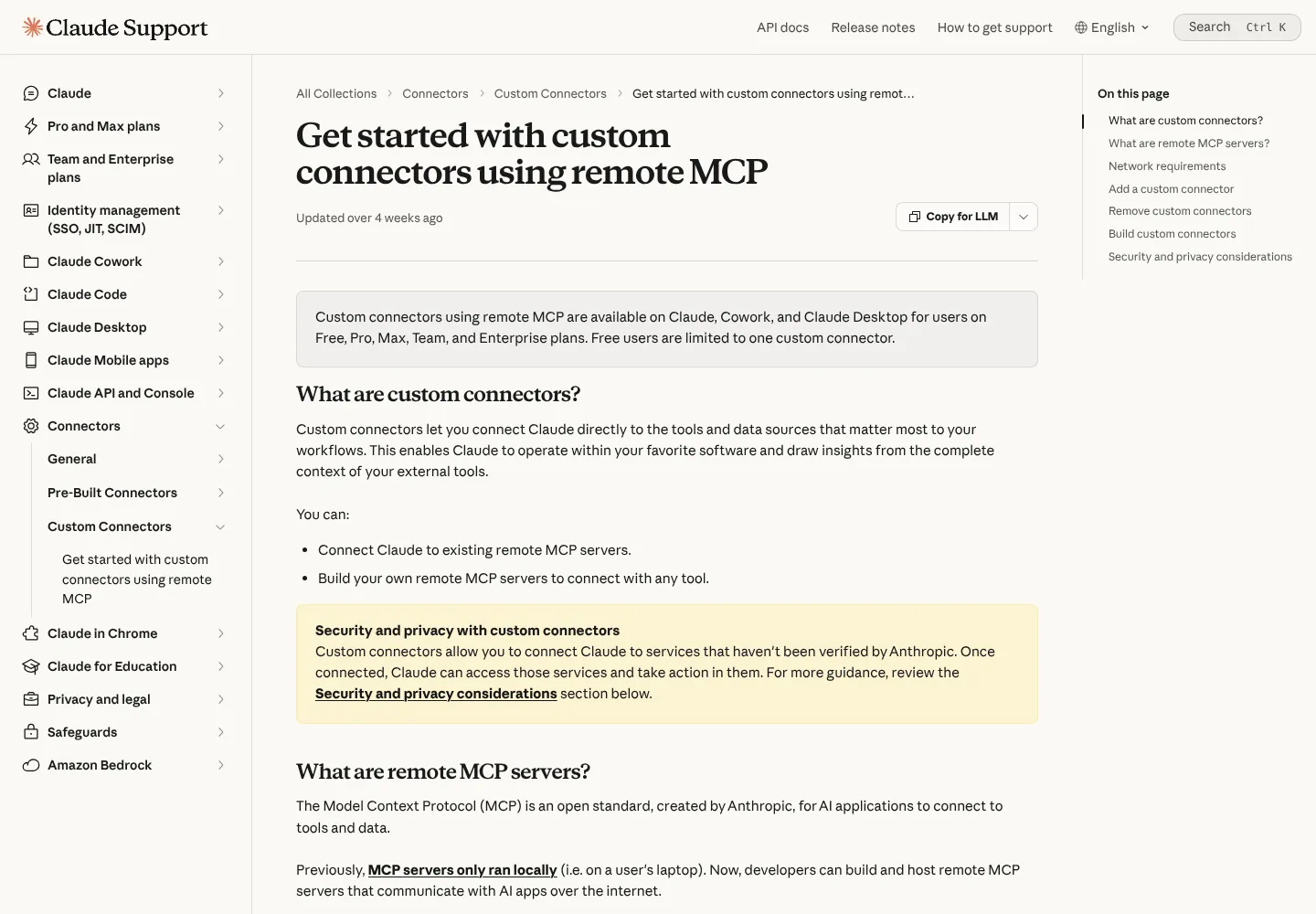
A custom connector follows the same path: select "+ Add", then "Add custom connector", give it a name and paste the server URL. Claude then shows the sign-in settings it detected. You can choose OAuth sign-in or no sign-in, and you can add fixed request headers if the server uses an API key, though Anthropic says request headers are a beta not every account has yet.
One detail trips people up. Anthropic says custom connectors are reached "from Anthropic's cloud infrastructure, rather than from your local device", even in Claude Desktop and Cowork. A server on your office network or behind a VPN will not connect unless you allowlist Anthropic's IP addresses or use its MCP tunnels feature.
On Team and Enterprise, Owners can set each tool to Always allow, Needs approval or Blocked, for example letting Claude read Google Drive but not edit it.
How do desktop extensions work?
A desktop extension is a local MCP server you install in Claude Desktop with one click, much like a browser extension. It suits tools that live on your computer: files and folders, desktop apps or a database on localhost.
- In Claude Desktop, open Settings > Desktop app and select Manage next to Extensions.
- Select Browse extensions and pick one of the Anthropic-reviewed extensions, then Install.
- Fill in any settings it asks for, such as an API key or a folder path.
- To install a file someone gave you, open Advanced settings, then Install Extension, and choose the
.mcpbfile.
Claude Desktop includes its own Node.js, so you do not need to install it. API keys are stored in Keychain on a Mac, and directory extensions update automatically by default.
The limit is reach. Desktop extensions work only in Claude Desktop and Claude Code, not on the web or mobile. Servers set up the older way, by editing claude_desktop_config.json, also stay on that one computer and are not available in Cowork or claude.ai.
How do you add an MCP server in Claude Code?
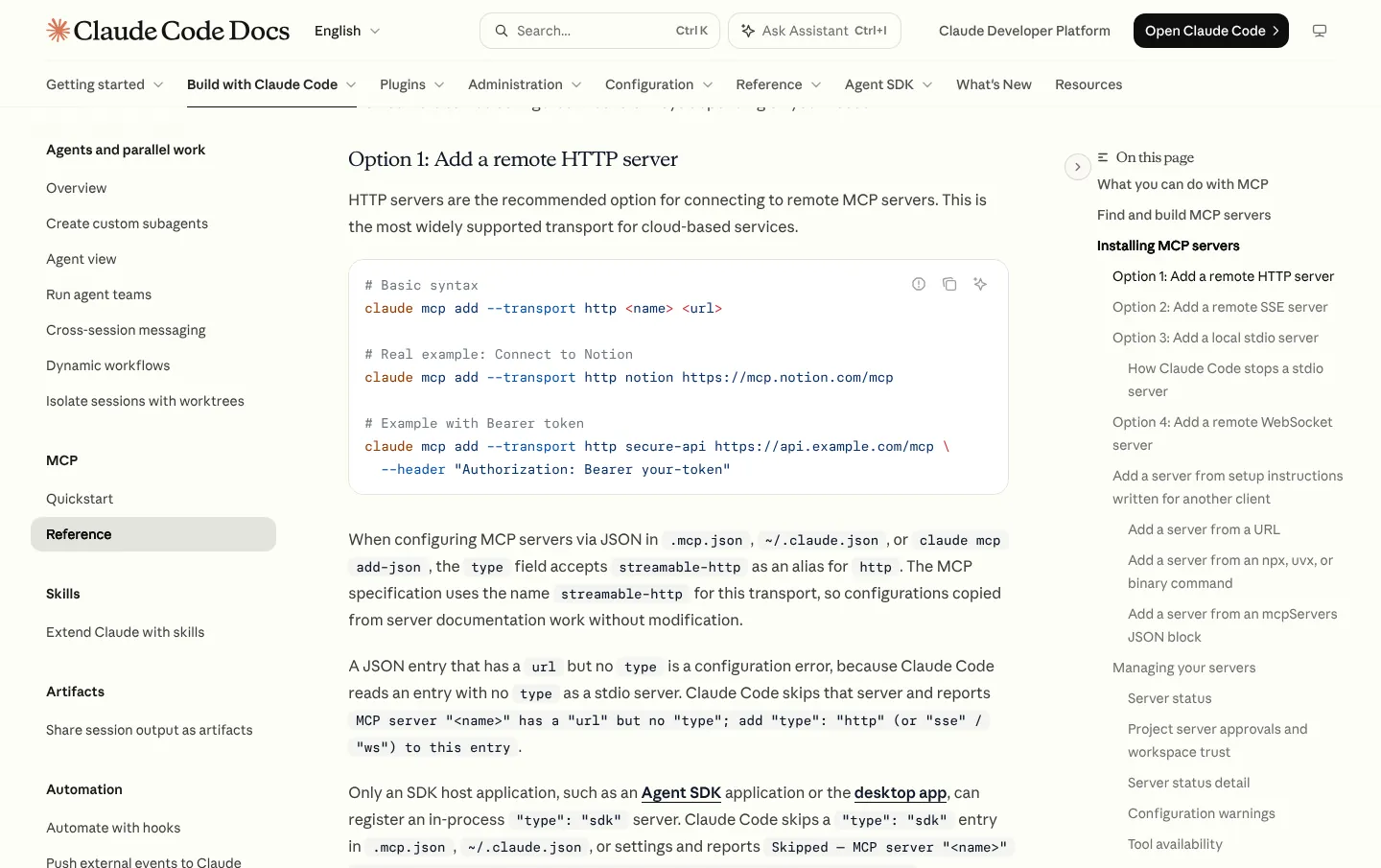
Run claude mcp add in your terminal, not inside a Claude Code session. For a remote server you give a name and a URL; for a local server you put the command that starts it after a double dash. My Claude Code guide covers installing Claude Code itself.
These are the forms in Anthropic's Claude Code documentation, checked on 29 October 2026:
# Remote server (recommended for cloud services)
claude mcp add --transport http <name> <url>
claude mcp add --transport http notion https://mcp.notion.com/mcp

# Local server: everything after -- starts the server
claude mcp add [options] <name> -- <command> [args...]

# Share with your team through .mcp.json
claude mcp add --transport http shared-server --scope project https://example.com/mcp
Then sign in. Type /mcp inside a Claude Code session and follow the browser prompts for any server that needs OAuth. claude mcp list shows each server with a status such as Connected or Needs authentication, and claude mcp remove <name> deletes one.
| Scope | Loads in | Shared with your team | Stored in |
|---|---|---|---|
| Local (default) | The current project only | No | ~/.claude.json |
| Project | The current project only | Yes, through version control | .mcp.json in the project root |
| User | All your projects | No | ~/.claude.json |
Two shortcuts help. claude mcp add-from-claude-desktop imports servers you set up in Claude Desktop, on a Mac or WSL. And connectors you added in claude.ai appear in Claude Code automatically when you sign in with your claude.ai subscription rather than an API key.
For safety, Claude Code asks you to approve servers from a project's .mcp.json before it uses them, so a cloned repository cannot switch on its own servers. Anthropic's docs add a plain warning: "Verify you trust each server before connecting it."
Which Claude plans can use MCP?
Every plan can use MCP in some form. The free plan gets directory connectors, one custom connector and desktop extensions; Claude Code, and with it claude mcp add, starts with Pro at £18 a month including VAT. Full prices are in my ChatGPT vs Claude vs Gemini vs Copilot comparison.
| Feature (29 October 2026) | Free | Pro and Max | Team and Enterprise |
|---|---|---|---|
| Directory connectors | Yes | Yes | Yes, once an Owner enables each one |
| Custom connectors by URL | One | Yes | Owners add them for the organisation |
| Desktop extensions | Yes | Yes | Yes; admins can allowlist or block |
| Claude Code and claude mcp add | No | Yes | Yes |
| Slack connector | No | No | Yes, with the Claude in Slack app |
| Admin controls for connectors | No | No | Yes |
Anthropic's UK pricing page shows Pro at £18 a month, or £15 a month billed yearly (£180 up front), and says prices include 20% VAT. In the US it is $20, or $17 a month yearly. My Claude pricing in the UK guide has every plan. Anthropic lists no separate charge for connectors, though some services bill for their side. Claude Code shares your plan's usage limits with chat, which my guide to Claude usage limits explains.
What are the best MCP servers for Claude?
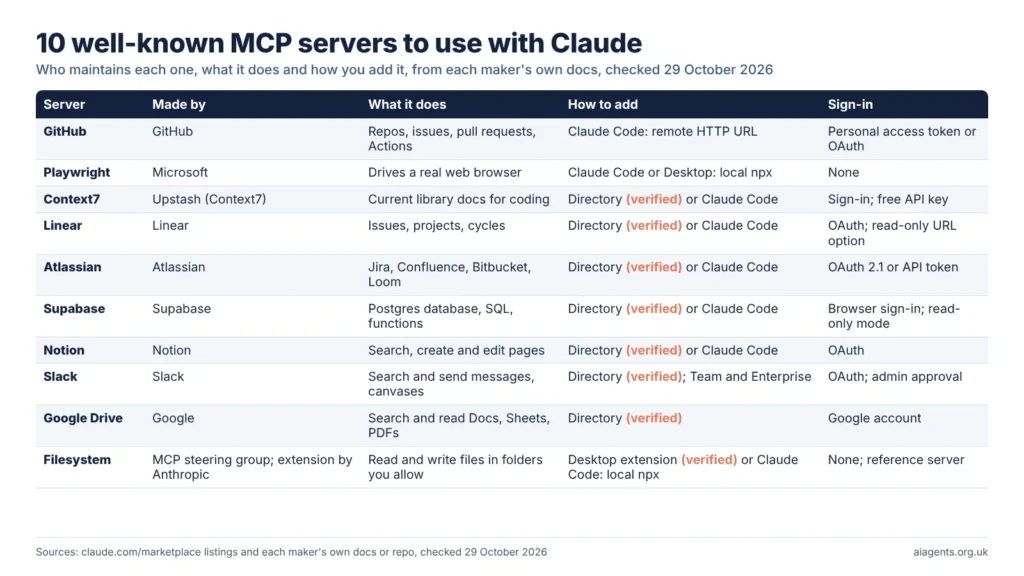
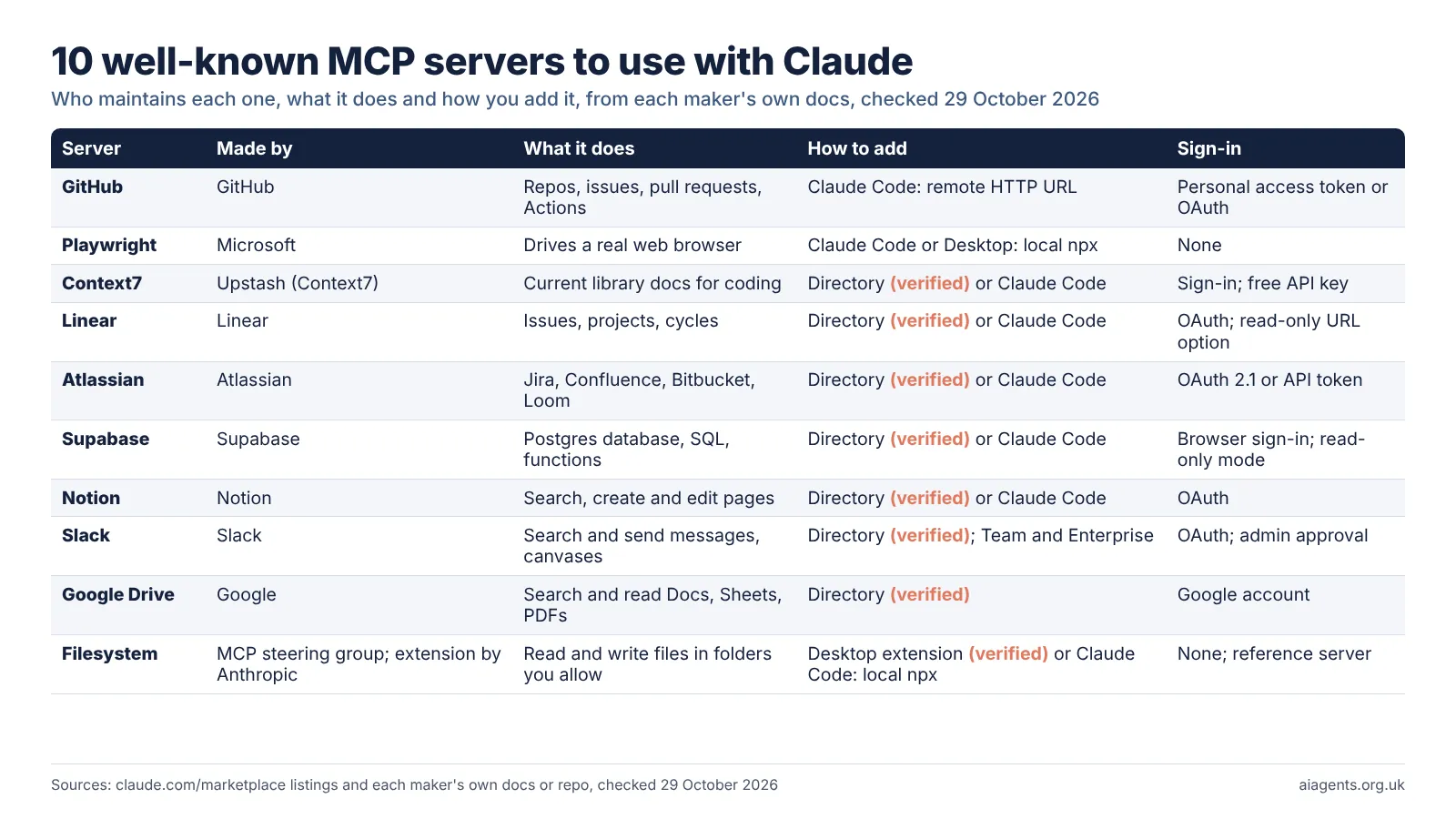
Start with servers built by the company that owns the service, because they are maintained and they respect your existing permissions. These ten are among the best known, and each comes from the vendor or from the MCP project itself.
| Server | Maintained by | What it does | How to add | Sign-in |
|---|---|---|---|---|
| GitHub | GitHub | Repos, issues, pull requests, Actions | Claude Code, remote URL | Personal access token or OAuth |
| Playwright | Microsoft | Drives a real web browser | Claude Code or Desktop, local npx | None |
| Context7 | Upstash (listed as Context7) | Current library docs for coding | Directory (Verified) or Claude Code | Sign-in; free API key for higher limits |
| Linear | Linear | Issues, projects and cycles | Directory (Verified) or Claude Code | OAuth; read-only URL |
| Atlassian | Atlassian | Jira, Confluence, Bitbucket, Loom | Directory (Verified) or Claude Code | OAuth 2.1 or API token |
| Supabase | Supabase | Postgres database, SQL, edge functions | Directory (Verified) or Claude Code | Browser sign-in; read-only mode |
| Notion | Notion | Search, create and edit pages | Directory (Verified) or Claude Code | OAuth |
| Slack | Slack | Search and send messages, canvases | Directory (Verified), Team and Enterprise | OAuth; admin approval |
| Google Drive | Search and read Docs, Sheets, PDFs | Directory (Verified) | Your Google account | |
| Filesystem | MCP steering group; desktop extension by Anthropic | Read and write files in folders you allow | Desktop extension (Verified) or Claude Code, local npx | None; reference server |
These Claude Code commands come from the makers' setup pages and, for GitHub, from Anthropic's docs. Microsoft's README gives the Playwright line without a double dash; I have used the form Anthropic documents for local servers, claude mcp add [options] <name> -- <command> [args...], where everything after -- is passed to the server untouched.
claude mcp add --transport http github https://api.githubcopilot.com/mcp/ --header "Authorization: Bearer YOUR_GITHUB_PAT"
claude mcp add playwright -- npx @playwright/mcp@latest
claude mcp add --transport http linear-server https://mcp.linear.app/mcp
claude mcp add --transport http atlassian https://mcp.atlassian.com/v2/mcp
claude mcp add --transport http notion https://mcp.notion.com/mcp
What each one is like in practice, from its own documentation:
- GitHub. The old reference GitHub server was archived and GitHub now runs its own. Use a fine-grained token limited to the repositories Claude needs. A
--read-onlymode offers only read tools. - Playwright. Microsoft's server reads pages through the accessibility tree, so it needs no vision model. Microsoft now suggests coding agents may do better with its Playwright CLI and skills, which use fewer tokens.
- Context7. Upstash's server pulls current, version-specific library documentation into Claude's context, so code examples match the version you use.
- Atlassian. Calls through the server use Rovo credits from your organisation's shared pool, which is a cost to check before rolling it out.
- Supabase. Supabase warns that connecting an AI to your projects "carries security risks". Scope the server to one project and add
read_only=truebefore going near production data. - Google Drive. Google builds and runs this connector, and each person signs in with their own account, so Claude sees only files that account can open. The old reference Drive server is archived.
- Filesystem. The MCP project calls its reference servers "educational examples", not production-ready. It can touch only the folders you name on the command line, and needs Node.js 24 or later through npx. In Claude Desktop the easier route is Anthropic's own Filesystem desktop extension, marked Anthropic verified in the directory, which wraps the same server.
Bigger catalogues exist. Smithery lists thousands of community servers and Alibaba's ModelScope MCP Square hosts many more, but both carry far lighter vetting than Anthropic's directory. If you want ready-made bundles of connectors and skills for Claude Code, see my Claude plugin directory review.
How do you test an MCP server with MCP Inspector?
Run npx @modelcontextprotocol/inspector and it opens a browser tool that connects to a server, lists its tools and lets you call them by hand. It is the reference testing tool from the MCP project, and it is free.
The Inspector needs Node 22.19.0 or newer and comes in three forms from one package: a web interface (the default), a command-line client for scripts, and a terminal interface with --tui. To point it at a remote server:
npx @modelcontextprotocol/inspector --server-url https://api.example.com/mcp --transport http
npx -y @modelcontextprotocol/inspector npx @modelcontextprotocol/server-filesystem ~/Desktop
You see every tool description the model will read, which is where hidden instructions would sit. One caution from its own docs: the Inspector stores OAuth tokens in your system keychain, but on a machine without one it saves them to ~/.mcp-inspector/secrets.json, "unencrypted unless you supply a key".
Is it safe to add MCP servers to Claude?
It is as safe as the servers you choose. Anthropic says connectors let Claude "access and potentially modify data" in your services, and that malicious servers "may include hidden instructions that try to make Claude perform unintended actions", known as prompt injection.
Anthropic's labels help but do not settle it. Verified connectors were tested by Anthropic, yet its docs say verification "isn't a security audit" and the developer can change the tools after review. Community connectors were only screened. Custom connectors were not reviewed at all.
Local servers carry a different risk: they run code on your computer. The MCP project's security guide shows a startup command that quietly sends your SSH key to an attacker.
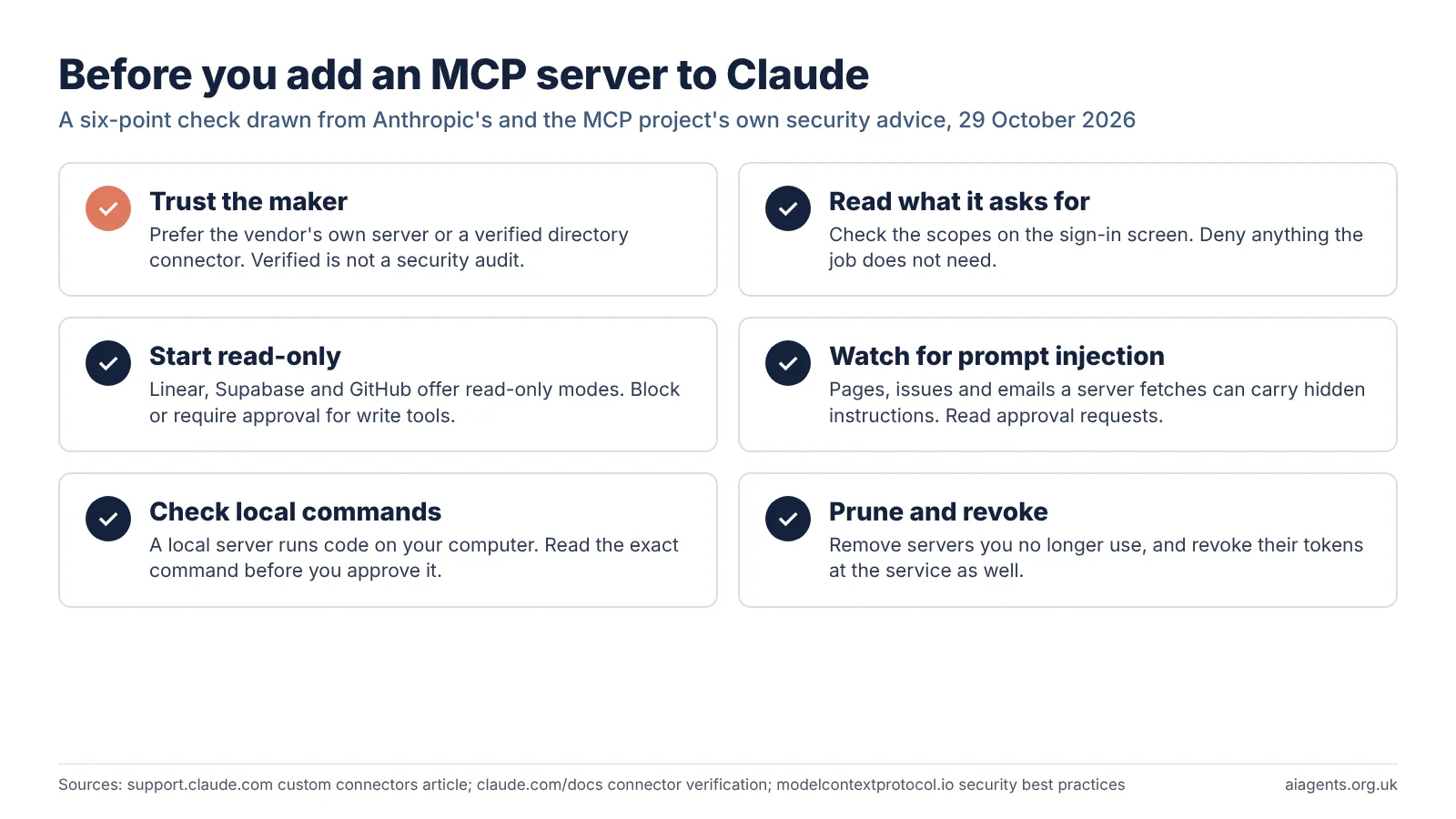
- Prefer the vendor's own server or a Verified directory connector over a copy from a registry.
- Read the permissions on the sign-in screen and deny anything the job does not need.
- Start read-only. Linear, Supabase and GitHub all offer it. On Team and Enterprise, set write tools to Needs approval or Blocked.
- Read approval prompts and click "Allow always" only for tools you trust to run unsupervised.
- Turn off write tools before Research. Anthropic says Research can call connector tools "without further approval".
- Remove what you no longer use, and revoke its tokens at the service as well.
For business data there is one more point. Anthropic says connected services process data on their own infrastructure, under their own terms, possibly outside the US, and its US-only inference setting does not change that. If customer data is involved, read my guide to AI agents and UK GDPR. The same thinking applies to skills, which I cover in Are agent skills safe to install?
Frequently asked questions
Can I use MCP with the free Claude plan?
Yes. Free users can connect servers from the Connectors Directory, add one custom connector by URL and install desktop extensions in Claude Desktop. Free does not include Claude Code, so the claude mcp add command needs a paid plan, from £18 a month in the UK, or API credit through a Console account.
What is the difference between a Claude connector and an MCP server?
They are the same technology seen from two sides. An MCP server is the program that exposes a service's tools. A connector is what Claude's apps call that server once you add it. Directory connectors, custom connectors and Claude Code servers all use MCP underneath.
Where does Claude Code store MCP servers?
Local and user scope servers are saved in ~/.claude.json in your home folder. Project scope servers go in a .mcp.json file at the project root, which you can commit so your team gets the same servers. Claude Code asks you to approve project servers before it uses them.
Do connectors I add in claude.ai work in Claude Code?
Yes, when you sign in to Claude Code with your claude.ai subscription. They appear in the /mcp list marked as coming from claude.ai. They do not load when Claude Code uses an API key, Amazon Bedrock or another third-party provider instead.
How do I test an MCP server before adding it to Claude?
Use the free MCP Inspector from the MCP project. Run npx @modelcontextprotocol/inspector, connect to the server and call its tools by hand. It needs Node 22.19.0 or newer, and it shows every tool description Claude would read, which is where hidden instructions would sit.
Are MCP servers safe to use with Claude?
Only as safe as their maker. Anthropic warns that malicious servers can hide instructions that push Claude into unintended actions, and its Verified label is not a security audit. Use the vendor's own server, grant the fewest permissions, start read-only and remove servers you stop using.
Read next
- What is MCP? The Model Context Protocol, explained for non-developers
- Claude Code explained: UK pricing, install and how it compares
- Claude plugin directory review: Anthropic's official add-ons
- Are agent skills safe to install?
- Smithery review: a registry of MCP tools for AI agents
- LM Studio plugins and MCP: how to give a local model tools
Sources
- Get started with custom connectors using remote MCP, Claude help centre: plans, Free limit of one, steps, network requirements, security advice, Research - checked 29 October 2026
- Use connectors to extend Claude's capabilities, Claude help centre: directory steps, per-chat toggles, Team and Enterprise controls, tool permissions, data location - checked 29 October 2026
- Getting started with local MCP servers on Claude Desktop, Claude help centre: desktop extensions, .mcpb install, built-in Node.js, Keychain storage, auto-updates - checked 29 October 2026
- When to use desktop and web connectors, Claude help centre: remote connector versus desktop extension - checked 29 October 2026
- Connectors directory, Claude docs: one catalogue across Claude apps - checked 29 October 2026
- Connector verification, Claude docs: Verified, Community and Custom labels - checked 29 October 2026
- Add a connector that isn't in the directory, Claude docs: custom connectors by plan, desktop extensions - checked 29 October 2026
- MCP tunnels, Claude docs: reaching MCP servers inside a private network - checked 29 October 2026
- Google Drive connector, Claude docs: built and run by Google, per-user sign-in - checked 29 October 2026
- Slack integration, Claude docs: Slack connector on Team and Enterprise - checked 29 October 2026
- Claude plans and pricing, Anthropic (US view): Claude Code in all paid plans, US prices, connectors and desktop extensions by plan - checked 29 October 2026
- Connect Claude Code to tools via MCP, Claude Code documentation: claude mcp add syntax, scopes, approvals, claude.ai connectors, GitHub example - checked 29 October 2026
- What is the Model Context Protocol?, modelcontextprotocol.io: definition - checked 29 October 2026
- MCP specification, modelcontextprotocol.io: revision 2026-07-28 - checked 29 October 2026
- MCP Inspector, modelcontextprotocol.io: web, CLI and TUI clients, Node 22.19.0, secret storage - checked 29 October 2026
- Security best practices, modelcontextprotocol.io: local MCP server compromise - checked 29 October 2026
- modelcontextprotocol/servers on GitHub: reference servers, archived GitHub and Google Drive servers - checked 29 October 2026
- Filesystem MCP server, GitHub: allowed directories, Node.js 24 - checked 29 October 2026
- GitHub MCP Server, GitHub: remote server, toolsets, read-only mode - checked 29 October 2026
- Playwright MCP, Microsoft on GitHub: accessibility tree, Claude Code command, CLI advice - checked 29 October 2026
- Context7, Upstash on GitHub: what it does, server URL, free API key - checked 29 October 2026
- MCP server, Linear docs: URL, read-only endpoint, Claude Code command - checked 29 October 2026
- Get started with the Atlassian MCP server, Atlassian support: URL, OAuth 2.1, Rovo credits - checked 29 October 2026
- Supabase MCP server, Supabase docs: URL, read-only mode, security warning - checked 29 October 2026
- Notion MCP, Notion developer docs: hosted by Notion, OAuth - checked 29 October 2026
- Slack MCP server, Slack developer docs: endpoint, admin approval, Claude as a partner client - checked 29 October 2026
- Claude Marketplace connector listings for Notion, Linear, Atlassian, Supabase, Context7, Slack and Google Drive, Anthropic: Anthropic verified label, maker, connector URL - checked 29 October 2026
- Claude plans and pricing, Anthropic (UK view): Pro £18 a month or £15 a month billed yearly, "Prices include 20% VAT" - checked 29 October 2026
- Filesystem desktop extension, Claude Marketplace: made by Anthropic, Anthropic verified, wraps @modelcontextprotocol/server-filesystem - checked 29 October 2026