
Ollama, LM Studio and Jan all run AI models on your own Mac for free; they differ in who they are for. Ollama vs LM Studio is the comparison most people start with; Jan is the open-source third option. Ollama is a command-line runtime that other software talks to, with a huge model library and, since 2026, optional paid cloud models. LM Studio is a desktop app for finding, testing and serving models, with Apple's MLX engine, a headless server mode and a built-in MCP client. Jan is the simplest fully open-source private chat window. This comparison covers features, speed on Apple Silicon, MCP support, privacy and which to pick for which job, including the one thing none of them does: turn a model into an agent.
Key facts
- Ollama: command-line first, big model library, free locally; cloud models $20 (Pro) or $100 (Max) a month; no built-in MCP client.
- LM Studio: desktop app plus CLI and headless mode (v0.4.0, January 2026); MLX engine; built-in MCP client; free for home and work; iPhone companion app.
- Jan: fully open source; simplest private chat; MCP support added; fewer power features.
- Speed: all three run MLX on Apple Silicon; unified memory decides which models load, throughput decides how it feels.
- None is an agent: add a harness (OpenClaw or Hermes Agent) or a workflow tool (n8n) for tools, memory and schedules.
On this page
- What are Ollama, LM Studio and Jan?
- Ollama vs LM Studio vs Jan: feature comparison
- Which is fastest on Apple Silicon?
- Which is the most private?
- How do you turn a model runner into an agent?
- Which should you pick?
- Frequently asked questions
- Sources
What are Ollama, LM Studio and Jan?
Ollama started as the quickest way to run an open model from the terminal and became the default local backend that other tools point at. Its curated library includes the Qwen, Gemma, DeepSeek, Kimi and GLM families; you can import any GGUF file and customise models with a Modelfile. In 2026 it raised $88m and added paid cloud tiers, so it is now hybrid: local by default, cloud if you choose.
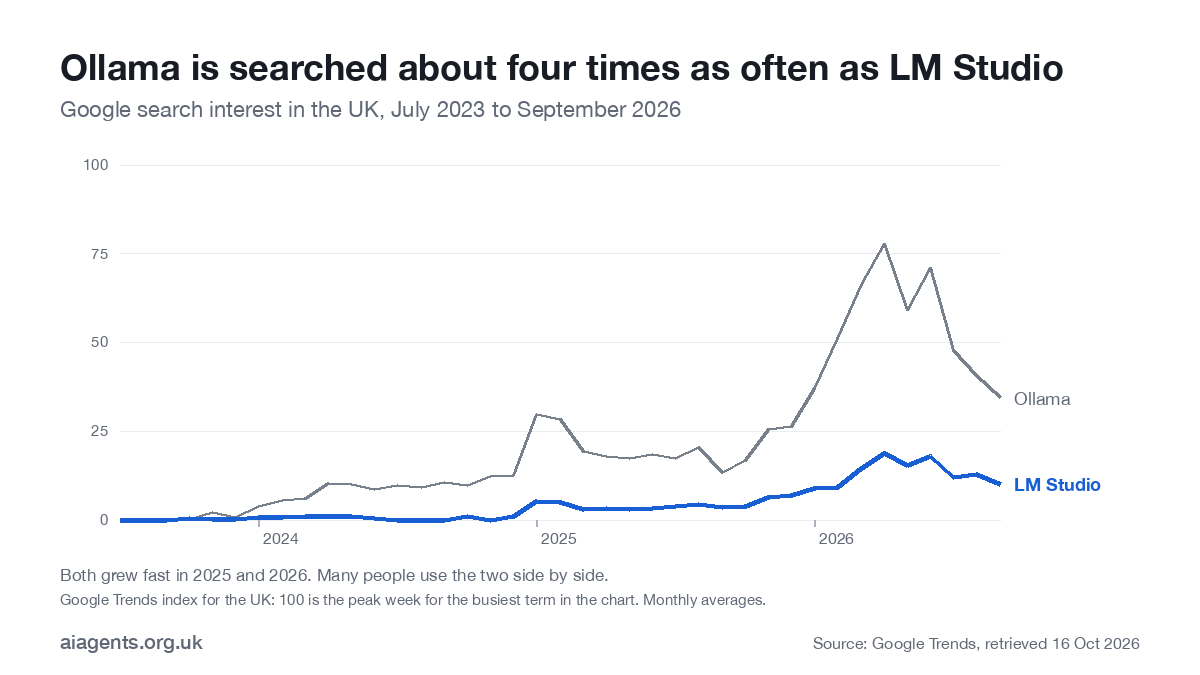
Ollama is the better-known name: in the UK it is searched about four times as often as LM Studio, according to Google Trends. Both have grown fast since 2025, and many people use the two side by side.
LM Studio is a desktop app for browsing, downloading and chatting with models, with a local API server, Python and JavaScript SDKs, document retrieval, and an MLX engine tuned for Apple Silicon. Version 0.4.0 in January 2026 added llmster, a headless mode for servers; June 2026 brought Locally, an iPhone and iPad app that uses your Mac as the backend. It is free for home and work use, with an Enterprise tier.
Jan is the open-source option: a clean chat window that runs models locally, with an OpenAI-compatible local server and extensions. It has fewer power features than LM Studio and a smaller team, and it is the one to choose if "fully open source" matters more than polish.
Ollama vs LM Studio vs Jan: feature comparison
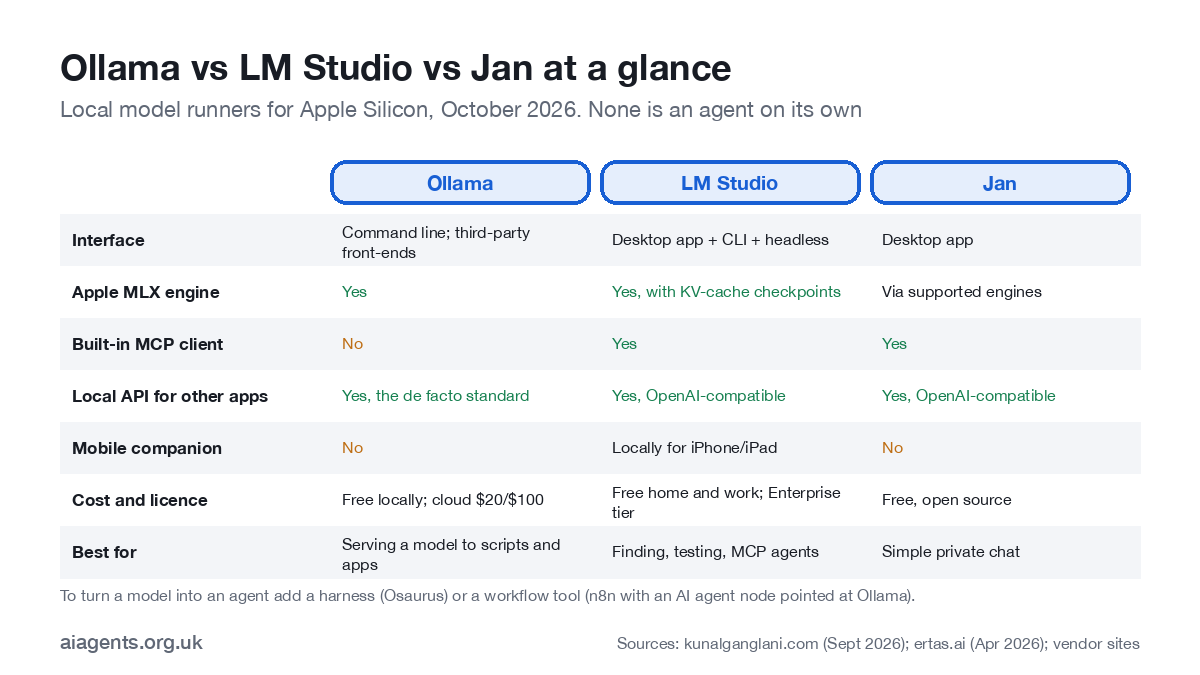
| Ollama | LM Studio | Jan | |
|---|---|---|---|
| Interface | Command line; community and web front-ends | Desktop app plus lms CLI and headless llmster | Desktop app |
| Apple MLX engine | Yes | Yes, with KV-cache checkpointing for long agent loops | Via supported engines |
| Local API for other apps | Yes, the de facto standard | Yes, OpenAI-compatible | Yes, OpenAI-compatible |
| Built-in MCP client | No; relies on the client app | Yes | Yes (added 2025-26) |
| Model library | Curated library plus GGUF import and Modelfiles | Hugging Face browser inside the app | Hub inside the app |
| Document RAG | No, left to apps | Yes | Limited |
| Mobile | No | Locally app for iPhone and iPad (June 2026) | No |
| Licence and cost | Free locally; cloud $20 or $100 a month | Free for home and work; Enterprise tier | Free, open source (Apache) |
| Cloud option | Yes, optional, prompts leave your Mac | No | No |
Which is fastest on Apple Silicon?
All three now run Apple's MLX framework on M-series chips, so raw speed on the same model is close. Ollama reports up to 90% faster coding-agent performance from its MLX path than from its earlier GGUF path on an agent benchmark; LM Studio's engine adds checkpointing of the model's working memory, which pays off when an agent reuses a long context across many calls. In practice the memory decides which models you can load at all (see which Mac you need), and throughput decides whether a 27B model feels snappy or sluggish. For a first agent, a 14B model on 16 GB or a 27B model on 32 GB is comfortable in any of the three.
Which is the most private?
Local inference in all three keeps the model, your prompts and your files on the Mac. Two caveats. Ollama's cloud tiers route prompts through Ollama's servers; stay on local models if privacy is the point. And any tool you connect through MCP or a workflow (web search, email) sends what that tool needs out of the machine. Privacy is a tool-list question as much as a model question. UK GDPR still applies to what you do with the data; what changes is that there is no third-party processor. See AI agents and UK GDPR.
How do you turn a model runner into an agent?
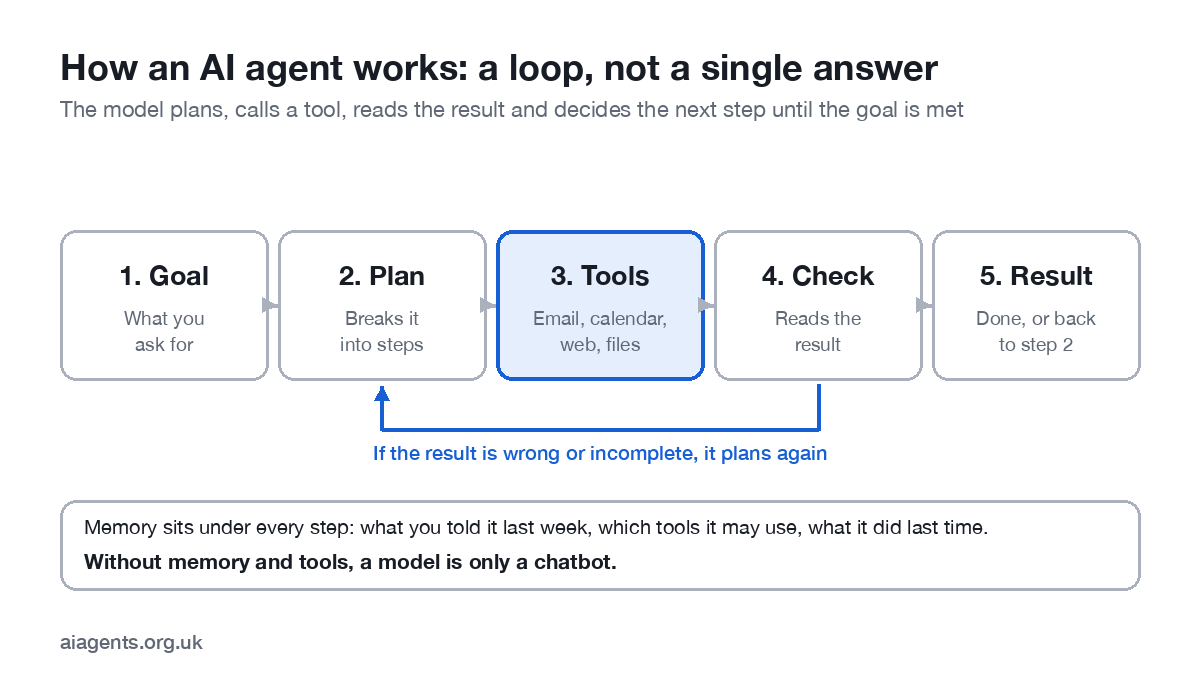
None of the three is an agent. They run models and expose them to other software. To get tools, memory, skills and schedules you add a layer: an agent harness such as OpenClaw or Hermes Agent, both free and able to run on a local model; a workflow tool such as n8n with an AI agent node pointed at Ollama; or a coding agent such as Claude Code using a local model through Ollama. The division of labour that works for most people: LM Studio to find and test models, Ollama to serve the one you chose, a harness on top to make it do a job. LM Studio now makes its own harness, LM Studio Bionic, and the full set-up for Claude Code on a local model is in Claude Code with Ollama.
Which should you pick?
| You want to | Pick | Because |
|---|---|---|
| Try local models for the first time | LM Studio | Friendly app; browse, download, chat, compare |
| Run a model that other apps and scripts use | Ollama | The standard local backend; one command |
| A private ChatGPT-style chat, fully open source | Jan | Simplest and most open |
| Build MCP-based agents on a Mac | LM Studio or an agent harness | Built-in MCP client; or AnythingLLM, whose agents use MCP tools |
| Serve a team from a Mac mini | LM Studio headless or Ollama | Both run without a screen |
| Use cloud models as a fallback | Ollama | The only one with a cloud tier |
Frequently asked questions
Which is better, Ollama or LM Studio?
LM Studio for discovering and testing models in a friendly app, and for building MCP-based agents with its built-in client. Ollama for running a model as a service that other apps and scripts talk to. Many people use both: LM Studio to choose, Ollama to serve.
Is Jan better than LM Studio?
Jan is fully open source and the simplest private chat window; LM Studio has more features (MLX engine tuning, headless mode, SDKs, a built-in MCP client, an iPhone companion). Pick Jan for openness and simplicity, LM Studio for capability.
Are Ollama, LM Studio and Jan free?
All three are free for personal use; LM Studio is free for work use too, with a paid Enterprise tier. Ollama's local inference is free; its optional cloud models cost $20 or $100 a month.
Do they support MCP?
LM Studio has a built-in MCP client. Jan has added MCP support. Ollama has no built-in client and relies on the application using it, such as Claude Code or an agent harness.
Which one turns a model into an agent?
None of the three on its own; they run models. For tools, memory, skills and schedules you add an agent harness such as OpenClaw or Hermes Agent, or build in a workflow tool like n8n that connects to Ollama.
What is LM Studio?
LM Studio is a free desktop app for Mac, Windows and Linux that finds, downloads and runs open AI models on your own computer. You can chat with a model, compare models, and serve one to other apps through a local API. It includes Apple's MLX engine, a headless server mode and a built-in MCP client for connecting tools.
Related: the complete LM Studio guide covers installing it, which models fit your memory and the local server, and LM Studio plugins and MCP shows how to give a model tools.
Related: The Ollama guide covers installing it, the best Ollama models for your memory and what Ollama Cloud costs in pounds.
This week: A fourth option arrived on 13 October: Llama for Windows, a free tray app from the llama.cpp team and Hugging Face for Windows 11. What it does and how it compares is in local AI this week.
Next: choose your Mac and model in Run AI agents on your own Mac.
Read next
- Which Mac or mini PC should you buy to run AI at home?
- Is it safe to run Chinese AI models on your Mac?
- Ollama vs LM Studio: which to install on your Mac
- Open WebUI review: a ChatGPT-style front end for Ollama
- Msty review: local AI in a normal chat app
- AnythingLLM review: chat with your own documents
Sources
- Google Trends, UK search interest (retrieved 16 October 2026) - relative interest over time
- Kunal Ganglani, LM Studio vs Ollama 2026: 3 shifts that change everything (updated 23 September 2026) - features, MCP, headless mode, cloud tiers, performance claims
- Ertas, Best LLM for Mac (Apple Silicon) in 2026 (updated 30 April 2026) - model and memory recommendations
- Jan, project site - licence and features
- Ollama, model library - available models



Pingback: Beelink GTR9 Pro for local AI: UK price and what it runs
Pingback: Framework Desktop for local AI: UK price and what it runs
Pingback: GMKtec EVO-X2 for local AI: UK price and what it runs
Pingback: HP Z2 Mini G1a for local AI: UK price and what it runs
Pingback: Minisforum MS-S1 MAX for local AI: UK price, 128 or 192 GB
Pingback: Best Mac or mini PC for local AI: UK prices (2026)