Ollama is free software that runs AI models on your own computer. You install it on a Mac, Windows PC or Linux machine, download an open model such as Gemma 4, Qwen3.8 or OpenAI's gpt-oss, and chat with it in the Ollama app or the terminal, with nothing sent to the cloud. Local use is free and unlimited. Ollama Cloud, an optional extra that runs bigger models on Ollama's servers, has a free tier and paid plans from $20 a month (about £15). This guide covers installing it, the best models for your memory, the commands you need, the cloud plans in pounds, connecting it to other apps and keeping it safe.

Key facts
- What it is: a free, open-source (MIT) model runner for macOS, Windows and Linux.
- Cost: local use is free and unlimited. Ollama Cloud Pro is $20 a month (about £15); Max is $100 (about £75).
- Latest version: v0.40.7, released 18 October 2026.
- Needs: macOS 14 Sonoma or later, Windows 10 22H2 or later, or Linux. 8 GB of memory runs small models; 16 GB is comfortable.
- Models to start with: gemma4 (7-10 GB), gpt-oss:20b (14 GB), qwen3.8:27b (18 GB), llama3.2 (2 GB).
- Interest: about 22,200 UK searches a month for "ollama" (Semrush, October 2026).
- Safety: it only listens on your own computer by default (127.0.0.1:11434). Keep it that way.
On this page
- What is Ollama?
- Is Ollama free?
- How do you install Ollama?
- How do you run your first model?
- Which Ollama models are best?
- Ollama models list
- How much memory do you need?
- What are Ollama cloud models?
- How do you use Ollama with other apps?
- Is Ollama safe?
- How do you update Ollama?
- How do you stop, restart or uninstall Ollama?
- What are the best Ollama alternatives?
- Frequently asked questions
- Sources
What is Ollama?
Ollama is a model runner. It downloads open-weight AI models from its library, loads them into your computer's memory and serves them through a small local server at localhost:11434. The Ollama app, the ollama command in the terminal and other software such as Open WebUI, n8n or VS Code all talk to that server. Your prompts are processed on your own machine.
It began as a command-line tool. In July 2025 Ollama added a desktop app for Mac and Windows: pick a model, chat, and drag in PDFs, text or code files, or images for models that can see them.
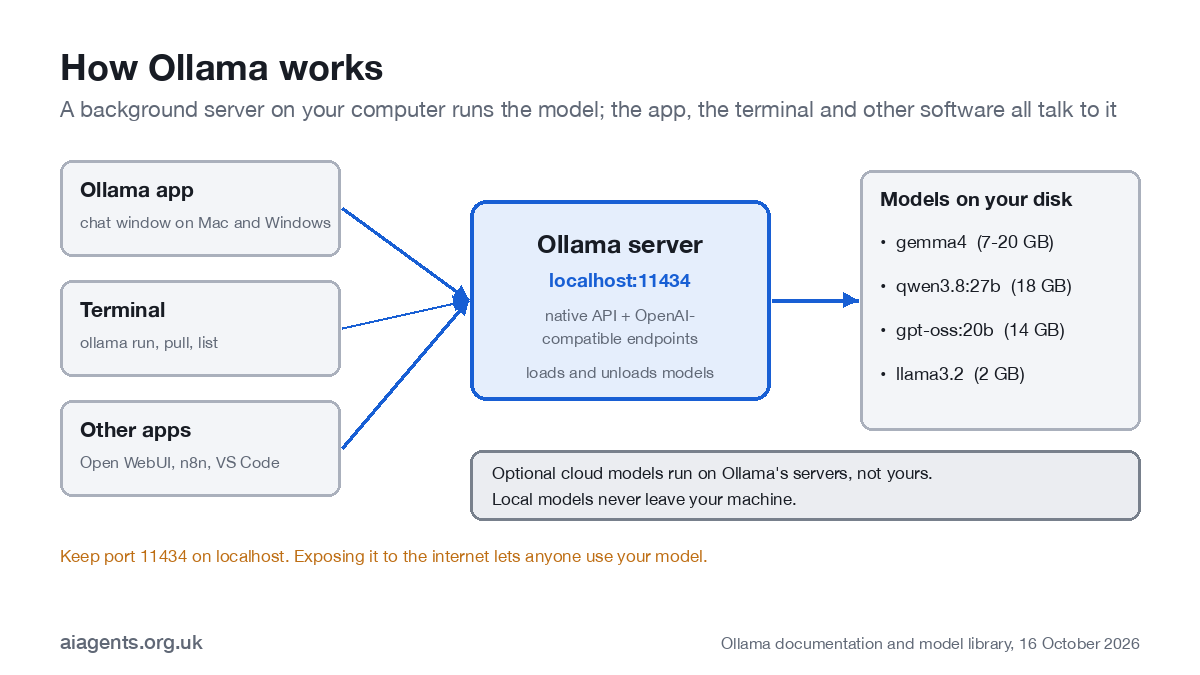
Ollama on its own is not an AI agent. It provides the model, the part that reads and writes. An agent also needs tools and a loop that plans, acts and checks its work, which comes from an app on top. See what an AI agent is and how to build one.
Is Ollama free?
Yes. Ollama is open source under the MIT licence, and running models on your own hardware is, in Ollama's words, "always unlimited". The app and the models cost nothing to download, and you do not need an account to use them locally.
What costs money is Ollama Cloud, which runs larger models on Ollama's servers. Prices are in US dollars; the pound figures use the Bank of England rate of 15 October 2026 ($1 = £0.7546).
| Plan | Price | In pounds (approx.) | Included each month | Requests at once |
|---|---|---|---|---|
| Free | $0 | £0 | Starter usage credits and starter models; local use unlimited | 1 |
| Pro | $20 a month or $200 a year | £15 a month or £151 a year | $60 of usage credits (about £45) and larger Pro models | 3 |
| Max | $100 a month | £75 a month | $300 of usage credits (about £226) and early access to new models | 10 |
| Team (early access) | $500 a month | £377 a month | Unlimited users and $1,000 of shared credits (about £755) | 10 |
| Enterprise | Custom | Custom | Model access controls, budgets per user and API key, dedicated support | Custom |
For most people the free local version is the right place to start. Pro makes sense if you want models too big for your computer, such as GLM-5.3 or DeepSeek V4.1 Flash, without buying new hardware. How that compares with ChatGPT, Copilot and agent platforms is in how much AI agents cost in the UK.
How do you install Ollama?
Download Ollama from ollama.com/download and run the installer, or use one command on Linux. It takes a couple of minutes, and the app adds the ollama command to your terminal.
- Mac: download Ollama from ollama.com/download, drag it to Applications and open it. It offers to add the
ollamacommand to your terminal. You need macOS 14 Sonoma or later. Apple Silicon Macs (M1 onwards) use the graphics chip; Intel Macs run on the processor only, which is much slower. - Windows: run the installer from the same page, or paste
irm https://ollama.com/install.ps1 | iexinto PowerShell. You need Windows 10 22H2 or later and at least 4 GB of disk space for the program. NVIDIA cards need driver 551.61 or newer; AMD Radeon cards use ROCm or Vulkan. - Linux: run
curl -fsSL https://ollama.com/install.sh | sh. Ollama installs as a background service.
Models live in ~/.ollama/models on a Mac and take from 2 GB to more than 60 GB each. If your internal drive is small, set the OLLAMA_MODELS environment variable to keep them on an external SSD.
How do you run your first model?
The easiest way is the app: open Ollama, choose a model from the menu beside the message box and type. It downloads the model the first time. In the terminal, these are the commands you will use most:
ollama run gemma4          # download if needed, then chat (type /bye to leave)
ollama pull qwen3.8:27b    # download without starting a chat
ollama list                # models on your disk
ollama ps                  # models loaded in memory right now
ollama rm llama3.2         # delete a model
ollama launch              # start Claude Code, OpenCode and other agents on Ollama
ollama serve               # start the server yourself (Linux, or without the app)
ollama -v                  # which version you have
Models stay in memory for five minutes after your last message, then unload. The default context window is 4,096 tokens, roughly a few pages of text. Before you give it long documents, raise it in the app's settings or with OLLAMA_CONTEXT_LENGTH; a bigger context uses more memory. Every command, and what it does, is in the Ollama commands cheat sheet.
Which Ollama models are best?
The best Ollama model is the biggest one that fits in your memory with room to spare. These are the ones we would start with, with download sizes from the Ollama library on 16 October 2026:
| Model | Download | Memory to run it comfortably | Good for |
|---|---|---|---|
| llama3.2 (3B) | 2 GB | 8 GB | Quick drafts and summaries on older or 8 GB machines |
| gemma4 (default e4b) | 7-10 GB | 16 GB | Everyday writing, documents and images |
| gemma4:12b | 8 GB | 16 GB | A step up in quality on a 16 GB machine |
| gpt-oss:20b | 14 GB | 16 GB minimum, 24 GB better | Reasoning and tool use; OpenAI's open model |
| qwen3.8:27b | 18 GB | 32 GB | Coding, research and agent tasks |
| gemma4:31b | 19-20 GB | 32 GB | The strongest Gemma 4 for local use |
| gpt-oss:120b | 65 GB | 80 GB or more | Near top-tier quality on a Mac Studio or workstation |
What is the best Ollama model for coding?
Start with qwen3.8:27b on a 32 GB machine or gpt-oss:20b on 16-24 GB. Ollama's library describes Qwen3.8 as built for coding, research and long-running agent tasks. For large codebases, a cloud model such as glm-5.3 avoids the memory limit. Our Qwen 3.8 on a Mac guide shows which build fits which amount of memory.
Does Ollama use MLX on a Mac?
Yes, for many models. On Apple Silicon, models such as Gemma 4 and Qwen3.8 come in -mlx builds (for example gemma4:12b-mlx) that use Apple's MLX framework. Try both builds and keep the faster one.
New models arrive most weeks, so check the Ollama library before you settle. The 14 October release added NVIDIA's Nemotron 3.5 Super, a 120B model for workstations.
Ollama models list
To list the models on your computer, run ollama list; ollama ps shows which are loaded right now. To see everything you can download, browse ollama.com/search. These are the main model families in the library on 16 October 2026:
| Model family | Sizes (tags) | What it handles | Context |
|---|---|---|---|
| gemma4 (Google) | e2b, e4b, 12b, 26b, 31b, plus -mlx and cloud builds | Text and images | 128K-256K |
| qwen3.8 (Alibaba) | 27b, plus 27b-mlx | Text and images; coding and agent tasks | 256K |
| gpt-oss (OpenAI) | 20b, 120b, plus cloud builds | Text, reasoning and tool use | 128K |
| llama3.2 (Meta) | 1b, 3b | Text; small and fast | 128K |
| nemotron-3.5-super (NVIDIA) | 120b | Text, images, tools and reasoning | n/a |
| embeddinggemma-2 (Google) | 270m to 740m | Embeddings for search over your own documents | n/a |
| deepseek-v4.1-flash, glm-5.3, glm-5.3-flash, mistral-large-4 | Cloud only | Large models with tools and reasoning, run on Ollama's servers | n/a |
Add a size tag to pick a version, for example ollama run gemma4:31b. Without a tag you get the default, usually a mid-sized build.
How much memory do you need?
A rule of thumb: about 0.5 to 0.6 GB per billion parameters at 4-bit, plus a few gigabytes for the conversation and your other apps. On a Mac the memory is shared between the processor and graphics, so a 32 GB Mac can give a model roughly 20-24 GB. On a Windows PC what matters is the graphics card's own memory (VRAM); a model that does not fit spills onto the main processor and slows down sharply. If you are choosing a machine, my guide to which Mac or mini PC to buy for local AI compares 12 of them with UK prices, the local LLM memory calculator shows which models fit the memory you have, and the Ollama models list ranks the 30 most downloaded with a pick for each memory size. If privacy is the reason you are here, start with the private AI guide.
- 8 GB: 1-4B models such as llama3.2 and gemma4:e2b.
- 16 GB: gemma4 (e4b or 12b), and gpt-oss:20b at a squeeze.
- 32 GB: 27-31B models such as qwen3.8:27b and gemma4:31b.
- 64 GB and up: two models at once or long documents; 96-128 GB for gpt-oss:120b.
Which Mac to buy, and what each one runs, is in how to run a local LLM on your Mac.
What are Ollama cloud models?
Cloud models are large models that run on Ollama's servers instead of your computer. They appear in the same app and use the same commands: add :cloud to the name, for example ollama run gemma4:cloud, and sign in when asked. Nothing is downloaded. The current line-up includes Meta's Muse Spark Open (816B), Reflection's Beam (501B), DeepSeek V4.1 Flash 1017, GLM-5.3, Mistral Large 4 and gpt-oss:120b; see what changed in local AI this week.
Privacy: Ollama says it does not see your prompts when you run locally. For cloud models it processes prompts to answer them, says it does not store or log them, and does not use them for training. That is a promise in its documentation rather than something you can check, so treat cloud models like any online AI service: do not send personal data until you have read the privacy policy and done the checks in AI agents and UK GDPR.
To make sure nothing leaves your machine, switch cloud features off: set OLLAMA_NO_CLOUD=1, or add "disable_ollama_cloud": true to ~/.ollama/server.json, and restart Ollama. You lose cloud models and Ollama's web search. Prices, the free allowance and where cloud prompts are processed are in Ollama Cloud explained.
How do you use Ollama with other apps?
Through its local API. Ollama has an OpenAI-compatible API, so anything written for OpenAI can use it: point the app at http://localhost:11434/v1/ and type any value as the API key, which Ollama ignores locally. That covers most chat front ends, workflow tools and scripts. For a ChatGPT-style window on top of Ollama, see our reviews of Open WebUI, Msty and AnythingLLM.
curl http://localhost:11434/v1/chat/completions \
  -H "Content-Type: application/json" \
-d '{"model": "gemma4", "messages": [{"role": "user", "content": "Summarise UK GDPR in one sentence"}]}'- Coding agents: run
ollama launchand pick Claude Code, OpenCode or another supported agent. It starts with an Ollama model instead of a paid API. - Desktop assistants: on a Mac, the Apps section of the Ollama app connects Claude Desktop and ChatGPT Desktop to Ollama models.
- Office chat: Open WebUI gives each colleague a login to one shared Ollama server. See the office setup in the self-hosted LLM guide.
- Automation: n8n has Ollama nodes, so a workflow can summarise emails or tag invoices with a local model. Plans and prices are in n8n pricing.
- Editors: the Ollama extension adds local models to VS Code Chat.
How do you use Claude Code with Ollama?
Run ollama launch claude and choose a model; Ollama starts Claude Code pointed at it. To set it up by hand, point Claude Code at your local server:
export ANTHROPIC_BASE_URL=http://localhost:11434
export ANTHROPIC_AUTH_TOKEN=ollama
export ANTHROPIC_API_KEY=""
claude --model qwen3.8:27b
Ollama recommends a context window of 64K tokens or more for local models, which uses a lot of memory. On a 16 GB machine, a cloud model such as glm-5.3-flash is the practical choice. The step-by-step set-up, the models that handle tool calls and what you give up are in Claude Code with Ollama.
Does Ollama support MCP?
Not on its own. Ollama serves the model; tools reach it through the agent in front, usually over MCP. Claude Code started with ollama launch can use MCP servers. If you want a point-and-click way to give a local model tools, LM Studio is easier: see LM Studio plugins and MCP.
Is Ollama safe?
The software is open source, widely used and runs on your own machine, so for most people the answer is yes. The risks come from how it is set up.
- Keep it private. Ollama listens on 127.0.0.1:11434, which means your own computer only. Setting
OLLAMA_HOST=0.0.0.0opens it to your network, and you should never forward that port on your router. Researchers found about 175,000 Ollama servers exposed on the internet in early 2026, many usable by anyone. - Download models you can trust, from the official library or a known publisher.
- Be careful with tools. A model that can run commands or send email through an agent can be tricked by a web page or document. Keep approvals on for anything you cannot undo.
- Keep it updated (see the next section).
UK GDPR: running locally means personal data does not go to an AI provider, which removes the international transfer and processor contract questions. You are still the controller: you still need a lawful basis, security that fits the risk and, if the AI is used to assess people, a DPIA. The full checklist is in AI agents and UK GDPR.
How do you update Ollama?
On a Mac or Windows PC the app downloads updates itself: click the Ollama icon in the menu bar or taskbar and choose Restart to update. On Linux, run the install command again. Check your version with ollama -v. Ollama shipped three releases in five days in mid-October: v0.40.5 on 14 October (Nemotron 3.5 Super), v0.40.6 on 16 October (Windows fixes, smaller q2_0 quantisations) and v0.40.7 on 18 October (Perplexity's pplx-decider model), so the version you see will move quickly. Updating does not delete your downloaded models.
How do you stop, restart or uninstall Ollama?
Check whether Ollama is running: open http://localhost:11434 in a browser. If the server is up, the page says "Ollama is running". In the terminal, ollama ps shows which models are loaded in memory.
Stop Ollama: on a Mac, click the Ollama icon in the menu bar and choose Quit Ollama. On Windows, right-click the icon in the system tray and quit. If you started the server yourself with ollama serve, press Ctrl+C in that window. On Linux, run sudo systemctl stop ollama. To unload one model from memory without stopping the server, run ollama stop gemma4, with the name of the model you want to unload.
Restart Ollama: open the app again from Applications or the Start menu; on Linux, sudo systemctl restart ollama. A changed setting such as OLLAMA_NO_CLOUD or OLLAMA_MODELS only takes effect after a restart.
Delete a model: ollama rm llama3.2, or remove it from the model list in the app. Models take 2 GB to more than 60 GB each, so this is the first thing to do when disk space runs short.
Uninstall Ollama on a Mac: quit Ollama, then remove the app, the ollama command and the models folder. Ollama's macOS documentation lists these, plus a few cache folders under ~/Library:
sudo rm -rf /Applications/Ollama.app
sudo rm /usr/local/bin/ollama
rm -rf ~/.ollama
The last line deletes every model you have downloaded. Leave it out if you plan to reinstall. On Windows, uninstall Ollama from Settings, Apps, then delete C:\Users\your-name\.ollama to remove the models. On Linux, stop and disable the ollama service, remove the binary and the /usr/share/ollama folder, as described in Ollama's Linux documentation.
What are the best Ollama alternatives?
LM Studio is the closest alternative and the best choice if you want a fuller desktop app. The others suit more specific needs:
- LM Studio: a free desktop app with a model browser, MLX and GGUF models, a local server and built-in MCP tools. See the LM Studio guide.
- Jan: fully open source, a simple private chat window with an OpenAI-compatible local server, and MCP support.
- llama.cpp: the open-source engine underneath many local AI tools. More control, command line only.
- vLLM: a server for running one model for many users on a GPU machine. For teams rather than laptops; see the self-hosted LLM guide.
Ollama or LM Studio?
Both are free and run the same open models. Choose Ollama if you want something light that runs in the background and that other apps and agents can call, or if you are on Linux or a server. Choose LM Studio if you want a richer desktop app with a model browser, detailed settings and point-and-click MCP tools. Plenty of people run both. The full comparison, including Jan, is in Ollama vs LM Studio vs Jan, and the set-up is in the LM Studio guide. For just the two, with usage figures and what users say, read Ollama vs LM Studio.
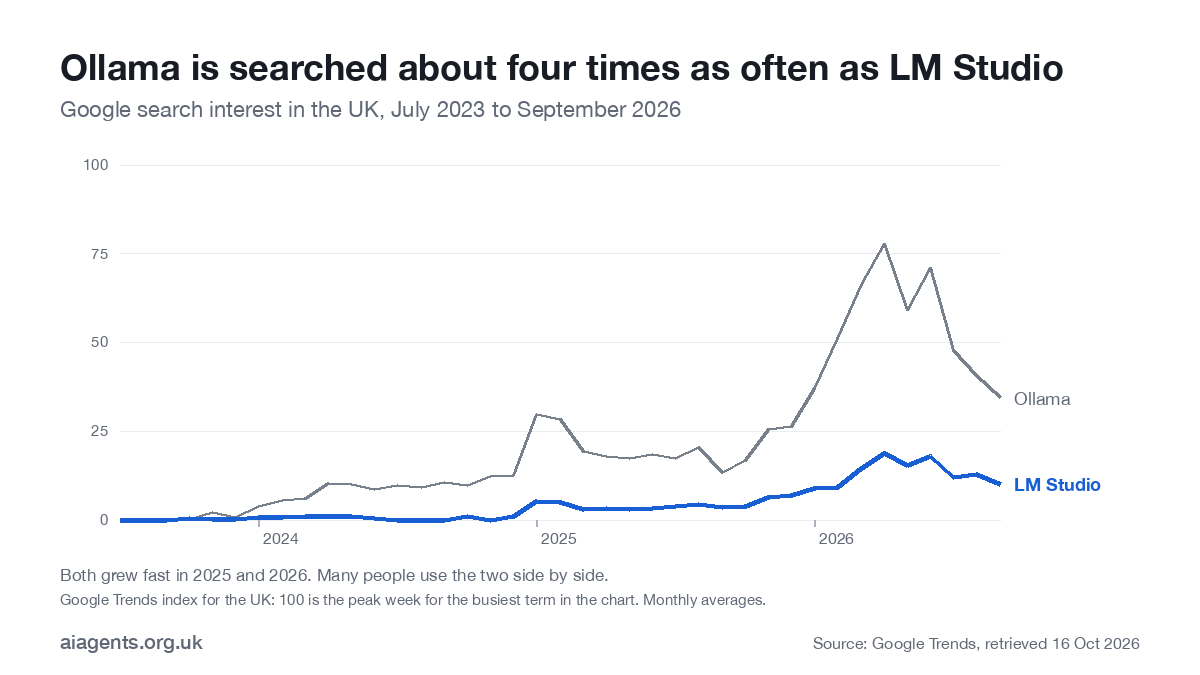
UK interest has grown fast. Google searches for Ollama ran at about four times those for LM Studio in 2026, and the most common follow-up searches are for the best Ollama models, the model list and whether Ollama is free.
Frequently asked questions
Is Ollama free?
Yes. Ollama is open source under the MIT licence, and running models on your own computer is free and unlimited. Only Ollama Cloud, which runs bigger models on Ollama's servers, has paid plans: Pro is $20 a month (about £15) and Max is $100 a month (about £75).
Does Ollama need the internet?
Only to download the app and the models. Once a model is on your disk it runs offline. Cloud models and Ollama's web search need a connection.
Is Ollama safe to use?
For most people, yes. It is open source and, by default, only listens on your own computer (127.0.0.1, port 11434). The risk comes from exposing that port to a network or the internet, downloading models from unknown sources, or giving a model tools without approvals.
What is the best Ollama model?
The largest one that fits your memory with room to spare. As of October 2026, gemma4 suits 16 GB machines, gpt-oss:20b is a good reasoning model at 14 GB, and qwen3.8:27b or gemma4:31b are the picks for 32 GB.
Which Ollama model is best for coding?
qwen3.8:27b on a machine with 32 GB of memory, or gpt-oss:20b on 16-24 GB. For bigger coding jobs, Ollama Cloud offers much larger models such as GLM-5.3 without new hardware.
How much does Ollama Cloud cost in the UK?
Prices are set in US dollars. Free costs nothing and includes starter credits. Pro is $20 a month or $200 a year (about £15 a month or £151 a year), Max is $100 a month (about £75) and Team is $500 a month (about £377) in early access, at the 15 October 2026 exchange rate.
Does Ollama work on Windows?
Yes. It needs Windows 10 22H2 or later. NVIDIA graphics cards need driver 551.61 or newer; AMD Radeon cards use ROCm or Vulkan.
Can Ollama run on a Mac with 8 GB of memory?
Yes, with small models of 1-4 billion parameters such as llama3.2 or gemma4:e2b. They are fine for drafting and summaries but noticeably weaker than larger models. 16 GB is the comfortable minimum.
How do I check which models are installed in Ollama?
Run ollama list in the terminal to see the models on your computer, with their size and when they were last changed. ollama ps shows which ones are loaded in memory right now. To browse everything you can download, go to ollama.com/search.
What is the Ollama local URL?
http://localhost:11434. The OpenAI-compatible API is at http://localhost:11434/v1/. By default it only accepts connections from your own computer.
Does Ollama support MCP?
Not on its own. Ollama serves the model, and MCP tools come from the agent in front of it, such as Claude Code started with ollama launch. LM Studio and Jan have MCP built in if you want tools in a desktop app.
Where does Ollama store models?
In ~/.ollama/models on a Mac, C:\Users\your-name\.ollama\models on Windows and /usr/share/ollama/.ollama/models on Linux. Set the OLLAMA_MODELS environment variable to use another drive.
Is Ollama Cloud free?
Partly. Ollama Cloud has a free tier with starter usage credits and a set of starter models, which is enough to try a cloud model. Pro ($20 a month, about £15) adds $60 of credits and larger models, and Max ($100, about £75) adds $300 of credits. Running models on your own computer is free and unlimited, with no account needed.
Does Ollama collect your data or send it to the internet?
Not when you run a model locally: Ollama's documentation says prompts and answers stay on your machine. The app does go online to download models and updates, and if you sign in and use cloud models or web search, those prompts go to Ollama's servers, where Ollama says they are not stored or used for training. Set OLLAMA_NO_CLOUD=1 to switch the cloud features off.
How do I stop or restart Ollama?
If Ollama is misbehaving rather than just needing a restart, Ollama not working on your Mac covers port 11434 errors, "could not connect", models running on the CPU and slow answers. To restart, quit it from the Ollama icon in the Mac menu bar or the Windows system tray, or press Ctrl+C in the window where you ran ollama serve; on Linux use sudo systemctl stop ollama. Open the app again, or run sudo systemctl restart ollama, to restart it. ollama stop followed by a model name unloads that model without stopping the server.
How do I uninstall Ollama on a Mac?
Quit Ollama, delete Ollama.app from Applications, remove the command at /usr/local/bin/ollama, and delete the ~/.ollama folder if you also want to remove your downloaded models. Ollama's macOS documentation lists a few extra cache folders under ~/Library you can delete too.
Next: pick a machine in how to run a local LLM on your Mac, or compare every route on price in how much AI agents cost in the UK.
Read next
- Which Mac or mini PC should you buy to run AI at home?
- Is it safe to run Chinese AI models on your Mac?
- Run a local LLM on your Mac: the complete guide
- Ollama vs LM Studio vs Jan: which local AI tool for your Mac?
- LM Studio plugins and MCP: how to give a local model tools
- OpenClaw explained: the free AI agent you run yourself
- Hermes Agent: the self-improving AI agent, explained
- Ollama commands cheat sheet
- Ollama Cloud explained: free tier, Pro prices and privacy
- Ollama vs LM Studio: which to install on your Mac
- Claude Code with Ollama and a local model
Sources
- Ollama, Pricing: plans, credits and concurrency, 16 October 2026
- Ollama, Download: install commands
- Ollama documentation, macOS: macOS 14 Sonoma or later; Apple Silicon and Intel
- Ollama documentation, Windows: Windows 10 22H2, driver and disk requirements
- Ollama documentation, FAQ: context length, model storage, keep-alive, network binding, disabling cloud, privacy, updates
- Ollama documentation, Cloud: cloud models and sign-in
- Ollama documentation, OpenAI compatibility: local base URL and API key
- Ollama documentation, Integrations: ollama launch, desktop apps, VS Code
- Ollama blog, Ollama's new app (30 July 2025): desktop app features
- Ollama on GitHub, Releases: v0.40.5, 14 October 2026
- Ollama library, gemma4: sizes and context
- Ollama library, qwen3.8: sizes and description
- Ollama library, gpt-oss: sizes
- Ollama library, llama3.2: sizes
- Bank of England spot rates via Pound Sterling Live, USD/GBP 2026: 0.7546 on 15 October 2026
- SecurityWeek, 175,000 exposed Ollama hosts (30 January 2026): exposure research
- Google Trends, Ollama and LM Studio, UK: retrieved 16 October 2026
- Semrush, Keyword Magic Tool (UK database): search volumes, 16 October 2026


